Accessible Name Calculator: What Will a Screen Reader Actually Announce?
Compute the accessible name of any element from pasted HTML: aria-labelledby chains, aria-label, label associations, alt text, and inner text resolved per the W3C algorithm — 100% client-side.
Free Interactive Tool
Accessible Name Calculator
Compute the accessible name of any element from pasted HTML — see exactly what screen readers will announce, and find unnamed buttons, links and inputs that fail WCAG 4.1.2.
Table of Contents
Every interactive element on your page carries two names. The first is the visible one — the text on a button or inside a link. The second is the accessible name: the string a screen reader announces, computed by a fixed W3C algorithm from aria-labelledby, aria-label, alt text, label elements, and inner text. The two are related but not identical, and the gap between them is where accessibility failures hide.
The blunt version: a button that only says "click here" to a screen reader is a locked door — the accessible name is what unlocks it. A sighted user sees an X icon and infers "close." A screen reader user hears, at best, the word "button." The name has to be computed the way assistive technology computes it.
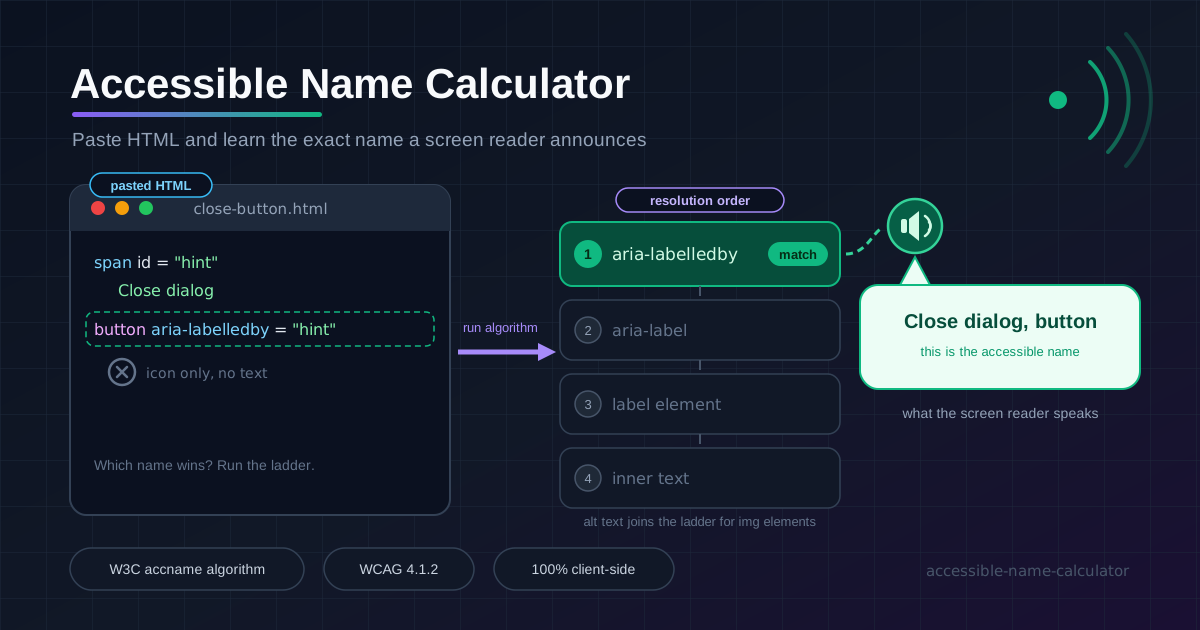
The Accessible Name Calculator does exactly that. Paste any HTML element and it walks the algorithm step by step — resolving aria-labelledby chains, aria-label, label associations, alt text, and the inner text fallback — then shows the final name plus the resolution order that produced it. Everything runs 100% client-side; your markup never leaves the browser.
Why Use Accessible Name Calculator?
- It computes, it does not guess. The tool executes the W3C AccName resolution order faithfully — including labelledby chains and empty alt attributes.
- You see the winning source. Showing which rung of the ladder won separates a solid inner-text name from a fragile one built on a dangling reference.
- aria-labelledby chains become legible. Multiple ids get joined in order with spaces — the only reliable way to debug a stitched-together name.
- Instant feedback. Paste, tweak an attribute, re-read — no build step, no extension; the loop is measured in seconds.
- Works on any element. Buttons, links, form fields, images, landmarks, and ARIA widgets all go through the same computation.
- Private by design. Pure client-side JavaScript — internal dashboards and unreleased designs can be pasted freely.
Key Features
| Feature | What it does |
|---|---|
| Paste-HTML input | Accepts a full document, a component, or a bare fragment |
| W3C algorithm engine | Resolves names in spec order: labelledby, label, alt, inner text |
| Resolution order view | Shows every rung of the ladder and which source won |
| Chain resolution | Joins multi-id aria-labelledby references in announcement order |
| Native semantics | Handles img alt, input types, label elements, and heading text |
| 100% client-side | No upload, no account, nothing leaves the browser |
- Doubles as documentation. Paste the computed name into a pull request so reviewers see why the announcement is what it is.
- Quietly teaches the algorithm. After a few pastes you will start predicting the result before you read it.
How to Use
- Open the Accessible Name Calculator.
- Paste the element to check — a button, a logo link, a field with its label, or a larger fragment containing it.
- Read the computed name, then the ladder to see which source won.
- Adjust the markup — add a missing aria-label, fix a dangling id, restore inner text — and watch the name update.
- Repeat for the remaining interactive elements and apply the fixes in your real source, not the pasted copy.
The Name Resolution Ladder
The W3C algorithm is a ladder you descend until a rung yields text. The order is fixed: aria-labelledby, then aria-label, then alt text for images, then an associated label element, then inner text per native semantics. The first rung that yields text wins — everything below it is ignored. That last clause is the part developers forget.
The icon-only button is the classic WCAG failure. Consider a close button that renders only an X glyph:
<button class="icon-btn">
  <svg aria-hidden="true">...</svg>
</button>
No labelledby, no label, no alt, no inner text — the computation falls off the bottom of the ladder and the name is empty, so the screen reader announces, at most, "button." That fails WCAG 4.1.2, Name, Role, Value. The fix is one attribute: <button class="icon-btn" aria-label="Close dialog">. Swapping text for an icon is how formerly accessible components silently break, so re-check icon buttons on every redesign.
aria-labelledby chains join multiple ids with spaces. The algorithm collects the text of each referenced element, in the order the ids are written, and joins the pieces. This is how names get composed from scattered nodes — take a linked logo:
<a href="/" aria-labelledby="brand tagline">
  <img id="brand" src="logo.png" alt="Acme Analytics" />
  <span id="tagline">Stop guessing. Start measuring.</span>
</a>
The chain reads brand first, tagline second, so the computed name is "Acme Analytics Stop guessing. Start measuring." Reverse the ids and you reverse the announcement. Two rules follow: every referenced id must exist, and id order is announcement order.
Common mistakes. An aria-label duplicating the visible text invites drift, because one of the two will change without the other. Sibling buttons that all announce "Close" force users to guess which dialog is which. An aria-label on a generic span or div is ignored entirely — generic roles do not support naming.
Practical Use Cases
Icon button audits
Paste each icon-only toolbar button — share, settings, delete, close — and confirm a specific, distinct name exists. You will usually find one announcing only "button" and another announcing its sibling's name.
Form field checks
A field can look labeled while announcing nothing. Paste the input with its surrounding markup and verify the <label for> association resolves, or that a labelledby reference points somewhere real.
Component library documentation
Record the computed name for each component's canonical markup. Contributors inherit a contract — "the delete button must announce Delete task" — and regressions become reviewable diffs.
WCAG 4.1.2 compliance
Criterion 4.1.2, Name, Role, Value, requires a programmatically determinable name. The calculator tests the name clause directly: compute it per control, and anything empty or uninformative is a finding.
Best Practices
- Let visible text be the name. If a button says "Save," the name should come from that text — one source of truth cannot drift.
- Prefer native elements. A real <button> names itself for free; a div with role="button" makes you responsible for name, role, and keyboard behavior.
- Make aria-label add information. Say what the icon means or which item the control targets, never echo the visible text.
- Write labelledby chains deliberately. Order the ids the way the name should be read, keep every reference alive, and re-check after any id rename.
- Re-check names after redesigns. Icon swaps, truncation, and localization all change or remove names; recompute them before launch, not after.
- Test with an actual screen reader too. The calculator is exact and fast; VoiceOver and NVDA confirm the full experience.
Try Your First Element Right Now
Open the Accessible Name Calculator, drop in the last icon button you shipped, and read what a screen reader would actually say. If the result surprises you, it just paid for itself.
Related Tools You Might Like:
- Heading Structure Checker — validate your H1–H6 outline for screen reader navigation
- Keyboard Focus Order Checker — verify that tab order matches the visual reading order
- JSON Formatter — format and validate JSON config files and API responses
May every button you ship say its name out loud.
Frequently Asked Questions
Q: What exactly is an accessible name?
A: The string assistive technology announces for an element, computed by the W3C AccName algorithm from aria-labelledby chains, aria-label, alt text, label elements, and inner text, in that fixed order.
Q: My button has an aria-label and visible text. Which one wins?
A: The aria-label wins — it sits higher on the ladder than inner text. That is also why an aria-label that differs from the visible text is risky: users hear a different control than they see.
Q: Does aria-labelledby override the content inside the element?
A: Yes. When it resolves, the joined text becomes the entire name and inner text is ignored. A reference matching nothing is skipped, and computation continues down the ladder.
Q: Does the tool upload my HTML anywhere?
A: No. The calculation runs entirely in your browser with client-side JavaScript, so unreleased designs and internal markup never leave your machine.