Assetlinks JSON Generator: Build Trusted Android App Links in Minutes
Generate the assetlinks.json Digital Asset Links file for Android App Links — add package names, SHA-256 signing-certificate fingerprints, and optional credential sharing, fully client-side.
Free Interactive Tool
Android Asset Links Generator
Generate the assetlinks.json Digital Asset Links file for Android App Links, right in your browser.
Table of Contents
Tap a link to a product page and the native app opens directly to that product instead of a browser tab. That seamless handoff is Android App Links, and it rests on one JSON file published on your website: Android refuses to send users to your app unless your domain vouches for it cryptographically — and that voucher is assetlinks.json.
Getting the file right is fiddly. The SHA-256 signing-certificate fingerprint is 64 hex characters in colon-separated pairs, and one structural slip makes Android silently fall back to the browser. The Assetlinks JSON Generator removes the risk: enter your package name, paste your fingerprints, optionally enable credential sharing, and copy a valid statement — generated entirely in your browser.
This guide covers why the file matters, how to generate it, the trust chain behind verification, and the debugging tricks that save hours when links refuse to open in the app.
Why Use Assetlinks JSON Generator?
- One typo breaks the whole flow. A missing bracket or malformed fingerprint invalidates the statement. The generator always emits valid JSON.
- Fingerprints are painful to transcribe. Each SHA-256 value is compared exactly, so a transposed pair fails silently. Paste it once and the tool embeds it correctly.
- Multiple apps, one statement list. Free and pro variants, tablet builds, or companion apps all fit in a single assetlinks.json.
- Debug and release side by side. List both keystores so testers and users are covered by the same file.
- Credential sharing made simple. The optional share_target relation ties your app into Android's Credential Manager with a toggle, not hand-written relation strings.
- Fully client-side. Package names and fingerprints never leave your browser — safe even for unreleased apps.
Key Features of the Assetlinks JSON Generator
| Feature | What it does |
|---|---|
| Package names | Adds android_app targets mapped to your deep-linked domain |
| SHA-256 fingerprints | Embeds colon-separated certificate hashes exactly as Android expects |
| Multiple apps | Combines several package names under one statement list |
| Multiple fingerprints | Lists debug, release, and Play-managed signing keys together |
| share_target relation | Enables Credential Manager sharing for passwords and passkeys |
| Copy and download | Outputs the finished file, ready for your web server |
Two details deserve emphasis. The namespace must be exactly android_app; anything else invalidates verification, so the generator sets it for you. And multiple fingerprints make rollouts realistic — key rotations and Play App Signing create moments when two valid certificates exist at once.
How to Use the Assetlinks JSON Generator
-
Find your signing-certificate fingerprint. For a keystore you manage, run:
keytool -list -v -keystore release-key.jks -alias my-key-alias
and copy the SHA-256 line. With Google Play App Signing, take it from the App signing key certificate in Play Console.
-
Add your package name. Open the Assetlinks JSON Generator and enter the application ID exactly as in your build configuration, for example com.example.shop. It is case-sensitive and must match the listing.
-
Paste your fingerprints. Add the release fingerprint plus the debug keystore fingerprint so QA builds verify too; the tool formats each into the colon-separated shape Android requires.
-
Optionally enable credential sharing. If app and website share logins, switch on the share_target relation so Credential Manager treats them as one identity.
-
Copy the JSON and host it. Serve the output at https://yourdomain.com/.well-known/assetlinks.json over HTTPS with no redirects, then tap a link on a device to confirm the app opens.
The Trust Chain Behind One File
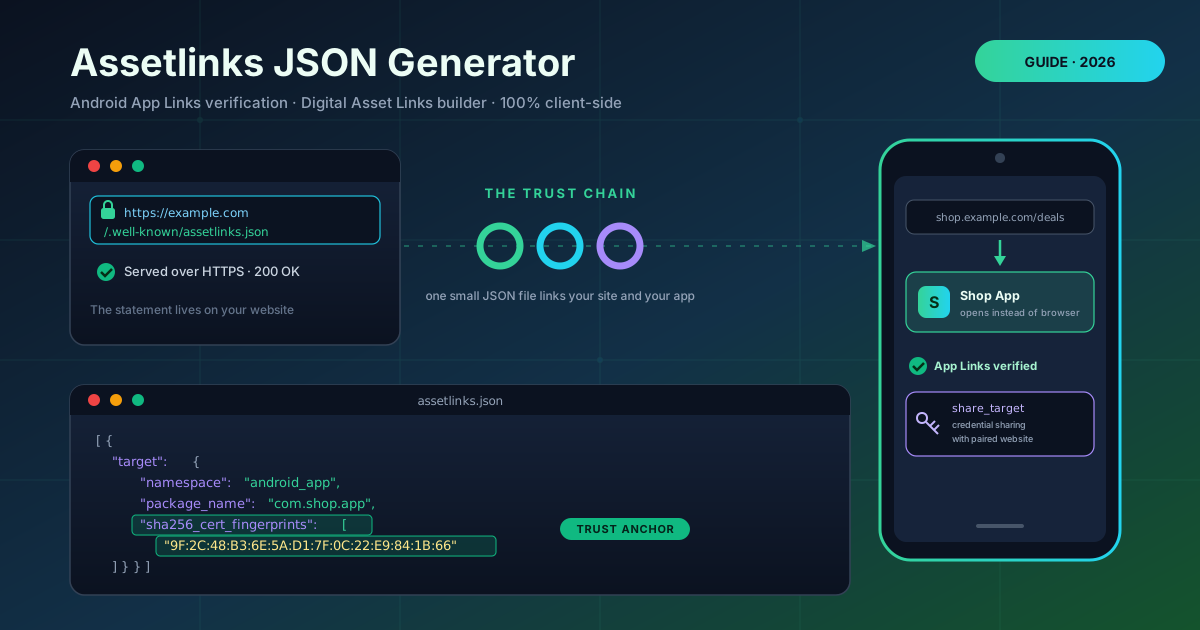
Digital Asset Links lets one origin make machine-checkable claims about another party — here, a website claiming that a specific Android app speaks for it. Android's verifier checks structure, package identity, and signing identity:
[{
  "relation": ["delegate_permission/common.handle_all_urls"],
  "target": {
    "namespace": "android_app",
    "package_name": "com.example.shop",
    "sha256_cert_fingerprints": [
      "9F:2C:48:B3:6E:5A:D1:7F:0C:22:E9:84:1B:66:3D:AB:C4:07:52:E1"
    ]
  }
}]
The relation array declares the granted permission; common.handle_all_urls is App Links. namespace of android_app marks an Android application, package_name pins the application ID, and sha256_cert_fingerprints lists the certificates allowed to sign it. Android compares the fingerprint that signed the installed APK against this list — only a match unlocks verified deep links.
Where the fingerprint comes from. It is the SHA-256 digest of your signing certificate: printed by keytool for self-managed keystores, or shown in Play Console for apps using Play App Signing. The most common field failure is copying the local upload key fingerprint — links still open in the browser because installed APKs are signed by the Play-managed App signing key.
Multiple apps, debug and release. The file is an array, so several fingerprints under one package cover every certificate that can sign the app, and separate statements let a family of apps claim the same domain.
share_target and credentials. A second relation, delegate_permission/common.get_login_creds, is what Credential Manager reads: a passkey saved on the web is offered in the app, and vice versa.
Debugging: 404 versus mismatch. A 404 means the verifier never reached the statement: wrong path, missing .well-known route, an HTTP-only host, or a redirect. A reachable file that fails means a mismatch — wrong fingerprint, package name, or invalid JSON. Verification is cached; Google's Statement List tester names the failing check.
Practical Use Cases
Deep links for e-commerce
Campaigns share product URLs everywhere. With a verified statement, shop.example.com/p/12345 opens the app on the product page, preserving cart state and cutting a step from the funnel — while the same URL still works for users without the app.
Password manager credential sharing
A service with a web console and an Android app enables share_target. Users save a password or passkey once and Credential Manager offers it in both surfaces — and phishing domains cannot impersonate the pair, because trust comes from the fingerprint.
Single sign-on flows
An enterprise suite anchors app-to-app identity on the verified website pairing: sibling apps from the same domain join shared credential flows without re-prompting.
QA of release builds
Teams include debug and release fingerprints during development, so testers verify deep links on debug builds before every release candidate — catching rotated keys or renamed packages early.
Best Practices
- Include both debug and release fingerprints during development. One statement covering both keystores keeps QA and production verified by the same file.
- Verify with the Statement List tester. Google's Digital Asset Links tooling queries your live URL and names the failing check — use it after every change.
- Never serve the file over HTTP. Verification requires HTTPS on the exact host at the exact /.well-known/assetlinks.json path, with no redirects, serving valid JSON with an application/json content type.
- Re-verify after any signing change. Rotations and new build flavors change fingerprints; update the statement and expect a short cached delay.
- Cover every host you link from. Statements are per-hostname, so example.com and www.example.com each need their own file.
Ship Verified App Links Today
One small file separates "a link that opens a browser tab" from "a link that opens your app." The Assetlinks JSON Generator builds it in under a minute, entirely in your browser. Generate your statement, drop it into /.well-known/, and let Android trust your links.
Related Tools You Might Like:
- Hash Type Identifier — identify the type of any hash string
- JSON Formatter — validate and pretty-print JSON before deploying
- URL Parser — break deep-link URLs into scheme, host, and path
Happy linking!
Frequently Asked Questions
Q: Where exactly does assetlinks.json need to be hosted?
A: At the exact path /.well-known/assetlinks.json on every hostname your deep links use, over HTTPS and without redirects. A subfolder, query string, or HTTP URL fails verification.
Q: Which SHA-256 do I use with Google Play App Signing?
A: The fingerprint of the Play-managed App signing key certificate in Play Console. Your local upload key will not match the certificate that signs installed APKs.
Q: Is the SHA-256 fingerprint sensitive information?
A: No. It is a public digest anyone can compute from your published app, and it works as a trust anchor precisely because it is public and verifiable.
Q: Android still opens my links in the browser. What do I check first?
A: Confirm the file returns 200 over HTTPS at the exact path, then check the package name and fingerprint against the installed build. Results are cached, so use the Statement List tester and allow time to re-verify.