AWS ARN Parser: Decode and Rebuild Amazon Resource Names
Parse Amazon Resource Names into partition, service, region, account, and resource parts with copyable segments, and build valid ARNs back from components — 100% client-side.
Free Interactive Tool
AWS ARN Parser
Parse Amazon Resource Names into partition, service, region, account, and resource parts with copyable segments, and build ARNs back from components.
Table of Contents
Every IAM policy, CloudTrail log, and error message speaks ARN — and their resource segments differ per service in maddening ways. A bucket ARN has no region and no account, so it carries two colons in a row. A role ARN names its resource with a slash. A Lambda ARN chains fields together with colons after the fifth segment. Read a few hundred and your eyes learn to skip them; before that, every arn:aws:... string is a wall of punctuation you decode by hand.
Hand-decoding is slow and quietly error-prone. Which field is the account and which is the region? Is that an empty region or a missing account? A wrong answer becomes a policy statement that silently matches nothing, or an hour lost to an error message pointing at the wrong account.
The AWS ARN Parser takes one ARN in and returns its five components — partition, service, region, account, and resource — as clearly labeled, copyable segments. It parses both colon-delimited and slash-delimited resource formats, recognizes all three partitions, and builds a valid ARN back from the parts. Everything runs 100% client-side, so nothing leaves your machine.
Why Use AWS ARN Parser?
- Read any ARN at a glance — The parser splits the string into labeled segments, confirming service, region, and account in seconds instead of counting colons.
- Copy exactly the part you need — Each segment is individually copyable, removing the retyping mistakes that make policies misfire.
- Build ARNs in reverse — Feed in the five components and the tool assembles a valid ARN, including the double colons empty fields require.
- Handle every resource format — Slash-style resources such as role/DeployRole, colon-chained ones such as function:my-function:production, and hybrids all parse faithfully.
- Make sense of partitions — aws, aws-cn, and aws-us-gov are isolated worlds; the parser tells you immediately which one an ARN belongs to.
- Private and instant — ARNs can reveal your infrastructure layout, so everything is processed client-side with no uploads and no signup.
Key Features
| Feature | What It Does |
|---|---|
| Full ARN parsing | Splits any ARN into partition, service, region, account, and resource |
| Colon and slash formats | Handles slash-delimited, colon-chained, and mixed resources |
| Copyable segments | One click copies any single component exactly as it appears |
| Build-back mode | Assembles a valid ARN from individual component inputs |
| Partition detection | Recognizes aws, aws-cn, and aws-us-gov the moment you paste |
| Privacy-first | 100% client-side processing — no uploads, no signup |
The tool is deliberately focused: it reads and writes the ARN grammar and stays out of your way. Three pairings round out an ARN-heavy workflow:
- Pair it with the JSON Formatter when a CloudTrail event arrives as an unreadable one-liner.
- Use the URL Parser for the same segment-by-segment discipline on service endpoints.
- Hand the verified ARNs to the AWS IAM Policy Builder to turn them into validated least-privilege statements.
How to Use
- Open the tool — Navigate to the AWS ARN Parser. No installation, signup, or AWS credentials required.
- Paste an ARN — Drop in any ARN from a policy, log line, Terraform plan, or error message. Parsing is instant.
- Review the segments — Partition, service, region, account, and resource appear as labeled fields; fields AWS left empty show as empty rather than guessed.
- Copy what you need — Click any segment to copy it exactly — the account ID, the resource path, the region.
- Build an ARN back — Switch to build mode, fill in the components, and copy the assembled ARN into your policy or IaC template.
The Five Segments and Their Mood Swings
Every ARN follows the same grammar:
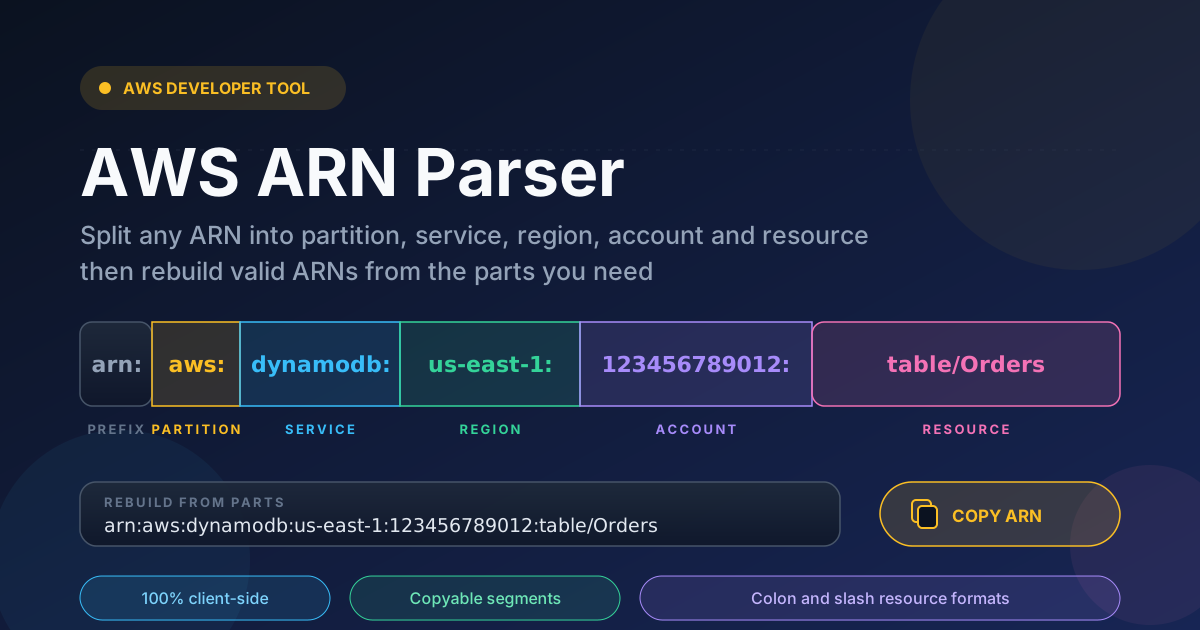
arn:partition:service:region:account-id:resource
The first five fields are fixed and colon-separated; the sixth — the resource — is where each service goes its own way, which is why ARNs feel inconsistent.
The resource field has at least three dialects. IAM uses a slash between type and name: arn:aws:iam::123456789012:role/DeployRole. DynamoDB does the same with table/Orders. Lambda chains colons instead: function:my-function:production. S3 is stranger still — bucket ARNs carry nothing after the service field but two colons, and object ARNs embed the key with slashes: arn:aws:s3:::reports-2026/eu/summary.csv. Some access-point ARNs mix every convention. A parser assuming one dialect misreads the others; this one treats everything after the fifth colon as the resource, as AWS intends.
The partition is a boundary, not decoration. aws is the global commercial cloud. aws-cn is the China partition, whose account space is completely separate. aws-us-gov is GovCloud, walled off for regulated US workloads. An identical-looking account ID in two partitions refers to two different customers, so the partition is a security question, not a cosmetic one.
Empty fields are normal, not corruption. IAM, S3, CloudFront, and Route 53 are global services, so their ARNs leave the region empty, and S3 bucket ARNs leave the account empty too. The two most common parse mistakes follow directly: reading a double colon as a typo, and assuming every ARN carries an account.
A worked decode. Take arn:aws:dynamodb:us-east-1:123456789012:table/Orders: aws is the commercial partition, dynamodb the service, us-east-1 a specific region, 123456789012 the owning account, and table/Orders the resource type plus name. Reading it back is just as common: assemble Resource values from these parts, extending deliberately for a prefix match such as arn:aws:s3:::reports-2026/eu/*.
Practical Use Cases
Writing IAM Policies
Policies live and die on exact ARNs. Decode the ARNs gathered from requirements, copy each segment precisely, and reassemble them as Resource values. A verified ARN cannot silently miss its target; a retyped one can.
CloudTrail and Log Analysis
CloudTrail records the resources behind every event as ARNs. While triaging unusual activity, parsing each one shows which accounts, regions, and services were touched — and whether an account ID recurs.
Cross-Account Debugging
"Access Denied" from a role assumption usually hides a one-character problem: wrong account ID, wrong partition, or a dropped path segment. Decode both the trust-policy ARN and the one in the error message, compare segment by segment, and the mismatch announces itself.
Infrastructure-as-Code Templates
Terraform and CloudFormation interpolate account IDs and regions into ARNs constantly. When a plan fails on an ARN, paste the rendered value into the parser, confirm which component is wrong, and fix the interpolation instead of poking at the template.
Best Practices
- Copy segments exactly for policies — A typo in an ARN raises no error; IAM simply matches nothing, and the permission you thought you granted never existed.
- Remember global services have empty regions — IAM, S3, CloudFront, and Route 53 intentionally leave region or account blank. Preserve the double colons; do not "fix" them.
- Validate before pasting into policies — Run any hand-assembled ARN through the parser once; if the segments come back as intended, it is sound.
- Check the partition first — Confirm aws, aws-cn, or aws-us-gov before trusting an account ID, especially with ARNs from colleagues or vendors.
- Prefer exact resource paths over wildcards — When you must wildcard, do it deliberately and narrowly, such as one bucket prefix.
- Keep a canonical source — Generate ARNs in code where possible; when investigating, decode from the log.
Stop Decoding ARNs by Hand
ARNs are the addressing system of AWS, and they will keep appearing in every policy, log, and stack trace. Open the AWS ARN Parser, paste the next string, and get partition, service, region, account, and resource in one glance — free, instant, and entirely in your browser.
Related Tools You Might Like:
- AWS IAM Policy Builder — turn verified ARNs into validated, least-privilege policy JSON
- JSON Formatter — pretty-print CloudTrail events and policy documents before you read them
- URL Parser — apply the same segment-by-segment breakdown to endpoints and query strings
Happy parsing!
Frequently Asked Questions
Q: Does the AWS ARN Parser send my ARNs to a server?
A: No. Parsing and building happen entirely in your browser. ARNs can reveal account IDs and resource names, so everything stays client-side.
Q: Why do some segments come back empty?
A: Because AWS left them empty. Global services such as IAM, S3, and CloudFront omit the region, and S3 bucket ARNs omit the account too — which is why arn:aws:s3:::my-bucket contains two colons in a row.
Q: Can it handle resource identifiers that mix colons and slashes?
A: Yes. The parser treats the first five fields as the fixed grammar and keeps everything after the fifth colon intact as the resource, so function:my-function:production, role/DeployRole, and table/Orders all survive intact.
Q: What is the difference between the aws, aws-cn, and aws-us-gov partitions?
A: They are isolated partitions: aws is the global commercial cloud, aws-cn is the China partition with a separate account space, and aws-us-gov is GovCloud. Identical-looking account IDs in two partitions refer to different customers.