Basic Auth Generator: Build Authorization Headers Safely in Your Browser
Create HTTP Basic Auth Authorization headers from a username and password — UTF-8 or Latin-1 base64, ready-to-paste curl and fetch snippets, and an .htpasswd preview. Runs 100% client-side, so credentials never leave your browser.
Free Interactive Tool
HTTP Basic Auth Header Generator
Generate HTTP Basic Auth Authorization headers from a username and password. Base64 via UTF-8 or Latin-1, with curl and fetch snippets and an .htpasswd preview — 100% in your browser.
Table of Contents
HTTP Basic Auth is crude, but still everywhere: staging sites, internal dashboards, routers and cameras with web UIs, webhooks expecting a shared secret. That simplicity is why it survives — and why hand-building the header is easy to get wrong. Get the encoding wrong and the server rejects you; paste a password in the wrong place and it lands in your shell history or a git commit.
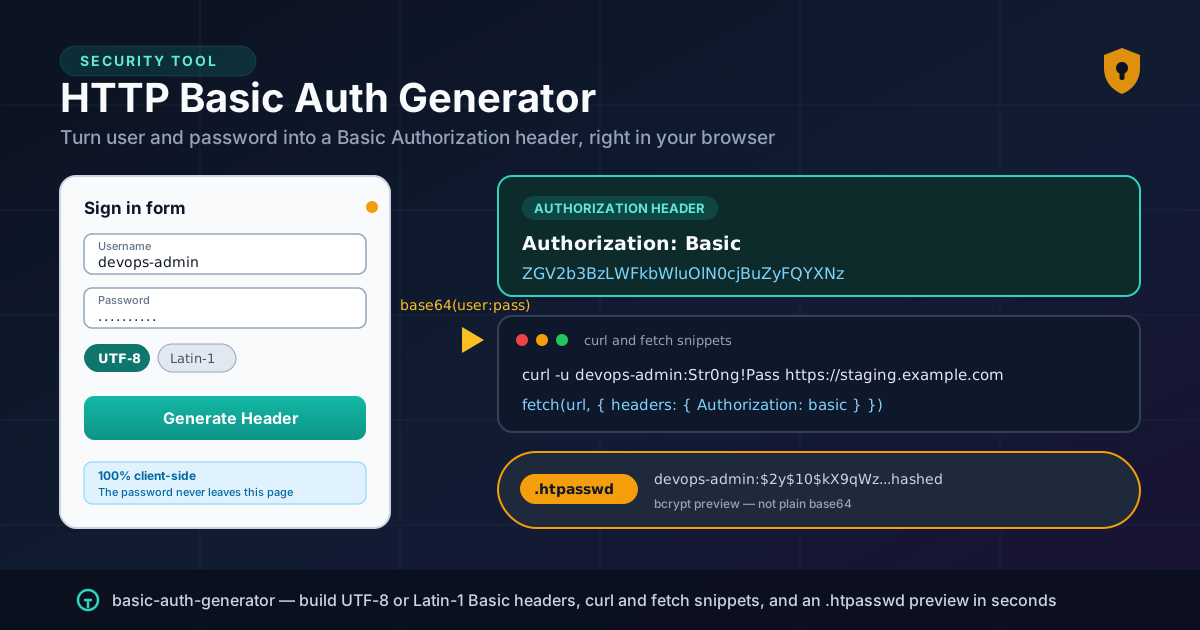
Our free Basic Auth Generator builds the Authorization: Basic ... header for you. Enter a username and password, choose UTF-8 or Latin-1 encoding, and the tool produces the base64 credential string plus ready-to-paste curl and fetch snippets and an .htpasswd preview. Everything happens in your browser: credentials are encoded by JavaScript on your machine, never transmitted, logged, or stored.
This guide covers what Basic Auth sends, why the encoding choice matters, and where the scheme still fits — provided you pair it with HTTPS and good credential hygiene.
Why Use Basic Auth Generator?
One-liners can base64-encode a string, but a purpose-built tool removes the failure modes:
- Your password never leaves the browser. The entire pipeline — assembly, encoding, snippet generation — runs client-side. Unlike encode sites that POST your input to a server, there is no round-trip at all.
- Correct UTF-8 versus Latin-1 handling. Non-ASCII passwords are ambiguous in the Basic scheme; the tool makes the encoding explicit instead of silently producing a header that works in one client and fails in another.
- No shell-history or clipboard leaks. Piping echo -n "user:pass" | base64 leaves the plaintext in your history. The generator does the work in-page with nothing recorded.
- Ready-made curl and fetch snippets. You get the exact curl -u invocation and a fetch call with the correct Authorization header — no quote-escaping or header syntax to remember.
- An .htpasswd preview alongside the header. Apache's .htpasswd format is often confused with the base64 header; the tool shows the correct bcrypt-style storage format so you never deploy a reversible "hash".
Key Features
The Basic Auth Generator packs the essentials into one client-side page:
| Feature | What It Does | Why It Matters |
|---|---|---|
| Header generation | Produces Authorization: Basic base64 from your credentials | Eliminates manual encoding mistakes |
| Encoding choice | UTF-8 or Latin-1 for non-ASCII credentials | Matches what the receiving server expects |
| curl snippet | Emits a curl -u user:pass one-liner | Fastest path to a working request |
| fetch snippet | Emits a fetch call with the precomputed Authorization header | Paste directly into browser scripts |
| .htpasswd preview | Shows the bcrypt-style line Apache expects | Keeps header encoding separate from password storage |
- Colon safety. The first colon terminates the username, so the tool rejects usernames containing one.
- Password-only edge case. A credential can be just :password.
How to Use
- Open the tool. Navigate to Basic Auth Generator in any modern browser — no account or installation required.
- Enter the username and password. The first colon splits the pair, so the username cannot contain one.
- Pick the encoding. Keep UTF-8 for modern setups; switch to Latin-1 only if your server decodes Basic credentials that way.
- Copy the output you need. Grab the raw header, the curl one-liner, the fetch snippet, or the .htpasswd preview line.
- Use and discard. Test the request, deploy the config, then clear the credential from your clipboard — and rotate it on schedule if it is real.
user:pass in Base64
This is the part worth understanding, because Basic Auth is simpler and trickier than it looks.
The scheme itself
RFC 7617 defines Basic Auth as a single header line. The client concatenates the username, a colon, and the password, base64-encodes that string, and sends it as the credential of the Basic scheme:
Authorization: Basic ZGV2b3BzLWFkbWluOlN0cjBuZyFQYXNz
Decoding ZGV2b3BzLWFkbWluOlN0cjBuZyFQYXNz yields devops-admin:Str0ng!Pass — the entire security story of the header. Base64 is an encoding, not encryption; anyone who intercepts the header recovers the password trivially. Basic Auth is only defensible over HTTPS.
Why the encoding choice matters
The scheme says nothing about the character encoding of the concatenated string. For pure ASCII credentials, UTF-8 and Latin-1 produce identical bytes. But once a password contains characters like ä, é, or §, the encodings diverge: UTF-8 stores ä as two bytes (0xC3 0xA4), Latin-1 uses one (0xE4), and the base64 output differs accordingly.
Modern stacks treat the credential as UTF-8, while legacy Apache configurations and older embedded devices assumed Latin-1. If a header "works in the browser but fails in curl," suspect an encoding mismatch. The generator makes the choice explicit: UTF-8 for modern targets, Latin-1 for legacy devices.
The generated snippets
The tool produces two subtly different snippets. The curl form uses -u, which handles concatenation and encoding for you:
curl -u devops-admin:Str0ng!Pass https://staging.example.com/
The fetch form embeds the precomputed header — what you want when debugging an app that must send the header itself:
fetch(url, { headers: { 'Authorization': 'Basic ZGV2b3BzLWFkbWluOlN0cjBuZyFQYXNz' } })
If curl succeeds but fetch returns 401, the bug is in how your client code assembles the header.
The .htpasswd preview
A frequent confusion: the base64 in the Authorization header is not a password hash. .htpasswd lines store a slow, salted hash, typically bcrypt:
devops-admin:$2y$10$kX9qWzR4vN8pQ2mT5yL3bOuC7dGfJ1aHsXeVrK9wPzQnM2iB4cD6e
The base64 header is reversible by design; the .htpasswd line is not. The generator's preview shows the correct format; use a proper hashing tool for real hashes and the htaccess generator for the surrounding Apache configuration.
Practical Use Cases
Staging environment protection
The classic case. Staging should not be public, but full SSO is overkill before launch. One shared team credential takes five minutes to configure, keeps crawlers out, and rotates easily.
API quick tests
To verify an endpoint's auth middleware actually rejects unauthenticated traffic, fire a single curl request with a generated header. The snippets let you test the happy path and the 401 path in seconds.
Routers and devices with Basic-only auth
Consumer routers, IP cameras, and NAS units often offer Basic Auth as their only API authentication, and many older devices decode credentials as Latin-1 — exactly where the encoding toggle pays off.
CI smoke tests
A nightly smoke test against a protected staging URL needs just enough auth to get past the wall. Store the credential as a CI secret and inject it into the fetch-style snippet so the password never reaches logs.
Best Practices
- Always pair Basic Auth with HTTPS. The header is effectively plaintext; over plain HTTP the credential is visible to proxies, Wi-Fi operators, and packet sniffers.
- Rotate staging credentials on a schedule. Shared passwords accumulate reach. Monthly is a reasonable cadence — and rotate immediately when a team member departs.
- Never commit generated headers with real passwords. The output is reversible, so headers and config files with live credentials belong in a secrets manager, not version control. A PII redactor pass before committing is a cheap safety net.
- Prefer per-consumer credentials. Where the server allows it, issue one credential per person or pipeline so access can be revoked individually.
- Rate-limit the auth endpoint. Basic Auth has no built-in brute-force protection on most servers; enable fail2ban on anything exposed beyond localhost.
- Treat it as a stopgap, not a strategy. For anything long-lived or user-facing, move to session-based auth or OAuth 2.0. Basic Auth earns its keep in staging and testing — not production identity.
Ready to Build Your Header?
Stop hand-rolling base64 in your terminal. Open the Basic Auth Generator, enter your credentials, pick the encoding that matches your server, and copy a correct header or snippet in seconds — computed entirely in your browser.
Related Tools You Might Like:
- OpenSSL Command Generator — build correct openssl commands for keys, certificates, and encodings.
- htaccess Generator — generate Apache .htaccess snippets, including auth sections that consume .htpasswd files.
- PII Redactor — strip emails, tokens, and other sensitive data before sharing or committing.
The Online Tools Forge Team builds fast, free, privacy-first developer utilities that run entirely in your browser. If this guide saved you a debugging session, share it with a teammate still piping credentials through their shell.
Frequently Asked Questions
Q: Is the Basic Auth header the same as encrypting my password?
A: No. Base64 is a reversible encoding, not encryption. The header only becomes safe over HTTPS, which encrypts the entire request — including the Authorization header — in transit.
Q: When should I choose Latin-1 instead of UTF-8?
A: Only when the receiving server or device decodes Basic credentials as ISO-8859-1, common in older Apache configurations and legacy embedded devices. For pure ASCII credentials the two encodings are identical.
Q: Does this tool send my username and password to a server?
A: No. All encoding and snippet generation happens in JavaScript inside your browser tab. Nothing is transmitted, logged, or stored — close the tab and the credentials are gone.
Q: Can I use the generated base64 string as an .htpasswd entry?
A: Never. The base64 string is reversible, so anyone with file access could recover the password. .htpasswd requires a slow, salted hash such as bcrypt — use the tool's preview to see the correct format.
Q: Why can't my username contain a colon?
A: The scheme concatenates username, one colon, and the password, and the server splits on the first colon. There is no escaping, so a colon would make the credential ambiguous.