Cron Gap Simulator: Catch Silent Gaps and Overlapping Jobs Before They Catch You
Cron Gap Simulator plots the next fire times of multiple cron expressions on one shared timeline, exposing silent gaps, overlapping runs, and timezone or DST surprises before they reach production.
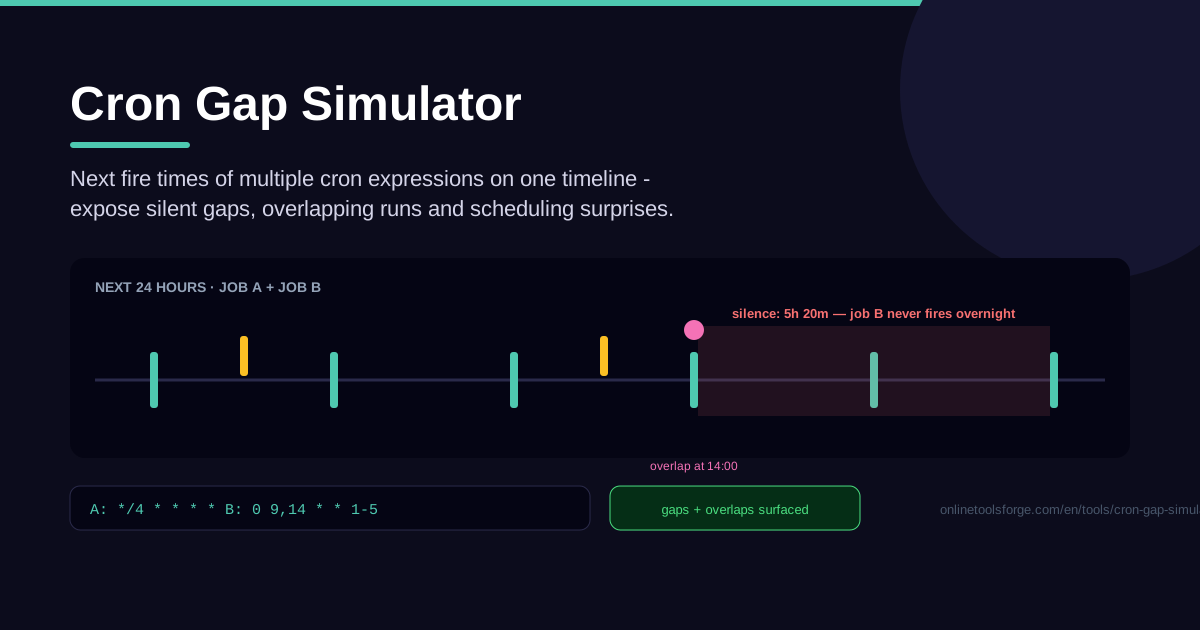
Table of Contents
Every cron expression looks innocent on its own. 0 */2 * * * fires every two hours; 30 3 * * 1-5 runs on weekday mornings; each line parses cleanly in any validator. The problems live between the lines: the window where nothing runs at all, the minute where three jobs fire together, the night a DST shift moved everything by an hour. The Cron Gap Simulator exposes exactly these failures — instead of testing expressions one by one, it simulates the next fire times of multiple cron expressions on a single shared timeline, so you see how schedules interact before they go live.
That matters because scheduling bugs are silent. Nothing crashes; no error lands in a log. A backup that never fires, a report that doubles up at 4 AM and hammers your database, an overnight stretch with no health check — these look like healthy systems right up until they are not. And because the tool is pure client-side, an entire crontab becomes a merged timeline in seconds, with nothing leaving your machine.
Why Use Cron Gap Simulator?
- Catch the overnight gap nobody noticed. The worst flaw produces no events at all — two jobs meant to alternate, one subtly wrong expression, and the night has a multi-hour hole with no backups or checks. A shared timeline makes that hole impossible to miss.
- See overlaps before they pile up. Jobs firing together compete for CPU, database connections, and I/O; add one job to a busy 3:00 window and queues and timeouts follow. Overlap markers show collisions early.
- Expose timezone and DST traps. An expression that looks right in UTC may run at a very different local hour, and simulating across a DST boundary reveals jobs that shift, skip, or fire twice.
- Test the schedule as a system. Each expression can be correct while the combination is broken — two jobs meant to hand off every 15 minutes, yet leaving a 45-minute dead zone.
- Simulate without risk. Nothing is executed and no jobs are triggered; paste a production crontab and experiment freely, because everything runs client-side in your browser.
- Iterate in seconds. Adjust an expression, re-simulate, and instantly see how the new fire times fill or reopen gaps across the window.
Key Features
| Feature | What it does |
|---|---|
| Multiple expressions | Enter several cron expressions at once, each labeled for readability. |
| Shared timeline | Merges every expression's next fire times into one chronological view. |
| Silent gap detection | Highlights periods where nothing runs, making coverage holes measurable. |
| Overlap detection | Flags moments when two or more jobs fire at or near the same time. |
| Timezone and DST awareness | Surfaces hour shifts around DST transitions and timezone mismatches. |
| Pure client-side | All simulation happens in the browser — no accounts, no uploads, no servers. |
- One merged view is the core idea: per-expression run lists never show what the fourth job does to the first, but one shared timeline does.
- Gaps are quantified: quiet periods are measured, so you see exactly how long nothing runs.
How to Use Cron Gap Simulator
- Add your expressions. Paste each cron expression, one per job, with recognizable labels — "db-backup", "report-sync", "health-check" — because a named timeline reads far easier.
- Simulate a window. Preview the next 24 hours or a full week; a week is the sweet spot: it captures day-of-week behavior and weekend patterns.
- Read the merged timeline. Every fire time appears in chronological order with its job label. Look for the rhythm: even spacing, dense morning clusters, quiet stretches.
- Spot gaps and overlaps. Find highlighted silent gaps where nothing fires for an uncomfortably long stretch, and collision points. Is each gap intentional? Is each overlap harmless?
- Adjust and re-simulate. Shift an expression by 30 minutes, stagger an offset, or fix a timezone, then simulate again until the timeline shows the coverage you intended.
When Cron Schedules Betray You
Cron failures follow a pattern: every expression is defensible alone, and the damage only appears in combination. A 0 4 * * * backup looks fine next to a 30 3-5 * * * report job — until both hit the database in the same half-hour. Teams rarely view a crontab as one system; the simulator forces that view.
Gaps arise from classic causes. Timezone pitfalls are the most common: the server thinks in UTC while the team thinks locally, so a "3 AM" job really runs at 10 AM. DST shifts are sneakier: in spring a 2:30 AM job vanishes because the hour is skipped; in autumn it fires twice. And the day-of-month versus day-of-week OR rule is the legendary one: when both fields are restricted, the job runs when either matches, not both. 0 0 13 * 5 is not "Friday the 13th at midnight" — it is midnight on the 13th plus every Friday, doubling some weeks' runs and opening gaps elsewhere.
Overlaps fail through queue pileups. Colliding jobs wait for resources, runtimes stretch, and stretched runtimes collide with the next fire — until a scheduler refuses a run because the last one never finished. A timeline preview shows collision points in advance, while the fix is still a one-character change.
The habit that prevents all of this: simulate before deploying. Every new or edited expression should pass a shared-timeline check beside the jobs it will live with — seconds of effort against bugs monitoring only reports afterward.
Practical Use Cases
Auditing a Server's Crontab
Paste the whole crontab -l output as separate entries and preview a full week. Servers accumulate cron entries for years — an old health check, a log rotation job, three overlapping backups. The timeline shows where coverage duplicates and where overnight hours sit empty because a "temporary" job was removed and never replaced.
Coordinating Backups Against Reports
Backups and reports are natural rivals: both read the database heavily, and a report landing mid-backup slows both down. Enter both together, then stagger — backup at 2:00, reports from 4:00 — and confirm the handoff stays clean across all seven days, weekends included.
Verifying a DST-Week Schedule
In the week around a daylight saving transition, simulate every job: runs shift an hour in wall-clock terms, a 2:15 AM job skips entirely on transition night, and jobs that never collide suddenly share a minute. Fix expressions before the transition, not during the on-call page.
Teaching Cron Semantics
Abstract field explanations rarely stick. Give juniors exercises instead — "no gap longer than four hours," or "why does 0 0 13 * 5 run twice some weeks?" — and the timeline turns cron's quirks into something visible rather than memorized.
Best Practices
- Simulate a full week, not a day — day-of-week logic and weekend patterns only reveal their shape over seven days.
- Include timezone context in every review; check expressions against both server time and business local time.
- Stagger overlapping jobs deliberately; offset enough for the first to finish, then confirm on the timeline.
- Alert on gaps in production so a deleted cron entry or dead host cannot recreate a silent hole.
- Re-simulate after every crontab change, the same way you run tests before merge.
- Keep labels meaningful; unnamed markers are hard to audit.
Try Cron Gap Simulator Now
Ready to see what your schedules do when nobody is watching? Open the Cron Gap Simulator, paste your expressions, and preview the next week of fire times on one timeline. The gaps you find in thirty seconds are the ones you would otherwise meet during an incident.
Related Tools You Might Like:
- Cron Parser — decode and validate a single expression field by field.
- Cron Expression Builder — construct expressions visually with every field explained.
- English to Cron — turn plain-language descriptions like "every weekday at 6" into a cron expression.
Happy scheduling — and may all your gaps be intentional!
Frequently Asked Questions
Q: What counts as a "silent gap" in cron scheduling? A: A silent gap is a stretch where none of your scheduled jobs fire — dangerous because nothing fails, yet your system is uncovered. The simulator highlights these periods so you can confirm whether each gap is intentional.
Q: Can Cron Gap Simulator run my jobs or touch my servers? A: No. It only simulates and displays fire times; it never executes commands or connects to your systems. Everything is computed client-side, so it is safe to paste a production crontab for analysis.
Q: How many cron expressions can I compare at once? A: Multiple expressions in one session, all merged on one timeline. Audits work best with a full crontab — typically five to twenty entries — so every interaction is visible.
Q: Does the simulation account for DST and timezones? A: Yes. Across a transition, jobs shift, skip, or fire twice — exactly how real cron behaves. Always preview the transition week for night-hour schedules.