CSP Evaluation Tool: Audit and Harden Your Content Security Policy
Audit any Content-Security-Policy header with the CSP Evaluation Tool: expose unsafe-inline, wildcards and missing default-src fallbacks, then apply a suggested hardened policy.
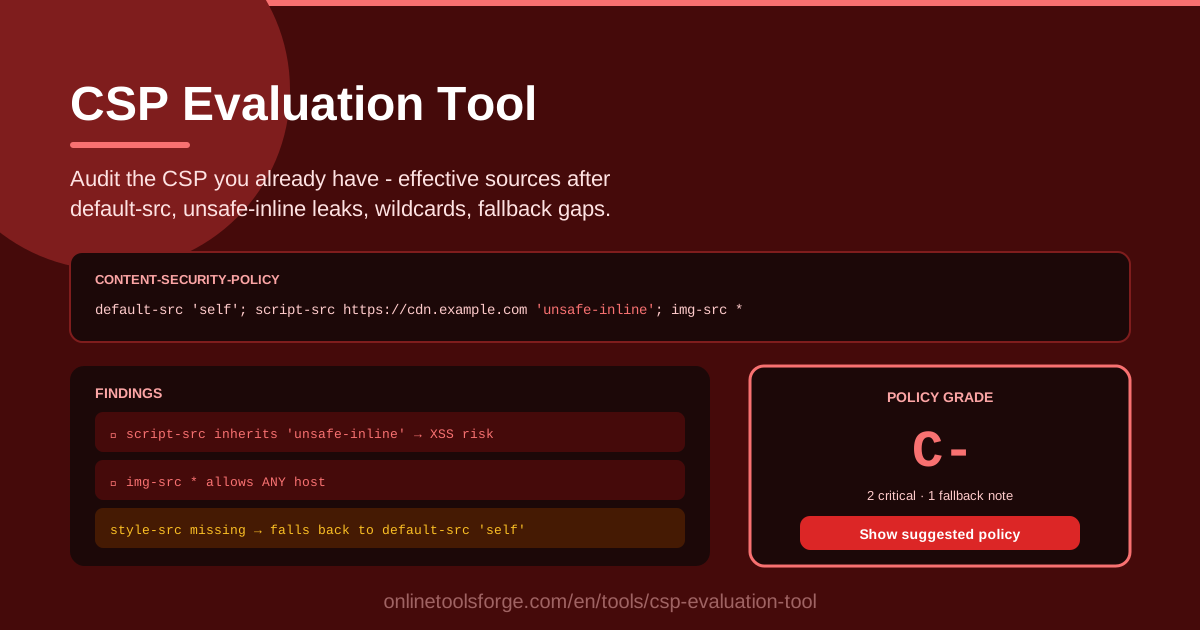
Table of Contents
A Content-Security-Policy that looks strict on paper can quietly allow far more than you intended. Between default-src fallback rules, keyword sources, and wildcards, what the browser actually enforces is often different from what the header seems to say. The CSP Evaluation Tool lets you paste an existing Content-Security-Policy header and see, directive by directive, exactly which script source is really in force after the fallback chain resolves.
This matters because CSP is one of the strongest client-side defenses against XSS. When it works, an injected payload simply cannot load or execute. When it is misconfigured, the policy creates a false sense of security: unsafe-inline re-opens inline script execution, a wildcard can point at hosts you do not control, and directives you never listed silently inherit whatever default-src permits.
This guide explains why auditing an existing policy is worth the time, how to read the tool's findings, and how the default-src fallback really behaves under the hood.
Why Use CSP Evaluation Tool?
- Auditing policies you inherited. Most teams eventually inherit a CSP someone else wrote years ago, and nobody remembers why each source is there. The tool turns that opaque string into a readable, challengeable breakdown you can act on.
- Seeing the true effective sources. The tool resolves the effective sources for every directive after the default-src fallback, so you stop guessing what actually governs scripts, styles, images, and connections.
- Finding unsafe-inline and unsafe-eval. These keywords are the classic weak points of any policy. Every directive where they apply is flagged, with the practical XSS risk spelled out.
- Detecting wildcards that allow any host. A wildcard is convenient today and dangerous tomorrow. The tool highlights exactly where host scoping should be tightened.
- Listing directives with no fallback. Some directives never inherit from default-src, so a missing entry leaves a real hole that nobody notices until it is exploited.
- Receiving a ready-to-apply hardened policy. The suggested policy comes with an explanation of every change, so you can roll it out step by step with confidence.
Key Features
| Feature | What it does |
|---|---|
| Effective source resolution | Resolves what each directive really allows after default-src fallback. |
| unsafe-inline / unsafe-eval flags | Marks every directive where these permissive keywords still apply. |
| Wildcard detection | Identifies sources that allow any host and suggests narrower scoping. |
| Missing fallback analysis | Lists directives that have no fallback at all. |
| Suggested hardened policy | Delivers a complete hardened policy with a rationale for each change. |
| Fully client-side | The evaluation runs in the browser; your policy never leaves your machine. |
Two details make daily use easier:
- Findings are ordered by severity, so critical items such as unsafe-inline in script-src surface first without reading the whole policy.
- Every suggested change is explained, which makes security reviews and pull requests painless.
How to Use CSP Evaluation Tool
- Copy your CSP header. Take it from your server or proxy configuration, your framework middleware, or the response headers visible in browser DevTools.
- Paste it into the tool. Open the CSP Evaluation Tool and drop the header string into the input area. Nothing is uploaded.
- Read the findings by severity. Start with the critical items: unsafe-inline or unsafe-eval in script-src, broad wildcards, and unexpected data: or blob: sources.
- Review the fallback analysis. Check the per-directive view to see which sources are explicit and which are inherited from default-src, plus which directives have no fallback at all.
- Apply the suggested policy step by step. Move to report-only mode first, confirm nothing legitimate breaks, then enforce — every change is documented.
How default-src Fallback Really Works
Directive inheritance. When a fetch directive such as script-src, style-src, img-src, connect-src, or frame-src is absent, the browser falls back to default-src. If default-src 'self' https://cdn.example.com is all you have, images, fonts, XHR, and frames all inherit exactly those two sources. The subtle part: the fallback applies only to absent directives. The moment you add img-src data:, images may load from data URIs even though default-src says otherwise, because an explicit directive replaces the fallback entirely for that resource type.
Why unsafe-inline silently weakens script-src. Inline script execution is the primary channel for XSS payloads. With default-src 'self' alone, inline scripts are blocked. But the day someone adds script-src 'unsafe-inline' to make one legacy widget work, every inline event handler and every injected script block in user-generated content becomes executable again. The change looks tiny in a diff while removing most of the policy's XSS protection.
Wildcards and host scoping. A bare _ allows any host and defeats the point of allow-listing. Subdomain wildcards like _.example.com are narrower but still trust every subdomain forever. Tight scoping per directive — scripts from one CDN, connections to your API only — is what makes a policy auditable months later.
Directives with no fallback. Notably base-uri and frame-ancestors never inherit from default-src. A missing base-uri lets injected HTML redirect relative URLs anywhere; a missing frame-ancestors lets anyone frame your pages. The tool lists these explicitly so they never get forgotten.
Report-only mode as a safe rollout. The Content-Security-Policy-Report-Only header applies a policy without blocking anything and reports violations instead. This is the recommended way to introduce a hardened policy: watch reports from real traffic, fix the gaps, then flip to enforcement with zero downtime risk.
Practical Use Cases
Auditing an Inherited Application
You join a team and inherit an old single-page application with a CSP nobody dares to touch. Paste the production header into the tool: within seconds you learn that script-src carries unsafe-inline from a legacy plugin, img-src includes a wildcard left over from a retired image proxy, and form-action was never set. That is a concrete, prioritized list instead of a vague feeling that the policy is weak.
Pre-Launch Security Review
Before shipping a customer-facing product, run the CSP through the evaluation as part of the launch checklist. You confirm the build did not leak unsafe-eval into production, the analytics host is scoped exactly, and base-uri and frame-ancestors are actually present. Catching this before launch costs minutes; catching it after launch costs an incident.
Tightening After a Pentest Finding
The pentest report says the tester achieved XSS but could not exfiltrate far. Copy the header, evaluate it, and the findings show exactly which directive let the payload through. Apply the suggested policy, redeploy in report-only mode for a week, verify the reports are clean, then enforce — and attach the before-and-after evaluation to the remediation notes.
Migrating from unsafe-inline to Nonces and Hashes
The endgame is removing unsafe-inline from script-src and style-src. Serve a per-request nonce on legitimate inline scripts, or hash static inline blocks and list them as sha256- sources. Re-evaluate after each stage to confirm no permissive keyword remains and nothing else weakened along the way.
Best Practices
- Roll out every new policy in report-only mode first. Enforcement without observation breaks production; let the reports tell you what real traffic needs.
- Replace unsafe-inline with nonces or hashes. This single change removes the majority of practical XSS exploitation paths.
- Keep the policy and the code in sync. Every third-party script or analytics tool added to the app should trigger a policy review, not a widened fallback.
- Re-evaluate after third-party changes. Vendors move endpoints and merge domains; run the evaluation whenever a dependency's loading behavior changes.
- Scope sources per directive. Fix violations by adding the narrowest source to the specific directive, never by widening default-src.
- Document why each source exists. The tool's change explanations are a good starting point for the notes you keep next to your header configuration.
Audit once, then keep the habit: paste your header into the CSP Evaluation Tool, read the findings, and ship a policy you can actually explain — one directive at a time.
Related Tools You Might Like:
- CSP Generator — build a strict policy from scratch when you are ready to write a new one.
- Security Headers Generator — complete the picture with the other HTTP security headers.
- Hash Generator — compute the SHA-256 hashes you need for inline script allow-listing.
Stay safe out there!
Frequently Asked Questions
Q: What is the difference between CSP evaluation and CSP generation? A: Evaluation analyzes a policy you already deploy — resolving effective sources and flagging unsafe-inline, wildcards, and missing fallbacks. Generation builds a new policy from requirements. In practice you generate first, then evaluate and iterate on what actually ships.
Q: Why does the tool show sources for directives I never wrote? A: That is default-src fallback. Any fetch directive that is absent inherits the default-src value, and the tool resolves this per directive so you see the policy the browser really enforces, not just the one you typed.
Q: Is my policy sent to a server when I paste it? A: No. The entire evaluation runs in your browser and nothing is uploaded, stored, or logged, so it is safe to analyze internal or customer-specific policies.
Q: Can the tool fix my policy automatically? A: It produces a suggested hardened policy with an explanation of every change, but applying it stays manual by design. CSP interacts with your application's real resource loading, so the safe workflow is report-only first, verify, then enforce.