Date Range Splitter: Cut Any Date Range Into Weekly, Monthly, or Quarterly Chunks
Free online date range splitter. Divide any start and end date into weekly, monthly, or quarterly chunks with exact day counts for reporting, invoicing, and sprint planning. 100% in-browser.
Free Interactive Tool
Date Range Splitter
Split any date range into weekly, monthly, or quarterly periods with day counts — ideal for reporting, invoicing, and sprint planning.
Table of Contents
Every invoice cycle, sprint plan, and monthly report starts with the same chore: cutting a date range into clean periods without miscounting a single day. Do it by hand and you wrestle with February's 28 days, months that end mid-week, and quarters that straddle a fiscal year — and one off-by-one slip quietly skews an invoice line or a stakeholder deck.
The free date range splitter removes that chore. Enter a start date and an end date, pick weekly, monthly, or quarterly chunks, and it instantly lists every period with its exact day count. Everything runs 100% in your browser: no account, no uploads, no spreadsheet gymnastics.
Why Use Date Range Splitter?
- Day counts you can bill against. Every chunk shows its exact number of days, so pro-rated invoices and timesheets add up without manual counting.
- Three chunk modes, one input. The same range becomes weekly, monthly, or quarterly periods in one click — no rebuilding when requirements change.
- No off-by-one errors. Inclusive end dates, partial first and last chunks, and month-end boundaries are handled by the tool, not your mental arithmetic.
- Instant and private. Splitting runs locally in your browser, so client dates and contract windows never leave your machine.
- Free with zero friction. No signup, no limits, desktop and mobile — open the page, split the range, copy the results.
Key Features
| Feature | What It Does |
|---|---|
| Start and end dates | Define the full range, inclusive of both ends |
| Weekly chunking | Cuts the range into 7-day periods with a partial final chunk |
| Monthly chunking | Splits at calendar month boundaries, 28 to 31 days each |
| Quarterly chunking | Groups the range into quarters for fiscal reporting |
| Day count per chunk | Exact days in every period for pro-rated math |
Two details make these features stand out in daily work:
- Partial chunks are first-class citizens. A range that starts mid-month or ends mid-week still produces a correctly labeled partial period.
- Results read like a report. Each chunk shows its date span and day count, ready to paste into an invoice or project plan.
How to Use
- Open the tool. Load the date range splitter — no account needed.
- Enter the start date. Pick the first day, say February 10, 2026 — it is included in the first chunk.
- Enter the end date. Pick the last day, say April 20, 2026. The tool treats it as inclusive.
- Choose a chunk mode. Select weekly, monthly, or quarterly — the period list rebuilds instantly with exact day counts.
- Copy the results. Use the day counts for invoices, sprint boundaries, or reporting periods, and switch modes to compare.
Weeks, Months, and Quarters Are Not the Same Math
The most common mistake with date ranges is treating "a month" as a fixed unit. Weekly chunks are tidy: every full chunk is exactly 7 days and only the final chunk is partial. Monthly chunks are anything but uniform — calendar months run 28 to 31 days, so two monthly periods can differ by more than 3 days.
The gap matters most where money is involved. At a daily rate, a chunk covering a 28-day February is worth about 10 percent less than one covering a 31-day March. Day counts make pro-rated math self-documenting; their absence invites disputes.
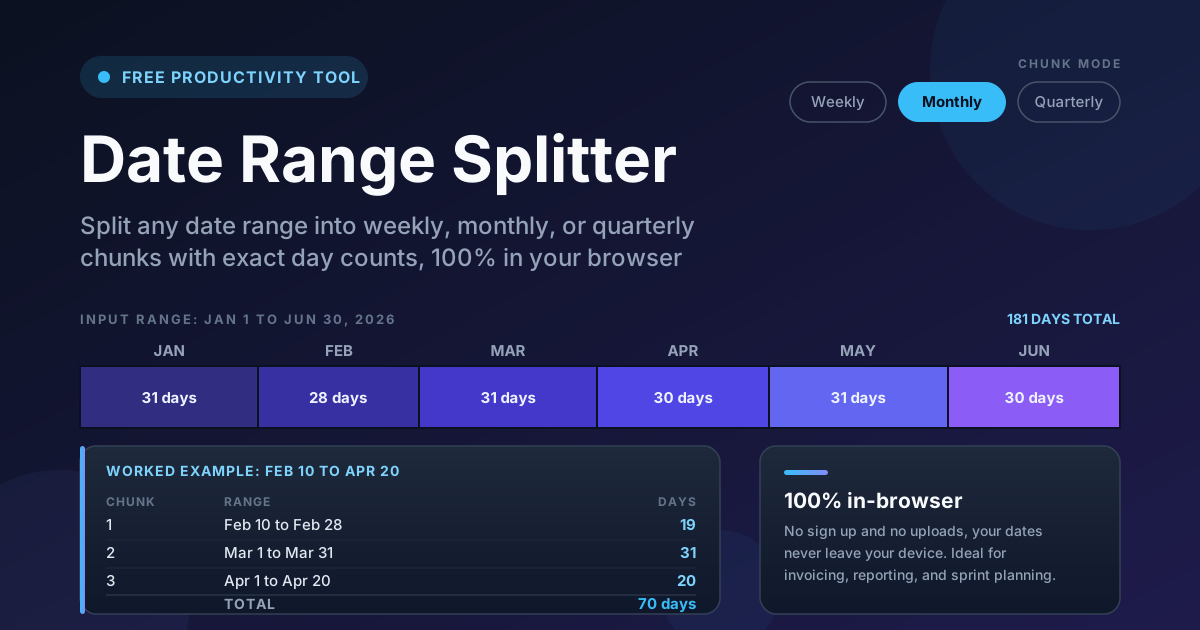
Here is a worked example. Split February 10 to April 20, 2026 into monthly chunks:
| Chunk | Range | Days |
|---|---|---|
| 1 | Feb 10 – Feb 28, 2026 | 19 |
| 2 | Mar 1 – Mar 31, 2026 | 31 |
| 3 | Apr 1 – Apr 20, 2026 | 20 |
| Total | Feb 10 – Apr 20, 2026 | 70 |
Notice the edges: the first and last chunks are partial — 19 and 20 days — while the middle is a full 31-day March, making all 70 days auditable at a glance. Split weekly, the same range gives ten full 7-day chunks — great for sprints, odd on invoices.
Quarters add a fiscal dimension: roughly 90 to 92 days each, with fiscal years often starting in April, July, or October. Splitting a long engagement into quarters aligns billing and reporting with the finance calendar, and the day counts keep partial first and last quarters honest.
Finally, watch for overlap and gap traps when ranges cross month ends. If one invoice covers February 10 to March 10 and the next starts on March 10, that day is billed twice — 29 billed days for a 28-day span; starting on March 11 bills nothing twice. Inclusive day counts make these seams explicit.
Practical Use Cases
Invoicing by period
Freelancers and agencies on retainer can turn an engagement window into exact invoice lines — one row per month with its day count. For daily or weekly rates, the day counts do the pro-rating before drafting.
Sprint and milestone planning
Drop a project's full duration into the tool, split it into weekly chunks, and map each chunk to a sprint number with real calendar boundaries. Demos, releases, and reviews get planned against day counts, not guesses.
Monthly reporting periods
Analysts and operations teams need last month, quarter to date, or custom windows broken into comparable periods. A clean split gives every dashboard query the same boundaries, so numbers line up across sources.
Rental and subscription billing
Landlords, equipment hirers, and SaaS operators handle mid-period starts and cancellations constantly. Splitting the occupied window into monthly chunks turns every pro-rated charge into a line item the customer can verify.
Best Practices
- Decide inclusive versus exclusive end dates first. Ambiguous endpoints cause double-billed days. The tool counts the end date as included — apply that convention everywhere.
- Use day counts for money. Quote the days next to the amount on every invoice line so the pro-rated math is checkable.
- Match the chunk mode to the audience. Finance thinks in months and quarters; delivery teams think in weeks and sprints.
- Watch time zones when exporting. A range can shift a day in a spreadsheet set to another time zone — spot-check the outer chunks after export.
- Sanity-check the total. The chunk day counts must sum to the full range length; if not, fix an endpoint before billing.
- Normalize formats before sharing. Reformat cross-border results with the date format converter so nobody misreads 03/04 as March 4.
Split Your Next Range in Seconds
Stop counting calendar days by hand. Open the date range splitter, enter a start and end date, and get clean weekly, monthly, or quarterly chunks with exact day counts — free, instant, and 100% in-browser.
Related Tools You Might Like:
- Date Calculator — add or subtract days from a date, or measure the exact span between two dates.
- Date Format Converter — reformat ranges between ISO, US, European, and custom date styles.
- Age Calculator — measure elapsed time in years, months, and days for any date.
Happy splitting!
Frequently Asked Questions
Q: How are the days in each chunk counted?
A: The start and end dates of the full range are both inclusive. Each chunk reports its exact calendar days, including partial first and last chunks, and the totals always sum to the full range length.
Q: What if a range does not fit whole weeks, months, or quarters?
A: The first and last chunks are partial. February 10 to April 20 split monthly gives a 19-day February, a full 31-day March, and a 20-day April chunk — 70 days total, each visible in the results.
Q: Can I use the day counts for invoicing a daily rate?
A: Yes. Multiply your rate by each chunk's day count and quote the days on the invoice line — pro-rated charges become self-explanatory, even in short months like February.
Q: Does the tool store my dates anywhere?
A: No. Splitting runs 100% in your browser. Nothing is uploaded, saved, or shared, and the page works offline once loaded.