Depreciation Calculator: Straight-Line, Declining Balance, and Sum-of-Years-Digits Compared
Builds straight-line, declining-balance, and sum-of-years-digits schedules from cost, salvage value, and useful life, with year-by-year book value tables and CSV export.
Free Interactive Tool
Depreciation Calculator
Free online depreciation calculator. Build straight-line, declining-balance, and sum-of-years-digits schedules from cost, salvage value, and useful life, with year-by-year book value tables and CSV export.
Table of Contents
Buy a machine for 30,000, run it for five years, and sell it for 5,000. The business consumed 25,000 of value — the question is when it comes off the books. Evenly? Front-loaded while the asset is fresh? Those three answers are the three classic depreciation methods, and the choice changes your expenses and paper asset values every year.
The Depreciation Calculator on Online Tools Forge models all three. Enter cost, salvage value, and useful life to get a year-by-year schedule of depreciation, accumulated depreciation, and ending book value. Methods switch in one click, declining balance supports 200% and 150% factors with the standard automatic switch to straight-line in later years, and the schedule exports to CSV — all 100% client-side.
Why Use the Depreciation Calculator?
- Stop guessing how assets age on your books — a 30,000 machine is not a one-time expense; spreading it over the asset's life keeps your income statement realistic.
- Compare all three methods in seconds — enter inputs once, then flip between methods to see how expense timing changes.
- Know the book value at any point — the ending book value shows what the asset is worth on your books after any year.
- Get the declining-balance switch right — the tool switches to straight-line the standard way, landing exactly on salvage value.
- Export and stay private — a one-click CSV for any spreadsheet, with everything 100% client-side.
Key Features
| Feature | What it does |
|---|---|
| Three methods | Straight-line, declining-balance (200% or 150% factor), sum-of-years-digits |
| Core inputs | Asset cost, salvage value (default 5,000), useful life in years |
| Year-by-year table | Depreciation, accumulated depreciation, and ending book value for every year |
| Declining-balance switch | Automatically switches to straight-line in later years, never below salvage |
| CSV export | Download the full schedule for any spreadsheet |
- Total depreciation always equals cost minus salvage: every method finishes at exactly the salvage value.
- The table updates instantly with any input change.
How to Use
- Enter the asset cost — for our running example, 30,000.
- Enter the salvage value — its worth at end of life; the default 5,000 fits here, or 0 if worthless.
- Set the useful life in years — five for our machine.
- Pick a method — straight-line, declining-balance (200% or 150% factor), or sum-of-years-digits.
- Review and export — scan the schedule, then save the CSV.
The Three Methods Compared
To make the differences concrete, the same asset runs through every method: cost 30,000, salvage value 5,000, useful life 5 years. The depreciable base is 25,000 throughout — only the timing changes.
Straight-Line: the even split
Annual depreciation equals (cost − salvage) / life: 25,000 / 5 = 5,000 per year.
| Year | Depreciation | Ending book value |
|---|---|---|
| 1 | 5,000 | 25,000 |
| 2 | 5,000 | 20,000 |
Every year is identical until book value reaches 5,000 in year 5. It is the small-business default: easy to explain and right for assets that wear evenly, such as furniture.
Declining Balance: front-loaded, with the standard switch
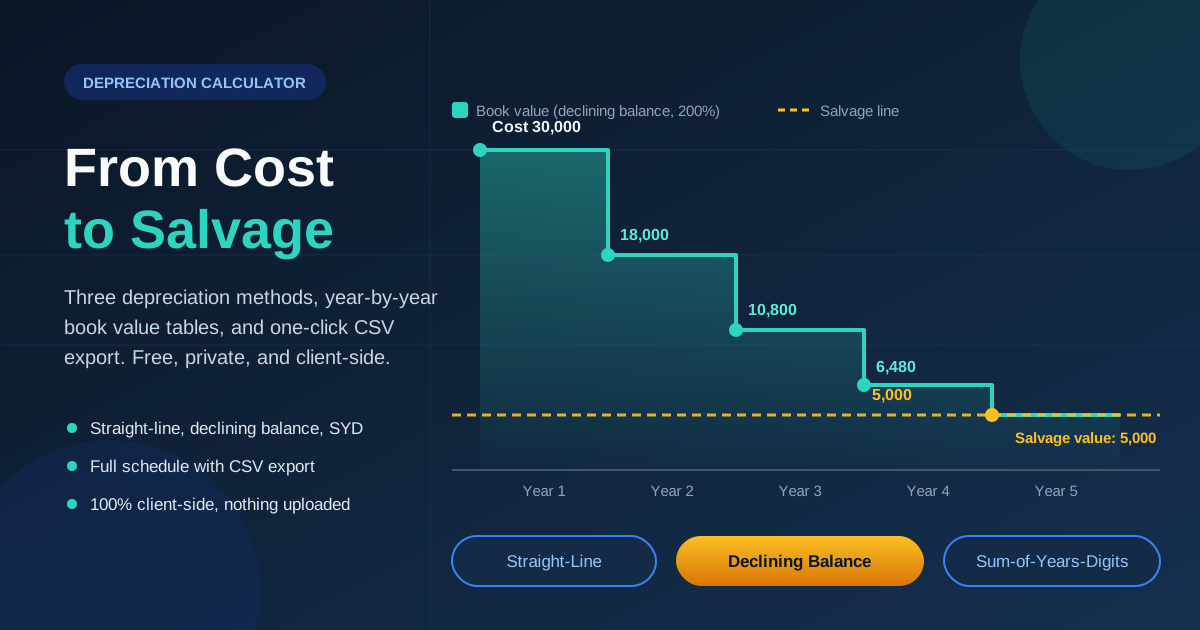
Declining balance applies a fixed rate to the remaining book value each year, so charges shrink annually. Double-declining uses twice the straight-line rate: 2 / 5 = 40% per year (150% uses 1.5 times instead).
| Year | Depreciation | Ending book value |
|---|---|---|
| 1 | 30,000 × 40% = 12,000 | 18,000 |
| 2 | 18,000 × 40% = 7,200 | 10,800 |
Year 2 charges less than year 1 even though the rate never changes — it multiplies a shrinking balance. Year 3 takes 4,320, leaving 6,480, and a raw 40% charge would eventually push book value below the 5,000 salvage floor. So the tool applies the standard practice: each year it compares the declining-balance charge against straight-line on the remaining balance (book value minus salvage, over remaining years), switches when that becomes larger, and caps the schedule so book value lands exactly on 5,000. A pure declining-balance charge never reaches zero, so this switch — the convention spreadsheets and accounting texts use — keeps the front-loaded pattern while guaranteeing the asset finishes exactly at salvage.
Sum-of-Years-Digits: the middle ground
Sum-of-years-digits (SYD) is also front-loaded but tapers by fraction. With a 5-year life the digit sum is 5 + 4 + 3 + 2 + 1 = 15; year 1 gets 5/15 of the base, year 2 gets 4/15.
| Year | Depreciation | Ending book value |
|---|---|---|
| 1 | 25,000 × 5/15 = 8,333 | 21,667 |
| 2 | 25,000 × 4/15 = 6,667 | 15,000 |
SYD accelerates less than double-declining (8,333 versus 12,000 in year 1) yet more than straight-line, and it consumes exactly the 25,000 base with no mid-schedule switch.
Side by side
First-year depreciation is 12,000 (double-declining), 8,333 (SYD), or 5,000 (straight-line) — a 2.4x spread purely from method choice. All three arrive at 5,000 book value in year 5 — only the expense pattern in between differs.
Practical Use Cases
Small-business bookkeeping
Every asset above your capitalization threshold needs a schedule. Build one per asset, export the CSV, and file it with the purchase documents — so "what is the van's book value?" takes seconds at audit time.
Equipment purchase planning
Comparing a 30,000 machine against a 38,000 model that lasts two years longer? Depreciation is part of the true cost. Schedule both and compare annual expense — front-loaded methods make the pricier machine costlier early.
Tax-estimate discussions with your accountant
Book and tax depreciation are different systems, with tax rules prescribing their own methods and lives. Bring the calculator's schedules to the conversation so you can follow what changes — then let your accountant make the final tax call.
Resale timing
The ending book value is an honest resale baseline. If your machine shows 6,480 on the books but comparable used units sell for 9,000, it is worth more to a buyer than to your books — and the reverse is a disposal cue.
Best Practices
- Separate book from tax depreciation — tax filings usually follow your jurisdiction's prescribed methods and lives; use this tool for management accounts and modeling.
- Keep salvage value realistic — an inflated figure understates annual depreciation and leaves a paper loss at disposal; check used-market prices first.
- Match the method to the asset — straight-line for even wear, declining balance for rapid early loss, SYD for gentler acceleration.
- Export the CSV with the asset file — the schedule only helps if it survives staff turnover; keep it beside the invoice.
- Recalculate when facts change — a revised salvage value or life means spreading the remaining base over the new horizon.
Model Your Next Asset in Minutes
Open the Depreciation Calculator, enter cost, salvage value, and useful life, and flip between the three methods — then export the CSV — free, private, and entirely in your browser.
Related Tools You Might Like:
- Loan Calculator — monthly payments and total interest if you are financing the purchase
- Compound Interest Calculator — what the cash spent on an asset could earn if invested instead
- Mortgage Calculator — model the property side of your balance sheet with full amortization detail
Happy calculating!
Frequently Asked Questions
Q: Why does the declining-balance method switch to straight-line in later years? A: A pure declining-balance charge never reaches zero, so the schedule would miss its salvage value. The tool switches to straight-line on the remaining balance when it exceeds the declining-balance charge, capped so book value lands exactly on salvage value.
Q: When should I choose the 150% factor instead of 200%? A: The 150% option accelerates more gently — 1.5 times the straight-line rate rather than double. It is a common middle choice when 200% feels too aggressive.
Q: What salvage value should I enter if I do not know it? A: Check used-market prices for similar assets, or enter 0 if the asset will be worthless.
Q: Is my financial data sent to a server? A: No. The calculator runs entirely in your browser, and nothing you type is uploaded or stored.