Email Authentication Chain Checker: Validate SPF, DKIM and DMARC Together
The Email Authentication Chain Checker validates your SPF, DKIM and DMARC records as one chain, catching syntax errors, weak policies and alignment gaps before they cost you deliverability.
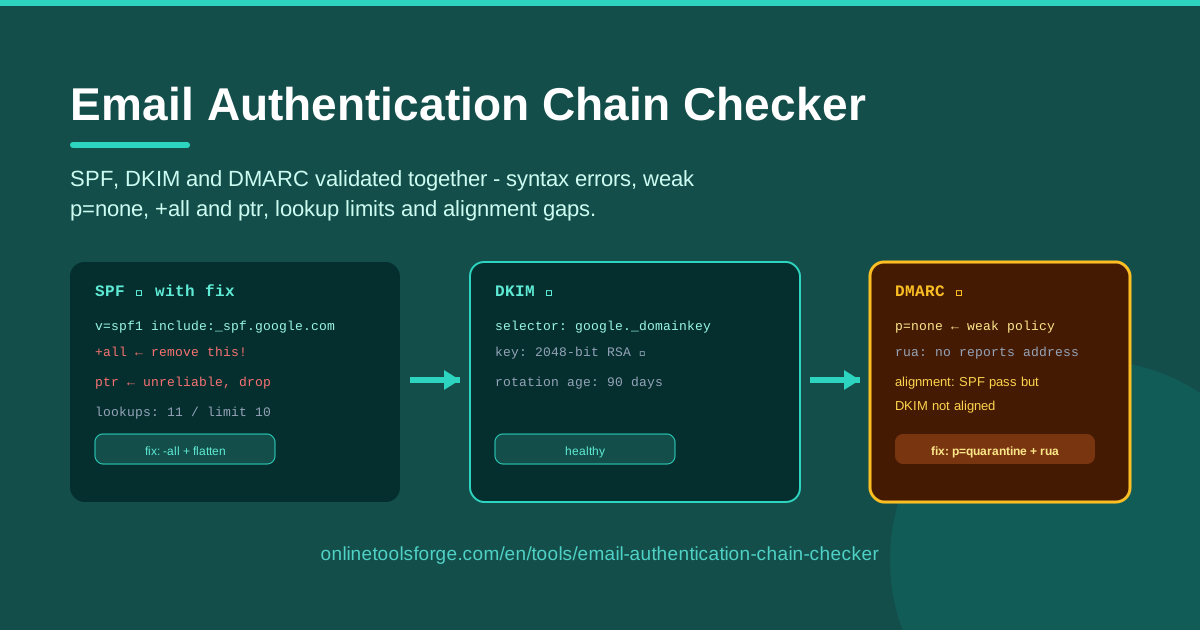
Table of Contents
Every email you send makes three promises to the receiving server: your sending servers are authorized (SPF), the message was signed and arrived unaltered (DKIM), and you have published a policy for handling failures (DMARC). Break any one of them — a typo in SPF, a DKIM selector pointing nowhere, a DMARC record stuck at p=none — and deliverability suffers while spoofers gain a foothold. Yet these records are almost always checked one at a time, which hides the gaps between them.
The Email Authentication Chain Checker closes that gap. Paste your SPF, DKIM and DMARC records and the tool validates them together as a single chain, flagging syntax errors, missing policies, weak p=none DMARC, dangerous +all and ptr mechanisms, DNS lookup limit breaches and alignment failures — each with a concrete fix hint. Because everything runs in your browser, nothing you paste ever leaves your machine.
Why Use Email Authentication Chain Checker?
- The three records only work as a set. SPF can pass and DKIM can verify while DMARC still fails on alignment — something no single-record validator will tell you. Checking the chain together is the core of this tool.
- It exposes the mechanisms attackers love. A +all mechanism authorizes the entire internet to send as your domain, and ptr adds unreliable lookups for no real security. The checker marks both and explains the risk.
- It catches weak DMARC policies early. p=none means "monitor only" — spoofed mail from your domain still gets delivered. The tool flags it and points you toward quarantine and reject.
- It guards the silent SPF lookup limit. SPF evaluation breaks past 10 DNS lookups, which receivers turn into permerror with no visible clue. The checker counts your lookups first.
- Every finding ships with a fix hint. You see the problem, why it matters and what to change — not just a red X.
- It is fast and private. Everything parses locally in your browser: no signup, no uploads.
Key Features
| Feature | What it does |
|---|---|
| Chain validation | Analyzes SPF, DKIM and DMARC together as one authentication chain |
| Syntax checking | Detects malformed tags, duplicate tags and missing values in each record |
| Dangerous mechanism detection | Flags +all and ptr mechanisms that weaken or bloat SPF |
| DMARC policy analysis | Identifies weak p=none policies, missing p= tags and missing reporting |
| DNS lookup limit check | Counts SPF mechanisms that trigger DNS queries and warns before breaching the limit of 10 |
| Alignment verification | Checks whether SPF and DKIM identities align with the header From domain |
| Fix hints | Attaches a specific, actionable recommendation to every finding |
- Findings are grouped per record and per chain, so you see not only what is wrong but where the chain breaks.
- The checker applies the same semantics a receiving mail server would, including SPF lookup counting and DMARC alignment rules.
- Nothing is uploaded — validation runs entirely in your browser.
How to Use Email Authentication Chain Checker
- Paste your SPF record. Copy the complete v=spf1 record from your DNS provider into the SPF field. The tool checks syntax, dangerous mechanisms and the lookup count.
- Paste your DKIM record. Add the public key record your email provider publishes at your selector's _domainkey hostname, including the selector name so it ties into the chain.
- Paste your DMARC record. Enter the record published at _dmarc.yourdomain.com. The tool parses the policy, subdomain policy and reporting tags.
- Read the chain findings. Results are grouped by record and by chain-level issues such as alignment gaps, each showing severity, the affected mechanism and what it means for delivery.
- Apply the fix hints and re-run. Work through the recommendations, update your DNS, paste the new records and validate until the chain comes back clean.
How SPF, DKIM and DMARC Interlock
Each protocol answers one question. SPF lists which servers may send mail for a domain. DKIM verifies a cryptographic signature proving the message came from the domain and arrived unaltered. DMARC publishes what to do when the others fail, and where to send reports. Each can look healthy alone while the combination fails — which is why chain checking matters.
The +all mechanism is the sharpest danger: it authorizes every server on the internet to send as your domain, turning your SPF record into an open door. The ptr mechanism is the opposite failure — deprecated in practice, skipped by most large receivers, and it burns a DNS lookup while adding no protection.
That budget matters. RFC 7208 caps SPF evaluation at 10 DNS lookups, and every include, a, mx, ptr and exists counts. A single ESP include often costs two to four lookups, so records cross the line silently and receivers return permerror, which many treat as SPF failure.
DMARC policy is a progression. p=none only reports, so unauthenticated mail still reaches inboxes. p=quarantine steers failures to spam, and p=reject blocks them. Move none, then quarantine, then reject, guided by reports.
Finally, alignment binds the three together: DMARC passes only when SPF or DKIM passes and its identity aligns with the visible From: domain. A signature from your ESP's own domain can verify perfectly yet fail alignment for your domain — a failure only a chain check can see.
Practical Use Cases
Troubleshooting Deliverability Failures
Your newsletters suddenly land in spam after a new integration ships. A single-record SPF check says "valid" — but the chain view shows the new vendor was never added as an include, and the working DKIM selector belongs to the old ESP. Add the include, confirm the selector, re-validate.
Hardening a Domain After a Spoofing Incident
After a phishing wave impersonates your domain, paste the current records. The checker typically surfaces the usual suspects: p=none still publishing "monitor only", a missing include for a recently adopted CRM, or a stray +all — each with the exact edit that closes the hole.
Auditing an ESP Migration
Migrating platforms is where authentication records quietly rot: the old include stays published, the new DKIM selector goes uncovered, and alignment failures pile up in unread reports. Run the chain check before cutover, after cutover and a week later.
Meeting Google and Yahoo Sender Requirements
Bulk senders to Gmail and Yahoo Mail must publish SPF and DKIM, enforce a DMARC policy of at least p=none with alignment, and stay under the SPF lookup limit. Paste your three records, read the findings, and close any gaps before your next campaign.
Best Practices
- Treat p=none as a waypoint. Collect reports, confirm legitimate senders, then move to p=quarantine and finally p=reject.
- Keep SPF under the 10-lookup limit. Prune unused includes and consolidate vendors before permerrors appear.
- Rotate DKIM keys on a schedule. Publish a new selector, verify it in the chain, then retire the old key.
- Monitor DMARC reports weekly. They reveal legitimate senders you forgot to authorize — and attackers you did not.
- Re-validate after every DNS change. Authentication drifts silently, and a chain check takes seconds.
- Never ship +all or ptr. If you find either, remove it the same day.
Ready to see whether your authentication holds up? Open the Email Authentication Chain Checker, paste your SPF, DKIM and DMARC records, and work through the findings. Five minutes now beats weeks of debugging mystery bounces later.
Related Tools You Might Like:
- SPF Record Builder — construct a correct SPF record from scratch
- DMARC Record Builder — generate a DMARC policy with the right tags
- DKIM Record Generator — create DKIM key pairs and publish-ready records
Issues caught in the chain are issues that never reach your customers. Stay safe out there!
Frequently Asked Questions
Q: Why check SPF, DKIM and DMARC together instead of one at a time? A: Because the most damaging failures live between the records. SPF and DKIM can both pass while DMARC fails on alignment, or a record can be perfect syntactically while breaching the SPF lookup limit. A chain check evaluates the records the way a receiving server does — as a system.
Q: Is a p=none policy really a problem? A: It is a valid starting point, but it offers no protection: spoofed mail that fails authentication is still delivered; the policy only asks for reports. Once reports confirm your legitimate senders, move to p=quarantine and then p=reject.
Q: What happens if my SPF record exceeds 10 DNS lookups? A: Evaluation stops with a permerror, which many receivers treat as SPF failure. Remove unused includes or consolidate vendors — the checker counts your lookups so you see the problem first.
Q: Does the tool send my records to a server? A: No. All parsing and validation run in your browser. Nothing you paste is uploaded, stored or logged.