How to Read Email Headers: Trace the Received Chain and Check SPF, DKIM, and DMARC
Parse raw RFC 5322 headers in your browser with the free Email Header Parser — decode MIME encoded-words, follow the Received hop chain, and read SPF, DKIM, and DMARC results.
Free Interactive Tool
Email Header Parser
Parse raw RFC 5322 email headers into readable fields, decode MIME encoded-words, and trace the Received hop chain.
Table of Contents
When a suspicious or delayed email arrives, the message body tells you little about where it really came from. The evidence lives in the raw headers — a dense block of technical text that most clients hide. The Email Header Parser turns that wall of text into a readable field table, decodes MIME encoded-words, and lays out the Received hop chain topmost-first so you can follow the mail path. Everything runs in your browser: nothing you paste is ever uploaded.
To get the raw headers in Gmail, open the message, click the three-dot menu, and choose "Show original"; in Outlook, use "View message source" or the desktop "Internet headers"; in Apple Mail, press Shift-Command-H. This guide shows how to read the Received chain and the SPF, DKIM, and DMARC results.
Why Use the Email Header Parser?
- See through spoofed senders. The From address is trivial to forge, but the Received chain and Authentication-Results record the true infrastructure, including the sending server IP.
- Follow the mail path hop by hop. The tool orders Received lines topmost-first — most recent at the top — so you can trace the route without reversing the list.
- Decode unreadable subjects. Subjects often arrive wrapped in RFC 2047 encoded-words like =?UTF-8?B?...?=; the tool decodes these MIME encoded-words into real text.
- Check authentication at a glance. SPF, DKIM, and DMARC outcomes are parsed out of Authentication-Results, so a failed check is visible in seconds.
- Work privately and quickly. Parsing is 100% client-side, and you get a clean table of From, To, Subject, Date, Message-ID, Return-Path, Reply-To, and Delivered-To.
Key Features
| Feature | What it does |
|---|---|
| Readable field table | Extracts From, To, Subject, Date, Message-ID, Return-Path, Reply-To, Delivered-To. |
| MIME encoded-word decode | Decodes RFC 2047 encoded-words into readable subjects and names. |
| Received chain trace | Lists hops topmost-first — most recent first — with timestamps preserved. |
| Authentication-Results | Surfaces SPF, DKIM, and DMARC outcomes recorded by the receiving server. |
| 100% client-side | All parsing runs in your browser; no headers are uploaded, stored, or logged. |
- You can paste only the header block, without the body, and hop timestamps stay intact so delivery delays can be measured.
How to Use the Email Header Parser
- Copy the raw headers. Use Gmail's "Show original" or Outlook's "View message source" and copy the block starting at the first Received: line.
- Paste into the tool. Open the Email Header Parser and drop the block into the input area.
- Review the field table. Watch for a Reply-To that differs from From, or a Return-Path domain that does not match the visible sender.
- Read the Received chain. Follow the hops from the top (most recent) down to the original handoff, checking that names and timestamps chain plausibly.
- Check authentication results. Look at SPF, DKIM, and DMARC before concluding — spoofers with a perfect From address usually fail at least one.
Reading the Received Chain
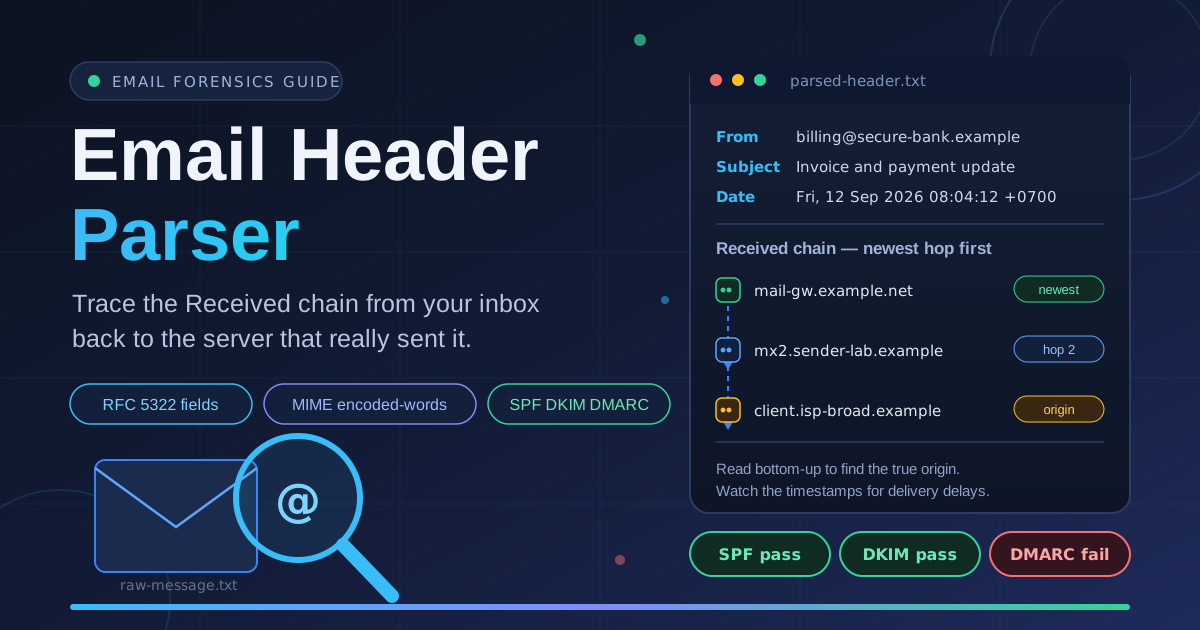
The Received header is the backbone of email forensics. Every server that handles a message appends its own Received line at the top of the block, so the list is ordered newest-first: the topmost line is the last server that touched the message, and the bottommost is closest to the origin — read the chain bottom-up.
Received: from mail-sor1.example-corp.com ([203.0.113.41])
        by mx.inbox-guard.net with ESMTPS; Fri, 12 Sep 2026 01:02:55 -0700
Received: from lists.newsletters.example.net ([198.51.100.7])
        by mail-sor1.example-corp.com with ESMTP; Fri, 12 Sep 2026 01:02:51 -0700
Authentication-Results: mx.inbox-guard.net;
        spf=pass smtp.mailfrom=example-corp.com;
        dkim=pass header.d=newsletters.example.net;
        dmarc=fail (p=reject) header.from=secure-bank.example
Bottom-up: a broadband client handed the message to lists.newsletters.example.net, which relayed it through mail-sor1.example-corp.com, then your provider.
Use the timestamps to measure delays. Each hop carries its own date, time, and timezone; consecutive timestamps show where a message sat — a few minutes is normal queuing, a fourteen-hour gap points to greylisting or an offline sender.
Separate genuine hops from forged ones. Spammers can insert fake Received lines. Genuine chains stay consistent: each hop's receiving server appears as the sender in the line above, timestamps increase upward, and names resolve to real infrastructure, while forged lines often break that continuity. The safest evidence is the bottom-most hop appended by your own mail provider — everything above it was written by infrastructure you do not control.
Understanding SPF, DKIM, and DMARC
The Authentication-Results header records what the receiving server concluded:
- SPF checks that the connecting IP is authorized to send for the envelope domain: pass means authorized, fail means the IP is not listed, and softfail labels unidentified hosts as merely suspicious.
- DKIM verifies a cryptographic signature over the message. pass proves the content was not altered in transit and the signing domain takes responsibility; a missing signature can also come from forwarding systems that rewrite the message.
- DMARC requires alignment: SPF or DKIM must pass and match the visible From domain. Its policy values p=none, p=quarantine, and p=reject say what receivers should do with failures — so a dmarc=fail on a p=reject domain is a strong phishing signal, and combined with spf=fail and dkim=none, effectively a verdict.
Practical Use Cases
Phishing Triage
When a user reports a suspicious message, check Authentication-Results for a DMARC failure, compare the Return-Path against the display name, and read the chain for unexpected countries or hosts. Parsing turns a gut feeling into evidence for an incident report.
Deliverability Debugging
If your campaigns land in spam, the headers of a delivered message reveal why. A spf=softfail, a DKIM signature broken by a forwarding hop, or a dmarc=none policy each point to a concrete DNS fix.
Diagnosing Delayed Mail
Password resets and invoices sometimes arrive hours late. Walking the hop timestamps pinpoints where the message waited, and whether the delay came from your provider, a greylisting filter, or a slow relay.
Tracing Spam Sources
For recurring unsolicited mail, the bottom of the Received chain identifies the network that injected the message. Report that IP to the abuse desk instead of blocking the forged display domain.
Best Practices for Header Analysis
- Strip sensitive content before sharing. Remove recipient addresses and internal server names from any excerpt you share — headers can leak infrastructure details.
- Check all three authentication results. SPF is fooled by forwarding, DKIM can be absent on legitimate mail, and only DMARC alignment confirms the visible From domain.
- Correlate Received chain times. Timestamps should increase as you move up the chain; a hop that breaks chronological order deserves suspicion.
- Trust your own provider's lines most. Records appended by your mail provider are hard to forge; treat claims above them as unverified.
- Pair header analysis with content checks. Headers prove origin, not intent — inspect links and attachments before clicking anything.
Start Parsing Email Headers Now
The next time a message looks off, do not trust the display name. Copy the raw headers and paste them into the free Email Header Parser: a readable field table, a topmost-first Received chain, and clear SPF, DKIM, and DMARC outcomes — privately, in your own browser.
Related Tools You Might Like:
- Email Extractor — pull every email address out of any text
- URL Parser — break URLs and query strings into readable parts
- Base64 Tool — encode and decode Base64 strings and tokens
Happy header hunting!
Frequently Asked Questions
Q: Are my email headers uploaded when I use the tool?
A: No. Parsing runs entirely in your browser with client-side JavaScript, so the headers you paste never touch a server.
Q: Why is the most recent Received hop at the top?
A: Every server adds its Received line above the existing ones, so the block reads newest-first. You reconstruct the true origin by reading bottom-up.
Q: Can spammers forge Received headers?
A: Yes. Genuine chains stay consistent, with each server appearing as the sender in the next hop and timestamps increasing upward; forged lines usually break that continuity.
Q: What is the difference between SPF softfail and fail?
A: fail means the sending IP is definitively not authorized for the domain; softfail labels unidentified hosts as merely suspicious — a warning, not proof of fraud.