FILETIME and LDAP Timestamp Converter: Decode Windows 100-Nanosecond Time
Convert Windows FILETIME and LDAP or Active Directory 100-nanosecond timestamps to ISO 8601, Unix time, and readable dates — and back — with exact BigInt math, fully in your browser.
Free Interactive Tool
FILETIME / LDAP Timestamp Converter
Convert Windows FILETIME and LDAP/Active Directory timestamps to ISO 8601, Unix time, and human-readable dates — and back. Exact BigInt math, fully in-browser.
Table of Contents
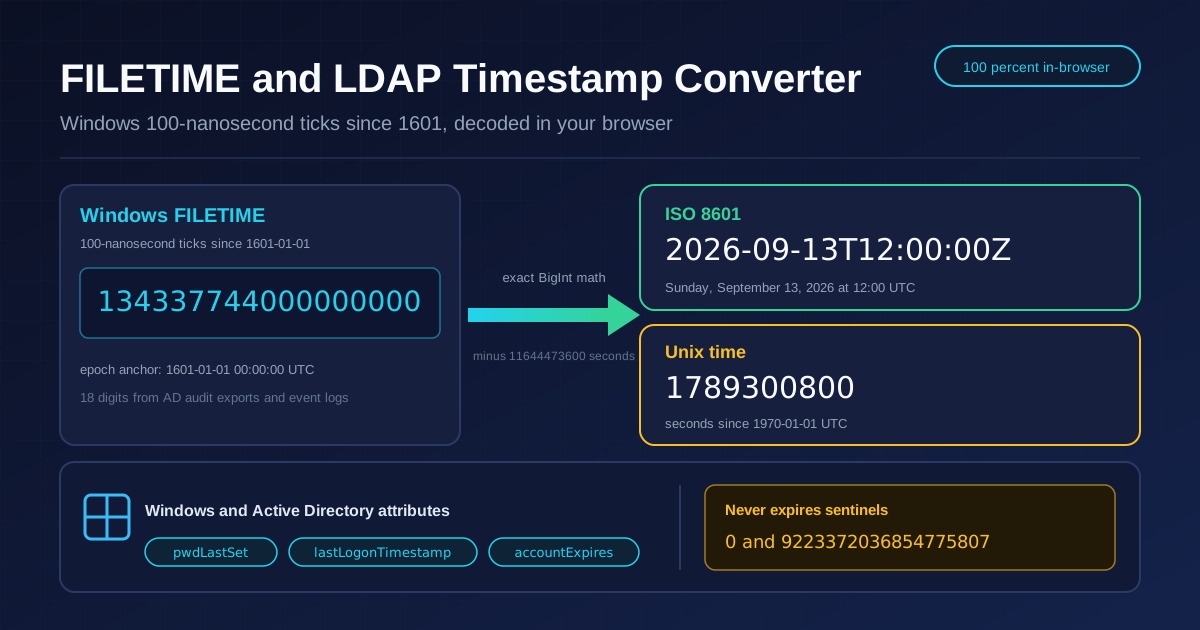
If you have ever opened an Active Directory audit export or a Windows event log, you have met numbers like 134337744000000000 — eighteen digits that look like noise but pin down a precise moment, accurate to a hundred nanoseconds. Windows and Active Directory do not count seconds since 1970 the way Unix does; they count 100-nanosecond intervals since January 1, 1601. Until translated, every pwdLastSet or lastLogonTimestamp value in your report is unreadable. The free FILETIME and LDAP Timestamp Converter turns those 18-digit integers into ISO 8601 dates, Unix timestamps, and readable text — and converts back just as easily.
The numbers are too large for ordinary floating-point math, so the tool uses exact BigInt arithmetic, never losing a tick to rounding, and everything runs entirely in your browser: no upload, no sign-up, no waiting.
Below: how to use the converter, why Windows counts time from the year 1601, how the Unix conversion works, and where the format hides edge cases — including the "never expires" sentinels that have fooled more than one auditor.
Why Use FILETIME Converter?
- Two-way conversion in one place. Decode a FILETIME into ISO 8601, Unix time, and a readable date, or generate the exact 18-digit value from a date for scripts.
- Exact BigInt arithmetic. FILETIME values for modern dates exceed what a 64-bit float can represent precisely; BigInt integers keep every last digit intact.
- Built for Active Directory work. It matches the attributes you actually encounter — pwdLastSet, lastLogonTimestamp, accountExpires — for reliable audit input.
- Reads ISO 8601 and Unix time. Modern tooling speaks ISO 8601 while log platforms speak Unix time; one input produces both.
- 100 percent in-browser. All math happens locally, so audited domain data never leaves your machine.
- No install, no friction. Open the page, paste, read. Nothing to download and no account to create.
Key Features
| Feature | Description |
|---|---|
| FILETIME to ISO 8601 | Paste an 18-digit value for an exact UTC timestamp and readable date. |
| FILETIME to Unix time | Convert to seconds-since-1970 for SIEM queries and APIs. |
| Date to FILETIME | Type a date and time to generate the tick value for AD filters. |
| Exact BigInt math | Full-precision integers keep every digit intact. |
| Sentinel detection | Recognizes values that mean "never" or "not set", not real dates. |
| Copy to clipboard | One click copies any result into a report or query. |
- Instant recalculation updates results on every keystroke for fast column-by-column review.
- UTC-first output keeps audit evidence out of the wrong time zone.
- Bidirectional checks let you encode a known date and confirm it matches your export.
How to Use
- Open the converter. Navigate to the FILETIME and LDAP Timestamp Converter in your browser.
- Paste your value. Copy an 18-digit number from an AD export or LDAP result into the FILETIME field — for example 134337744000000000.
- Read the conversions. The tool instantly shows the matching ISO 8601 timestamp (2026-09-13T12:00:00Z), Unix time (1789300800), and a plain-language date.
- Reverse the direction when needed. Enter a date and time instead and the exact tick value appears instantly.
- Copy the result. Lift the value straight into your audit report, LDAP filter, or log query.
The 1601 Epoch and 100-Nanosecond Ticks
Windows measures time as the number of 100-nanosecond intervals — ticks — elapsed since 00:00:00 UTC on January 1, 1601. The choice looks eccentric until you recall the calendar history: the Gregorian calendar repeats its leap-year pattern every 400 years, and January 1, 1601 opens exactly such a cycle. Anchoring the epoch at a cycle boundary made leap-year arithmetic simpler for the NT developers.
The bridge is a fixed constant: from 1601 to 1970 there are exactly 11644473600 seconds. FILETIME to Unix time means subtracting that constant and dividing by 10,000,000 — each second holds ten million ticks; the reverse multiplies by ten million and adds the constant back. A worked example: 134337744000000000 ticks divided by ten million is 13433774400 seconds since 1601; subtract 11644473600 to get 1789300800 seconds since 1970 — 2026-09-13T12:00:00Z, a Sunday at noon UTC.
Why BigInt? A double-precision float represents integers exactly only up to about 2 to the 53rd, while current FILETIME values sit near 1.34 times ten to the 17th — fifteen thousand times larger. Floating-point math silently changes the final digits; BigInt integers count every tick exactly.
Several Active Directory attributes store time this way. pwdLastSet records when a password was last changed, driving expiry reporting. lastLogonTimestamp approximates the most recent interactive logon; AD refreshes it only during replication, so it lags up to 14 days by design.
Finally, watch the sentinels. A FILETIME of 0 usually means "never set", such as an account that never logged on. The value 9223372036854775807, the maximum signed 64-bit integer, means in accountExpires that the account never expires. Both are deliberate states, not corruption; the converter flags them so you report "never".
Practical Use Cases
Active Directory Account Audits
Stale-account hunts live and die by lastLogonTimestamp. Export your users, convert each 18-digit value, and sort by real date to find accounts unused for 90 or 180 days, then paste readable dates into the evidence.
Password Expiry Reporting
pwdLastSet tells you exactly when each password was last changed. Convert the values against your maximum password age and you have a defensible report of accounts overdue or near expiry.
Incident Timeline Analysis
Windows event logs sprinkle FILETIME values through authentication events and file activity. Converting them to a common UTC scale lines up Windows evidence with firewall logs and SIEM entries that speak Unix time, rebuilding one coherent timeline.
Data Migrations and Integrations
When identities move from AD to another directory, timestamps must translate faithfully. Encoding a cutoff date into FILETIME lets migration scripts filter precisely, while decoding validates the result.
Best Practices
- Handle the sentinels explicitly. Treat 0 and 9223372036854775807 as "never" or "not set"; converting them as ordinary dates misleads.
- State the time zone. FILETIME and Unix time are UTC at heart; convert locally only for presentation and label the zone you share.
- Verify against a known account. Decode one timestamp you can confirm independently before trusting a bulk conversion.
- Do not treat lastLogonTimestamp as real-time data. Its 9-to-14-day replication lag is by design; exact values need lastLogon per domain controller.
- Keep full precision end to end. Avoid pipelines that pass timestamps through floats or truncated strings.
- Document the format in exports. Label raw 18-digit columns as FILETIME so nobody misreads them as Unix milliseconds.
Stop Decoding FILETIME by Hand
Eighteen digits from 1601 should never slow down an audit or a migration. The FILETIME and LDAP Timestamp Converter gives you exact, bidirectional translation between Windows ticks, ISO 8601, and Unix time — BigInt precision, in-browser and free. Bookmark it for the next LDAP export.
Related Tools You Might Like:
- Unix Timestamp Converter — decode and encode classic seconds-since-1970 epoch values.
- Date Range Splitter — break an audit window into daily or weekly intervals.
- Text Case Converter — normalize distinguished names and report headings between cases.
Happy converting!
Frequently Asked Questions
Q: What exactly is a FILETIME or LDAP timestamp?
A: A count of 100-nanosecond intervals elapsed since 00:00:00 UTC on January 1, 1601, stored as a signed 64-bit integer — hence the 18-digit values in Windows and AD exports.
Q: How do I convert FILETIME to Unix time manually?
A: Subtract 11644473600 — the seconds between the 1601 and 1970 epochs — then divide by 10,000,000. The reverse: multiply by ten million and add the constant back.
Q: Why do I need BigInt for this conversion?
A: Current FILETIME values far exceed the roughly nine quadrillion limit where 64-bit floats still represent integers exactly, so ordinary math silently rounds the final digits; BigInt is exact.
Q: What does the value 9223372036854775807 mean?
A: The maximum signed 64-bit integer, used as a sentinel: in accountExpires it means the account never expires, while 0 means "never set". Report them as special states, not dates.
Q: Is my Active Directory data uploaded anywhere?
A: No. Conversion runs client-side in your browser; pasted values never leave your device, making the tool safe for production identity data.