GitHub Actions Workflow Generator: Ship a Solid CI Workflow in Minutes
Build GitHub Actions CI/CD workflow YAML with triggers, Node.js matrix, caching, lint, test, build, and Docker ghcr.io deploy steps — all in your browser.
Free Interactive Tool
GitHub Actions Workflow Generator
Build GitHub Actions CI/CD workflow YAML files with triggers, matrix builds, dependency caching, lint, test, build, and Docker deploy steps — free, private, and 100% in-browser.
Table of Contents
A good CI workflow YAML is 80% boilerplate — generate it, then customize. The on: block, the Node.js setup, the dependency cache, the lint-test-build ladder, the Docker login and push: nearly every JavaScript repository needs the same skeleton, yet most teams copy-paste it from an old project pinned to ancient action versions. The 20% that matters gets buried under plumbing you have typed a dozen times.
The GitHub Actions Workflow Generator collapses that into a short form. Toggle triggers (push, pull request, manual dispatch, cron), pick your Node.js version matrix, switch on dependency caching, enable the lint, test, and build steps you actually run, and optionally add a Docker job that pushes to ghcr.io. It emits a complete workflow YAML ready to drop into .github/workflows/.
Everything runs 100% in your browser: no account, no upload — the YAML is generated locally as plain text.
Why Use GitHub Actions Workflow Generator?
- A coherent skeleton, not a blank file. Triggers, matrix, caching, and steps arrive wired together, so you edit values instead of hunting for a missing needs:.
- Current action versions by default: maintained checkout, setup-node, and cache — not a snippet from an old repository.
- The matrix is a choice, not a chore: Node.js 18, 20, and 22 are one toggle away, not a copy-paste refactor.
- Caching without the ceremony: the cache step and its lockfile key appear automatically.
- Docker to ghcr.io when you want it: login, build, and push with registry, tags, and permissions already consistent.
- Private by design. Client-side JavaScript only, so proprietary pipeline details never touch a third-party service.
Key Features
| Feature | What it gives you |
|---|---|
| Trigger toggles | push, pull_request, workflow_dispatch, and cron schedule combined as you need |
| Node.js version matrix | A strategy block that fans build and test jobs across versions |
| Dependency caching | A cache step keyed on your lockfile so installs skip the network when possible |
| Step toggles | Lint, test, and build steps switched on or off to match your scripts |
| Docker ghcr.io deploy | An optional job that logs in, builds, and pushes your image to ghcr.io |
| Live YAML output | The workflow updates as you toggle, with copy and download built in |
| 100% in-browser | No account, no upload, no server round trip — pure client-side generation |
The emitted YAML is ordered the way reviewers read it — name, triggers, permissions, jobs — and related settings move together: enabling the Docker job also adjusts dependencies and permissions, keeping the file internally consistent with no templating syntax.
How to Use
- Open the GitHub Actions Workflow Generator and toggle the triggers your project needs — most teams start with push and pull_request.
- Select the Node.js versions for your matrix — match what your app supports, not every version that exists.
- Flip on dependency caching, then enable the lint, test, and build steps matching scripts in your package.json.
- If you ship containers, enable the Docker ghcr.io deploy job and adjust the image name to match your repository.
- Review the YAML, copy or download it as ci.yml into .github/workflows/, commit, and watch the first run in the Actions tab.
Anatomy of the Generated Workflow
The on: triggers. Each earns its place differently. push runs the pipeline when commits land — scope it with a branches: [main] filter so feature branches do not double the bill. pull_request is where most CI value lives: it validates the diff before it merges. workflow_dispatch adds a manual Run workflow button, handy for releases and for testing pipeline changes. schedule takes a cron expression and runs the workflow on a timer for nightly suites or audits. The generator gets the nesting and quoting right — the part people get wrong by hand.
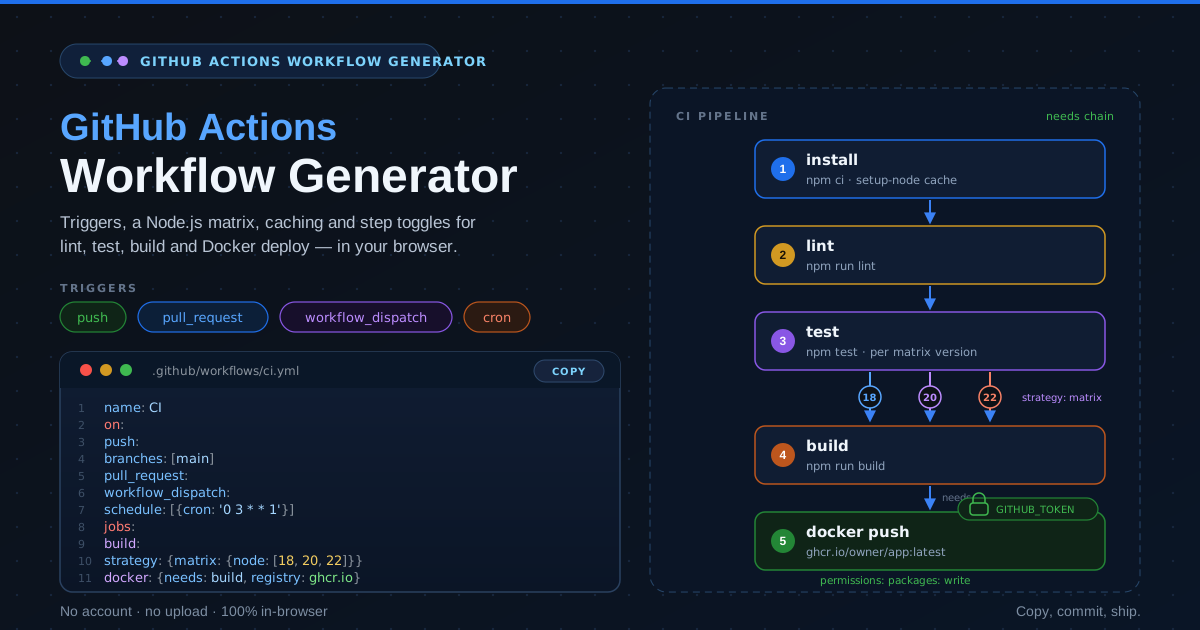
The Node.js matrix strategy. Instead of hardcoding one version, the matrix declares a list under strategy.matrix.node, and GitHub fans the job out — one copy per version. This catches the classic failure where code works on Node 22 but breaks on Node 18. Two knobs matter: fail-fast (on by default) cancels remaining jobs when one fails; max-parallel caps concurrency. Three versions — support floor, default, latest — is the sweet spot.
actions/cache for node_modules. The cache step hashes your lockfile into a key and restores node_modules — or your package manager's store — on a match. A cold npm ci takes minutes; a hit takes seconds. Because the lockfile hash is part of the key, any dependency change resets the cache by design and stores a fresh, correct install. The generator pairs it with actions/setup-node's built-in cache: input — the modern, shorter form.
Job order: lint, then test, then build, then Docker. The pipeline runs as a needs: chain, in a deliberate order. Lint fails fastest — seconds, not minutes — so broken formatting never pays for a second install. Test follows on the matrix, because tests are the expensive gate worth parallelizing. Build runs once tests are green, producing the artifact the image needs; Docker declares needs: build, so nothing is pushed from code that did not pass.
GITHUB_TOKEN and secrets hygiene for ghcr. Pushing to the GitHub Container Registry needs no personal access token: the workflow-scoped GITHUB_TOKEN can authenticate, provided the job declares permissions: packages: write. The generator scopes that grant to the Docker job only — least privilege. Never paste a PAT into a workflow file or widen permissions to debug a registry error; for external registries, use repository secrets referenced by name.
An annotated excerpt of the output:
name: CI
on:
  push:
    branches: [main] # every merge to main, not every branch
  pull_request: # validate the diff before it lands
  workflow_dispatch: # manual run button in the Actions tab
  schedule:
    - cron: '0 3 * * 1' # Mondays at 03:00 UTC
jobs:
  build:
    runs-on: ubuntu-latest
    strategy:
      matrix:
        node: [18, 20, 22] # three parallel jobs
    steps:
      - uses: actions/checkout@v4
      - uses: actions/setup-node@v4
        with:
          node-version: ${{ matrix.node }}
          cache: npm # lockfile-keyed cache
      - run: npm ci
      - run: npm run lint # fails fastest, runs first
      - run: npm test
      - run: npm run build
  docker:
    needs: build # only push from green code
    runs-on: ubuntu-latest
    permissions:
      packages: write # the only write grant
    steps:
      - uses: actions/checkout@v4
      - uses: docker/login-action@v3
        with:
          registry: ghcr.io
          username: ${{ github.actor }}
          password: ${{ secrets.GITHUB_TOKEN }}
      - uses: docker/build-push-action@v6
        with:
          push: true
          tags: ghcr.io/${{ github.repository }}:latest
Practical Use Cases
Bootstrapping greenfield repositories
The first hour of a new project should not go to reconstructing a pipeline from memory. Generate the workflow before the first pull request exists, and CI enforces your standards from commit one.
Standardizing pipelines across services
Five microservices tend to mean five slightly different workflows. Generate one canonical shape — same triggers, same matrix, same job order — so engineers moving between repositories already know the pipeline.
Containerizing a Node.js app to ghcr.io
When a Node application moves into a container, the deploy story becomes an image story. The Docker job brings login, build, and push to ghcr.io with the workflow-scoped token and the right permissions — no secret juggling.
Adding scheduled cron jobs
Some work should not wait for a commit: nightly suites, weekly audits, periodic exports. Toggle the schedule trigger, set the cron expression, and the workflow gains a time dimension.
Best Practices
- Pin action versions. Use major-version tags like @v4 at minimum, full commit SHAs for critical steps — floating tags are a supply-chain risk.
- Cache first. Add caching before optimizing anything else; it is the cheapest speedup available.
- Keep jobs small and ordered. Fail-fast steps early, expensive parallel work in the middle, publishing last, each gated by needs:.
- Protect the main branch. Require the workflow to pass before merge, and scope push to main so the branch always reflects green code.
- Grant permissions narrowly. Keep packages: write on the Docker job alone and declare the minimum everywhere else.
- Treat the YAML as code. Review workflow changes in pull requests like any other change, because the pipeline is part of your product.
Generate Your Workflow YAML Today
The gap between "no CI" and "a solid pipeline" is usually one well-formed file. Open the GitHub Actions Workflow Generator, toggle your options, and copy workflow YAML ready to commit. No account, no upload, nothing to install.
Related Tools You Might Like:
- ESLint Config Generator — generate the lint config your CI lint step will run
- TSConfig Generator — pin down the compiler options your build step depends on
- YAML Formatter — keep workflow YAML cleanly formatted before you commit it
Happy shipping!
Frequently Asked Questions
Q: Does the generated workflow work with npm, pnpm, and yarn?
A: Yes. The install command and cache step adapt to your package manager, and the cache key derives from the matching lockfile, so caching stays correct.
Q: Do I need a personal access token to push images to ghcr.io?
A: No. The Docker job authenticates with the workflow-scoped GITHUB_TOKEN, which works as long as the job declares packages: write permission. Reserve personal access tokens for external registries.
Q: What cron schedule should I use for the schedule trigger?
A: Use UTC times that suit your team and avoid the top of the hour, when runners are busiest — a small offset reduces delays; high load can also skip scheduled runs.
Q: Will the workflow run on every push if I enable both push and pull_request?
A: It can, which is wasteful. Scope the push trigger to your main branch so pull requests carry the per-diff runs and main gets one canonical run per merge.