GROQ Playground: Learn and Test Sanity Queries Online in Seconds
GROQ Playground is a free in-browser tool for practicing GROQ, the query language of Sanity — paste JSON, write queries, and see formatted results instantly.
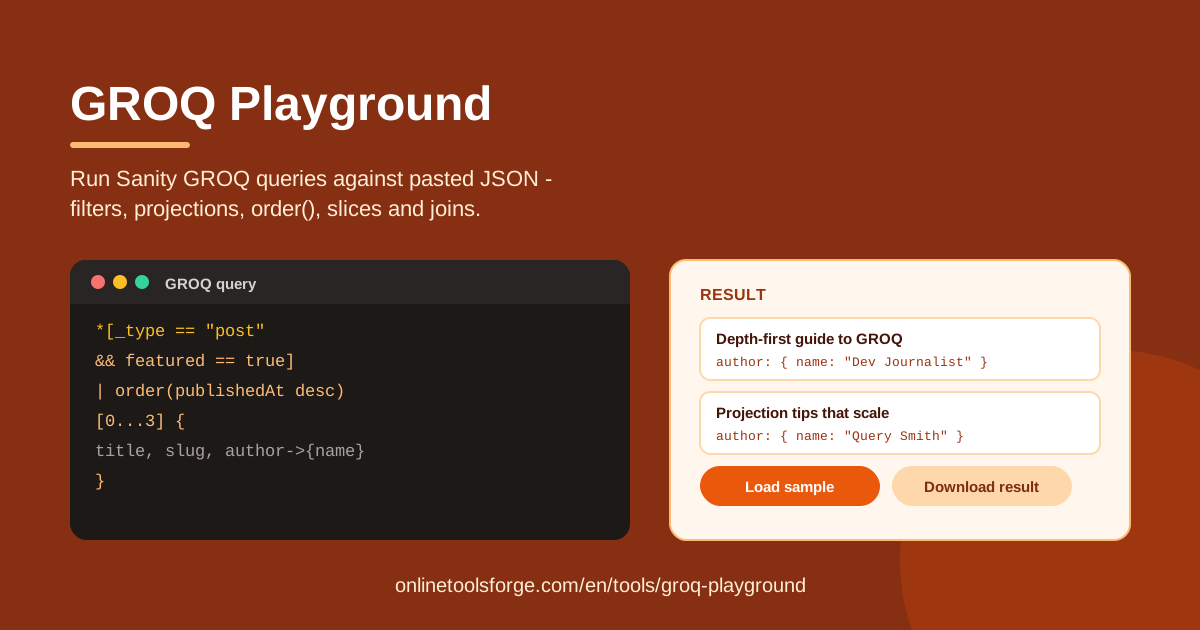
Table of Contents
If you build with Sanity, GROQ — short for Graph-Relational Object Queries — is the query language that pulls your content out of the dataset. It is compact and expressive, but the only reliable way to learn it is to run queries and watch what comes back. The GROQ Playground gives you that feedback loop in a single browser tab: paste a JSON dataset, write a query, and instantly see a clean, formatted result — no Sanity project, no API keys, no account.
Because every query runs 100% client-side, the playground is also a safe sandbox for real data. Paste a production export, a test fixture, or an example from the Sanity docs; nothing is uploaded anywhere. And if you do not have a dataset of your own yet, the built-in Load sample button drops in demo content so you can start experimenting immediately.
This guide covers what the tool can do, a five-step workflow, the GROQ essentials you will reach for every day, and practical ways to make the playground part of your development routine.
Why Use GROQ Playground?
- Zero setup. Open the page and start querying — no CLI, no project bootstrap, no sign-up.
- Instant feedback. Results appear in a formatted panel the moment a query runs, so you iterate in seconds instead of restarting a dev server.
- Safe with real data. Everything executes in your browser and your dataset never leaves your machine, so pasting production exports is fine.
- Clear error messages. Syntax problems are reported plainly, and an empty result explicitly says the query matched no documents instead of showing a confusing blank.
- Reusable output. Download the formatted result for documentation, tests, or a bug report with one click.
- A fast way to learn GROQ. Sample data, immediate results, and honest errors are the quickest combination for internalizing Sanity's query language.
Key Features
| Feature | What it does |
|---|---|
| Paste JSON or Load sample | Feed the tool any JSON dataset, or load demo content in one click. |
| GROQ query editor | Write real Sanity GROQ: filters, projections, order(), slices, and reference joins with ->. |
| Formatted Result panel | See matched documents as clean, readable output rather than raw blobs. |
| Query error messages | Get specific feedback on syntax errors, plus a clear "query matched no documents" note. |
| Download results | Export the formatted output for docs, tests, or bug reports. |
| Reset | Clear the dataset and query to start over fresh. |
| 100% in-browser | No account, no uploads, no server round-trips. |
Two details deserve a highlight. First, reference joins really resolve: following a field with -> shows the joined document in the result, which is the part of GROQ people get wrong most often. Second, the errors are teachable rather than cryptic — a missing bracket produces a specific message, so every fix teaches you a rule you keep.
How to Use GROQ Playground
- Load your dataset. Paste a JSON array of documents into the data panel, or click Load sample for instant demo content. Sanity exports and API responses work as-is.
- Write your query. Type a GROQ expression such as *[_type == "post"]{title, "slug": slug.current} in the query editor.
- Run it. Execute the query; the playground parses your GROQ against the pasted JSON and reports any syntax error immediately with a clear message.
- Inspect the result. Read the formatted output in the Result panel, then tighten the filter, adjust the projection, or add order() and a slice until the shape matches what your app needs.
- Download or reset. Save the result with Download, or use Reset to clear everything and try the next idea.
GROQ Essentials
The everything selector. A bare * matches every document in the dataset. It is the starting point of nearly every query — run it alone first and you see exactly what you are working with.
Filters in square brackets. Append a condition to narrow results: *[_type == "post"] returns only documents whose _type is post. Conditions combine with && and ||, and comparisons such as publishedAt > "2026-01-01" behave as you would expect.
Projections in curly braces. Follow a filter with {...} to shape the output. In *[_type == "post"]{title, "slug": slug.current} only the title and a slug appear, and the "alias": value syntax renames fields. Projections keep payloads small and results predictable.
Ordering and slicing. Pipe into | order(_createdAt desc) to sort, then take a slice like [0...3] for the first three items. Slices are how GROQ does pagination — there is no LIMIT keyword.
Dereferencing with ->. When a field is a reference to another document, -> follows it: *[_type == "post"]{title, author->{name}} embeds just the author's name instead of a raw ID.
GROQ versus SQL and jq. There are no tables and no JOIN keyword; a join is simply ->, and the query shape mirrors the JSON you get back. Compared with jq, GROQ is more declarative — you describe the result you want, with ordering and reference resolution built in rather than hand-written.
Practical Use Cases
Learn Sanity Queries Before Wiring Up an App
When you start a Sanity project, the frontend and the queries usually evolve together. Prototype every query here first against sample documents, then copy the verified query into your code. That way you are never debugging GROQ and your framework at the same time, and the query you ship is one you have already seen return the right shape.
Debug a Production Query Against a Small Fixture
If a live query misbehaves, export the handful of documents involved, paste them in, and reproduce the problem locally. Shrinking the dataset to a few documents makes off-by-one slices and bad projections obvious within seconds — and the fixture doubles as a regression test for the fix.
Teach Content Modeling to Your Team
Content modeling clicks when people can poke at the data. Walk a new teammate through your schema by running *[_type == "author"]{...} live, showing how documents link together and why each projection is shaped the way it is. It beats any slide deck.
Quick Data Checks on Exported JSON
Received a JSON export from a client or another CMS? Run quick checks without writing a script: how many posts are published, which entries lack an author, what the newest ten items are. A query that takes thirty seconds to write answers questions a spreadsheet would take an hour to fake.
Best Practices
- Project only what you need. Fetching {title, slug} instead of * shrinks payloads and makes results far easier to read.
- Order before you slice. [0...3] after order() yields a meaningful top three; slicing an unordered list returns arbitrary documents.
- Name your projections. Use "authorName": author->{name} so the code that consumes the result stays self-documenting.
- Start broad, then narrow. Begin with *, add a filter, then a projection — one change at a time keeps errors obvious.
- Keep a fixture file. A small hand-made dataset makes regression-testing queries after schema changes painless.
- Reset between tasks. A clean slate stops yesterday's dataset from contaminating today's experiment.
Ready to write your first query? Open the GROQ Playground, click Load sample, and run * — you will have a working query within a minute, and every experiment after that is free.
Related Tools You Might Like:
- jq Playground — practice jq filter expressions against JSON in the browser.
- JSON Formatter — pretty-print, validate, and minify JSON before querying it.
- Regex Tester — build and debug regular expressions with live match highlighting.
Happy querying!
Frequently Asked Questions
Q: Is GROQ Playground affiliated with Sanity? A: No. It is an independent, free tool that implements Sanity's GROQ query language against any JSON you paste, entirely inside your browser.
Q: Do I need a Sanity account or an API token? A: No. The playground works on pasted JSON only, so there is nothing to connect and nothing to authenticate.
Q: My query runs but returns nothing. What should I check? A: The tool explicitly tells you when the query matched no documents. Usually the filter is too strict — verify the exact _type string, the field names, and the value types in your data.
Q: Is it safe to paste production data? A: Yes. All parsing and querying happen client-side; your dataset is never uploaded to any server.