HAR to cURL Converter: Replay Any Browser Request as a Copy-Paste cURL Command
Convert Chrome or Firefox HAR network captures into ready-to-run cURL commands with optional header, cookie, and auth masking — 100% client-side with HAR to cURL Converter.
Free Interactive Tool
HAR to cURL Converter
Convert Chrome or Firefox HAR network captures into copy-paste cURL commands with optional header, cookie, and auth masking.
Table of Contents
An API call fails in the browser but works in your tests, and someone asks you to "send the request". Reproducing a failing browser request by hand is error-prone: you retype the URL from memory, guess at the headers, drop a cookie, and mangle the body. The HAR file your browser already saved contains everything — the method, the full URL, every header, all cookies, and the exact body — and the HAR to cURL Converter turns that capture into a copy-paste cURL command in seconds.
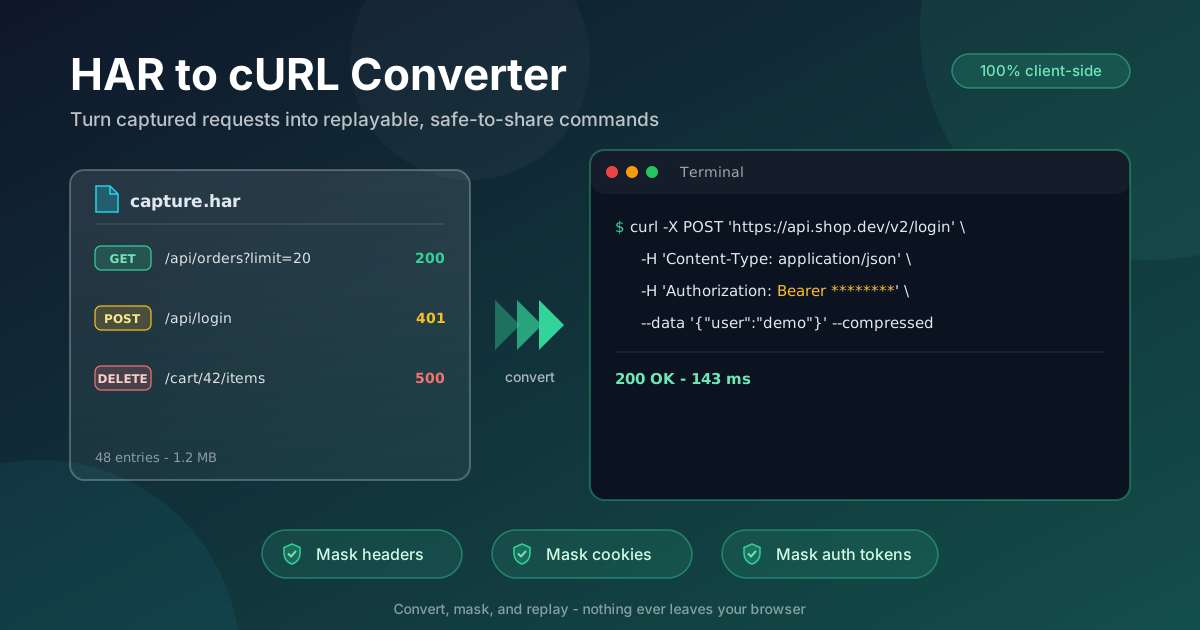
The flow is simple. Drop a .har file from Chrome or Firefox DevTools onto the page, pick the request you care about, and the tool emits a ready-to-run command. Before you copy it, three optional masking toggles scrub headers, cookies, and the Authorization header, so the command is safe to paste into a ticket or a chat.
Like every tool on this site, conversion runs 100% client-side. HAR captures carry live session tokens, and nothing here is ever uploaded to a server.
Why Use HAR to cURL Converter?
- Exact reproduction, zero retyping. The command is built from the real request the browser sent — correct method, full URL with query string, every header attached, body byte for byte.
- Mask before you share. Independent toggles strip sensitive headers, cookies, and Authorization credentials, so a pasted command cannot leak your session.
- No proxy required. "Copy as cURL" lives inside DevTools; requests from mobile apps or captures a colleague sends are not in your browser. A HAR file converts anywhere.
- Chrome and Firefox exports. Both write the same HAR format, and the converter handles their small differences in headers and timing data.
- Nothing leaves your machine. Parsing is entirely client-side — safe for internal dashboards and authenticated production flows.
- One request in, one command out. No setup, no API client import: drop the file, choose the entry, copy the command.
Key Features
| Feature | What It Does |
|---|---|
| HAR file loading | Accepts Chrome and Firefox .har exports, or pasted HAR JSON |
| Entry picker | Lists every captured request so you pick the one that failed |
| Command generation | Emits method, URL, headers, cookies, and body as cURL flags |
| Header masking toggle | Replaces sensitive header values with redacted placeholders |
| Cookie masking toggle | Strips the cookie jar so shared commands cannot hijack sessions |
| Auth masking toggle | Redacts the Authorization header, including Bearer tokens |
A few details worth knowing:
- Shell-ready output. Standard flags paste cleanly into bash or zsh, and one click copies the command.
- Masking is optional and independent. Scrub headers, cookies, or auth — or none when the command is only for your own terminal.
How to Use
- Capture the HAR file. In Chrome, Edge, or Firefox: open DevTools, switch to the Network tab, reproduce the failing request, then right-click the list and choose "Save all as HAR". Clear the log first so the capture holds only what you need.
- Drop the file in. Open HAR to cURL Converter and drag the .har onto the page, or paste the HAR JSON. Parsed entries appear immediately.
- Pick the request. Select the exact one to replay — usually the failing status code or the endpoint under investigation.
- Toggle masking. If the command is leaving your machine, switch on the header, cookie, and auth toggles first.
- Copy and replay. Paste into your terminal and press Enter. The request now runs outside the browser, where you can vary inputs and inspect the raw response.
Why Mask Before You Share
A HAR file is a faithful recording, and that is the problem when one leaves your machine. The Authorization header carries your Bearer token — whoever receives it holds your identity until it expires. Session cookies authenticate requests on their own, so a forwarded command can act as you. Tokens also hide in query strings such as ?access_token=..., and presigned URLs embed credentials in the path.
What each toggle removes. The header toggle redacts sensitive values but keeps header names, so the request structure survives. The cookie toggle strips the Cookie header entirely — the replay arrives unauthenticated, which is usually what a colleague should see. The auth toggle replaces the Authorization value with a redacted placeholder. What survives is everything that keeps the request debuggable: method, URL, content type, body shape, and non-sensitive headers.
How to replay a masked request safely. Generate the command with masking on and run it — expect a 401 or 403, which is the point: the structure is verified without exposing your credentials. If you need an authenticated replay, substitute your own token locally and never share that variant.
The flags the tool emits. The method travels in -X (such as -X POST), each header in its own -H 'Name: value' flag, the body in --data, and --compressed asks for a compressed response exactly as the browser did. A masked output looks like this:
curl -X POST 'https://api.example.com/v2/orders' \
  -H 'Content-Type: application/json' \
  -H 'Authorization: Bearer ********' \
  --data '{"sku":"A-1001","qty":2}' \
  --compressed
The recipient gets a complete, runnable request — and no way to become you.
Practical Use Cases
Bug Reports Engineers Can Replay
"Login returns an error" is a screenshot; a masked cURL command is a reproduction. Capture the failing request, mask it, and paste it into the ticket — the engineer sees the exact status code, response body, and headers on the first run.
API Debugging Without a Proxy
Standing up a proxy to inspect one request is heavy. With a HAR already in hand — yours or a colleague's export — the converter yields a runnable command in seconds, ready to vary one parameter at a time.
Capturing Mobile-App Traffic Through a Proxy HAR
Mobile apps have no "copy as cURL" button, but they honor a system proxy. Point the phone at a desktop proxy, save the session as a HAR, and convert it: a native app's API call becomes a command you can replay and share with the backend team.
Regression Reproduction
When a release breaks an endpoint, capture once, convert, and post the command to the incident channel. Anyone can rerun it after each fix and confirm the response converges back to normal — and it later seeds a regression test.
Best Practices
- Always mask before sharing. HAR files are credential-bearing by default; turn the toggles on for anything that leaves your machine.
- Capture a single failing request when possible. Clear the log, reproduce once, export — a focused HAR becomes a focused command.
- Check for tokens in query strings too. Masking covers headers and cookies, but a URL with an access_token needs a manual look.
- Reproduce close to the failure. Export from the state that actually fails so the command replays the bug, not a healthy variant.
- Note the environment alongside the command. A curl line says nothing about the server or feature flag behind it.
- Keep the raw HAR private. The masked command is safe to share; the source HAR almost never is.
The next time a request misbehaves, skip the retyping. Save the HAR, drop it into the HAR to cURL Converter, mask what matters, and paste a command your whole team can run — a screenshot and a shrug becomes a one-line reproduction.
Related Tools You Might Like:
- HAR File Analyzer — read the whole capture first: waterfall, slowest requests, and status-code breakdown
- URL Parser — break down long capture URLs and inspect the query parameters hiding in them
- JSON Formatter — pretty-print the HAR JSON itself or the request body inside the entry you convert
Happy replaying — may every pasted command return the status code you expect!
Frequently Asked Questions
Q: Is my HAR file uploaded anywhere?
A: No. Parsing and command generation happen entirely in your browser. The capture — including any tokens and cookies inside it — never leaves your machine.
Q: What exactly does each masking toggle remove?
A: The header toggle redacts sensitive header values, the cookie toggle strips the Cookie header, and the auth toggle redacts the Authorization value. Method, URL, content type, body, and non-sensitive headers all survive, so the request stays debuggable.
Q: The masked command returns 401 — is that a problem?
A: No, it is expected: masking removes your credentials, so the server rejects the request. That confirms the structure is intact without exposing your session. Substitute your own token locally for an authenticated replay.
Q: Can I use this for requests captured from a mobile app?
A: Yes. Route the phone's traffic through a desktop proxy, save the session as a HAR file, and convert it like any other capture.