Helm Values Validator: Catch Broken values.yaml Before helm install
Validate Helm values.yaml against values.schema.json with full JSON Schema draft-07 support. Reports type, required-field, enum, and path errors — 100% client-side.
Free Interactive Tool
Helm Values Validator
Validate Helm values.yaml against values.schema.json entirely in your browser
Table of Contents
Every team that ships with Helm eventually meets the same failure. A pull request tweaks one value in values.yaml — a replica count, a port, an image tag — and CI passes because the YAML syntax is valid. Then helm install renders a manifest with replicas: two, and the rollout fails halfway through.
Helm has a built-in answer: values.schema.json. Since Helm 3, a chart can ship a JSON Schema file declaring which keys are required, which types they must have, and which values are allowed — but you normally discover violations at install time, inside a pipeline, when feedback is slowest.
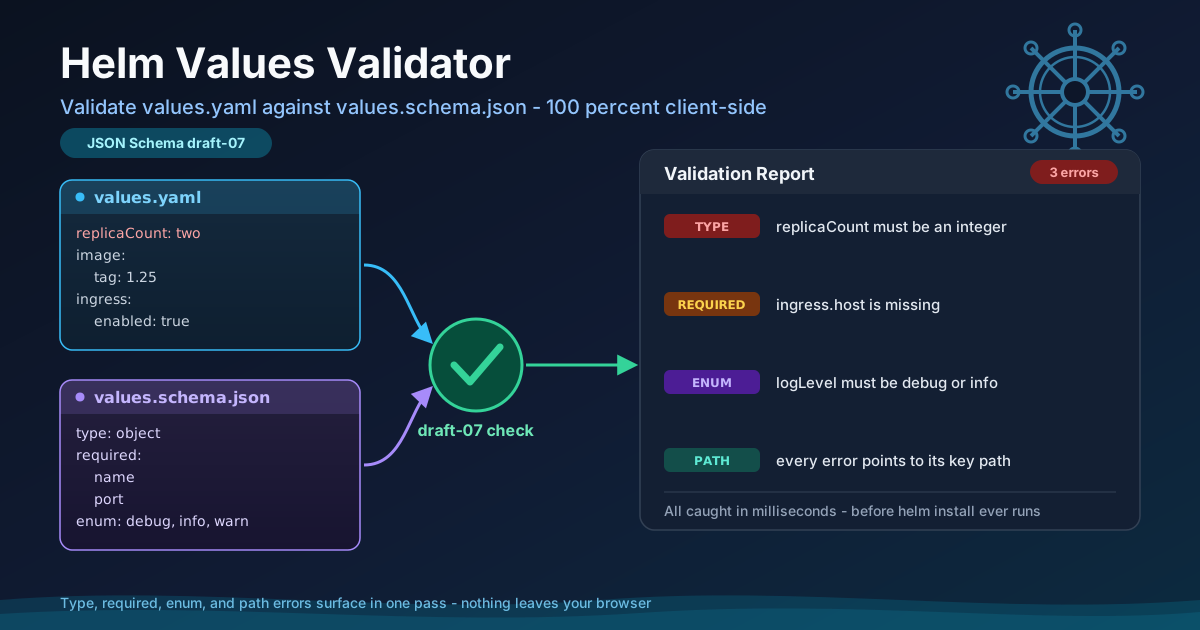
The Helm Values Validator moves that check to the earliest possible moment. Paste your values.yaml and values.schema.json into the browser and get an instant, per-key error report covering type mismatches, missing required fields, and enum violations, with full JSON Schema draft-07 support. Everything runs client-side, so validate before you commit.
Why Use the Helm Values Validator?
- Fail fast, not mid-rollout — A violation caught while you edit is a thirty-second fix; caught by a stalled rollout it is an incident and a rollback.
- Precise, path-prefixed errors — Each problem is reported at its exact location, such as service.port, so you go straight to the offending key.
- Full draft-07 support — The validator implements the draft-07 keywords Helm honors, so what passes here is what Helm accepts.
- 100% client-side and private — Values files contain hostnames and occasionally secrets. Nothing is uploaded; everything runs in your browser.
- Works with any chart — No installation, no chart changes. Validate overrides against the schema of any chart, including third-party ones.
- Instant feedback loop — Fix a value, re-run, see the next error. Schema conformance becomes routine, not a deploy-time gate.
Key Features
| Feature | What It Does |
|---|---|
| Draft-07 validation | Uses the keyword set Helm relies on |
| Type checking | Flags wrong types, such as a string where an integer is required |
| Required-field enforcement | Reports required keys missing from the file |
| Enum validation | Catches values outside an allowed set |
| Per-path error reporting | Anchors each error to its exact key path |
| Client-side only | Runs in the browser; nothing is transmitted |
Errors arrive together, so one pass shows every problem, and YAML syntax mistakes are reported separately as parse errors.
How to Use
- Open the tool. Nothing to install, no account needed.
- Paste your values.yaml. Drop in the values file or the override fragment you are about to commit.
- Paste values.schema.json. Add the schema from your chart or the upstream chart you consume.
- Run the validation. The tool parses both documents and evaluates the values in one pass.
- Fix by path and re-run. Each error names the key path, the violated rule, and what was found instead; re-run until clean.
values.schema.json in Plain Words
A values.schema.json file sits next to values.yaml in the chart directory. It is a machine-readable contract — a declaration of what a valid values file looks like — and Helm refuses to render templates when values do not conform. Think of it as type declarations for configuration.
A handful of draft-07 keywords do most of the real work:
- type — constrains a value to object, string, integer, number, boolean, or array, preventing the classic string-versus-integer failure.
- required — lists keys that must be present inside an object; anything missing is a hard error before rendering.
- enum — restricts a value to a fixed set of choices, ideal for log levels or pull policies.
- minimum / maximum — bound numeric values, so a port of 99999 is rejected.
- pattern — applies a regular expression to strings, useful for image tags and hostnames.
The tool reports four error classes, each prefixed with the offending key's path so the message points straight at the line to fix: type (wrong type), required (a demanded key is absent), enum (not an allowed choice), and path (structural mistakes, surfaced with their full location).
A small trio shows how the pieces fit — first, a slightly broken values.yaml:
replicaCount: two
image:
  repository: nginx
  tag: 1.25
service:
  type: ClusterIP
logLevel: verbose
Next, the schema it must satisfy:
{
  "type": "object",
  "required": ["replicaCount", "service"],
  "properties": {
    "replicaCount": { "type": "integer", "minimum": 1 },
    "service": { "type": "object", "required": ["port"] },
    "logLevel": { "enum": ["debug", "info", "warn", "error"] }
  }
}
And the report the validator produces — three problems, each anchored to a path:
TYPE     replicaCount   expected integer, found string
REQUIRED service.port   required key is missing
ENUM     logLevel       must be one of: debug, info, warn, error
Three lines, three exact locations, zero ambiguity — the diff between broken and deployable becomes a short checklist.
Practical Use Cases
Pre-Deploy Checks in CI
Add a validation step before helm upgrade. Linting catches YAML syntax and helm template catches template errors, but only schema validation catches semantic config mistakes — and the failure appears in seconds, attached to the commit.
Chart Maintainer Documentation
A schema is the most honest README a chart can have. Publishing values.schema.json tells consumers which keys exist, which are mandatory, and what shapes are allowed.
Multi-Environment Value Sets
Environments drift: a key added in staging never reaches production, or a prod override uses the wrong type. Validating every values file against the same schema turns drift into a mechanical check.
Upgrading Charts Across Breaking Schema Changes
When a chart major version renames keys or narrows enums, the schema changes first. Validate your existing values file against the new schema before upgrading to get every required migration in one pass.
Best Practices
- Ship a schema with every chart you own. A missing values.schema.json is undocumented, unvalidated configuration; even a minimal schema pays for itself the first time it blocks a bad deploy.
- Validate per environment, not just once. Run every values file against the schema — the file you skip is the one that breaks the release.
- Treat required as documentation. Listing required keys forces you to decide what the chart genuinely needs, and communicates that contract to consumers.
- Version schemas with the chart. A stale schema that accepts keys the templates no longer read is worse than none.
- Keep schemas strict but pragmatic. Constrain keys where mistakes are expensive, but avoid pattern rules so narrow users ignore the validator.
- Make validation a merge gate. Discipline does not scale; a pipeline step does.
Ready to Validate Your Values?
Open the Helm Values Validator, paste in your values.yaml and values.schema.json, and see every type, required, enum, and path error in one pass — before helm install touches your cluster. It runs entirely in your browser.
Related Tools You Might Like:
- JSON Schema Faker — generate realistic sample data from a JSON Schema.
- YAML Formatter — clean up indentation in values files.
- Docker Compose to Kubernetes Converter — translate Compose files into Kubernetes manifests.
Validate early, deploy confidently — your on-call self will thank you.
Frequently Asked Questions
Q: Do I need to modify my chart to use this tool?
A: No. The validator works entirely from the two documents you paste in — copy values.schema.json out of any chart and validate your overrides.
Q: Which JSON Schema draft does the tool support?
A: The draft-07 keyword set, the dialect Helm uses for values.schema.json. Keywords such as type, required, enum, minimum, maximum, and pattern are evaluated the same way Helm evaluates them at install time.
Q: Is my values file uploaded anywhere?
A: No. Parsing, schema evaluation, and error rendering all run client-side in your browser, so it is safe to use with values files containing sensitive configuration.
Q: What is the difference between a YAML syntax error and a schema error?
A: A syntax error means the file cannot be parsed at all — a missing colon, a bad indent. A schema error means the YAML is valid but violates the contract: a wrong type, a missing required key, or a disallowed enum value.
Q: Can it validate nested values and arrays?
A: Yes. Draft-07 schemas commonly describe nested objects and arrays of objects, and errors are reported with full key paths such as ingress.tls[0].secretName, so buried mistakes still point straight at the offending entry.