Homoglyph Detector: Spot the Unicode Trickery Behind Phishing Domains
Homoglyph Detector exposes Unicode confusables, invisible characters, and bidi overrides in any domain or string, so you can catch lookalike phishing and typosquatting before it catches you.
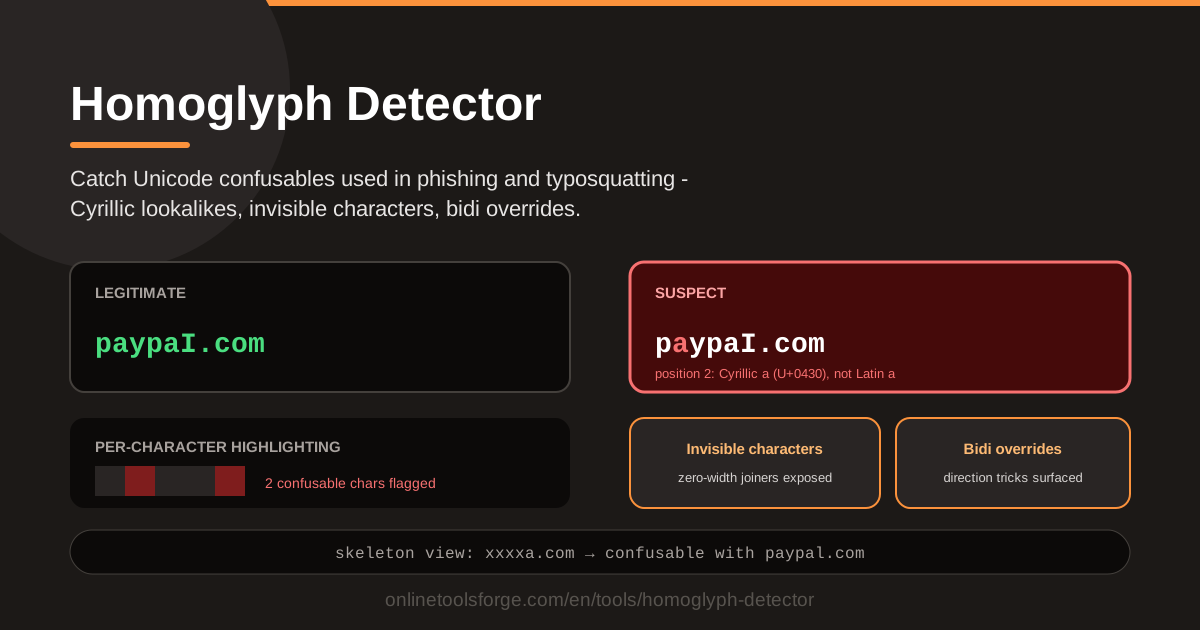
Table of Contents
That supplier invoice, that bank password reset, that security alert from a code hosting site — each arrived with a link that looked perfect. Same brand, same spelling, same dot in the same place. Yet the money went to the wrong account, or the credentials went to the wrong server. The trick is rarely a clumsy typo. It is a Unicode substitution so visually identical that the eye cannot separate real from fake.
Security researchers call these homoglyphs or confusables: code points from different writing systems that render almost exactly like the letters you expect. The classic example is the Cyrillic а (U+0430) versus the Latin a (U+0061) — pixel-level twins that produce entirely different domains. Squinting will not spot them, and your browser will not warn you. What you need is a tool that inspects every character — exactly what the Homoglyph Detector does.
Paste any string or domain into the tool and it scans for homoglyph substitutions, invisible characters such as zero-width joiners, and bidi override tricks that scramble what you see. Every suspicious position is highlighted, and a skeleton view reduces the text to a canonical form. This guide shows you how to use it — and how these attacks work.
Why Use Homoglyph Detector?
- Catch lookalike domains before you click. A swapped character is invisible to the eye but obvious to a scanner.
- Expose invisible characters. Zero-width joiners and hidden code points slip past copy-paste checks and some validation routines.
- Unmask bidi override tricks. Right-to-left marks can reverse the visual order of a filename or URL so it reads differently than it is.
- See exactly where the problem is. Per-character highlighting pinpoints confusable positions instead of just flagging the whole string.
- Compare with a skeleton view. The tool reduces each character to a canonical form, so lookalike strings pop out immediately.
Key Features
| Feature | What it does |
|---|---|
| Homoglyph and confusable detection | Flags characters swapped for lookalikes from other scripts, like a Cyrillic а for a Latin a |
| Invisible character detection | Surfaces zero-width joiners, spaces, and other code points that render nothing on screen |
| Bidi override detection | Detects right-to-left override characters that reverse the display order of text |
| Per-character highlighting | Shows exactly which positions are confusable |
| Skeleton view | Reduces every character to a canonical form so near-identical strings can be compared |
| Fully browser-based | All scanning and highlighting happens locally, nothing sent to a server |
Worth knowing:
- It accepts any pasted string: a domain, an email address, a username, a filename, or an email body line.
- Analysis is local, so sensitive strings like internal hostnames or customer identifiers stay safe.
How to Use Homoglyph Detector
- Paste the domain or string. Copy the exact text you received and paste it in. Never retype it by hand, or you may silently fix the problem without knowing it existed.
- Let the scan run. Analysis happens immediately as you paste — no configuration needed.
- Read the per-character flags. Each confusable position is highlighted, with details on what the character really is and which script it comes from.
- Inspect the skeleton view. The string becomes its canonical skeleton for direct comparison against the name you expected.
- Decide on trust. A clean result and a matching skeleton mean proceed; any flagged character means stop and verify through another channel.
How Homoglyph Attacks Work
Lookalike code points across scripts. Unicode was designed to represent every writing system on Earth, and that ambition has a side effect: many scripts contain characters that render almost identically to Latin letters. Greek omicron (ο) matches Latin o, and lowercase Cyrillic overlaps heavily with English shapes. An attacker who registers such a lookalike effectively owns a name that reads as yours.
The classic Cyrillic а. Cyrillic а (U+0430) versus Latin a (U+0061): indistinguishable at typical screen sizes, yet completely different characters. A domain beginning with the Cyrillic letter is a genuinely different domain that browsers and mail clients render exactly like the real one, and because internationalized domain names welcome these scripts, the substitution survives registration, certificate issuance, and email delivery without a visible warning.
Invisible characters. A second family of tricks uses invisible characters rather than lookalikes. The zero-width joiner (U+200D) and zero-width space (U+200B) take up no visual space, so a word can contain a hidden character while rendering perfectly. Attackers use them to evade keyword filters, create usernames that visually duplicate yours, and break naive exact-match comparisons in code.
Bidi overrides. The third trick is disorienting. Unicode must support right-to-left scripts such as Arabic and Hebrew, so it defines override characters — including the right-to-left override (U+202E) — that force everything after them to render backwards. Hidden in a filename or URL, one can make text display in an order that no longer matches its content.
Skeleton algorithms from UTS #39. The Unicode Consortium addresses this in the UTS #39 specification, which defines confusable detection and skeleton algorithms that fold every character — confusables, invisibles, and formatting marks — down to a canonical skeleton. Strings sharing a skeleton cannot be reliably told apart by human readers. The Homoglyph Detector applies the same idea: its skeleton view collapses text into canonical form, and a mismatch against the genuine name tells you the string is not what it appears.
Practical Use Cases
Vetting Sponsor and Partner Domains Before Wiring Money
When a sponsor or supplier emails updated bank details or a new payment URL, the cost of being wrong is measured in five or six figures. Paste the exact domain into the detector before you touch the transfer. A clean scan is not permission by itself — pair it with an out-of-band phone call — but a single flagged character should end the conversation.
Auditing Usernames on a Platform
If you run a service where users register names, homoglyph duplicates are a serious abuse vector: an attacker registers a name that looks like "admin" with a Cyrillic first character and impersonates your staff. Sample new registrations periodically and reject any whose skeleton matches an existing privileged account.
Reviewing Email Display Names
Display names are free text and often unvalidated, so a name can hide a zero-width character or swapped letter and still look perfect in your inbox. When a message claims to be from IT support or your CFO, paste the display name in and check that what you see matches the underlying characters.
Checking Brand Typosquatting
When you monitor for domains squatting on your brand, separating ordinary typos from homoglyph copies matters, because the response differs. Typos are usually parked for ad revenue; homoglyph registrations almost always signal credential harvesting. Run each candidate through the detector first to classify it.
Best Practices
- Verify domains out-of-band for payments. Never treat a clean-looking link as authorization to move money; confirm account changes by phone, using a number you already had.
- Never trust display names alone. Judge an email by its actual sender address, and scan even that.
- Register confusable domains for your brand. Defensive registrations cost less than a single incident response.
- Combine with punycode checks. Internationalized domains travel as punycode on the wire; converting them reveals what hides behind a suspicious label.
- Scan before trusting pasted identifiers. Usernames, webhooks, and API hostnames all deserve the same ten-second check.
- Make it a habit. Homoglyph checks work only if they happen every time, not just after a scare.
The next time a link, domain, or username looks slightly too perfect, let the Homoglyph Detector do the squinting for you. Paste the string, read the highlights, compare the skeleton, and act on evidence instead of eyeballs. It is free, browser-based, and faster than the phishing email was to write.
Related Tools You Might Like:
- Punycode Converter — decode internationalized domain names to see the raw ASCII behind them
- Password Strength Checker — evaluate the credentials those phishing pages are fishing for
- URL Encoder — encode and inspect URLs safely before you share or click them
Check before you click — stay safe out there!
Frequently Asked Questions
Q: What is a homoglyph in simple terms? A: A character from one writing system that looks nearly identical to a character from another, such as the Cyrillic а beside the Latin a. Two different code points, one identical appearance — a perfect opening for phishing.
Q: Can a domain with a homoglyph still have a valid HTTPS certificate? A: Yes. Certificate authorities issue certificates for any domain an applicant controls, and a lookalike domain is a real domain. The padlock proves encryption, not identity.
Q: Are invisible characters dangerous, or just cosmetic? A: Genuinely dangerous. A zero-width joiner in a username lets an attacker create an account that visually duplicates yours, while hidden characters in invoices or URLs silently bypass filters that match visible text.
Q: Does the Homoglyph Detector send my text anywhere? A: No. The analysis runs entirely in your browser, so sensitive strings like internal hostnames, customer identifiers, or unreleased product names are safe to inspect.