HSTS Header Generator: Enforce HTTPS with max-age, includeSubDomains and preload
Learn how the free HSTS Header Generator builds Strict-Transport-Security headers with max-age, includeSubDomains and preload, a preload-readiness checklist, and copy-paste nginx, Apache and Express snippets.
Free Interactive Tool
HSTS Header Generator
Build Strict-Transport-Security (HSTS) headers with max-age, includeSubDomains, and preload plus a preload-readiness checklist and ready-to-paste server snippets.
Table of Contents
For most of the web's history, HTTPS was a suggestion. Browsers loaded pages over plain HTTP unless a link said otherwise, leaving room for downgrade attacks and Wi-Fi interception. HTTP Strict Transport Security (HSTS) closes that gap: a single response header tells the browser this domain speaks HTTPS only and that plain-HTTP requests must be upgraded before anything is sent. In short, HSTS turns "should use HTTPS" into "must use HTTPS" for every future visit.
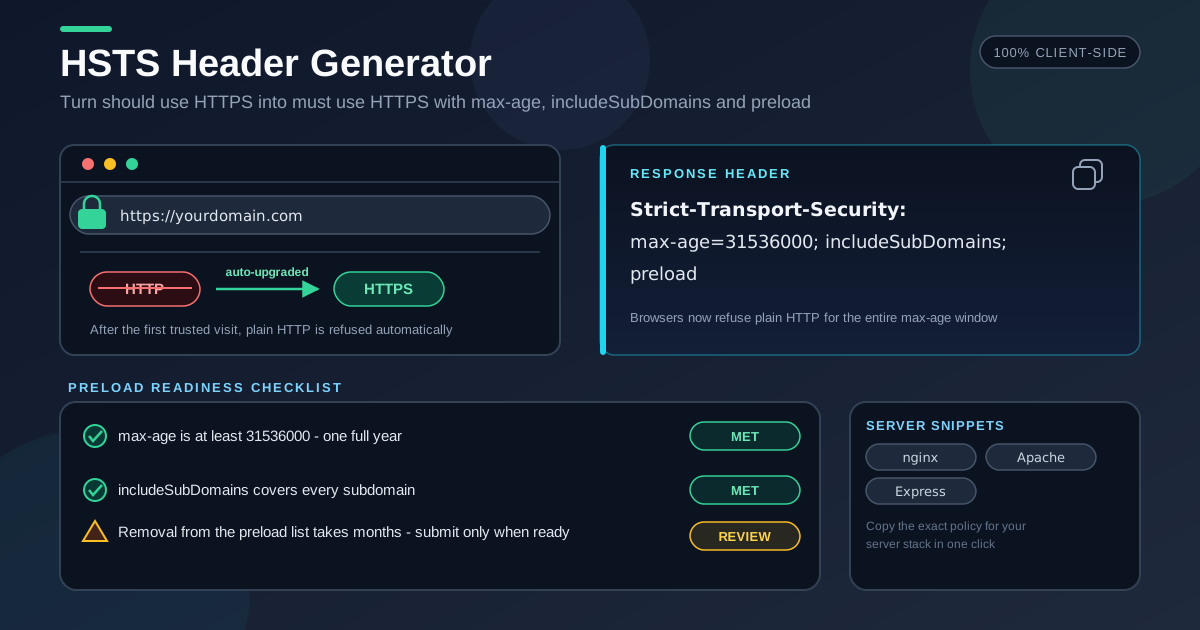
The HSTS Header Generator builds that header for you. Enter a max-age, flip the includeSubDomains and preload toggles, and watch the exact Strict-Transport-Security policy compose itself — with a preload-readiness checklist and copy-paste nginx, Apache, and Express snippets. Everything runs 100% in your browser.
Caution is warranted, because HSTS mistakes are sticky. Browsers cache the policy until max-age expires, so an over-aggressive value can lock visitors out of a broken subdomain for months. This guide covers how to use the tool, what each directive controls, and how to roll out safely.
Why Use HSTS Header Generator?
- A correct header with zero syntax slips. The output is a valid policy such as Strict-Transport-Security: max-age=31536000; includeSubDomains; preload — casing and semicolons handled for you.
- Presets built for a safe ramp. One-click values from 5 minutes to 2 years let you start small and increase commitment after each stage proves stable.
- A preload-readiness checklist built in. Enabling preload makes the tool verify the one-year max-age and includeSubDomains requirements, and warn that removal takes months.
- Snippets for the big three servers. The same policy renders as an nginx add_header line with always, an Apache Header always set directive, and an Express middleware block.
- Protection against sticky mistakes. Browsers remember an HSTS policy until it expires, so a typo is not one refresh from fixed; generating the string removes that failure mode.
- Free, private, and fully client-side. No signup, no uploads, no server round-trips.
Key Features
| Feature | What it does |
|---|---|
| max-age input | Enter any value in seconds, with presets from 5 minutes up to 2 years |
| includeSubDomains toggle | Extends the HTTPS-only rule to every subdomain of your domain with one switch |
| preload toggle | Marks the policy as preload-list eligible and reveals the readiness checklist |
| Preload-readiness checklist | Verifies the one-year max-age and includeSubDomains requirements, flags irreversibility |
| Live header preview | The composed Strict-Transport-Security string updates as you change any option |
| nginx / Apache / Express | Copy-paste output blocks for the three most common ways to ship response headers |
| 100% in-browser | Nothing is uploaded; the tool works offline once loaded |
Three details make daily use pleasant:
- Presets are time-boxed on purpose, nudging you toward a staged rollout instead of a one-shot maximal policy.
- The checklist only appears when preload is on, so it acts as a deliberate speed bump rather than background noise.
- Snippets regenerate from the same value as the preview, so the header you test is the header you deploy.
How to Use
- Open the tool. Head to the HSTS Header Generator — no account needed.
- Set max-age. Pick a preset or type seconds: 300 (5 minutes) for a first rollout, 31536000 (1 year) once HTTPS is stable domain-wide.
- Toggle includeSubDomains. Turn it on only after confirming every subdomain, including forgotten staging hosts, serves HTTPS with a valid certificate.
- Decide on preload. Leave it off until a long, stable policy has run; then review the checklist: one-year max-age, includeSubDomains on, and awareness that removal takes months.
- Copy and deploy. Paste the header or server snippet into your config, deploy, and verify with curl -I https://yourdomain.com.
max-age, includeSubDomains, preload
A Strict-Transport-Security policy has three building blocks with different risk profiles, and they belong in a deliberate order.
max-age: the rollout dial
max-age is how long the browser remembers the HTTPS-only rule, in seconds. During the window it refuses http:// URLs for the domain — typed links, bookmarks, redirects — and upgrades them silently. But it cuts both ways: if HTTPS breaks, a visitor holding a long cached policy keeps hitting hard failures until it expires.
So roll out incrementally: start with five minutes and watch for certificate and mixed-content problems.
Strict-Transport-Security: max-age=300
After a clean week, move to a month with subdomains covered:
Strict-Transport-Security: max-age=2592000; includeSubDomains
The steady state for a stable domain — and the preload program's minimum — is one full year:
Strict-Transport-Security: max-age=31536000; includeSubDomains
The clock is rolling: every fresh response resets the window, so regular visitors stay protected as long as you keep shipping the header.
includeSubDomains: extend, then audit
includeSubDomains applies the HTTPS-only rule to every hostname under your domain, not just the one that sent the header. A visitor to mail.yourdomain.com inherits the protection even if that host never emitted its own policy. It is also the riskiest toggle, because "every subdomain" includes the ones you forgot: a teammate's dev box, a legacy staging host, or an internal tool still on plain HTTP. Once the policy is cached, those hosts become unreachable until it expires. Audit first: enumerate DNS records and wildcards, load each subdomain over HTTPS, and fix or decommission stragglers before flipping the switch.
preload: the one-way door
The preload directive marks the domain as a candidate for the HSTS preload list — a catalog of HTTPS-only domains baked into Chromium, Firefox, and other engines. Once listed, browsers enforce HTTPS on the very first visit, closing the one gap ordinary HSTS leaves open.
The trade-off: removal is close to a one-way door. Requests are honored, but changes propagate through browser releases over months, and users on older builds keep the strict policy even longer. Before submitting, confirm every checklist item — one-year max-age, includeSubDomains enabled, valid certificates everywhere — and ship only the fully hardened form:
Strict-Transport-Security: max-age=31536000; includeSubDomains; preload
Never ship preload on day one; submit only after months of a clean one-year policy in production.
Practical Use Cases
A new site's security baseline
Launching a marketing site or SaaS product? Deploy with a short max-age in week one, move to one year plus includeSubDomains once the domain settles, and add preload only when ready to commit to the list. Each step is a one-line config change.
Hardening an existing online store
E-commerce sites carry legacy pages, third-party widgets, and years of old http:// links. HSTS eliminates the downgrade window after the first visit, protecting checkout flows on public networks. Ramp max-age while watching for mixed-content warnings, then lock in the one-year policy.
Multi-subdomain dashboards
Running app., api., and docs. under one domain? After auditing that every subdomain serves valid HTTPS, a single header with includeSubDomains protects the entire estate, including hosts you add later, without configuring each server separately.
Post-incident hardening
After a certificate lapse or an interception report, HSTS is the structural fix that prevents a repeat. Deploy a strict, not-yet-preload policy, then verify with curl -I on every entry point that the header survives proxies, CDNs, and errors.
Best Practices
- Never ship preload on day one. Run a long, stable max-age policy first; removal takes months, so treat the toggle as a milestone, not a default.
- Audit every subdomain before includeSubDomains. Enumerate DNS records and wildcards — forgotten dev and staging boxes are the classic casualty.
- Keep the site HTTPS-only end to end. Every asset should load over HTTPS so visitors never see mixed-content warnings.
- Ramp max-age gradually. Minutes, then days, then months, then a year; each stage buys evidence that the next one is safe.
- Test with curl -I after every deploy. Confirm the header on real responses, including redirects and errors, because proxies and CDNs can strip headers silently.
- Add the header to your release checklist. A missing HSTS header fails quietly, so make verification routine.
Lock In HTTPS Today
HSTS is one of the highest-value security controls you can ship in a single line of configuration — as long as the line is right. Open the HSTS Header Generator, set your max-age, review includeSubDomains and preload against the built-in checklist, and paste the snippet for your stack.
Related Tools You Might Like:
- Security Headers Generator — build the full OWASP header set, HSTS included, in one pass.
- CSP Generator — craft a Content-Security-Policy that blocks injected scripts and controls resource loading.
- Permissions-Policy Generator — disable powerful browser features such as camera and geolocation declaratively.
Enforce HTTPS everywhere!
Frequently Asked Questions
Q: Does HSTS protect a visitor's very first visit?
A: Not by itself. The browser enforces the policy only after receiving the header once, so the first connection can still be intercepted — the trust-on-first-use gap. Joining the HSTS preload list closes it, because the HTTPS-only rule is baked into the browser before the first request.
Q: What does the always flag in the nginx snippet do?
A: By default, nginx adds headers to certain response codes only. The always parameter attaches Strict-Transport-Security to every response, including redirects and errors such as 404 and 503, so the policy keeps refreshing no matter what the application returns.
Q: Can I undo a preload submission?
A: Removal is possible but slow. The change reaches users only as browser updates roll out over months, and older builds retain the strict policy even longer — which is why the checklist treats preload as a deliberate decision.
Q: Does includeSubDomains cover subdomains of subdomains?
A: Yes. The rule binds every hostname beneath the domain that set the header, at any depth — including names that exist only in internal DNS — regardless of DNS wildcards.