IEEE 754 Float Explorer: See the Bits Behind Every Floating-Point Number
Decompose any number into binary32 or binary64 sign, exponent, and mantissa bits, toggle bits live, and inspect exact decimal values with rounding error analysis using IEEE 754 Float Explorer.
Free Interactive Tool
IEEE 754 Float Explorer
Decompose any number into IEEE 754 binary32 or binary64 sign, exponent, and mantissa bits, toggle individual bits, and see the exact decimal value.
Table of Contents
Type 0.1 + 0.2 into a JavaScript console and you get 0.30000000000000004. Every developer meets that surprise eventually, yet few have looked at the bits behind it. IEEE 754 Float Explorer fixes that in seconds: enter any number and the tool decomposes it into the exact sign, exponent, and mantissa bits your processor really stores.
To be precise, 0.1 + 0.2 !== 0.3 is not a JavaScript bug — it is IEEE 754 doing exactly what its bits say, and this explorer shows you those bits. Every floating-point value is scientific notation packed into 32 or 64 bits: one sign bit, a biased exponent field, and a fraction called the mantissa. Instead of trusting folklore about "float weirdness", toggle bits and watch the value respond — a better way to learn the format than any diagram. The tool also prints the exact decimal value behind your input, quantifies the rounding error, renders a hex view, and handles NaN and Infinity, all client-side.
Why Use IEEE 754 Float Explorer?
- See what the machine sees. The decimal you type is almost never what gets stored; the explorer lays out the real binary32 or binary64 bit pattern.
- Explain rounding error at the source. Comparing your input with the exact stored value turns vague "precision issues" into a measurable difference.
- Support both common formats. Switch between binary32 (1 + 8 + 23 bits) and binary64 (1 + 11 + 52 bits) to see how much precision the double format buys.
- Handle the special cases honestly. NaN, Infinity, zero, and denormals appear with their true bit patterns instead of a vague error message.
- Zero setup and zero risk. Free, 100% client-side, no signup, no uploads — it works in any browser.
Key Features
| Feature | What it does |
|---|---|
| Bit decomposition | Splits any number into sign, exponent, and mantissa fields for binary32 and binary64 |
| Live bit toggles | Click any individual bit and the numeric value updates immediately |
| Exact decimal readout | Prints the full exact decimal value of the stored bits, however long it runs |
| Rounding error analysis | Quantifies the gap between your input and what the format can represent |
| Hex view | Shows the raw IEEE 754 word in hexadecimal for debuggers and memory dumps |
| Special value support | Decomposes NaN, Infinity, zero, and denormals correctly |
| 100% client-side | All computation happens in your browser; nothing is uploaded |
- Genuinely exact readouts. Entering 0.1 in binary64 prints 0.1000000000000000055511151231257827021181583404541015625, not the friendly short form.
- Toggles that teach. Flip an exponent bit to jump by powers of two, or a low mantissa bit to nudge the value by one ULP.
- Hex input built in. Paste a raw memory word such as 0x4048F5C3 and decode it instantly.
How to Use
- Enter a number. Type a decimal such as 0.1, 3.14, or -273.15, or paste a hex bit pattern like 0x4048F5C3 to decode raw bytes.
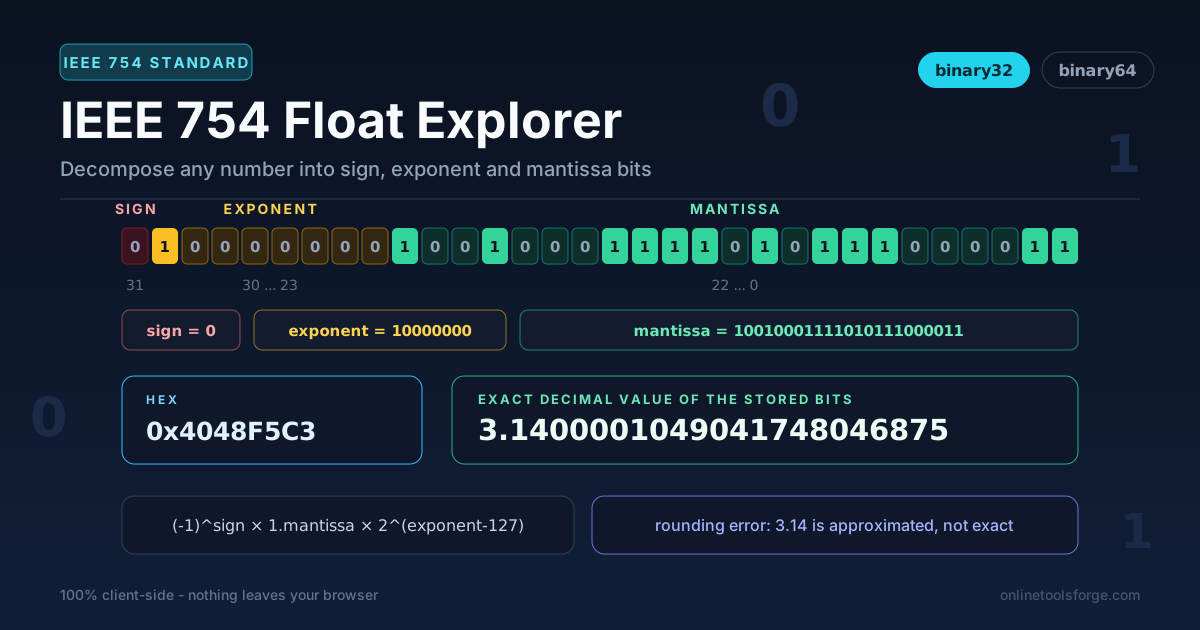
- Read the three bit fields. The strip shows the sign bit, the exponent field, and the mantissa, every bit drawn as its own square so the whole word is visible at a glance.
- Toggle a bit and watch the value. Click any square to flip it: the sign bit negates the number, exponent bits scale it by powers of two, and mantissa bits change fine-grained precision.
- Compare binary32 vs binary64. Switch precision and enter the same number in both modes: 3.14 fits comfortably in binary64 but lands on a visibly different value in binary32.
- Inspect the rounding error. Read the exact decimal value and the rounding analysis to see how far the stored number sits from your input.
Sign, Exponent, Mantissa
Every storable IEEE 754 value follows one formula:
value = (-1)^sign × 1.mantissa × 2^(exponent - 127) for binary32, with the bias 1023 replacing 127 for binary64.
The hidden leading 1. Normalized binary numbers always begin with "1.", so the format never stores it. The mantissa field holds only the fraction, and the explorer reinserts the implicit 1 — which is why a 23-bit mantissa delivers 24 bits of precision, and a 52-bit fraction delivers 53 significant bits in binary64.
The biased exponent. The exponent field stores the true exponent plus a bias (127 or 1023), letting the format span tiny and huge numbers without a second sign. A stored field of 128 means 2^(128 - 127) = 2^1.
Why 0.1 cannot be represented exactly. Decimal 0.1 equals 1/10, but in binary it repeats forever — 0.000110011001100... IEEE 754 must round that infinite expansion to 53 significant bits in binary64, storing the nearest dyadic fraction: 0.1000000000000000055511151231257827021181583404541015625. The error is minuscule per operation but never disappears, so repeated additions accumulate drift.
Special values. When the exponent field is all ones, the mantissa distinguishes Infinity (all zeros) from NaN (nonzero) — toggle your way into those states. When the exponent field is all zeros, the hidden 1 disappears and the value becomes denormal (subnormal), trading precision for gradual underflow near zero.
A worked example: 3.14 in binary32. The sign is 0. Since 3.14 = 1.57 × 2^1, the true exponent is 1, so the stored field is 1 + 127 = 128, written 10000000. The fraction 0.57 becomes the 23-bit mantissa 10010001111010111000011. Together that is hex 0x4048F5C3, and the exact stored value is 3.1400001049041748046875 — about 0.000000105 above what you typed. Enter it yourself and you will find every one of those bits.
Practical Use Cases
Debugging Floating-Point Surprises in JavaScript
When a total prints 19.990000000000002 or a === comparison fails inexplicably, paste both operands into the explorer. The bit patterns tell you immediately whether the mismatch is representation error, accumulated drift, or a logic bug — and binary64 shows JavaScript numbers exactly as the language stores them.
Teaching Number Representation in CS Courses
The explorer is a ready-made lecture demo: students predict what toggling a bit will do, then click and check. The NaN, Infinity, and denormal coverage maps onto homework questions, and the hex view connects theory to the memory dumps students meet later.
Embedded and Protocol Work with float32
Many sensors, PLC payloads, and binary file formats transmit binary32. Decode a received hex word to verify endianness and scaling, or encode an expected value and compare words field by field while documenting a wire format.
Verifying Float Serialization Across Systems
When a float crosses a boundary — C++ service to JavaScript client, JSON to a database — round-tripping leaves tiny value deltas. Comparing exact decimal readouts on both sides separates harmless representation differences from real corruption.
Best Practices
- Use binary64 to see JavaScript numbers as they are. JS Number values are IEEE 754 doubles; binary64 is the faithful view, binary32 is for float32 data.
- Compare decimal vs exact value before blaming your code. Confirm the discrepancy is inherent to the format, not a bug in your arithmetic.
- Remember float32 loses precision fast. It keeps roughly 7 decimal digits, so never round-trip money or identifiers through it.
- Do not use equality for computed floats. Compare against a tolerance, and use the exact readout to pick a sensible epsilon.
- Prefer exactly representable test inputs. Values like 0.5, 0.25, and 3 are stored exactly — ideal for isolating where error creeps in.
- Use hex mode when inspecting memory. The word pastes into any debugger or memory viewer with every bit faithful.
Try IEEE 754 Float Explorer Now
Stop guessing why 0.1 does not add up. Open IEEE 754 Float Explorer, drop in your number, and read the answer straight off the bits — free, instant, client-side.
Related Tools You Might Like:
- Base Converter — convert numbers between binary, octal, decimal, and hex.
- ASCII to Binary Converter — see how text becomes bytes and bits.
- Bitwise Calculator — practice AND, OR, XOR, and shift operations on binary values.
Happy exploring!
Frequently Asked Questions
Q: Why does 0.1 + 0.2 not equal 0.3 in JavaScript?
A: JavaScript numbers are IEEE 754 binary64 doubles. Neither 0.1 nor 0.2 has an exact binary form, so each is stored as the nearest representable fraction, and their sum lands one ULP away from the double closest to 0.3.
Q: What is the difference between binary32 and binary64?
A: binary32 (single precision) uses 1 sign bit, 8 exponent bits, and 23 mantissa bits — about 7 decimal digits of precision. binary64 (double precision) uses 1, 11, and 52 bits — 15 to 17 decimal digits — and is the format JavaScript uses for every number.
Q: What does the hidden leading 1 mean?
A: Every normalized IEEE 754 value starts with the digit 1 before the binary point, so the format omits it and gains one bit of precision for free. The explorer reinserts it when rebuilding the exact value.
Q: Is my data uploaded anywhere when I use the tool?
A: No. The tool runs entirely in your browser with 100% client-side computation, so the numbers you inspect never leave your device.