IPv6 Expander: Expand, Compress and Validate Any IPv6 Address
Expand compressed IPv6 addresses to the full 8-group form, compress them back to canonical RFC 5952 notation, and detect address types — with validation and a per-group breakdown, all in your browser.
Free Interactive Tool
IPv6 Expander
Expand compressed IPv6 addresses to full form and compress them back to canonical notation, with validation and a per-group breakdown.
Table of Contents
Ask three engineers to write down the same IPv6 address and you may get three different answers. The address 2001:db8:85a3::8a2e:370:7334, its expanded form 2001:0db8:85a3:0000:0000:8a2e:0370:7334, and the uppercase 2001:DB8:85A3::8A2E:370:7334 are all equally valid — the format permits zero compression and is case-insensitive — yet none matches another character for character.
That flexibility becomes a correctness problem the moment addresses are compared as text. A configuration system sees fe80::1 and fe80:0:0:0:0:0:0:1 as different strings and generates a duplicate firewall rule. A log grep for one spelling silently misses entries written the other way. The addresses are equal; the strings are not.
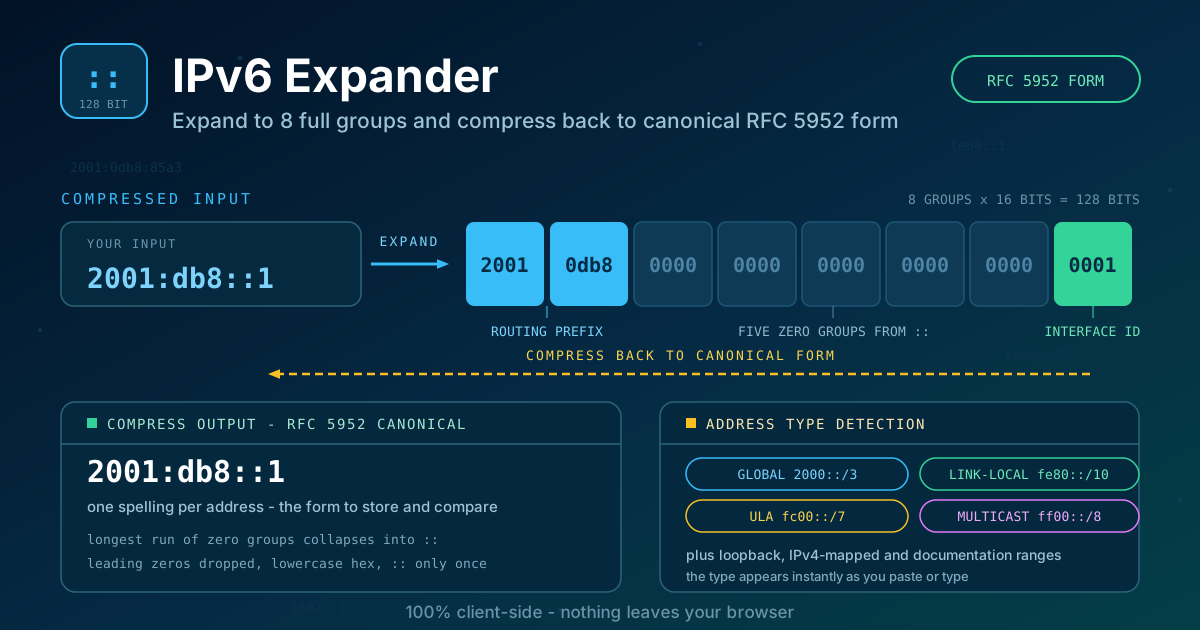
The IPv6 Expander removes the guesswork. Paste any IPv6 address and it expands the :: shorthand into the full 8-group form, compresses it back to canonical RFC 5952 notation, validates the input, detects the address type, and shows a per-group breakdown of all 128 bits — entirely in your browser, so internal addresses never leave your machine.
Why Use IPv6 Expander?
- One canonical spelling for every address. RFC 5952 defines exactly one way to write each IPv6 address, so normalizing before storing or comparing eliminates a whole class of mismatch bugs.
- Validation before interpretation. A double ::, a five-digit group, or a stray g is caught immediately instead of propagating into configs and monitoring rules.
- Address type detection. Global unicast, link-local fe80::/10, unique local fc00::/7, multicast, loopback, and IPv4-mapped addresses are identified as you type.
- Works in both directions. Expand compressed addresses for low-level tools; compress verbose ones for cleaner configs.
- Nothing uploaded, ever. All parsing happens client-side, so addresses from production firewalls stay on your machine.
Key Features
| Feature | What it does |
|---|---|
| Expand to 8-group form | Fills the :: gap with zero groups, showing the complete 128-bit address |
| Compress to RFC 5952 | Canonical output: lowercase hex, no leading zeros, longest zero run collapsed |
| Validation | Rejects multiple ::, overlong groups, and invalid characters |
| Address type detection | Labels the address global, link-local, unique local, multicast, loopback, or IPv4-mapped |
| Per-group breakdown | Lists each of the 8 groups with its 16-bit value, ready for audits |
| 100% client-side | All computation happens in your browser; nothing is sent to a server |
- The expansion is the form reverse DNS zones require; the compression is the form inventories and configs should use.
- Together they make one browser tab a linter, a formatter, and a quick reference in one.
How to Use
- Open the IPv6 Expander. It loads instantly in any browser — no installation, no account.
- Paste or type an address. Any valid spelling works, and validation runs as you type.
- Read the full 8-group expansion. Every 16-bit group appears in four-digit form, so nothing stays hidden behind the :: shorthand.
- Copy the canonical RFC 5952 form. This lowercase, minimally compressed spelling is the one to store in inventories, templates, and alert rules.
- Check the detected address type. Global, link-local, or unique local often explains unexpected routing behavior at a glance.
The :: Shorthand and RFC 5952 Canonical Form
An IPv6 address is 128 bits written as eight 16-bit groups, each rendered as one to four hexadecimal digits separated by colons; in full form every group shows all four digits, as in 2001:0db8:85a3:0000:0000:8a2e:0370:7334. Because real addresses contain long zero runs, two shortcuts are allowed: leading zeros within a group may be dropped (0db8 becomes db8), and one run of consecutive all-zero groups may be replaced by a double colon. Expansion is the reverse: the :: fills the gap with zero groups until the address again has exactly eight. To stay unambiguous, :: may appear only once per address — two of them would leave both gap lengths undefined, so such input is invalid.
RFC 5952 turns all permitted spellings into one deterministic canonical form:
- Use lowercase hexadecimal letters.
- Strip leading zeros in every group.
- Compress the longest run of two or more all-zero groups; on a tie, the leftmost.
- Never compress a single zero group.
Address type follows from the leading bits: 2000::/3 (including the 2001:db8::/32 documentation range) is global unicast, fe80::/10 is link-local — auto-configured on every interface and never routed — and fc00::/7 covers unique local addresses, IPv6's private space. Multicast ff00::/8, loopback ::1, and IPv4-mapped ::ffff:0:0/96 are recognized too.
A Worked Example, Both Directions
Expanding 2001:db8:85a3::8a2e:370:7334 fills the gap with two zero groups:
2001:db8:85a3::8a2e:370:7334
  becomes 2001:0db8:85a3:0000:0000:8a2e:0370:7334
Compressing back strips leading zeros and collapses the longest zero run into :::
2001:0db8:85a3:0000:0000:8a2e:0370:7334
  becomes 2001:db8:85a3::8a2e:370:7334
Both denote the same address; the second is the only spelling an RFC 5952-aware system should emit, store, or compare.
Why Normalization Matters
Firewall and ACL rules. Devices match addresses, but auditors and diff tools compare text. If one rule file spells a prefix as fd12:3456:789a::/48 and another as fd12:3456:789a:0:0:0:0:0/48, review tooling misses the duplication.
DNS reverse zones. The ip6.arpa zone spells an address as 32 nibbles in reverse order — producible only from the fully expanded form, since a :: cannot be reversed.
Log matching. Servers and load balancers print IPv6 in their own habitual style. A grep for one spelling misses the other in the same file; normalize both the needle and the haystack to correlate reliably.
Practical Use Cases
Firewall rule auditing
Export the rule base, expand every address to its 8-group form, and sort. Duplicates and shadowed entries surface once identical addresses finally look identical, and the breakdown reveals a /64 scope written where a single host was intended.
Log correlation
To trace everything one client did across a proxy and a web server, normalize the address to canonical form and search for that spelling everywhere. It pairs well with the Nginx Log Analyzer: analyze the logs first, then expand the IPv6 clients you find before writing alert rules.
DNS setup
Writing a forward AAAA record is easy; its reverse zone is not. Expand the address, split it into 32 nibbles, reverse them, and append ip6.arpa. One transposed nibble silently breaks reverse lookups, so working from the expanded form keeps every step checkable.
Subnet planning
The /64 boundary sits mid-address: the first four groups carry the routing prefix, the last four the interface identifier. Compressed addresses obscure that split; the expanded form makes prefix boundaries visible.
Best Practices
- Store addresses in RFC 5952 canonical form, lowercase. Inventories, CMDBs, and templates should hold exactly one spelling per address; hex case matters to diff, grep, and string indexes.
- Expand before comparing. Any script that matches or deduplicates addresses should normalize both sides first; then string equality means address equality.
- Validate at the boundary. Check user-supplied addresses before they enter your systems, and reject rather than repair.
- Remember :: appears only once. An address that seems to need two is not valid IPv6 — flag it, do not guess.
- Use the documentation range in examples. 2001:db8::/32 exists so tutorials and tickets never leak real prefixes.
Normalize Your Next IPv6 Address Now
Every address written this week probably exists in several spellings across your configs and logs. Paste one into the IPv6 Expander, copy the canonical RFC 5952 form, and let that single spelling be the one your systems store, compare, and log — free, unlimited, entirely in your browser.
Related Tools You Might Like:
- Base Converter — convert group values between hex, decimal, and binary while planning IPv6 subnets
- URL Parser — split any URL, including IPv6 literals in brackets, into scheme, host, port, and path
- Nginx Log Analyzer — break down access logs and spot IPv6 traffic hiding behind inconsistent spellings
Happy expanding!
Frequently Asked Questions
Q: Does it matter whether I use the compressed or expanded form in a config file? A: Functionally no — both parse to the same 128 bits. Operationally yes: pick RFC 5952 canonical form so reviews, diffs, and greps behave predictably.
Q: Can an address contain two double colons? A: No. :: may appear only once, because two of them would make each zero gap's length ambiguous. The validator flags such input immediately.
Q: Is any data sent to a server? A: No. Parsing, validation, and formatting run entirely in your browser, so addresses from internal networks never leave your machine.