Complete Guide to JSON Schema Visualizer: Read Complex Schemas as Interactive Trees
Turn deeply nested JSON Schema documents into an interactive tree of types, required fields, and $ref relationships. Learn how to review, debug, and document schemas faster.
Free Interactive Tool
JSON Schema Visualizer
Render JSON Schema properties, types, required fields, and $ref relationships as an interactive tree entirely in your browser.
Table of Contents
Modern APIs run on JSON Schema. It defines request and response contracts, powers validation libraries, and underpins OpenAPI documents. Yet production schemas are rarely small: deeply nested objects, arrays of arrays, and shared definitions stitched together through $ref pointers. Deeply nested schemas with shared $ref definitions are genuinely unreadable as raw JSON — you lose your place three levels in.
The JSON Schema Visualizer fixes this by rendering any schema as an interactive, expandable tree. Every property appears as a node annotated with its type, required fields are flagged at a glance, and $ref relationships resolve into visible links between branches. Because the tool is 100% client-side, you can paste a schema from any codebase or specification and start exploring immediately, with nothing uploaded anywhere.
Why Use JSON Schema Visualizer?
- Instant structural overview: Hundreds of lines of JSON collapse into a scannable outline where every branch is one click away.
- Required fields stand out: The required array normally lives apart from the properties it constrains; the visualizer marks them directly on each node.
- $ref relationships become navigable: Follow visible links between a reference site and its target definition, like jumping between functions in an IDE.
- Nested definitions stay manageable: Shared structures — addresses, pagination envelopes — each live in one expandable branch instead of being duplicated everywhere.
- Zero setup, zero data leakage: Everything runs in your browser, so proprietary API shapes never leave your machine.
- Faster reviews and onboarding: Reviewers verify changes branch by branch; newcomers explore the model instead of reading a 900-line file.
Key Features
| Feature | What It Does |
|---|---|
| Expandable tree view | Renders the schema as a collapsible hierarchy, one node per property |
| Type annotations | Labels every node: string, number, boolean, object, array, and more |
| Required-field markers | Flags properties listed in the required array directly on the node |
| $ref resolution and linking | Links referencing branches to their shared definition targets |
| Enum and format hints | Surfaces allowed values and format constraints such as email |
| Schema statistics | Summarizes property counts, nesting depth, and definition usage |
Expansion state is preserved while you navigate, so you can compare two deep branches without re-expanding the path, and because parsing happens in your browser, feedback is immediate: paste, render, explore.
How to Use
- Open the tool. Navigate to the JSON Schema Visualizer in any modern browser — no account or installation needed.
- Paste your schema. Copy in a standalone JSON Schema, an OpenAPI components/schemas block, or a draft 2020-12 document with a definitions section.
- Explore the tree. Click carets to expand or collapse branches and read the type chips and required markers on each row.
- Follow $ref links. Jump from a referencing property to its shared definition and back without losing your place in the outline.
- Verify what matters. Check which fields are optional, confirm the shape of nested arrays, and review enum values before applying the findings.
Schemas as Trees, Not Text
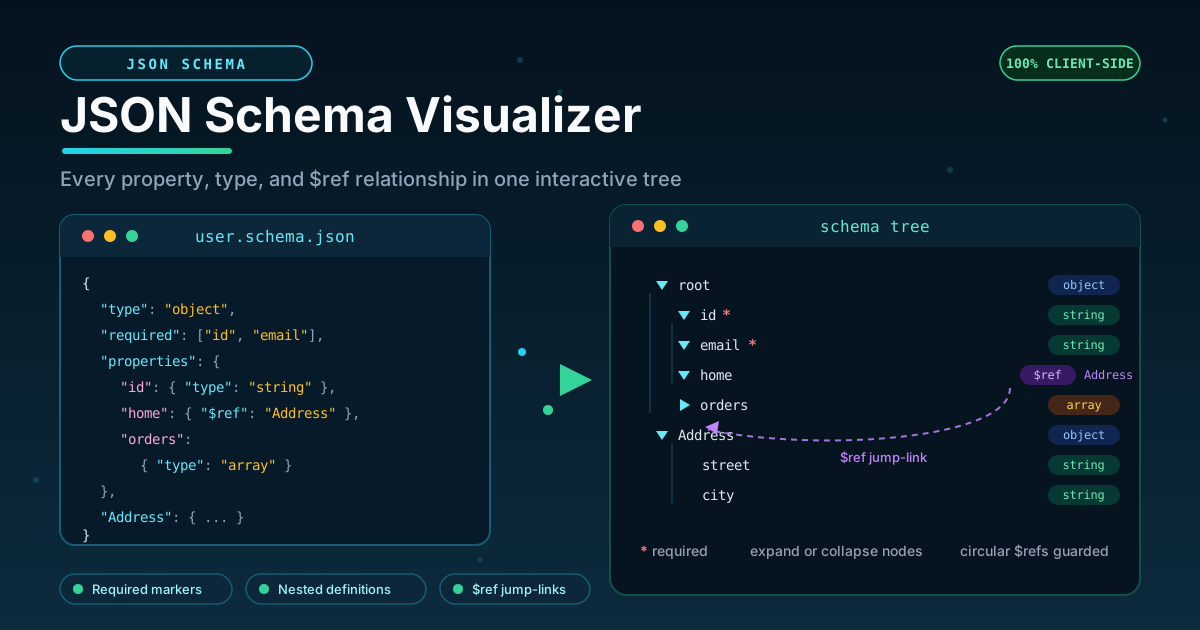
A JSON Schema describes a tree: a root object containing properties, which contain further properties, arrays, and references to shared definitions. Raw JSON obscures that hierarchy because it interleaves structure with metadata — type, required, enum, and $ref keywords sit at the same indentation level as the fields they describe. Consider this small schema:
{
  "type": "object",
  "required": ["id", "email"],
  "properties": {
    "id": { "type": "string" },
    "role": { "enum": ["admin", "member", "guest"] },
    "home": { "$ref": "#/definitions/Address" }
  },
  "definitions": {
    "Address": {
      "type": "object",
      "properties": {
        "street": { "type": "string" },
        "city": { "type": "string" }
      }
    }
  }
}
Rendered as a tree, the same document reads like an outline:
root (object)
├── id* (string)
├── role (enum: admin | member | guest)
├── home ──$ref──▶ definitions/Address
└── Address (object)
    ├── street (string)
    └── city (string)
Each line answers a question raw JSON makes you work for. The asterisks show id is required while role and home are optional. The enum chip lists the allowed values without a search. The $ref marker shows that home reuses Address, and the link between them is a jump, not a memory exercise.
Where definitions live. Standalone schemas hold shared structures under definitions (or defs in draft 2020-12), while OpenAPI parks them under components/schemas. The visualizer handles both, so either style of $ref resolves to the same navigable branch.
Circular references, handled. Real schemas are often recursive — a Node containing children of type Node, or an Employee whose manager references Employee. A naive renderer would loop forever. The visualizer guards circular $ref chains, so a self-referencing branch expands to a sensible depth and marks the recursion instead of hanging the page.
The outline answers real questions. Which fields can I omit when calling this endpoint? What does an item inside orders[] look like? Is status free-form or constrained? A tree answers each in seconds because the information sits on the node.
Practical Use Cases
API Contract Reviews
Before two teams agree on an API, someone must read the schema carefully. A tree turns that into a checklist: every property accounted for, required fields confirmed, optional fields deliberate. Reviewers catch duplicated blocks that should become $ref targets and enum values nobody remembered adding.
OpenAPI Component Inspection
Large OpenAPI documents hold dozens of component schemas referenced from many endpoints. Paste the components/schemas block, expand the branch you care about, and follow the $ref web between shared models. It pairs naturally with an OpenAPI to TypeScript converter: visualize the contract first, then generate typed code.
Schema Debugging
When validation misbehaves — a field passes that should fail, or valid input is rejected — confirm what the schema actually says. Tree view exposes typos in property names, misplaced required entries, wrong types, and $ref targets that no longer exist.
Onboarding Documentation
New engineers need the data model before they can contribute. Walk them through the interactive tree: the core resource, the mandatory fields, the enumerated values, and the branch shared with three other endpoints.
Best Practices
- Keep schemas DRY with $ref. Define each structure once and reference it; the visualizer makes sharing obvious — and duplication just as obvious.
- Name definitions clearly. Address, Money, and PageInfo communicate intent in the tree; Type1 does not.
- Visualize before reviewing a diff. Compare old and new schema outlines branch by branch; structural changes stand out far more than in a line-oriented diff.
- Put enums on constrained fields. A tree that lists allowed values documents the contract for free.
- Prefer depth over width. Group related fields into nested objects so the hierarchy mirrors your domain model.
- Check the recursion guard. If the schema is self-referencing, expand that branch once to confirm the cycle resolves as expected.
Try It Now
Paste your most convoluted schema into the JSON Schema Visualizer and watch it resolve into something readable. It is free, needs no sign-up, and runs fully in your browser. When the tree view inspires the next step, the companion tools below cover it.
Related Tools You Might Like:
- JSON Schema Faker - Generate realistic sample data that conforms to your schema
- OpenAPI to TypeScript Converter - Turn OpenAPI specifications into typed TypeScript interfaces
- JSON Formatter - Pretty-print, validate, and minify raw JSON payloads
Updated: September 2026 | Reading time: 8 minutes
Frequently Asked Questions
Q: Is my schema uploaded anywhere when I use the visualizer? A: No. Parsing and rendering happen entirely in your browser, so schemas with proprietary field names never leave your machine.
Q: Which JSON Schema draft versions are supported? A: The tool handles the common draft formats — draft 2020-12 with its defs keyword as well as older documents using definitions — and resolves $ref pointers in both styles.
Q: What happens with schemas that reference themselves? A: Circular $ref chains are guarded. The recursive branch expands to a readable depth and marks the recursion rather than looping endlessly.
Q: Can I visualize the components section of an OpenAPI document? A: Yes. Paste the components/schemas block directly, and every referenced model renders as an expandable branch with $ref links between shared definitions.
Q: Does the tree show enum values and formats, or only types? A: Alongside each node's type, the tool surfaces enum constraints and format hints such as email or date-time.