JSON to Markdown Table Converter: Turn JSON Arrays into GitHub-Flavored Tables in Seconds
Convert JSON arrays of objects into clean GitHub-flavored Markdown tables instantly with the free, browser-based JSON to Markdown Table Converter.
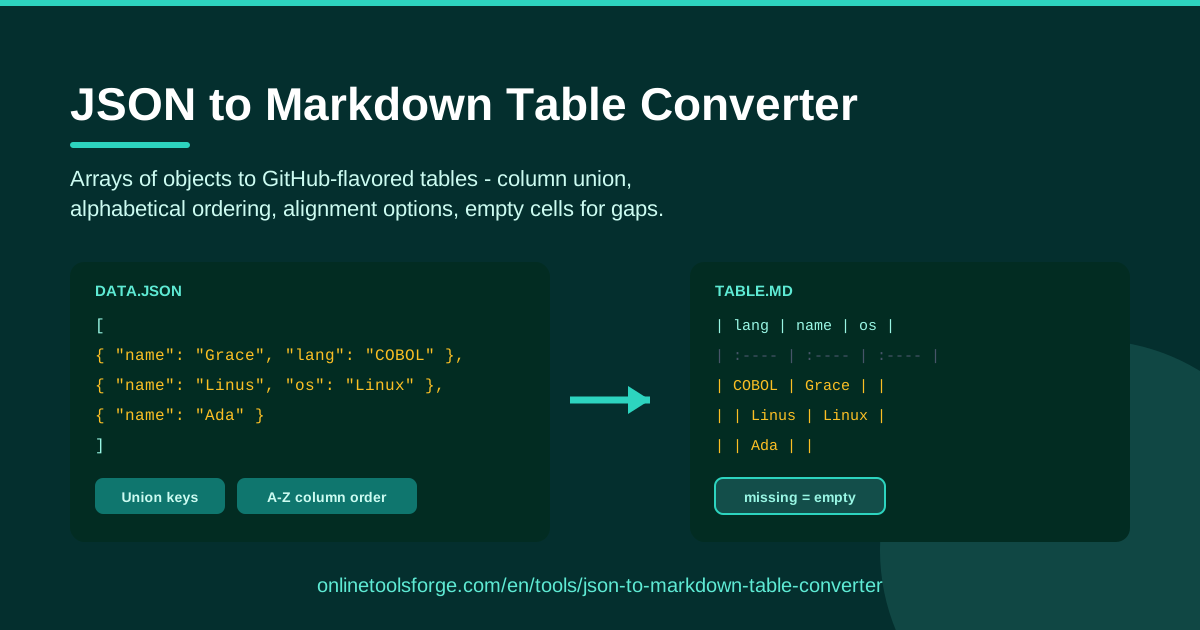
Table of Contents
Every developer has been there: you have a JSON array of objects — an API response, a batch of test fixtures, a slice of a database export — and you need to present it as a readable table in a README or documentation page. Hand-writing Markdown rows for dozens of objects is slow, repetitive, and easy to break. One misplaced pipe character can collapse the whole table.
That is exactly what the JSON to Markdown Table Converter is for. Paste any JSON array of objects and it instantly generates a GitHub-flavored Markdown (GFM) table. Every key found across all your objects is automatically united into columns, objects missing a key get empty cells, and you can optionally sort columns alphabetically and apply left, center, or right alignment.
Everything runs entirely in your browser. No uploads, no accounts, no limits — your data never leaves your machine.
Why Use JSON to Markdown Table Converter?
- Zero manual formatting. Writing table pipes and separator rows by hand is the most error-prone part of Markdown. The converter produces perfectly formed output every time, so your table renders correctly on the first try.
- Handles messy arrays. Real-world data is rarely uniform. Objects in the same array often carry different keys, and the converter merges them into one coherent table instead of failing.
- GFM-ready output. The generated table uses GitHub-flavored Markdown, so it renders natively on GitHub, GitLab, Bitbucket, and virtually every docs platform and static site generator.
- Alignment options. Choose left, center, or right alignment using standard :---, :---:, and ---: markers, giving your tables a polished, deliberate look.
- Private by design. Parsing happens client-side in your browser. Nothing is transmitted, stored, or logged, which makes it safe even for internal API data.
- Free and instant. No sign-up, no paywall, no setup. Open the page, paste, copy — the whole loop takes seconds.
Key Features
| Feature | What it does |
|---|---|
| JSON input | Paste any JSON array of objects straight from an API response or file |
| GFM table output | Emits a valid GitHub-flavored Markdown table with a header row and separator |
| Column union | Collects every unique key across all objects and turns it into a column |
| Alphabetical ordering | Optionally sorts columns A–Z so headers stay predictable |
| Alignment options | Left, center, or right alignment via :---:, ---: marker syntax |
| Empty cells for gaps | Objects missing a key simply get a blank cell |
| Fully browser-based | All processing happens locally; no data is ever sent to a server |
A few of these deserve a closer look:
- Column union means you never lose data. If object one has name and role but object two adds email, all three keys appear as columns.
- Alphabetical ordering keeps wide tables scannable. Instead of keys appearing in whatever order they occurred, columns line up in a consistent, predictable A–Z sequence.
- Alignment and empty cells work together: aligned columns stay readable even when some rows are blank, which is common with optional API fields.
How to Use JSON to Markdown Table Converter
- Open the tool. Head to the JSON to Markdown Table Converter — it loads instantly and needs no installation.
- Paste your JSON array. Drop a JSON array of objects into the input panel. A snippet like [{"id": 1, "name": "Ada"}, {"id": 2, "email": "[email protected]"}] works out of the box.
- Choose column ordering. Keep keys in their natural order or enable alphabetical ordering to sort headers A–Z.
- Pick an alignment. Select left, center, or right alignment and the tool bakes the correct :--- markers into the separator row.
- Copy the table. The GFM table appears in the output panel. Copy it and paste it straight into your README, issue, or docs page.
How Column Union Handles Messy Arrays
The heart of the converter is column union — the step that turns an irregular list of objects into one regular grid.
Consider an array where each object describes a service, but different snapshots captured different fields:
| name | port | health | owner |
|---|---|---|---|
| auth | 8080 | ok | |
| billing | degraded | api-team |
The first object has name, port, and health; the second has name, health, and owner. Instead of erroring out or silently dropping data, the converter takes the union of all keys — name, port, health, owner — and uses that as the column set. The first row gets an empty owner cell; the second gets an empty port cell. Every value survives, and the table stays rectangular.
With alphabetical ordering enabled, those columns are emitted in sorted sequence, so the header row is deterministic no matter what order keys appeared in the original objects. That determinism matters when you regenerate the table from new data: identical shapes always produce identical headers, which keeps diffs in pull requests clean.
Empty cells are the deliberate alternative to failure. A stricter approach — demanding that every object share exactly the same keys — would reject precisely the real-world arrays developers most want to tabulate. Treating "key absent" as "value empty" is both semantically reasonable and visually clean.
Finally, alignment markers are written into the separator row for you. Left alignment (:---) suits names and free text, center (:---:) works well for short categorical values, and right (---:) lines up numbers so digits stack neatly under each other.
Practical Use Cases
Documenting API Responses in READMEs
Most APIs return arrays of objects, and the fastest way to show a sample response is a table. Paste the response into the converter, copy the GFM table, and drop it under a "Sample Response" heading. Readers see field names as column headers and example values below — no squinting at raw JSON.
Turning Test Fixtures into Review Tables
When a pull request changes fixtures or seed data, reviewers want a quick overview of what the data looks like. Convert the fixture array to a Markdown table and include it in the PR description. Alphabetical column ordering keeps the table stable across commits, so reviewers diff meaningful changes instead of shuffled columns.
Comparison Tables for Documentation
Comparing plans, environments, or configuration options? Put each option in an object, paste the array, and let the converter build the grid. Alignment options help here: left-align the labels, center the values, and the comparison reads cleanly on any device.
Changelog and Release Data
If your release notes are generated from structured data — issue IDs, titles, types — a quick JSON-to-table pass turns them into tidy Markdown. Column union handles entries with optional fields (some fixes carry a credit, some do not), so the table still forms with empty cells where a field is absent.
Best Practices
- Normalize keys first when possible. Union is powerful, but thirty objects with thirty different keys produce a thirty-column table. Consolidate key names before converting to keep output readable.
- Keep rows small. Very long cell values make Markdown tables hard to read in raw form. Trim or summarize large fields before converting.
- Choose alignment deliberately. Right-align numbers, left-align text, and reserve center for short, uniform values. Consistent alignment signals care.
- Use alphabetical ordering for stable diffs. If you regenerate tables often, sorting columns A–Z prevents pointless churn when key order changes upstream.
- Keep one array per table. Nesting arrays of arrays inside cells produces cluttered output. Flatten the data you actually need to show.
- Paste, preview, publish. Because the tool is instant and private, there is no cost to re-running it — regenerate from the latest data rather than editing the table by hand.
Ready to turn that JSON into a clean table? Open the JSON to Markdown Table Converter, paste your array, and copy a GitHub-ready table in seconds.
Related Tools You Might Like:
- Markdown Table Formatter — clean up and re-align existing Markdown tables.
- JSON Formatter — pretty-print, validate, and inspect JSON before converting.
- JSON to CSV Converter — export the same JSON arrays to spreadsheet-friendly CSV.
Happy converting!
Frequently Asked Questions
Q: Is my JSON data uploaded anywhere? A: No. The converter runs entirely in your browser using client-side JavaScript. Your data is never transmitted, stored, or logged.
Q: What kind of JSON does the tool accept? A: It expects a JSON array of objects, such as [{"id": 1, "name": "Ada"}]. Keys can differ between objects — column union merges them into one table with empty cells where a key is missing.
Q: How do I get centered or right-aligned columns? A: Select the alignment option before copying. The tool writes the standard GFM markers — :--- for left, :---: for center, ---: for right — into the table's separator row.
Q: Can I control the column order? A: Yes. By default columns follow the order keys appear in your objects, and you can enable alphabetical ordering to sort headers A–Z for stable, predictable output.