Kubernetes YAML Validator: Catch Manifest Errors Before kubectl apply
The Kubernetes YAML Validator checks your manifests online for missing fields, selector mismatches, and indentation errors with per-line diagnostics, before they ever reach your cluster.
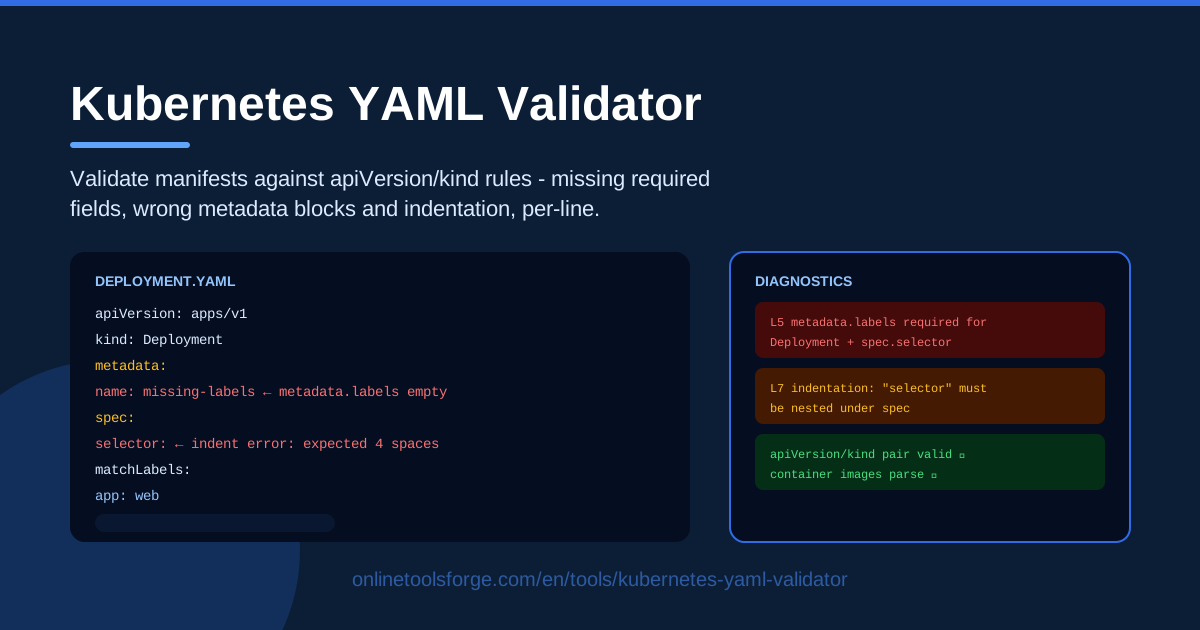
Table of Contents
Kubernetes manifests are deceptively simple. A few lines of YAML decide how your application runs, scales, and recovers, and a single misplaced space or missing field can turn a routine deploy into a broken rollout. The frustrating part is that these mistakes rarely announce themselves. The file looks fine in your editor; the API server disagrees, and you find out only when kubectl apply fails.
That is exactly what the Kubernetes YAML Validator is built for. Paste your manifest and the tool checks it against built-in apiVersion/kind rules right in your browser, flagging missing required fields, wrong metadata blocks such as labels and selectors that do not line up, and indentation errors, all with per-line diagnostics that point you at the exact line instead of a vague parser message.
There is no cluster connection, no sign-up, and nothing leaves your machine. Whether you are writing your first Deployment or reviewing a teammate's Service before a release, a validation pass takes seconds and saves you the classic "error validating data" loop. This guide covers how the tool works, the mistakes it catches most often, and how to make it part of your daily workflow.
Why Use Kubernetes YAML Validator?
- Catch errors before kubectl apply. The cheapest place to fix a manifest is before it ever reaches the API server. Validation takes seconds; unwinding a failed rollout takes far longer.
- Per-line diagnostics. Instead of a cryptic parser error, you get the exact line number and a readable explanation of what is missing or misplaced.
- Kind-aware rules. The validator applies built-in rules matched to the apiVersion and kind you declare, so a Deployment is judged by Deployment rules and a Service by Service rules.
- Selector and label checks. Selector mismatches are the classic silent failure: the manifest applies cleanly, and then nothing routes to your pods. The tool catches these structural mismatches up front.
- Runs entirely in your browser. Nothing is uploaded, so you can safely validate internal manifests with real names, images, and environment details.
- A fast dry-run alternative. For structural checks, it removes the need for a reachable cluster, a kubeconfig, and waiting on API round-trips.
Key Features
| Feature | What it does |
|---|---|
| Paste-and-validate | Drop any Kubernetes manifest into the browser and validate it instantly |
| apiVersion/kind rules | Built-in per-kind rules check that required fields exist for the kind you declare |
| Missing field detection | Flags absent required fields such as metadata.name or the containers list |
| Metadata block checks | Verifies labels, annotations, and selector blocks are well-formed and consistent |
| Indentation diagnostics | Detects indentation slips that quietly break YAML structure |
| Per-line diagnostics panel | Lists every issue with its exact line so you can jump straight to the fix |
Three details worth knowing:
- Validation is structural, not just syntactic. A plain YAML parser will happily accept a spec that means nothing; this tool checks that fields under spec actually make sense for the declared kind.
- The selector-versus-labels check is the headline. It compares the selector block against pod template labels and warns when they can never match, which is the most common reason a Deployment creates pods while the Service never finds them.
- It validates what you actually ship. Paste the manifest exactly as it lives in your repo and check the real thing, not a sanitized version.
How to Use Kubernetes YAML Validator
- Paste your manifest. Open the Kubernetes YAML Validator and paste the YAML you are about to apply: a Deployment, a Service, a ConfigMap, whatever is next in line.
- Check the detected kind. The tool reads apiVersion and kind from the manifest and applies the matching built-in rules. If either is missing or misspelled, that is your first diagnostic.
- Read the diagnostics. Every issue is listed with its line number and a short explanation: a missing required field, a metadata block in the wrong shape, or an indentation problem.
- Fix the flagged lines. Correct each line the panel points to, and glance at neighboring lines too, because indentation problems usually affect siblings as well.
- Re-validate. Run the check again after every edit until the panel comes back clean. A few seconds of iteration beats a failed rollout every time.
The Manifest Mistakes Everyone Makes
apiVersion and kind pairing. Every Kubernetes object declares both fields, and they are not freely combinable. Deployment belongs to apps/v1, Ingress lives under networking.k8s.io/v1, and Service sits in core v1. Pair the wrong kind with the wrong apiVersion and the API server rejects the manifest before it even reads your spec. Rules that encode these pairings catch the mismatch instantly, which matters now that the old extensions/v1beta1 resources are long gone.
Selector versus labels mismatch. A Deployment's spec.selector.matchLabels must be a subset of the pod template's labels. Change a template label during a refactor and forget the selector, and the Deployment refuses to roll out; or worse, a Service selects nothing and traffic quietly stops. These bugs are the most dangerous class because some of them apply successfully and then fail silently in production.
Missing required fields per kind. Each kind has its own minimum: a Deployment needs containers with images and a valid template, a Service needs ports and a selector to be useful, and ConfigMap or Secret objects need data to do anything at all. When you copy a tutorial manifest and trim it down, it is easy to delete a required field along with the example values.
Indentation under spec. YAML treats indentation as structure, so drifting two spaces inside a nested block like spec.template.spec.containers can turn a list into a map or merge two fields into a nonsense key. Editors stay quiet because the YAML is still valid; it just no longer means what you intended. Per-line diagnostics are what make this class of bug findable at all.
Why validation beats dry-run for speed. A server-side dry run is thorough but needs a reachable cluster, valid credentials, and a round trip per check. For structural mistakes, which cause the vast majority of apply failures, a browser validator gives you the same catch in milliseconds with no kubeconfig and no context switching. Keep the dry run for admission and policy questions; use instant validation for everything structural.
Practical Use Cases
Pre-apply checks in daily work
Before every kubectl apply, paste the changed manifest into the validator. It takes ten seconds and catches the typos, missing fields, and selector drift that slip past even careful reviewers. Teams that build this habit stop treating apply as the first validation step and start treating it as the last one.
Teaching YAML structure to newcomers
Nothing teaches manifest anatomy faster than immediate feedback. Have a junior engineer write a Deployment from scratch, validate it, read the diagnostics, and fix what is flagged. Each message is a small lesson in why metadata, selector, and spec must line up, which sticks far better than memorizing reference pages.
Debugging a rejected manifest
When the API server rejects a manifest with a terse message, paste it into the validator. The per-line diagnostics usually reveal the real cause, whether that is a field in the wrong block, a missing metadata.name, or indentation that shifted during a copy-paste, in less time than it takes to find the right documentation page.
CI config sanity
Validate manifests standalone before wiring them into a pipeline, and use the tool as a sanity check for generated configs: if templating or substitution scripts produce your YAML, run the output through once to confirm the structure survived. For anything Helm-based, pair it with a proper chart lint pass.
Best Practices
- Validate every manifest before apply. Make it muscle memory: paste, check, then apply. The cost is seconds; a broken deployment costs hours.
- Keep selectors consistent with labels. Treat selector.matchLabels and template labels as a locked pair. If you change one, change the other, and let the validator confirm the match.
- Use consistent indentation. Pick two spaces, never tabs, and never mix. Consistency prevents the nesting bugs that are hardest to spot by eye.
- Version-control your manifests. Keep YAML in git next to the code it deploys. Reviewed, revertible manifests plus validation are how structure stays correct over time.
- Re-validate after edits, not just once. Most broken manifests were valid at some point in the session. Re-run the check after every change, however small.
- Start from validated examples. When writing a kind for the first time, begin from a manifest that already passes validation rather than from memory.
The next time you are about to run kubectl apply on a manifest you have not checked, give it ten seconds in the Kubernetes YAML Validator first. Paste, read the per-line diagnostics, fix the flagged lines, and ship with confidence, all in your browser and completely free.
Related Tools You Might Like:
- Helm Lint Checker — lint your Helm charts before they render into manifests
- Helm Values Validator — check your values files before templating
- YAML Formatter — clean up indentation and formatting in any YAML file
Happy shipping!
Frequently Asked Questions
Q: Is my manifest uploaded to a server? A: No. Validation runs entirely in your browser, so manifests containing internal names, images, or environment details never leave your machine.
Q: Does this replace kubectl apply --dry-run? A: For structural mistakes it is a faster alternative that needs no cluster. A server-side dry run still adds value for admission control and policy checks, so use both where it matters.
Q: Which resource kinds does it validate? A: It checks manifests against built-in apiVersion/kind rules covering common workload and configuration kinds such as Deployment, Service, and ConfigMap. An unknown kind or a wrong pairing is itself reported as a diagnostic.
Q: Can I validate a multi-document YAML file? A: Yes. Paste the whole file and the diagnostics will point to the specific lines with problems, including indentation issues that span more than one document.