Loan Comparison Calculator: Which Loan Really Wins on Total Cost?
Compare up to three loans side by side with the Loan Comparison Calculator and see which one wins on monthly payment, total interest, and total cost.
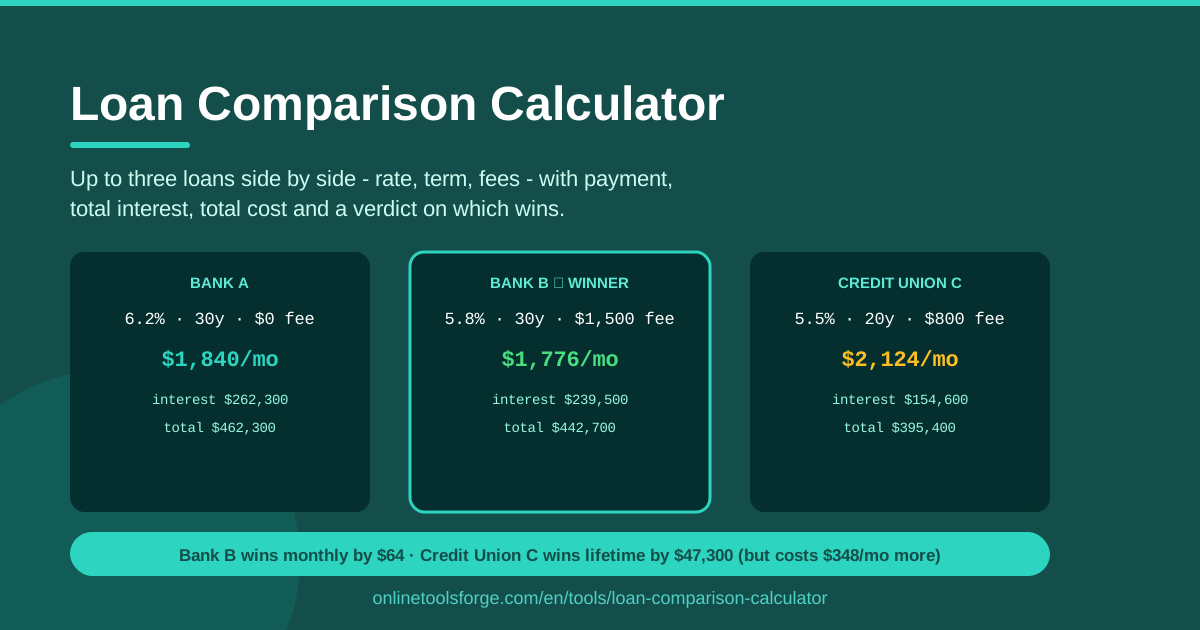
Table of Contents
Holding two or three loan offers at once is a strange kind of riches. One quote has the lowest monthly payment, another brags about its rate, and a third promises zero fees. Each looks like the winner from a different angle, and gut feeling is a terrible tiebreaker when thousands of dollars are on the line. Lenders design offers to shine on whichever number flatters them most.
The Loan Comparison Calculator ends the guessing. Enter up to three loans with their rate, term, and fees, and the tool computes the monthly payment, total interest, and total cost for each one. Then it delivers a verdict: which loan wins, and by exactly how much. Everything runs client-side in your browser, so your numbers never leave your device.
This guide explains what the tool measures, how to run a fair comparison, and how to turn the verdict into real negotiating power.
Why Use Loan Comparison Calculator?
- Headline rates hide the full picture. A glossy rate says nothing about processing fees or how many months you will keep paying. Total cost exposes what the marketing leaves out.
- Monthly payments mislead. A longer term shrinks the payment while quietly piling on interest. Side-by-side totals make that trade-off obvious in one glance.
- Manual amortization math invites errors. One slipped exponent and your comparison is fiction. The calculator applies the standard payment formula to every loan, identically.
- Fees flip the ranking. A loan with a lower rate can still lose once an origination fee lands on the bill. Folding fees into total cost makes the ranking match your wallet.
- A verdict beats a hunch. "The bank one felt better" becomes "Loan A wins by $1,860" — a specific number you can act on.
- It is free, fast, and private. No account, no upload, no waiting; run as many scenarios as you like.
Key Features
| Feature | What it does |
|---|---|
| Three loan slots | Compare Loan A, Loan B, and Loan C side by side in one view. |
| Rate, term, and fee inputs | Capture the three variables that actually set a loan's cost. |
| Monthly payment | Computes the exact amortized payment for each loan. |
| Total interest | Shows what you pay purely for the privilege of borrowing. |
| Total cost | Combines principal, interest, and fees into one comparable figure. |
| Winner verdict | Names the winning loan and states the margin in dollars. |
| Client-side processing | Every calculation runs in your browser; nothing is uploaded. |
Three details make the results trustworthy. The tool uses the same amortization formula lenders do, so payment figures line up with official quotes. Fees are added on top of principal plus interest, which is exactly how they hit your wallet. And because it is instant, you can rerun the comparison the moment an offer changes.
How to Use Loan Comparison Calculator
- Enter Loan A. Start with the offer you know best: the amount, the annual rate, the term, and any fees such as origination or processing charges.
- Enter Loan B and Loan C. Add the competing quotes. Only have two offers? Leave the third slot empty — the tool compares whatever you provide.
- Review the payment and totals. Each loan's monthly payment, total interest, and total cost appear instantly. Notice where the rankings disagree; the cheapest payment is often not the cheapest loan.
- Read the verdict. The tool declares the winner and the exact margin. A $40 gap is a coin flip; a $2,400 gap is a decision.
- Negotiate with the loser. Take the number back to the losing lender. "You're $1,800 dearer over the term — beat it" is a sentence that gets results.
Rate vs Term vs Fees
Rate, term, and fees interact in ways intuition gets wrong, so it pays to understand what each one really does.
Why the lowest rate can lose. A low rate stretched over a long term can cost more in total interest than a higher rate paid off quickly. Picture $20,000 at 6% over five years against $20,000 at 5.5% over seven. The shorter, higher-rate loan frequently wins on total cost even though its payment is bigger. The rate is the yearly price of money; the term decides how many years you buy.
How fees change the true cost. Fees are the great hidden equalizer. A 2% origination fee on a $25,000 loan is $500 owed before a cent of interest accrues. A "zero interest" promotion may hide a flat arrangement fee larger than ordinary interest would have been. Once fees enter total cost, offers that looked miles apart can swap places entirely.
Monthly payment versus lifetime cost. These pull in opposite directions. Stretching the term eases the monthly burden but multiplies the months on which interest accrues. If the cheapest-total loan's payment genuinely does not fit your budget, a slightly costlier loan you can comfortably repay beats one you might default on — the point is to choose that trade-off with open eyes.
The verdict logic. The calculator compares total cost — principal plus all interest plus fees — and crowns the lowest figure the winner, stating the margin. It answers "which loan is better" using the one number nobody can argue with.
Negotiating with a second offer in hand. That margin is ammunition. Lenders rarely know what competitors quoted you, and many hold discretionary room on rate or fees to win the deal. Presenting a precise, computed gap converts a shopping exercise into real savings.
Practical Use Cases
Car Loan: Dealer Financing vs Bank Pre-Approval
Dealer financing often carries a higher rate sweetened with rebates, while a bank pre-approval is usually cleaner. Enter the dealer's structure as Loan A and the bank's as Loan B, fees included. The verdict tells you whether the rebate genuinely offsets the rate — and gives you the number to take back to the finance office.
Choosing Between Two Personal Loan Consolidation Offers
When consolidating cards into a personal loan, two lenders may quote near-identical rates but very different setup fees. Run both through the calculator; a $95 difference in fees plus a 0.4% rate gap can add up to hundreds of dollars, and the verdict shows which structure actually costs less over the term.
Comparing Mortgage Lenders Before You Commit
Mortgage quotes differ enormously on fees even when rates look similar: origination charges, points, and processing costs vary by lender. Compare up to three loan estimates with identical amounts and terms, then let total cost — not the headline rate — pick your lender. On a 30-year loan, small differences compound into tens of thousands.
A Refinancing Break-Even Sanity Check
Before refinancing, enter your current loan's remaining rate, term, and any payoff costs as Loan A, and the new offer as Loan B. If the verdict shows the new loan winning by only a few hundred dollars — much of it from fees you pay upfront — the paperwork may not be worth it. A comfortable four-figure win is a green light.
Best Practices
- Compare identical amounts. All loans should be for the same sum; otherwise total cost differences just reflect size, not value.
- Include every fee. Origination, processing, documentation, early-repayment penalties — if money leaves your pocket, put it in the fee field.
- Match terms before comparing rates. A 5-year and a 7-year loan are not the same product; align terms first, then let the rate fight it out.
- Decide by total cost for long loans. The longer the term, the more interest dominates — and the more total cost matters relative to the monthly payment.
- Test revised offers immediately. When a lender comes back with a better rate, rerun the comparison in seconds rather than trusting that "better" means "best."
- Keep the verdict as your paper trail. Screenshot the result before negotiating so you remember the exact margin you were quoted.
Ready to settle your loan debate? Open the Loan Comparison Calculator, enter your offers, and let the total cost crown the winner — then go collect the difference.
Related Tools You Might Like:
Happy saving!
Frequently Asked Questions
Q: Does the Loan Comparison Calculator send my financial data anywhere? A: No. The tool runs entirely client-side in your browser, so the loan details you enter are never uploaded, stored, or shared.
Q: How many loans can I compare at once? A: Up to three. Enter two if that is all you have — the tool compares as many offers as you provide.
Q: Should I include fees in the comparison? A: Yes, always. Fees can easily flip which loan wins, and leaving them out gives you the lender's picture rather than yours.
Q: Which number should decide a close call between two loans? A: For long-term loans, total cost is the fairest judge. If cash flow is tight, weigh the monthly payment too, but make the trade-off consciously rather than by default.