MongoDB ObjectId Decoder: Uncover the Creation Timestamp Hidden in Every _id
Decode MongoDB ObjectIds into creation timestamps, random values, and counters, and build date-range query boundary ObjectIds — all in your browser, with nothing uploaded.
Free Interactive Tool
MongoDB ObjectId Decoder
Decode MongoDB ObjectIds into creation timestamps, random values, and counters. Build date-range query boundary ObjectIds. Free, offline, no upload.
Table of Contents
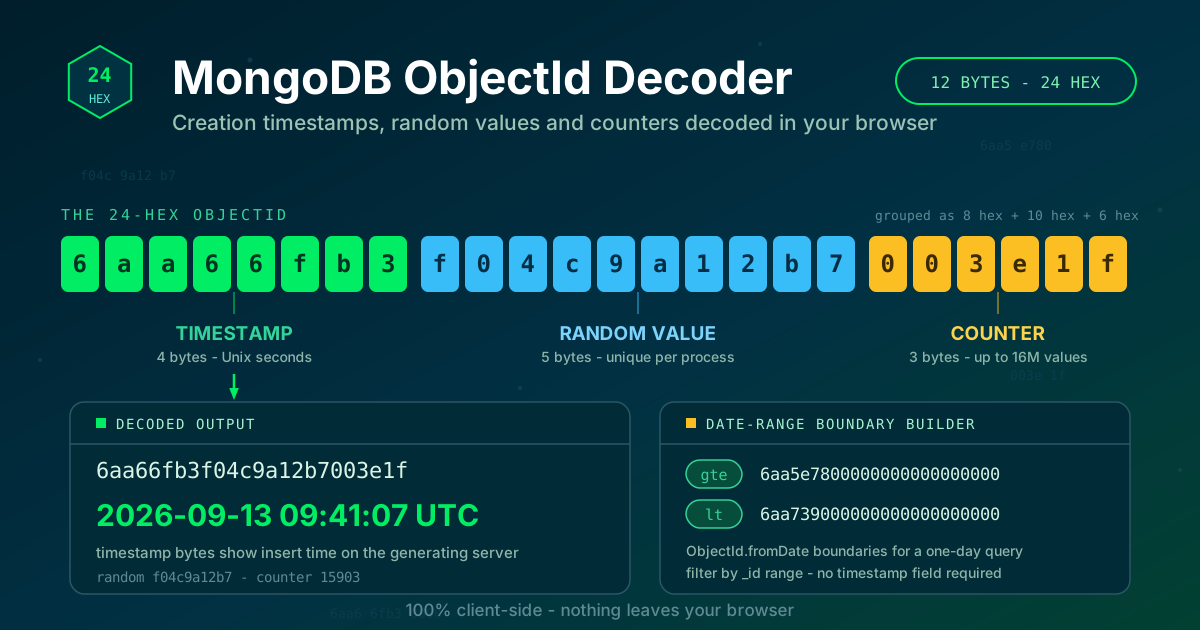
Open any MongoDB collection and look at the _id field. That 24-character hex string, something like 6aa66fb3f04c9a12b7003e1f, is not random noise: the first 8 characters are a Unix timestamp recording the exact second the document was inserted. Every MongoDB _id encodes when the document was created — most developers never decode it, even though the answer sits in plain sight.
The MongoDB ObjectId Decoder reads it for you. Paste any 24-hex ObjectId and the tool splits it into its three parts — the 4-byte creation timestamp, the 5-byte random value, and the 3-byte counter — and shows the precise creation date in UTC. It also runs in reverse, generating boundary ObjectIds for date-range queries, which solves a classic MongoDB problem: filtering by creation date when no dedicated timestamp field exists.
Why Use MongoDB ObjectId Decoder?
- Creation dates from the _id alone. No schema change or extra field — every default ObjectId carries its insert time in the first 8 hex characters.
- The complete 12-byte breakdown. Timestamp, per-process random value, and counter, separated and explained — what you need when debugging generation behavior.
- A date-range boundary builder. The most useful undocumented MongoDB trick — querying by _id range instead of a timestamp field — takes two date picks.
- Nothing uploaded, ever. Decoding runs entirely in your browser; identifiers from production systems never leave your machine.
- Validation built in. Truncated or non-hex inputs are caught immediately instead of yielding a confidently wrong date.
Key Features
| Feature | What it does |
|---|---|
| Timestamp extraction | Converts the first 4 bytes into a readable UTC creation date and time |
| Full byte breakdown | Separates the timestamp, random value, and counter segments |
| Boundary ObjectId builder | Generates start and end ObjectIds from two dates for range queries on _id |
| Client-side only | All computation happens in your browser; no data is sent to a server |
- The three segments answer different questions — "when", "which process generated this", "how many IDs so far".
- Together they turn an opaque string into a small forensic record you can read in seconds.
How to Use
- Open the MongoDB ObjectId Decoder. It loads instantly in any browser, with no installation or account.
- Paste a 24-hex ObjectId. Copy it from a document, log line, API response, or export; validation runs as you type.
- Read the decoded segments. The creation timestamp appears first, followed by the random value and the counter, each labeled with its byte range.
- Switch to the boundary builder. Pick a start and end date; the tool produces two boundary ObjectIds ready to paste into a query.
- Use them in your query. Treat the lower boundary as an inclusive minimum and the upper boundary as an exclusive maximum.
The 12 Bytes of an ObjectId
An ObjectId is 12 bytes rendered as 24 lowercase hex characters, divided into three fields:
- Timestamp (4 bytes, first 8 hex characters). An unsigned big-endian count of seconds since the Unix epoch — safe until February 2106.
- Random value (5 bytes, next 10 characters). Chosen once per process at startup, keeping ObjectIds unique across machines and restarts.
- Counter (3 bytes, last 6 characters). Starts at a random value and increments per ObjectId generated, adding thousands of unique IDs per second per process.
Decoding a Real Example
Take 6aa66fb3f04c9a12b7003e1f. The first 8 characters, 6aa66fb3, are 1789292467 in decimal — 2026-09-13 09:41:07 UTC, the second this document was inserted. The middle 10 characters, f04c9a12b7, identify the application process. The last 6, 003e1f, equal 15,903: roughly the 15,904th ID that process minted. The whole investigation took one paste.
The Date-Range Query Trick
Because _id values sort in creation order, you can filter by time using the _id index alone. Build one ObjectId at your start date and another at your end date, then query the range:
db.orders.find({
  _id: {
    $gte: ObjectId('6aa5e7800000000000000000'),
    $lt: ObjectId('6aa739000000000000000000'),
  },
});
Those boundaries come from 2026-09-13 00:00:00 UTC and 2026-09-14 00:00:00 UTC, so the query returns every document created on September 13 — through an index every collection already has. No createdAt field, no extra index. For legacy collections or schemas you cannot change, this is often the only practical way to answer "what happened on that day".
What the Timestamp Does Not Tell You
Treat the embedded timestamp as insert time on the generating server, not business time. A batch job backfilling last year's orders today gives them today's ObjectIds, and clock skew between servers shifts timestamps by the skew. An ObjectId also records creation, not last modification — updated documents keep their original _id. Decode it for forensics and querying; do not repurpose it as an authoritative business clock.
Practical Use Cases
Debugging data issues
When records appear duplicated, out of order, or suspiciously clustered, decode their ObjectIds. Timestamps show insertion time, random values reveal the creating process, and counters show insertion order. A counter reset pins the moment an application restarted.
Archive and partition queries
Boundary ObjectIds select everything created before a cutoff with one indexed range on _id — no full collection scan, no timestamp field, deterministic results.
Forensics on imported data
CSV imports and migration dumps rarely carry reliable creation dates, yet MongoDB assigns fresh ObjectIds on insert. Decoding them shows when the import ran, how long it took, and the order rows landed — evidence found nowhere else.
Backup window planning
Restores and point-in-time comparisons need to know what changed in a window. Decode a known document's ObjectId to anchor the timeline, generate boundaries, and count the documents inside to size the incremental work.
Best Practices
- Still store explicit timestamps for business logic. The embedded timestamp reflects server insert time; orders, events, and audits deserve a real createdAt set by your application. Treat _id decoding as an addition, not a replacement.
- Remember boundary ObjectIds are start-inclusive. Pair the lower boundary with an inclusive operator and the upper with an exclusive one, so each document lands in exactly one range.
- Validate hex length before decoding. Exactly 24 characters of 0-9 and a-f; anything else is a corrupted copy that will decode to garbage.
- Expect rough ordering, not a guarantee. One process generates ObjectIds in increasing order, but multiple servers interleave them, so never treat _id order across servers as strict sequence.
- Know that IDs leak creation time. Anyone who sees an ObjectId can decode its timestamp — exposing _id values publicly publishes insertion metadata, worth a thought for sensitive apps.
- Keep ObjectIds as strings. Spreadsheets and scripts can strip leading zeros or convert the hex to numbers; carry them as text end to end.
Decode Your First ObjectId Now
Twelve bytes, three fields, one hidden clock — every MongoDB document has carried its own birth certificate all along. Paste an _id into the MongoDB ObjectId Decoder to read it in seconds, or generate boundary ObjectIds for your next date-range query.
Related Tools You Might Like:
- Snowflake ID Decoder — read creation timestamps from Discord, Twitter/X, and Instagram IDs
- UUID Decoder — break down UUIDs into version, variant, and embedded timestamp fields
- Unix Timestamp Converter — translate raw Unix timestamps into readable dates and times
Happy decoding!
Frequently Asked Questions
Q: Can I get the creation date of any MongoDB document from its _id? A: Only if the document uses MongoDB's default generator; custom application-supplied _id values carry no embedded timestamp.
Q: Does decoding an ObjectId require access to the database? A: No. An ObjectId is 12 bytes with a fixed layout, so decoding is pure arithmetic — the tool works entirely offline in your browser.
Q: How does ObjectId.fromDate help me query without a timestamp field? A: It builds an ObjectId whose timestamp equals a chosen date, with zeroed random and counter bytes. Two of those as range boundaries on _id filter the collection by creation time through the index every collection already has.
Q: Why does the decoded date differ from my createdAt field? A: The ObjectId records when the server inserted the document; createdAt records your application's business time. Backfills, retries, and imports make the two diverge.