MTA-STS Policy Generator: Enforce STARTTLS Mail Delivery With RFC 8461 Policies
Generate the RFC 8461 MTA-STS DNS TXT record and the HTTPS policy file together — with mode testing or enforce, MX patterns, and max_age — so sending servers can never be downgraded to plaintext.
Free Interactive Tool
MTA-STS Policy Generator
Generate MTA-STS DNS TXT records and HTTPS policy files for STARTTLS enforcement
Table of Contents
STARTTLS made email encryption look almost universal: most mail servers advertise it, and when both sides support it the SMTP connection upgrades to TLS. The catch is that the advertisement is optional and unauthenticated. An attacker on the network path — a compromised router, a hostile ISP — can simply strip the STARTTLS line from the server's greeting. The sending server sees no TLS offer, falls back to plaintext, and hands over the message, attachments and all. This downgrade attack is invisible to both sender and recipient.
MTA-STS, defined in RFC 8461, closes exactly that hole. Your domain publishes a policy that pins which MX hosts may receive its mail and requires delivery over a valid TLS session with a matching certificate. A supporting sending server fetches that policy before connecting; if a downgrade is attempted, it refuses to deliver rather than leaking the message in plaintext.
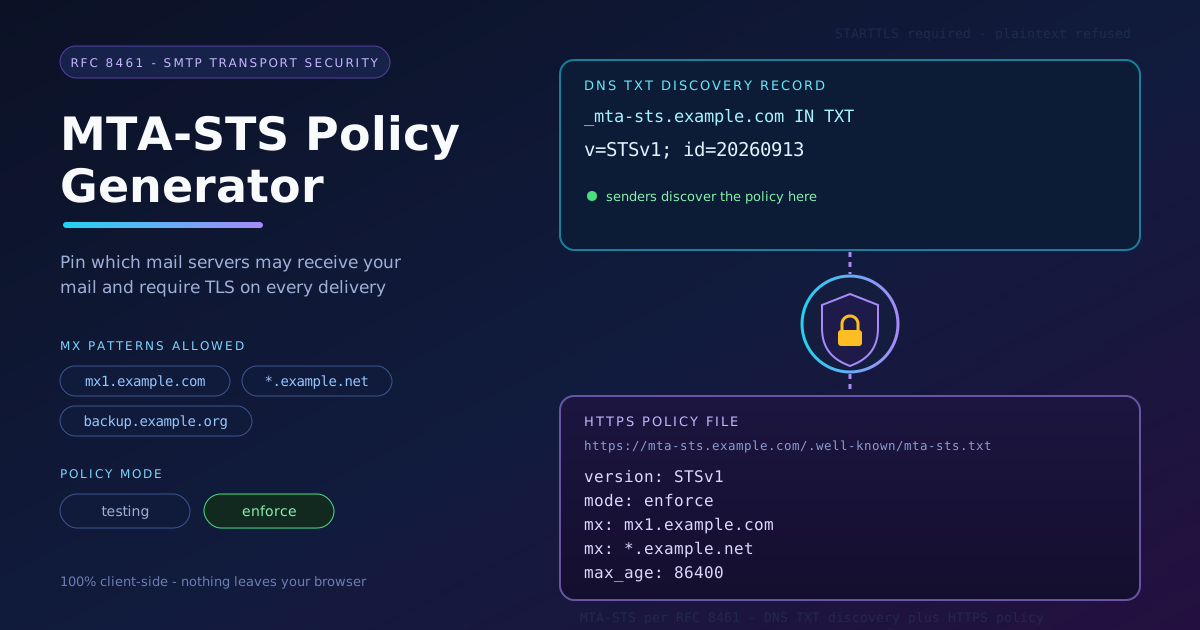
The policy lives in two places at once, and both must be present and consistent: a DNS TXT record at _mta-sts.yourdomain.com for discovery, and the policy file itself, served over HTTPS at https://mta-sts.yourdomain.com/.well-known/mta-sts.txt. Our MTA-STS Policy Generator builds both halves together — mode, MX patterns, and max_age included — 100% client-side in your browser.
Why Use MTA-STS Policy Generator?
- Both halves, generated together. MTA-STS only works when the DNS TXT discovery record and the HTTPS policy file agree. The tool emits both from one set of inputs, so they cannot drift apart.
- RFC 8461-compliant syntax. Correct tag order, record names, and policy fields — details senders validate strictly and hand-editing gets wrong.
- Safe testing-first workflow. Publish in testing mode first: monitor delivery without risking rejection before the policy is proven.
- Flexible MX pattern support. Exact hosts like mx1.example.com or wildcard patterns — fitting single-provider and multi-provider mail estates alike.
- Correct id and max_age handling. The policy id and cache lifetime follow the specification, so sender-side caching behaves as intended.
- 100% client-side processing. Your domain and mail infrastructure details never leave the browser — no uploads, no accounts, no logging.
Key Features
| Feature | Details |
|---|---|
| Inputs | Your domain, MX hostnames or patterns, mode, and max_age |
| DNS output | TXT record for _mta-sts.yourdomain.com with v=STSv1 and a policy id |
| HTTPS output | Policy file for /.well-known/mta-sts.txt on the mta-sts subdomain |
| Modes | testing for monitoring rollout, enforce for mandatory TLS delivery |
| MX patterns | Exact hostnames and wildcard patterns, one per policy line |
| Privacy | 100% client-side — generation happens entirely in your browser |
- Copy-ready artifacts. Each half is presented exactly as it should be pasted into DNS or uploaded to your server.
- Consistent id semantics. Change the policy and the tool issues a fresh id — what tells caching senders to re-fetch.
How to Use
- Open the MTA-STS Policy Generator and enter your mail domain. This is the domain users send to, not the subdomain that serves the policy.
- Choose the mode. Start with testing — it publishes the policy for monitoring without instructing senders to reject mail.
- Add your MX patterns. List every hostname that may receive mail, one per entry, matching your DNS MX records exactly — including backup providers.
- Set max_age and generate. The tool produces both artifacts: copy the DNS TXT record to your DNS provider at _mta-sts.yourdomain.com, and publish the policy file at https://mta-sts.yourdomain.com/.well-known/mta-sts.txt, served over HTTPS with a valid certificate.
- Monitor, then enforce. Watch delivery reports (TLS-RPT is the standard companion), confirm no legitimate sender fails, then regenerate with mode enforce — and bump the id so senders re-fetch.
Two Halves of One Policy
The DNS half is a discovery record. Senders look up a TXT record at _mta-sts.yourdomain.com rather than guessing where the policy lives. Its value is short and strict: v=STSv1 declares the version, and id= carries a short string identifying the current revision. The id is the caching mechanism — senders store the policy for up to max_age seconds and re-fetch only when the id in DNS differs from the cached one. Change the file without changing the id, and most senders keep running the old policy until it expires.
The HTTPS half is the policy itself, a small plain-text file served from the mta-sts subdomain over a valid TLS connection. A complete example, annotated:
version: STSv1          # policy format version, always STSv1 today
mode: testing           # testing monitors and reports; enforce requires TLS
mx: mx1.example.com     # an exact host allowed to receive mail
mx: *.example.net       # a wildcard covering a provider's fleet
max_age: 86400          # seconds senders may cache this policy
The mode field is where deployments should move slowly. In testing mode, compliant senders apply the policy but still deliver on failure — ideal for spotting a forgotten backup MX or a mismatched certificate. In enforce mode, a sending server that cannot complete a valid TLS session to a listed MX host must not deliver the message. That is the real downgrade protection — and why a flawed enforce-mode policy means delayed or bounced mail, so earn it first.
Because early failures are exactly what you want to see, MTA-STS pairs naturally with TLS-RPT (RFC 8460): a DNS TXT record at _smtp._tls.yourdomain.com telling senders where to send delivery reports. Publish both, watch the testing-mode reports, and promote to enforce once the numbers are clean.
Practical Use Cases
Enterprise mail hardening
Organizations running their own Exchange, Postfix, or gateway infrastructure gain a concrete guarantee: interception requires breaking TLS, not merely being on-path. This closes the gap SPF, DKIM, and DMARC leave open — they authenticate the message, while MTA-STS protects the channel.
Mail provider migrations
Switching platforms is precisely when a stale MX list hurts most. Regenerate the policy with the new provider's hosts, publish under a new id, and keep the old provider listed until migration completes. Senders converge onto the new topology with no delivery gap.
Compliance checklists
Frameworks requiring encryption in transit increasingly reference MTA-STS explicitly. The generator produces the artifacts auditors ask for — the discovery record and the hosted policy — and the testing-to-enforce progression evidences a deliberate rollout.
Preventing MITM mail interception
For teams exchanging contracts, invoices, or personal data, plaintext SMTP is the weak link an attacker waits for. With an enforce-mode policy, a downgrade attempt becomes a visible, retryable delivery failure — not a silent leak.
Best Practices
- Start in testing mode, always. Enforce before your MX list is proven is how legitimate mail gets rejected.
- Watch reports before flipping to enforce. Give testing mode a few weeks and reconcile every reported failure.
- Keep max_age reasonable. Around 86,400 seconds (one day) to a few weeks balances fast rollback against sender-side caching.
- Change the id on every policy change. The id is the only signal senders have that the policy was updated; a new file with an old id is invisible.
- Keep the policy served over valid HTTPS. If the certificate lapses, senders fall back to last-known behavior — or stop applying the policy.
- Regenerate after any MX change. New provider, new gateway, retired backup host — the policy must reflect reality immediately.
Lock Down Your Mail Transport Today
Plaintext email is your domain's default until you say otherwise. The MTA-STS Policy Generator produces both halves of an RFC 8461 policy in seconds — DNS record, policy file, mode, MX patterns, and max_age — entirely in your browser. Publish in testing mode today, and make enforce the setting your domain earns.
Related Tools You Might Like:
- DKIM Record Generator — build correctly chunked DKIM DNS TXT records from any public key.
- Security Headers Generator — generate CSP, HSTS, and other HTTP security headers for your web properties.
- YAML Formatter — format, validate, and beautify YAML configs, including mail server definitions.
Stay in testing until the reports are clean, then enforce with confidence. Happy sending!
Frequently Asked Questions
Q: Do I need both the DNS TXT record and the HTTPS policy file?
A: Yes. The DNS record is only a pointer — senders fetch and apply the actual policy from the HTTPS URL. Publishing one without the other means MTA-STS is not active.
Q: What is the difference between testing and enforce mode?
A: In testing mode, compliant senders apply the policy but still deliver when something fails, making rollout safe. In enforce mode, a sending server that cannot establish a valid TLS session to a listed MX host must not deliver — that is the real downgrade protection.
Q: How long should max_age be?
A: It is expressed in seconds, commonly from 86,400 (one day) to several weeks. Shorter values let you correct mistakes faster; longer values reduce how often senders re-fetch.
Q: When exactly do I need to change the policy id?
A: Every time the policy content changes — mode flips, MX changes, or max_age updates. Senders cache the policy until they notice a different id in DNS, so an unchanged id means an unchanged policy.
Q: Does MTA-STS replace SPF, DKIM, and DMARC?
A: No. Those protocols authenticate who may send and whether a message was altered; MTA-STS protects the transport channel against downgrade and interception. A hardened domain runs both layers together.