Paycheck Calculator: See What Each Paycheck Is Really Worth
The Paycheck Calculator converts your annual salary into per-paycheck gross and net pay, with breakdowns for tax withholding, 401k, health insurance, and other deductions.
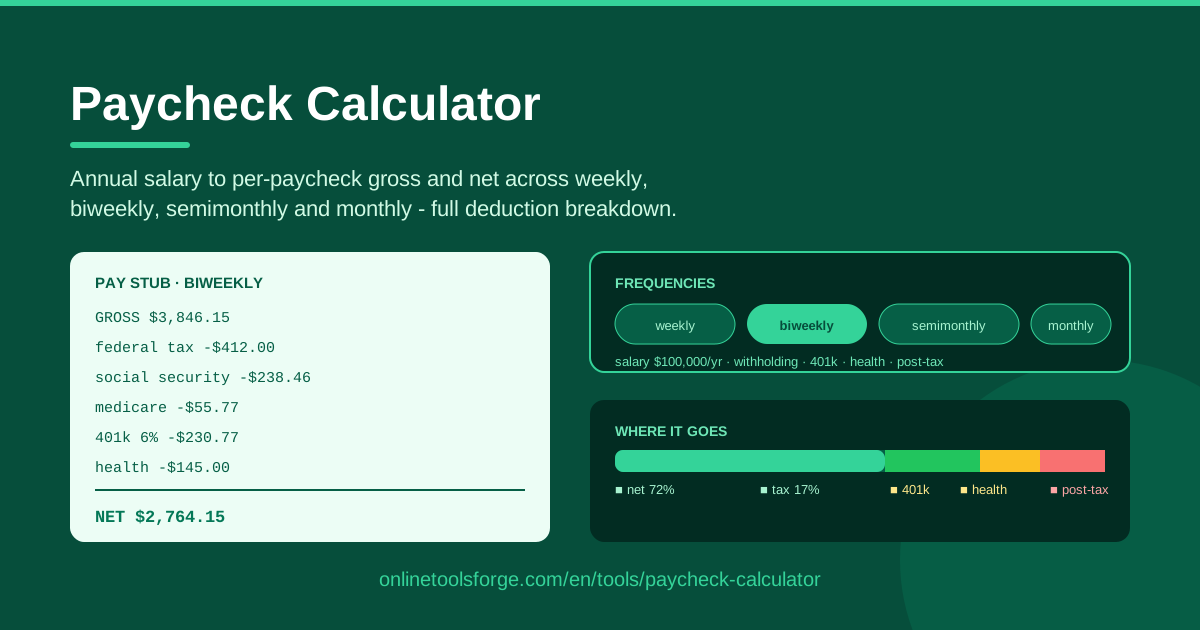
Table of Contents
The number on a job offer is never the number that lands in your bank account. A $72,000 salary sounds clean, but after federal withholding, 401k contributions, and health premiums take their share, what actually arrives every two weeks can be a genuine surprise. The Paycheck Calculator closes that gap: enter your annual salary once and it converts it into per-paycheck gross and net across weekly, biweekly, semimonthly, and monthly schedules, with a clear breakdown of where the money goes.
That breakdown matters more than most people expect. Budgets built on gross pay fail quietly — rent gets set a little too high, the savings plan a little too ambitious, and the first real paycheck exposes the difference. Planning from a realistic net figure, with every deduction itemized, is what separates a budget that survives from one that collapses in month two.
Like every tool on Online Tools Forge, it runs entirely in your browser. Your salary never leaves your device, there is no signup, and results update the instant you change an input.
Why Use Paycheck Calculator?
- Offer evaluation: Compare offers on real take-home pay instead of headline salary. A $74,000 offer paid monthly produces bigger individual checks than a $73,000 offer paid biweekly, but which one nets more per year depends on each employer's deduction setup. The calculator makes the comparison concrete in seconds.
- Budget planning: Every durable budget starts from net pay, not gross. Knowing your true per-paycheck take-home lets you size rent, debt payments, and savings against money you will actually hold.
- Deduction transparency: See exactly what your 401k percentage and health premium cost per check — and what they would cost at a different contribution level.
- Pay frequency clarity: Weekly, biweekly, semimonthly, and monthly schedules change both check size and check count. The calculator shows all four so you can plan around the rhythm your employer actually uses.
- Retirement tuning: Nudge your 401k contribution up or down and watch the net effect instantly — the fastest way to find the highest contribution your cash flow can absorb.
- Private and instant: All math runs client-side. No account, no uploads, no waiting.
Key Features
| Feature | What it does |
|---|---|
| Annual salary input | Enter your yearly salary once; every per-paycheck figure derives from it |
| Four pay frequencies | Converts gross and net across weekly, biweekly, semimonthly, and monthly schedules |
| Gross vs net output | Shows per-paycheck gross and the estimated take-home that reaches your account |
| Tax withholding breakdown | Estimates withholding so the largest deduction is visible, not invisible |
| 401k deduction | Models pre-tax retirement contributions and their effect on taxable income |
| Health insurance deduction | Factors the premium out of every check |
| Post-tax deductions | Handles Roth-style and other post-tax items separately from pre-tax ones |
| Client-side processing | All calculations happen in your browser — nothing is stored or sent |
Three details worth calling out. The frequency switch recalculates everything immediately, so comparing biweekly against semimonthly is a single click. The pre-tax and post-tax buckets are kept separate, because a Roth 401k deduction and a traditional 401k deduction affect your net very differently. And the whole tool works cleanly on a phone, which matters when you are mid-negotiation and want a number fast.
How to Use Paycheck Calculator
- Enter your annual salary. Type the gross yearly figure from your offer letter, contract, or most recent raise. Everything else builds from this number.
- Pick your pay frequency. Choose weekly, biweekly, semimonthly, or monthly to match how your employer actually pays. Unsure? Biweekly means every two weeks (26 checks a year); semimonthly means twice a month (24 checks).
- Add your deductions. Enter your 401k contribution percentage and health insurance premium, plus any post-tax deductions you know about.
- Read the gross vs net breakdown. The tool shows per-paycheck gross, each deduction line, and the estimated net — the number that actually hits your account.
- Plan around the net number. Use that figure for rent decisions, savings targets, and debt payoff. Re-run it whenever salary, benefits, or contribution levels change.
Gross, Net, and the Pay Frequency Myth
Start with the vocabulary, because the three numbers people conflate are distinct. Gross is your salary divided by the number of pay periods — a pure arithmetic split. Net is what remains after tax withholding and your deductions. Take-home is the practical version of net: the amount that settles in your bank. A useful paycheck is the second and third numbers, never the first.
Now the pay frequency myth. Many people assume a biweekly salary "pays more" because some months contain three paychecks. It does not. Biweekly means 26 checks a year, each slightly smaller than the 24 semimonthly checks; monthly means 12 large ones; weekly means 52 small ones. The annual total is identical — only the delivery rhythm changes. The famous "three-paycheck month" is not bonus money; it is your own salary arriving on a different schedule. That said, it is a genuine cash-flow opportunity: if you budget against two checks per month, the third check lands as found money you can route straight into savings.
Pre-tax deductions complicate the picture in a helpful way. A traditional 401k contribution — and usually health premiums — comes out before withholding is calculated, which lowers your taxable income. This is why bumping your 401k from 4% to 6% does not shrink your net check by the full 2% of gross; part of that increase comes back as reduced tax. The calculator's breakdown makes this visible instead of leaving you to guess.
Finally, accept that net is always an estimate. Real withholding depends on your W-4 — filing status, dependents, any extra amount you request — plus state and local taxes the tool cannot see, benefits you did not enter, and mid-year events like bonuses or raises. Treat the output as a planning baseline with a small error bar, and tighten it once a real pay stub arrives.
Practical Use Cases
Comparing Two Offers with Different Pay Frequencies
Offer A pays $76,000 semimonthly; Offer B pays $73,500 biweekly with richer health coverage. Enter each salary with its own frequency and benefits. A's individual checks look bigger, but B's 26 checks per year — combined with a cheaper premium — can close or reverse the gap in annual net. The side-by-side numbers turn a gut decision into a math decision.
Setting Your 401k Contribution Level
Your employer matches 50% up to 6%, and you want to capture the full match without starving your checking account. Run the calculator at 4%, 6%, and 8% and compare per-check net at each level. You will see the match-friendly 6% costs less net than you feared, and you can judge whether 8% is sustainable before changing anything with HR.
Planning Rent Around True Net Income
Say biweekly net comes out to $2,150. Annualized that is about $55,900, or roughly $4,660 per month — not $4,300 (two checks) and not $6,450 (three). Budget rent against the monthly equivalent, keep the guideline of staying near a third of net, and treat any third paycheck as an automatic boost to your emergency fund.
Moving from Freelance to Salary
Freelancers live on gross revenue minus quarterly tax estimates, so a salaried offer can feel abstract. The calculator shows exactly what "stable" looks like: the same income every period, deductions handled automatically, and pre-tax benefits quietly lowering your tax burden. It is the fastest way to compare a $95,000 freelance target against a $85,000 salary on realistic take-home terms.
Best Practices
- Budget from net, not gross. Commitments sized against gross are the most common cause of first-quarter budget failure.
- Plan with the monthly equivalent. If paid biweekly, multiply net by 26 and divide by 12; if weekly, multiply by 52 and divide by 12.
- Keep 401k at least to the match. Contribution above the match is yours to choose; below it, you are declining part of your compensation.
- Revisit after tax and life changes. A raise, a new W-4, a premium change, or a new dependent all shift your net — recalculate rather than assume.
- Sanity check against your first real stub. Compare the estimate to actual pay and adjust your budget to the observed number.
- Treat it as a baseline, not a guarantee. Local taxes and payroll quirks can move the real figure slightly in either direction.
Ready to see your real number? Open the Paycheck Calculator, enter your salary, pick your frequency, add your deductions, and start budgeting against money you will actually receive.
Related Tools You Might Like:
- Salary Calculator — work out full annual pay including bonuses and overtime.
- Hourly to Salary Converter — turn an hourly rate into annual and monthly equivalents.
- Savings Goal Calculator — set a target and find the per-paycheck amount that gets you there.
Smart paychecks start with knowing your net. Happy planning!
Frequently Asked Questions
Q: Is the net pay from the Paycheck Calculator exact? A: It is a close estimate. Actual withholding depends on your W-4 elections, state and local taxes, and benefits the tool does not know about. Expect small differences and calibrate against your first real pay stub.
Q: What is the difference between biweekly and semimonthly pay? A: Biweekly means a check every two weeks — 26 per year, including two months with three checks. Semimonthly means two checks per month — 24 per year, each slightly larger. The annual total is the same; only the rhythm differs.
Q: Does a 401k contribution reduce my net by its full amount? A: No. Traditional 401k contributions are pre-tax, so they lower your taxable income and part of the contribution comes back as reduced withholding. Your net falls by less than the contribution itself.
Q: Is my salary information stored anywhere? A: No. The calculator runs entirely client-side in your browser. Your inputs are never uploaded, saved, or shared.