PEM Certificate Decoder: Read X.509 Certificates and CSRs in Your Browser
Learn how to decode PEM certificates and CSRs in your browser with the free PEM Certificate Decoder — read subject, issuer, SANs, validity dates, serial number and public key type, with no upload required.
Free Interactive Tool
PEM Certificate Decoder
Decode X.509 PEM certificates and CSRs in your browser. Inspect subject, issuer, SANs, validity, serial number, and key type without uploading anything.
Table of Contents
Every engineer eventually meets a certificate error they cannot explain. The browser shows ERR_CERT_AUTHORITY_INVALID, a pipeline dies with unable to get local issuer certificate, a service refuses to start because the certificate "has expired or is not yet valid". These messages say something is wrong, but almost never what — because nobody opened the file and looked. Certificate errors are cryptic, yet the PEM file already contains every answer: who it names, who signed it, which hostnames it covers and when it expires.
The free PEM Certificate Decoder opens that package in your browser. Paste a certificate or a CSR, and it unpacks the DER structure inside the PEM wrapper and lays out subject, issuer, SAN entries, validity dates, serial number and public key type in a readable panel. Everything runs client-side — nothing is uploaded or logged — so even an internal staging certificate never leaves your machine.
This guide covers why in-browser decoding is worth using, the key features, how to decode a file, what each field means, and the use cases, best practices and questions that come up most.
Why Use PEM Certificate Decoder?
- Privacy: decoding happens in your browser. PEM files can carry internal hostnames and internal CA names in their SAN entries. Pasting one into a random web service leaks exactly that into a third-party log; this tool parses the DER locally, so internal certificates stay internal.
- No OpenSSL ceremony required. openssl x509 -in cert.pem -text -noout works where OpenSSL exists; elsewhere a browser tab beats an install, especially mid-incident on a locked-down laptop.
- Certificates and CSRs in one tool. It recognizes both -----BEGIN CERTIFICATE----- and -----BEGIN CERTIFICATE REQUEST----- blocks.
- The fields that actually matter. Subject, issuer, SANs, validity, serial and public key type — the six things you check nine times out of ten.
- Nothing sensitive exposed by design. Certificates are public data shown to every visitor during the TLS handshake; decoding needs no private key, so there is no secret to lose by opening one.
Key Features
| Feature | What It Does |
|---|---|
| DER parser | A minimal DER parser unpacks the X.509 structure right in your browser. |
| Subject and issuer | Shows who the certificate is about and which authority signed it. |
| SAN entries | Lists every Subject Alternative Name — the field modern clients match against. |
| Validity dates | Reports Not Before and Not After so you can triage expiry at a glance. |
| Serial number | Exposes the serial for inventory, revocation tracking and log correlation. |
| Public key type | Identifies RSA, ECDSA or another key type carried in the certificate. |
| CSR support | Decodes PKCS#10 certificate signing requests in the same panel. |
A few details worth calling out:
- Auto-detects certificates and CSRs. The pasted block header picks the parser, so a stray CSR decodes sensibly instead of erroring.
- Strictly read-only and client-side. Nothing is generated, signed, uploaded or stored — a predictable viewer for incident work.
How to Use
- Open the tool. Go to the PEM Certificate Decoder page.
- Paste the PEM block. From a .pem or .crt file, a certificate email, or a ticket — certificates and CSRs both work.
- Decode. The parser reads the DER bytes and populates the field panel immediately.
- Review the fields. Subject, issuer, SANs, validity, serial number and public key type, in that order.
- Act on what you see. Compare SANs with the hostname served, calendar the Not After date, log the serial — and decode each PEM in a bundle separately.
What a Certificate Actually Says
An X.509 certificate is an identity document for a hostname, bound to a public key and signed by an issuer. Every field answers a different operational question.
Subject versus issuer. The subject is who the certificate is about; the issuer is who signed it. Identical values mean self-signed — normal in development, a flag in production. When a chain fails, matching the leaf issuer against the intermediate subject shows whether it is even assembled in order.
SANs — the field browsers actually match. The Subject Alternative Name extension lists the hostnames a certificate covers, wildcards included. Browsers match the site you typed against the SANs — full stop. The common name (CN) is legacy: modern clients ignore it for matching because it predates internationalized domains, so a CN match without a SAN match is wrong by modern rules.
The validity window. Not Before and Not After define when a certificate may be trusted. Expired means renew; not-yet-valid usually means clock skew; an absurdly long window is a policy smell. Most public certificates now live roughly 90 to 397 days, so expiry is routine, not an edge case.
The serial number. Assigned by the issuer and unique per certificate, it is how revocation lists, CAs and your own logs reference the exact artifact — the cheapest audit trail you will ever build.
The public key type. RSA, ECDSA or Ed25519 shapes handshake speed, signature size and client compatibility: RSA 2048 is the universal fallback, ECDSA P-256 the fast modern default, Ed25519 common in internal infrastructure. Both key type and signature algorithm are visible in the decoded output.
CSR versus certificate. A CSR (PKCS#10 certificate signing request) is the unsigned request: subject and public key, nothing else — no issuer, validity or serial, because a CA adds those when it signs. Fixing a wrong SAN costs nothing before signing and a broken certificate after, so decode the request first. The decoder tells you which artifact you pasted.
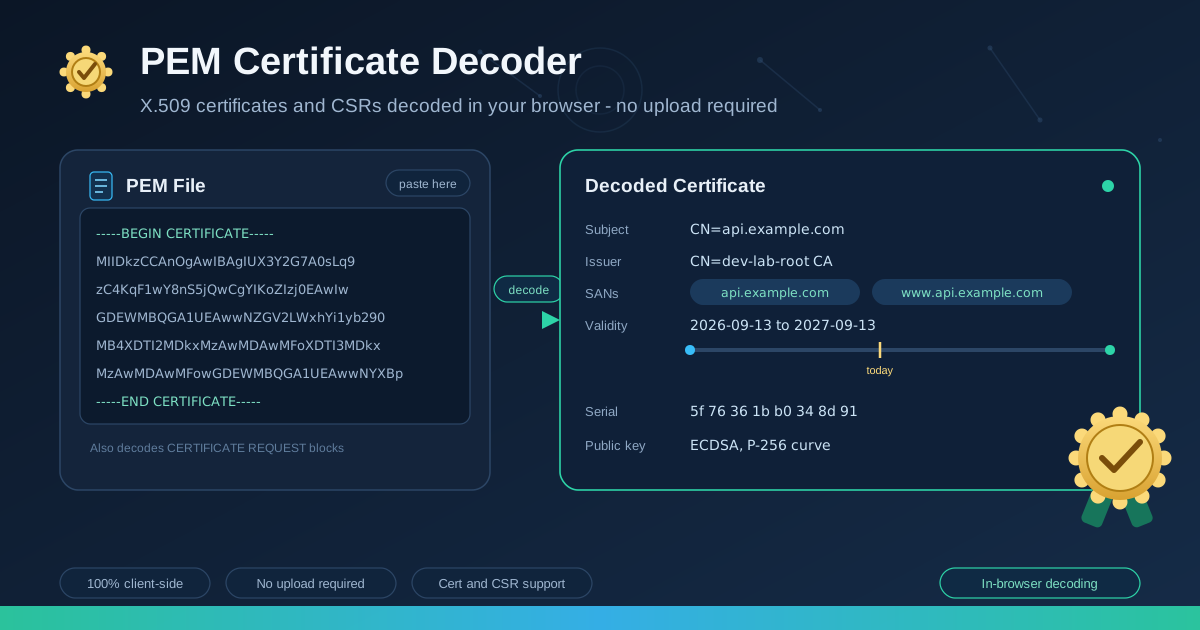
Here is an abridged PEM example and the highlights decoding it surfaces:
-----BEGIN CERTIFICATE-----
MIIDkzCCAnOgAwIBAgIUX3Y2G7A0sLq9zC4KqF1wY8nS5jQwCgYIKoZIzj0EAwIw
... (truncated for illustration) ...
-----END CERTIFICATE-----
- Subject: CN=api.example.com
- Issuer: CN=dev-lab-root CA
- SANs: DNS:api.example.com, DNS:www.api.example.com
- Validity: Not Before 2026-09-13, Not After 2027-09-13
- Serial: 5f 76 36 1b b0 34
- Public key: ECDSA, P-256 curve
Practical Use Cases
Debugging TLS errors
When a client reports a certificate error, decode the certificate the server is actually serving — not the one you believe you deployed — and read the SAN list. The gap between the requested hostname and the SAN entries explains most "wrong site" errors in one glance, and the issuer field exposes the other classic cause: an internal-CA test certificate leaked onto a public endpoint.
Verifying renewal SANs
Renewals are where SANs silently change: a subdomain gets dropped from the new order, and production breaks weeks later. Decode the old and the renewed certificate side by side and compare the SAN lists — thirty seconds that prevent the most embarrassing kind of outage.
Inspecting CSRs before signing
If your team runs an internal CA, read every incoming CSR before signing it. Decode the request, check the subject spelling and SANs against the ticket, and confirm the public key type matches your issuance policy — the certificate you emit becomes the thing everyone trusts.
Best Practices
- Match on SANs, not CN. The common name is a label; the SAN list is the contract.
- Check the full chain separately. Decode leaf, intermediates and root one by one, and verify each issuer matches the subject of the certificate below it.
- Never paste private keys anywhere. Decoding needs only the public part; a tool asking for the private key is a red flag, not a feature.
- Set expiry reminders the moment you decode. Put a renewal reminder 30 days out in your team calendar.
- Record serial numbers in your inventory. A serial-to-service table turns revocation triage from hours of guessing into minutes of lookup.
- Validate CSRs against intent. A clean decode is not a correct request — compare SANs against what the service actually serves before issuing.
Decode Your First Certificate Today
A PEM file is not a black box — it is a public identity document waiting to be read. Open the PEM Certificate Decoder, paste the certificate behind your next mystery error, and read every field in seconds, entirely in your browser. Decode first, conclude second.
Related Tools You Might Like:
- Certificate Generator — mint self-signed certificates and keys for local development and testing.
- OpenSSL Command Generator — build exact openssl commands for keys, CSRs and certificates without memorizing flags.
- Security Headers Generator — pair valid certificates with a hardened header set, from HSTS to CSP.
Every certificate tells a story — now you can read it.
Frequently Asked Questions
Q: Is it safe to paste a certificate into the decoder?
A: Yes. A certificate is public data — every visitor to your site receives it during the TLS handshake — so it holds nothing secret. This tool also decodes entirely in your browser, so the paste never leaves your machine. The one thing never to paste anywhere is a private key, and decoding never asks for one.
Q: Can the tool decode a CSR as well as a certificate?
A: Yes. It recognizes PKCS#10 certificate signing requests and decodes the subject and public key they carry. Remember what a CSR deliberately lacks: issuer, validity and serial do not exist until a CA signs the request. A short panel after pasting a CSR is the spec, not a bug.
Q: Why does the browser reject my certificate even though the common name matches?
A: Because browsers match the requested hostname against the SAN entries, not the CN. A certificate whose CN says api.example.com but whose SAN list omits it fails on every modern client. Decode the certificate and check the SAN list first — that resolves most hostname mismatch reports.