Permissions-Policy Generator Guide: Lock Down Browser Features Per Origin
Learn how to use the free Permissions-Policy Generator to build a valid Permissions-Policy header that blocks camera, geolocation, payment, and other browser features per origin, with ready-to-paste nginx, Apache, and Express presets.
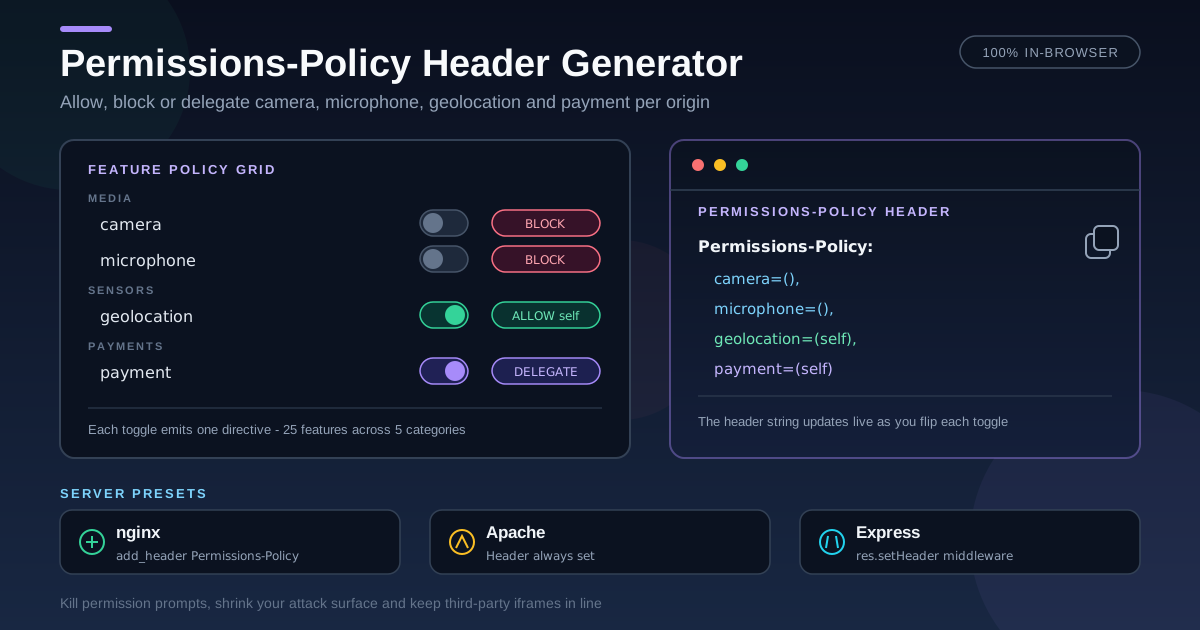
Free Interactive Tool
Permissions-Policy Header Generator
Build Permissions-Policy HTTP headers that allow or block browser features like camera, geolocation, and payment per origin.
Table of Contents
Modern browsers expose far more than pixels and forms. Any script on your page can ask for the camera, request the user's location, or trigger a payment sheet — convenient when the call comes from your own code, dangerous when it comes from a compromised third-party tag. The Permissions-Policy HTTP header is the browser's built-in boundary: it declares which features your page, and any iframe it embeds, may use.
The syntax looks simple until you need it precise. A missing parenthesis or a stray quote either breaks a legitimate feature or leaves a door open. The Permissions-Policy Generator removes the guesswork: toggle features grouped by category, pick an allow, block, or self mode per origin, and copy ready-to-paste output for the raw header plus nginx, Apache, and Express presets. Everything runs 100% in your browser.
This guide covers why the header matters, how the generator works, and recipes for three kinds of sites.
Why Use Permissions Policy Generator?
- A visual builder instead of a spec sheet — toggle 25+ features, from camera and microphone to geolocation, payment, USB, and Bluetooth, grouped by category.
- Per-origin control for every feature — deny, allow same-origin, allow all, or supply a custom allowlist for embeds.
- Presets for common hardening postures — Deny sensitive blocks the risky set in one click; Self for common opens everyday features on your origin.
- Copy-ready output for four targets — the raw header value plus nginx add_header, Apache Header always set, and Express.js middleware using res.setHeader.
- 100% client-side and free — no signup, no tracking, no upload; your policy never leaves the browser tab.
Key Features
| Feature | What it does |
|---|---|
| Grouped feature picker | 25+ features across Media & capture, Sensors, Device access, Identity & payment, and UI. |
| Four allowance modes | Deny everywhere (()), same origin only (self), allow everywhere (*), or custom origins. |
| Hardened presets | Deny sensitive blocks high-risk features; Self for common allows everyday ones. |
| Live header preview | Shows the exact header string as you toggle, and warns when nothing is selected. |
| Server presets | Ready-to-paste snippets for nginx, Apache, and Express.js, each with its own copy button. |
| Private by design | All generation happens locally in your browser — nothing is sent to a server. |
- The header preview is the source of truth. What you copy is exactly what the browser receives.
- Presets are starting points, not finished policies. Re-enable only what your product actually calls.
- Custom origins accept a comma-separated list, quoted correctly inside the directive.
How to Use
- Enable the features you want to control. Features left disabled are omitted, so the browser default applies — the tool marks each untouched feature.
- Choose an allowance mode per feature. Deny everywhere, Same origin only for your own code, or Custom origins for embeds and partners.
- Add custom origins where needed. For video meetings or partner checkout, enter the origins to allow, comma-separated.
- Review the generated header and server presets. The header card shows the final string; nginx, Apache, and Express cards show how to ship it.
- Copy and deploy, then verify. Paste into your server, CDN, or edge config, reload, and confirm the response carries the header.
Allow, Block, and Delegate
A policy is a comma-separated list of directives, one per feature:
Permissions-Policy: camera=(self), geolocation=(), payment=(self "https://pay.example")
- camera=(self) — the camera is allowed only for your own origin; cross-origin iframes get nothing unless delegated.
- geolocation=() — an empty allowlist blocks the feature everywhere, including your own pages and every embedded frame.
- payment=(self "https://pay.example") — self plus one explicit origin, quoted exactly as shown.
Defaults versus delegation
Unlike a blocklist, Permissions-Policy is an allowlist. A feature you never mention keeps the browser's default allowlist — usually same-origin only, though a few default to *. Each directive replaces the default with exactly the origins you list. Cross-origin iframes add a second constraint: the parent policy must include the frame's origin, and the iframe tag must request the feature with its allow attribute.
Why blocking unused features matters
Every feature you leave available is a capability an attacker inherits if they manage to run script on your page. Blocking unused features shrinks that attack surface to zero for those APIs, and it eliminates permission prompts that train users to click Allow without reading. A support chat that never needs the microphone should say so in the header.
Three recipes
A content site needs almost nothing, so block the sensitive set outright:
Permissions-Policy: camera=(), microphone=(), geolocation=(), payment=(), usb=(), serial=(), bluetooth=(), midi=(), hid=(), accelerometer=(), gyroscope=(), magnetometer=(), display-capture=(), idle-detection=()
A banking app allows only what the product genuinely uses, on its own origin. Passkeys need publickey-credentials-get:
Permissions-Policy: camera=(self), microphone=(self), geolocation=(), payment=(self), usb=(), serial=(), bluetooth=(), hid=(), midi=(), accelerometer=(), gyroscope=(), magnetometer=(), idle-detection=(), publickey-credentials-get=(self)
A SaaS product with embeds delegates camera and microphone to the meeting origin only:
Permissions-Policy: camera=(self "https://meet.example.com"), microphone=(self "https://meet.example.com"), display-capture=(self), geolocation=(self), payment=(), usb=(self), serial=(), bluetooth=()
Practical Use Cases
Content and marketing sites
Editorial sites need no device APIs, yet theme and analytics bundles can ship calls that request them. Blocking the sensitive set removes those prompts and keeps the privacy story simple.
Fintech and banking apps
For regulated products the header doubles as least-privilege evidence: block sensors you do not use, allow camera and microphone same-origin only when video KYC is real, and keep passkey login working with publickey-credentials-get=(self).
SaaS with third-party embeds
Meeting widgets, live chat with screen sharing, and embedded checkout each need a narrow slice of capabilities. Custom origins delegate camera or payment to one partner while everything else stays shut.
Security audits and header scanners
Scanners grade Permissions-Policy alongside CSP and HSTS, and a missing policy is a common audit finding. A version-controlled policy turns remediation into a one-line change.
Best Practices
- Start restrictive, then open only what breaks. A feature you never enable costs nothing; one you forget to restrict stays open to every script.
- Test your embeds after every change. iframe features need both the parent header and the allow attribute, so rerun the embed flow after each edit.
- Ship it as an HTTP header, not a meta tag. Permissions-Policy has no <meta http-equiv> equivalent, so it must come from your server, CDN, or edge config.
- Audit quarterly. Third-party scripts come and go; revoke features allowed for widgets that no longer exist.
- Prefer self over *. An asterisk includes every origin, even frames you do not control — use it only when you truly mean all origins.
- Keep the policy in version control. Treat headers like code: review changes, document why each origin is allowed, and roll back if an embed breaks.
Ready to lock down browser features? Open the Permissions-Policy Generator, toggle what your site actually uses, and copy a valid header with nginx, Apache, and Express presets in under a minute.
Related Tools You Might Like:
- Security Headers Generator — generate the full set of recommended security headers in one pass.
- CSP Generator — control which scripts, styles, and frames can load at all.
- HSTS Header Generator — force HTTPS and protect against protocol downgrade attacks.
Stay secure out there!
Frequently Asked Questions
Q: What is the difference between Permissions-Policy and Feature-Policy?
A: Feature-Policy was the original name, and old tutorials still use its syntax. Permissions-Policy is the standardized replacement: camera=(self) instead of camera 'self'. Modern browsers only honor Permissions-Policy.
Q: Does Permissions-Policy replace user permission prompts?
A: No. The header sets the ceiling; the user grant is still required for camera, microphone, and geolocation. A blocked feature, however, never prompts at all.
Q: Can I set Permissions-Policy with a meta tag?
A: No. Unlike Content-Security-Policy, Permissions-Policy has no meta-tag equivalent. It must arrive as an HTTP response header from your server, CDN, or edge platform.
Q: Will blocking features like camera break my site?
A: Only if something uses them. Check your code and every iframe, then block what remains. Video conferencing and camera-based upload are the flows that genuinely need a camera directive.