Referrer Policy Generator Guide: Stop Your URLs From Leaking
Learn how to use the free Referrer Policy Generator to build Referrer-Policy headers from all 8 W3C directives, see a per-scenario leak breakdown, and ship copy-paste nginx, Apache, Express, and meta tag snippets.
Free Interactive Tool
Referrer-Policy Header Generator
Build a Referrer-Policy security header from all 8 W3C directives, see exactly what referrer data leaves your site in each scenario, and copy ready nginx, Apache, Express, and meta tag snippets.
Table of Contents
Every page that hosts an outbound link makes a quiet disclosure on your behalf. When a visitor clicks from one of your pages to another site, the browser attaches a Referer header to the request — and by default it can carry the full URL of the page they left: scheme, host, path, and query string. If they were on an internal admin page or a token-bearing password-reset link, that entire address travels to the destination site.
The Referrer-Policy header is how you take that decision back. The W3C spec defines eight directives, each behaving differently for same-origin, cross-origin, and downgraded requests. The free Referrer Policy Generator makes the choice visual: select a directive, watch a per-scenario leak breakdown update live, and copy a ready-made snippet for nginx, Apache, Express, or a <meta> tag — all 100% in your browser. This guide walks through all eight and shows when to tighten beyond the default.
Why Use Referrer Policy Generator?
- See the leak, not just the name. Names like origin-when-cross-origin hide their behavior in one hyphenated breath. The tool translates each directive into a breakdown showing full URL, origin only, or nothing.
- All eight W3C directives in one place. From no-referrer to unsafe-url, every option is a click away, with risky ones flagged.
- Syntax for every deployment target. The same policy comes out as nginx add_header, Apache Header always set, an Express middleware, and a <meta name="referrer"> tag.
- A safe default built in. The tool pre-selects strict-origin-when-cross-origin, the value modern browsers already use, and marks it recommended.
- Instant, private, and free. 100% client-side: no signup, no quotas, and re-checking your header after every deploy takes seconds.
Key Features
| Feature | What it does |
|---|---|
| All 8 W3C directives | no-referrer, no-referrer-when-downgrade, origin, origin-when-cross-origin, same-origin, strict-origin, strict-origin-when-cross-origin, unsafe-url. |
| Per-scenario breakdown | What is sent on same-origin, cross-origin, and downgraded requests: full URL, origin only, or nothing. |
| Deployment snippets | Copy-paste output for nginx, Apache, and Express, plus a <meta name="referrer"> tag for hosts that cannot set headers. |
| Recommended and unsafe flags | strict-origin-when-cross-origin marked recommended; unsafe-url carries a warning. |
| One-click copy | Each snippet copies as a complete, syntactically correct block. |
| 100% client-side | Runs entirely in the browser; nothing is uploaded. |
Two details deserve emphasis before you deploy anything:
- The downgrade column is where mistakes hide. Policies that look safe on paper can still leak when a request downgrades from HTTPS to HTTP.
- The snippets are deployment-shaped, not just raw values: an nginx add_header without always silently skips error responses.
How to Use
- Open the tool and review the recommended default. The Referrer Policy Generator starts with strict-origin-when-cross-origin selected — where most sites land anyway.
- Study the per-scenario leak breakdown. Check what a same-origin request carries, what leaves cross-origin, and what happens on a downgrade.
- Compare alternatives against your threat model. If your URLs encode sensitive state, try strict-origin and same-origin side by side; if you lean on partner attribution, compare them with origin.
- Copy the snippet for your platform. Take the nginx, Apache, or Express output into your server config, or the <meta> tag into your <head> if your host cannot set headers.
- Deploy and verify with a real request. Inspect the response headers with curl -I or the devtools Network panel and confirm the Referrer-Policy value matches.
The Eight Directives Without the Headache
First, a naming detour: the request header is spelled Referer — a misspelling fossilized into the original HTTP spec — while the policy controlling it is Referrer-Policy, spelled correctly. Both are correct in context.
The Referer header can carry up to four parts of the URL a visitor came from: the scheme (https://), the host (yoursite.com), the path (/admin/users), and the query (?id=42). The fragment (#section) is never sent. That is why a full-URL referrer is a privacy problem — it often reveals not just "which site sent this visitor" but "which exact internal page or token-bearing link they left."
| Directive | Same-origin | Cross-origin | Downgrade (HTTPS to HTTP) |
|---|---|---|---|
| no-referrer | nothing | nothing | nothing |
| no-referrer-when-downgrade | full URL | full URL | nothing |
| origin | origin only | origin only | origin only |
| origin-when-cross-origin | full URL | origin only | origin only |
| same-origin | full URL | nothing | nothing |
| strict-origin | origin only | origin only | nothing |
| strict-origin-when-cross-origin | full URL | origin only | nothing |
| unsafe-url | full URL | full URL | full URL |
One row explains most real-world decisions. strict-origin-when-cross-origin is the recommended middle path, and Chrome, Edge, and Firefox made it the browser default around 2020: your own site gets the full URL (internal analytics keep working), other sites get only the origin, and downgraded HTTP requests get nothing.
Who should go stricter? If your URLs encode sensitive state — admin panels, support tickets, finance flows, token-bearing links — consider strict-origin (origin everywhere, nothing on downgrade) or no-referrer (nothing anywhere). Destination sites lose all attribution, which is usually the point.
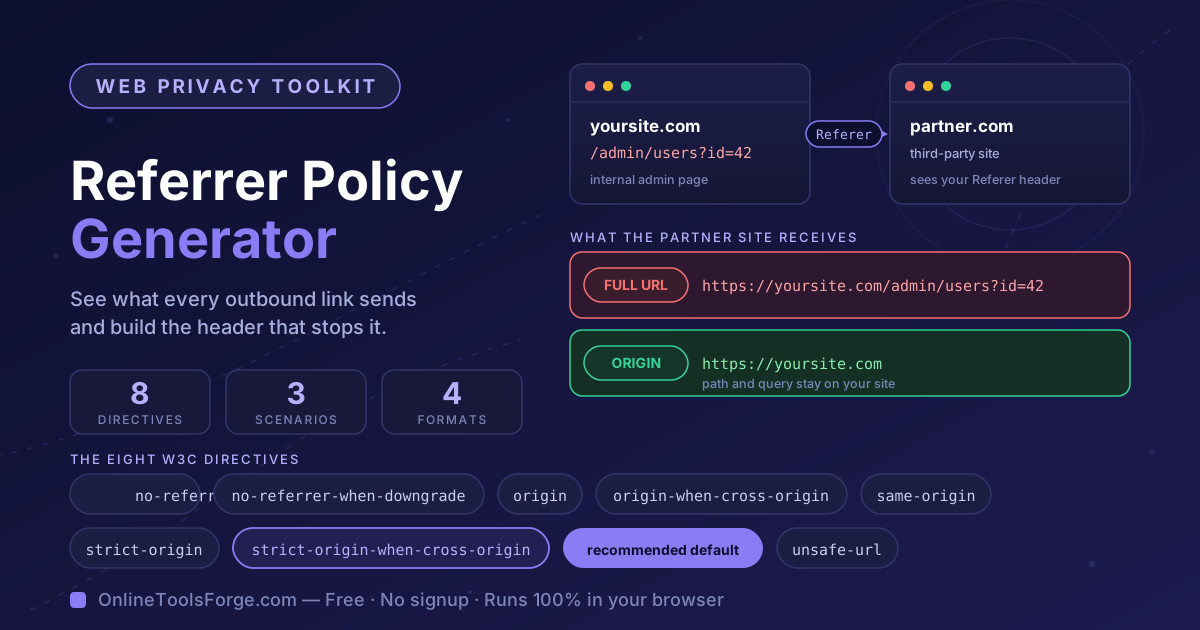
Now walk through the scenario in the featured image: a staff member on https://yoursite.com/admin/users?id=42 clicks a link to a partner's blog.
- With strict-origin-when-cross-origin, the partner receives Referer: https://yoursite.com — the traffic source and nothing more.
- With unsafe-url, the partner receives the complete URL, which now sits in their access logs indefinitely.
- With no-referrer, the partner receives no Referer header at all — maximum privacy, at the cost of attribution.
Practical Use Cases
Privacy Hardening for Content Sites
Blogs and documentation sites link out constantly, and every outbound click is a small disclosure. strict-origin-when-cross-origin at the server level keeps readers' browsing paths yours while partners still see the traffic source. Sites that want to go further can pick no-referrer and say so in their privacy policy.
Keeping Tokens and Internal Paths Off Third-Party Servers
The sharpest edge of referrer leakage is state encoded in URLs: password-reset tokens, invitation links, or internal paths like /admin that were never meant to be advertised. A strict policy — on those routes or site-wide — means a leaked referrer cannot expose them.
Making the Analytics Tradeoff Consciously
Full referrers let analytics reconstruct journeys; origin-only referrers keep "which site sent them" answerable but blur in-site detail. The recommended default splits the difference: partners get origins only, while first-party analytics still see full same-site referrers. Most teams lose nothing — but decide deliberately.
Passing Security and Compliance Reviews
Security questionnaires and GDPR-style reviews increasingly ask what personal data leaves your site in transit. A full-URL referrer — which can include account identifiers and document IDs — is exactly the incidental data share reviewers flag. A documented Referrer-Policy header turns that checklist vulnerability into a one-line answer.
Best Practices
- Set the header on all responses, not just HTML pages. Policies applied only to documents leave assets, redirects, and API endpoints drifting on browser defaults. Apply it server-wide.
- Prefer origin-only behavior for cross-site requests. Unless you have a documented reason to send full URLs to another origin, strict-origin-when-cross-origin (or strict-origin) is the defensible choice.
- Verify with a request inspector after every change. curl -I on a live page or the devtools Network panel shows exactly what the browser received, CDN layers included.
- Remember the meta tag fallback. On hosts where you cannot set response headers, <meta name="referrer" content="strict-origin-when-cross-origin"> in the <head> applies the same policy.
- Never ship unsafe-url. It exists almost entirely for debugging edge cases. If it appears in a production config, it is there by accident.
- Fix your HTTPS before tuning the downgrade column. Serving everything over HTTPS with HSTS — see our HSTS Header Generator — removes the downgrade scenario entirely.
Put Your Referrer Policy to Work
Referrer leakage is invisible until someone shows you the log line, and it costs one header and a few minutes to eliminate. Open the Referrer Policy Generator, review the breakdown for the default, and copy the snippet for your stack today.
Related Tools You Might Like:
- Security Headers Generator — build the full set of security headers, including Referrer-Policy, in one pass.
- CSP Generator — assemble a Content Security Policy that stops XSS and data exfiltration, with live validation.
- HSTS Header Generator — craft Strict-Transport-Security headers that force HTTPS and shut down downgrade attacks.
Happy hardening — and may every outbound click send exactly what you meant to send!
Frequently Asked Questions
Q: Is the tool free, and does anything get uploaded?
A: Completely free with no signup, and nothing is uploaded: everything runs locally in your browser.
Q: What is the difference between Referer and Referrer-Policy?
A: Referer is the request header the browser sends to the destination site, describing where the visitor came from. Referrer-Policy is the response header your site sets that tells the browser how much of that URL to include.
Q: Which directive should most sites pick?
A: strict-origin-when-cross-origin is the sensible default: full URLs within your own site, origin only to other sites, nothing on downgrades. Go stricter only if your URLs routinely carry tokens.
Q: Can I use the meta tag instead of server headers?
A: Yes, as a fallback. <meta name="referrer" content="..."> in the <head> applies the policy to requests initiated from that document — right for static hosts, though a server-wide header remains stronger.