Refinance Calculator: Know Your Break-Even Month Before You Refinance Your Mortgage
Use our free Refinance Calculator to compare your current mortgage against a new offer side by side — see monthly payment savings, the break-even month for closing costs, and the lifetime interest difference.
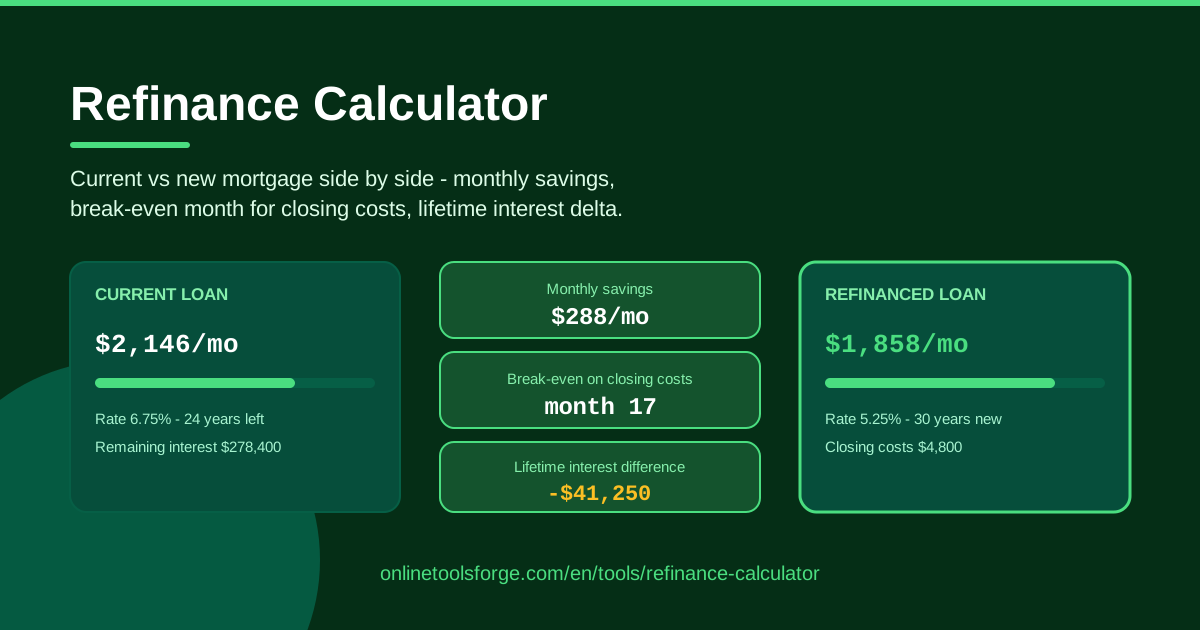
Table of Contents
Every homeowner with a mortgage eventually hears the same pitch: rates have dropped, refinance now and save. Sometimes that advice is genuinely good. Other times it quietly adds tens of thousands of dollars in interest. The trouble is that lenders advertise the new monthly payment, never the whole story — and the whole story is where the decision actually lives. That is why we built the free Refinance Calculator: it lays your current loan and the new offer side by side and answers the three questions that matter.
Question one: how much lower will my monthly payment be? Question two: how many months until the savings have repaid the closing costs — the famous break-even month? Question three: what happens to the total interest over the life of the loan? A refinance can win on the first question and lose badly on the third, and without running the numbers you would never know.
Best of all, the calculator runs entirely in your browser. No account, no email, no data sent anywhere — your loan details never leave your device.
Why Use Refinance Calculator?
- Break-even clarity. Closing costs can swallow months of "savings" before you come out ahead. The tool pinpoints the exact month your refinance starts paying for itself, so you can judge the offer against how long you realistically plan to stay in the home.
- Monthly savings at a glance. See the gap between your current payment and the new one in plain numbers, not marketing promises.
- Lifetime interest honesty. A lower payment can hide a much larger total interest bill. The lifetime interest difference exposes that trade-off immediately.
- Side-by-side comparison. Both loans are structured identically on screen, which makes the real trade-offs obvious instead of buried in paperwork.
- Scenario testing in seconds. Change the new rate, term, or closing costs and watch every figure update — ideal for weighing two or three competing offers.
- Total privacy. Everything is computed client-side, so sensitive financial details are never transmitted or stored.
Key Features
| Feature | What it does |
|---|---|
| Current loan inputs | Enter your existing balance, interest rate, and remaining term |
| Refinance offer inputs | Enter the new rate, new term, and total closing costs |
| Side-by-side comparison | Displays both loans in a matched layout for easy contrast |
| Monthly payment savings | Shows how much less (or more) the new payment is each month |
| Break-even month | Calculates how many months of savings are needed to cover closing costs |
| Lifetime interest difference | Compares total interest paid under each loan |
A few details worth calling out:
- The break-even figure is the heart of the tool: closing costs divided by monthly savings, expressed as the month you truly start profiting.
- Because every calculation runs client-side in your browser, results appear instantly and nothing is uploaded — the tool even keeps working offline once the page has loaded.
How to Use Refinance Calculator
- Enter your current loan details. Type in your remaining balance, current interest rate, and remaining term in years. You will find these on your latest mortgage statement.
- Enter the refinance offer. Add the new interest rate, the new term, and all closing costs — origination fees, appraisal, title, points, everything the lender quotes.
- Compare the monthly payments. The tool instantly shows your current payment next to the new one, along with the monthly difference.
- Find your break-even month. Check how many months of savings it takes to repay the closing costs. If you plan to move before that month, the refinance loses money.
- Check the lifetime interest difference. Confirm the new loan genuinely reduces total interest, or decide whether the lower payment is worth a higher overall cost.
Break-Even Math Explained
The break-even calculation is refreshingly simple:
Closing costs ÷ monthly payment savings = months to break even
Suppose your closing costs are $4,800 and the refinance saves you $160 per month. That is 30 months — two and a half years — before you recover the costs. Stay past month 30 and every dollar of savings is profit; sell the house in month 12 and you are $2,880 out of pocket. This is why break-even clarity matters more than the headline payment: the right answer depends entirely on your timeline.
The second subtlety is the term reset. When you refinance a 25-year-old loan into a brand-new 30-year loan, the payment almost always drops, because you are spreading a smaller balance over more months. But you are also adding years of interest you would otherwise have avoided. The new payment can fall while lifetime interest rises — exactly what the lifetime interest difference reveals.
That leads to the distinction between rate refinancing and term refinancing. Rate refinancing targets a lower interest rate while keeping a similar payoff date, minimizing term-reset damage. Term refinancing deliberately shortens or lengthens the loan: shortening usually raises the monthly payment but slashes lifetime interest, while lengthening does the reverse. Neither is wrong — but each should be a conscious choice, not an accident of the term your lender defaults to.
Practical Use Cases
The Classic Rate-Drop Refinance
You took a 30-year mortgage at 6.5% three years ago, and today's quotes sit near 5%. The calculator shows $185 in monthly savings against $5,200 in closing costs, giving a break-even of roughly 28 months. If you expect to stay another five years, the math is clearly favorable — and you have concrete numbers to back it up.
Cash-Out Offers Require Discipline
A lender offers $20,000 cash out with a payment that barely changes. It sounds free. Run it through the tool: the higher new balance usually means more lifetime interest even at a similar rate. Seeing the true cost of that cash lets you decide whether the purpose — renovation, debt consolidation — actually justifies it.
Shortening a 30-Year Mortgage to 15 Years
Your income has grown and you want the home paid off before retirement. Refinancing from 6.25% with 24 years remaining into 5% over 15 years raises the monthly payment, but the lifetime interest difference often shows savings of well over $100,000. Seeing both loans side by side turns an intimidating decision into a clear one.
PMI Removal Scenarios
If rising home values have pushed your equity past 20%, refinancing can eliminate private mortgage insurance on top of the rate savings. Compare offers with and without PMI: the monthly savings figure shows exactly how much the insurance removal contributes, which sometimes makes a modest rate improvement suddenly worthwhile.
Best Practices
- Compare quotes the same day. Rates move daily; two offers gathered a week apart are not a fair comparison.
- Include every closing cost. Origination, appraisal, title insurance, points, recording fees — leaving any out will fake an early break-even.
- Do not ignore the term reset. Always check the lifetime interest difference, even when the new payment looks wonderful.
- Run multiple scenarios. Test your top two or three offers plus a "do nothing" baseline to see what each choice really costs.
- Match the break-even to your timeline. A great refinance for someone staying ten years can be a loss for someone moving in eighteen months.
- Enjoy the privacy. Because the tool runs entirely client-side, you can enter real numbers without worrying about who sees them.
Ready to find out whether refinancing actually pays? Open the free Refinance Calculator, enter your current loan and the best offer on your desk, and let the break-even month make the decision for you. It takes about two minutes, costs nothing, and could save you five figures.
Related Tools You Might Like:
- Mortgage Calculator — work out payments for a brand-new home loan
- Loan Calculator — analyze any amortizing loan, not just mortgages
- Compound Interest Calculator — see what your monthly refinance savings could grow into if invested
Happy saving!
Frequently Asked Questions
Q: What is a break-even month in refinancing? A: It is the point where your accumulated monthly savings have repaid the closing costs. Before that month the refinance has cost you money; after it, every payment is genuine savings.
Q: Is a lower monthly payment always a good deal? A: No. Stretching the loan back out to 30 years can lower the payment while increasing total interest paid. Always check the lifetime interest difference before deciding.
Q: What counts as closing costs? A: Lender origination fees, appraisal, title search and insurance, recording fees, discount points, and prepaid items. Enter the full figure — an underestimated total makes the break-even month look better than reality.
Q: Does the Refinance Calculator store my loan information? A: No. Every calculation runs entirely in your browser on your own device. Nothing is transmitted, logged, or stored anywhere.