Regex Performance: Benchmark Two Patterns Before They Hit Production
Benchmark two regex patterns side by side with Regex Performance Tester — measure ops/sec, average match time, and match counts, and catch backtracking warnings before they reach production.
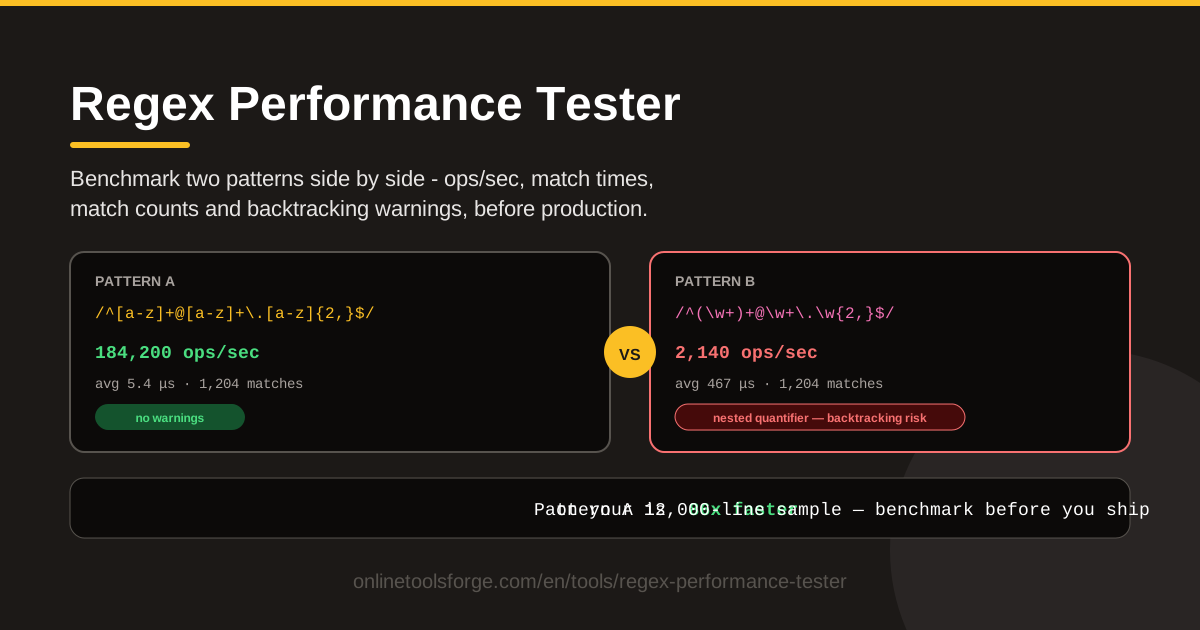
Table of Contents
Regular expressions are easy to write and even easier to get wrong in performance terms. A pattern that answers instantly on a ten-line test string can grind a service to a halt the first time it meets a large, messy, or adversarial input. Regex Performance Tester closes that gap: paste realistic sample text, run two candidate patterns side by side, and read the results as hard numbers — ops/sec throughput, average match time, and match counts — plus backtracking warnings that flag nested quantifiers carrying ReDoS-style risk. Everything runs in your browser: nothing to install, and no sample text ever leaves your machine.
This guide covers how the tool works, what makes some regexes dramatically slower than others, and how to make a two-minute benchmark part of your workflow. Whether you are choosing between two equivalent patterns, validating a hot-path validator, or showing a teammate why (\w+)+ is dangerous, measuring beats guessing.
Why Use Regex Performance Tester?
- Catch slow patterns before production. A regex that looks fine in code review can behave catastrophically on inputs nobody predicted. Benchmarking turns "it seems fast" into measured ops/sec on the data your system actually handles.
- Compare two candidates objectively. Most codebases contain several regexes that all "work." Running them side by side on the same sample removes intuition from the decision.
- Spot ReDoS-style risks early. Nested quantifiers are the classic ingredient of regular-expression denial of service; backtracking warnings surface that risk while the pattern is still on your screen, not in your incident channel.
- No setup, fully in-browser. No CLI to install, no benchmark harness to wire up, no uploads. Open the page, paste, and run.
- Benchmark with your own data. Results on synthetic strings mislead; real log lines and payloads make every number representative.
- Match counts keep results honest. If two patterns report different counts on the same text, they are not equivalent — a performance win that changes behavior is a bug.
Key Features
| Feature | What it does |
|---|---|
| Side-by-side benchmark | Runs patterns A and B against the same sample text under identical conditions. |
| Ops/sec throughput | Counts how many match operations each pattern completes per second. |
| Average match time | Reports mean time per operation so small absolute gaps become visible. |
| Match counts | Confirms both patterns find the same matches before you trust the speed comparison. |
| Backtracking warnings | Flags nested quantifiers and similar constructs linked to ReDoS-style catastrophic backtracking. |
| In-browser execution | Benchmarks locally with zero setup and full privacy. |
Two columns deserve emphasis. The match counts column matters more than it looks: verify both patterns return the same matches, or you are comparing apples to oranges. The backtracking warnings run alongside the timing, so a pattern can be flagged even when it passes quickly on your sample. And while ops/sec is the headline number, average match time translates most directly into user-perceived latency.
How to Use Regex Performance Tester
- Paste realistic sample text. Use a representative chunk of production data: actual log lines, API payloads, or form submissions. Include awkward cases — long lines, repeated characters, missing delimiters.
- Enter pattern A and pattern B. Put the incumbent in one slot and the challenger in the other; with one pattern, paste a simple variant to compare against.
- Run the benchmark. Both patterns execute repeatedly against the same sample under identical conditions while the tool collects timing data.
- Compare ops/sec and match times. Look at throughput first, then average match time; multiply time per match by your real call volume to estimate production impact.
- Read the warnings. Check the backtracking warnings for both patterns before declaring a winner — a slightly faster pattern with a nested-quantifier warning is usually the worse choice.
What Makes Regexes Slow
Backtracking basics. Most regex engines, including JavaScript's, try one path through the pattern and back up to try alternatives when it fails. On typical inputs the overhead is invisible. The trouble begins when a pattern can succeed in many different ways over the same stretch of text: the engine re-examines the same characters again and again.
Nested quantifiers multiply the work. The textbook example is (\w+)+. The outer quantifier can split a word into its inner pieces in many ways, so matching time can grow exponentially with input length. Feed it thirty a characters followed by one ! and it may churn through millions of failed alternatives — the catastrophic shape: a quantifier inside a quantifier, over an overlapping character class, followed by something that can never match.
The failure is input-dependent. A nested-quantifier pattern can pass every normal test and still explode on one crafted string. That asymmetry is why ReDoS (Regular Expression Denial of Service) is a security issue and not just a performance nuisance: an attacker supplies the input on purpose, and a single request can pin a CPU core.
Realistic samples matter. Benchmarking on "test" tells you almost nothing. Engine optimizations make short, clean strings fast while pathological cases hide; benchmark on production-shaped text — long lines, repeated characters, partially malformed input — and differences appear immediately.
Correctness first, speed second. Faster means nothing if the pattern matches what it should not or misses what it should catch. Confirm match counts agree, verify edge-case behavior, and only then optimize. A fast but subtly wrong pattern is worse than a slow one.
Practical Use Cases
Choosing Between Two Working Patterns
Your validation regex works — but so does the one from the Stack Overflow answer. Paste both with a realistic sample and compare ops/sec. When throughput differs by an order of magnitude — common when one leans on tight character classes and the other on .* — the decision makes itself, and you have numbers for the pull request.
Validating Hot-Path Request Validators
Request validation runs on every call, so regex cost multiplies by traffic. Benchmark your validator against a worst-case request body: long tokens, repeated punctuation, fields that fail halfway. Poor ops/sec or a backtracking warning there moves the pattern onto your fix list before an outage finds it.
Hardening Log Parsing Pipelines
Log parsers apply dozens of patterns to every line, so per-line milliseconds become hours per week. Paste a few hundred representative log lines and benchmark parsing patterns in pairs. The slowest pattern is usually the best first optimization target, and match counts confirm your rewrite extracts the same fields.
Teaching Juniors the Real Cost of Regex
Few lessons land harder than watching (\w+)+ crawl on a twenty-character input while a flattened alternative flies. Run both on a string designed to backtrack and let the ops/sec gap do the teaching — two minutes that replace a lecture.
Best Practices
- Anchor your patterns. Leading ^ or \b boundaries let the engine fail fast instead of probing every offset.
- Prefer character classes over dot-star. [^,]* states intent and prunes the search space; .* invites the engine down paths it must later abandon.
- Test with adversarial inputs. Long runs of a repeated character, unbalanced quotes, truncated tokens — alongside normal data, before approving any pattern.
- Keep timeouts in production. Configure regex timeouts or step limits where your runtime supports them, so an unknown pathological pattern degrades one request instead of the worker.
- Bound nested quantifiers. When unavoidable, add explicit limits like {1,20} and document why.
- Re-benchmark after every edit. "Optimized" patterns drift; rerun the comparison on a saved sample whenever a pattern changes.
Make this a habit: open Regex Performance Tester, paste a production sample, and benchmark your two candidate patterns side by side in seconds — catching one slow pattern before a deploy repays the effort many times over.
Related Tools You Might Like:
- Regex ReDoS Checker — audit a single pattern in depth for backtracking and ReDoS risk.
- Regex Tester — verify pattern correctness, captures, and flags with live match highlighting.
- Regex Explainer — decode any pattern token by token before you commit it.
Happy benchmarking!
Frequently Asked Questions
Q: What does a backtracking warning actually mean? A: It means the tool detected a construct associated with catastrophic backtracking, most commonly a quantifier nested inside another quantifier. Such patterns can slow down or hang on certain inputs even when they benchmark quickly on your sample, so treat the warning as a prompt to simplify or bound the pattern.
Q: Why do my two patterns show different match counts if they both "work"? A: Different counts mean the patterns do not agree on what a match is — one is greedier, stricter, or anchored differently. Fix that difference first; benchmarking non-equivalent patterns just produces a fast wrong answer.
Q: Are the benchmark results identical across browsers and machines? A: Absolute numbers vary with your hardware and the JavaScript engine, so treat ops/sec as a relative comparison. The A-versus-B ratio on your machine is more meaningful than any absolute figure.