SSRF URL Checker: Catch Dangerous Internal URLs Before Fetching
Inspect URLs for private, loopback, link-local, and cloud metadata endpoints that are dangerous to fetch server-side. Instant SSRF risk assessment in your browser.
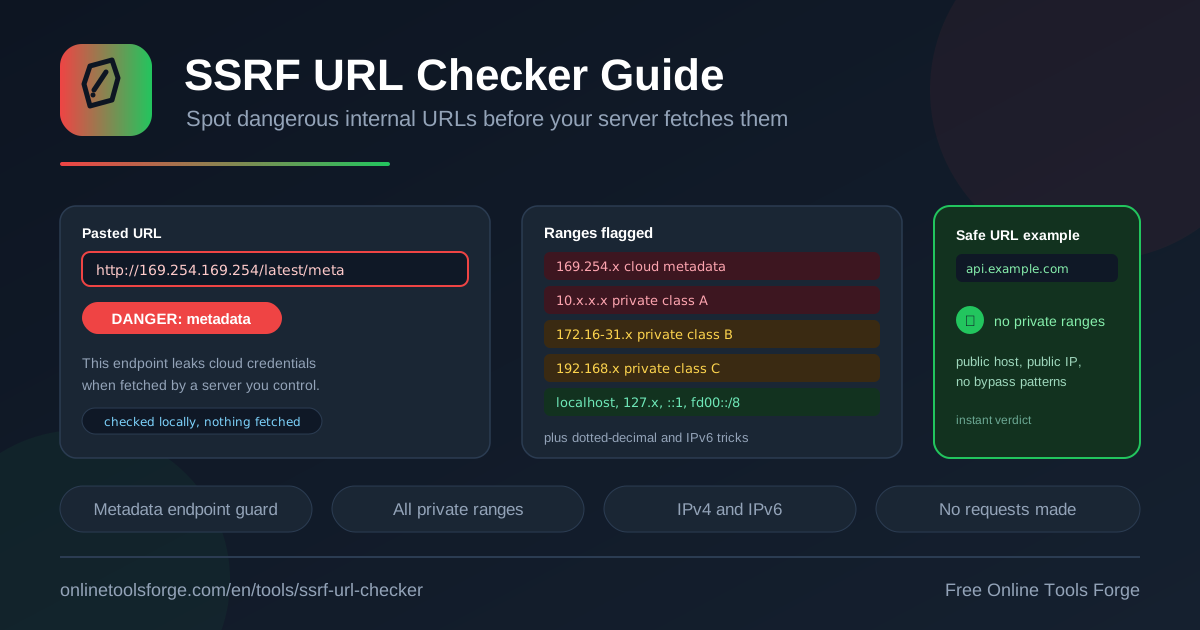
Table of Contents
Every time your server fetches a URL, the request goes out from inside your network, carrying your routing, your credentials, and your trust. Server-side request forgery (SSRF) is the attack class that exploits exactly this: an adversary submits a URL that looks harmless but points your server at an internal service, a database, or the cloud metadata endpoint. The free SSRF URL Checker lets you inspect any pasted URL for those dangerous host patterns and get an instant risk verdict before your backend ever connects.
The tool runs 100% in your browser. No request is ever made to the address you paste, nothing is logged, and nothing leaves your machine. That design matters, because many online URL inspectors do the opposite: they fetch the link from their own servers, which is precisely the behavior you are trying to prevent in your own code.
This guide covers which hosts signal SSRF risk, how to work the checker into code review and triage, and the habits that keep user-supplied URLs from becoming a gateway into your infrastructure.
Why Use the SSRF URL Checker?
- Zero network side effects. Every check happens client-side; the URL is parsed and evaluated in your browser and never fetched, so inspecting even a hostile link creates no traffic.
- Catches the classic breach pattern. The cloud metadata endpoint 169.254.169.254, implicated in several publicized credential leaks, is flagged immediately.
- Covers IPv4 and IPv6. Loopback forms such as localhost, 127.x, 0.0.0.0, and ::1 are detected, along with private IPv6 fd00::/8 addresses.
- Explains each finding. You get a short explanation of why a host is dangerous to fetch server-side, not just a red flag.
- Instant and frictionless. Paste, read the verdict, decide. Nothing to install and no account required.
- Safe for sensitive input. Because nothing leaves your machine, you can triage URLs from incident reports or pentest findings without exposing them to a third party.
Key Features
| Feature | What it does |
|---|---|
| Instant risk verdict | Paste a URL and immediately see whether it is safe or dangerous to fetch from a server. |
| Loopback detection | Flags localhost, 127.x.x.x, 0.0.0.0, and the IPv6 loopback ::1. |
| Private range detection | Flags the 10.x, 172.16-31.x, and 192.168.x IPv4 ranges used by internal networks. |
| Link-local and metadata detection | Flags 169.254.x addresses, including the cloud metadata endpoint 169.254.169.254. |
| Private IPv6 detection | Flags fd00::/8 unique-local addresses that only resolve inside an organization. |
| Plain-language findings | Explains why each flagged host is dangerous rather than only naming a matched rule. |
- All analysis is hostname parsing and range matching in JavaScript, so results appear in milliseconds and the tool even works offline.
- Treat the verdict as a triage signal for developers and reviewers; it complements, but does not replace, server-side validation in your application.
How to Check a URL for SSRF Risk
- Open the SSRF URL Checker in any modern browser.
- Paste the URL your server is about to fetch: a webhook target, an import source, an avatar URL, or any link sourced from user input.
- Read the instant verdict. Safe means the host is public; dangerous means it matches a loopback, private, link-local, or metadata pattern.
- Review the explanation for any flagged component so you know which category the host falls into and what it could expose.
- Act on the result: reject the URL in your application logic, or route it through allowlist review, before the backend performs any fetch.
Which Hosts Are Dangerous to Fetch
What SSRF is. Any feature that fetches a user-influenced URL — image previews, webhook registration, import by link — turns your server into a proxy with internal network access. An attacker who steers that request can reach admin panels bound to localhost, unauthenticated internal APIs, and cloud control planes that were never meant to face the internet.
Loopback hosts. Addresses such as 127.0.0.1, localhost, 0.0.0.0, and ::1 point back at the machine making the request. A fetch against them reaches whatever listens on your server itself, which is often the application, a local database, or a debug endpoint with far more privilege than the public interface.
The three private IPv4 ranges. RFC 1918 reserves 10.0.0.0/8, 172.16.0.0/12, and 192.168.0.0/16 for internal networks. A URL pointing at 10.0.4.12 or 192.168.1.1 asks your server to talk to an internal asset, and internal services frequently skip authentication because they assume only trusted hosts can reach them. That assumption is exactly what SSRF breaks.
Link-local and the metadata endpoint story. The 169.254.0.0/16 range is reserved for link-local traffic, and inside it sits the most notorious SSRF destination: 169.254.169.254, the instance metadata endpoint on AWS, GCP, and Azure. A successful request there returns temporary IAM credentials, instance identifiers, and tokens. The 2019 Capital One breach, which exposed data on roughly 100 million people, began with this exact pattern. If a user-supplied URL can reach the metadata endpoint, your server has effectively handed an attacker its cloud credentials.
Private IPv6. The fd00::/8 unique-local range is the IPv6 equivalent of RFC 1918 space: routable inside an organization, unreachable from the internet. Checkers that only understand IPv4 happily pass fd00::1234 as safe; this tool does not.
Why client-side checks protect you. Evaluating the URL in your own browser means the suspicious address is never fetched by anyone — not by you, not by the tool vendor, not by any server. You get the risk information without performing the very action you are trying to prevent.
http://169.254.169.254/latest/meta-data/   # cloud credential theft
http://127.0.0.1:8080/actuator/heapdump    # internal service access
http://192.168.1.1/admin                   # office router or gateway
http://[fd00::42]:5432/                    # private IPv6 database
Practical Use Cases
Validating Webhook Targets
Suppose your SaaS lets customers register callback URLs. During review, paste each submission into the checker. If a customer submits http://10.0.2.15:9000/hooks — an address on your own private network — you know the callback would stay inside your infrastructure, and your registration endpoint should reject it and raise an alert.
Auditing File-Import Features
Import-by-URL features in CMSs and data pipelines are classic SSRF entry points. Take URLs collected during QA fuzzing — metadata endpoints, localhost variants, private ranges — and confirm your validation layer rejects every one before the feature ships to production.
Reviewing Fetch Allowlists
Periodically run every entry in your fetch allowlist through the checker. Entries that resolve into private or link-local space, or that someone added temporarily for debugging, should be removed or replaced with a hardened external endpoint.
Security Training
Run a 15-minute session where developers paste the flagged examples, read the plain-language explanations, and then locate the validation gap in your own codebase. Seeing 169.254.169.254 flagged with a reason attached makes an abstract threat concrete in minutes.
Best Practices
- Enforce on the server. Browser checks are for triage and review; real enforcement must happen in backend code before any fetch is attempted.
- Resolve, then re-check. A hostname can look public but resolve to a private address; resolve DNS server-side and validate every returned IP.
- Prefer allowlists. Approve known-good host patterns instead of blocklisting every bad address, and reject everything else.
- Harden metadata access. Enforce IMDSv2 on AWS or the equivalent on your cloud, and block 169.254.169.254 in egress rules for application subnets.
- Re-validate redirects. A safe first URL can redirect straight into an internal address; disable redirects or check every hop in the chain.
- Isolate the fetcher. Run outbound fetches from a network segment with no route to sensitive internal services, so a missed check has nowhere dangerous to go.
Check Your Next URL in Seconds
Paste an unfamiliar or suspicious URL into the free SSRF URL Checker and get an instant, private risk assessment. It runs entirely in your browser, costs nothing, and takes less time than reading this paragraph. Make it a habit before any user-supplied URL reaches your backend.
Related Tools You Might Like:
- URL Parser — break any URL into its scheme, host, port, and path.
- IP Lookup — see where a hostname or address points and who owns it.
- IP Range Calculator — compute CIDR ranges when writing your own allowlists.
Stay safe!
Frequently Asked Questions
Q: Does the SSRF URL Checker fetch the URL I paste? A: No. All parsing and range matching happens in your browser. The tool never requests the address and nothing is sent anywhere, so checking is completely side-effect free.
Q: What is SSRF in simple terms? A: Server-side request forgery is an attack where a user tricks your server into fetching a URL of their choosing, usually pointing at internal services or the cloud metadata endpoint that the attacker cannot reach directly from the internet.
Q: Why is 169.254.169.254 so dangerous? A: On AWS, GCP, and Azure, that link-local address serves instance metadata, including temporary credentials for the attached IAM role. If a server-side fetch can reach it, an attacker can steal those credentials and pivot into your cloud account.
Q: Can the checker replace server-side validation? A: No. It is a fast triage and review aid. Your application must still validate user-supplied URLs on the server, including resolving hostnames and re-checking the resolved addresses before every fetch.
Q: Does it detect private IPv6 addresses? A: Yes. Alongside IPv4 loopback and RFC 1918 ranges, the tool flags fd00::/8 unique-local IPv6 addresses, which many simpler checkers overlook entirely.