Text Similarity Checker: Compare Two Texts with Levenshtein, Jaccard and Cosine Scores
The Text Similarity Checker compares two texts with Levenshtein, Jaccard and cosine similarity percentages plus a word-level diff — all computed in your browser.
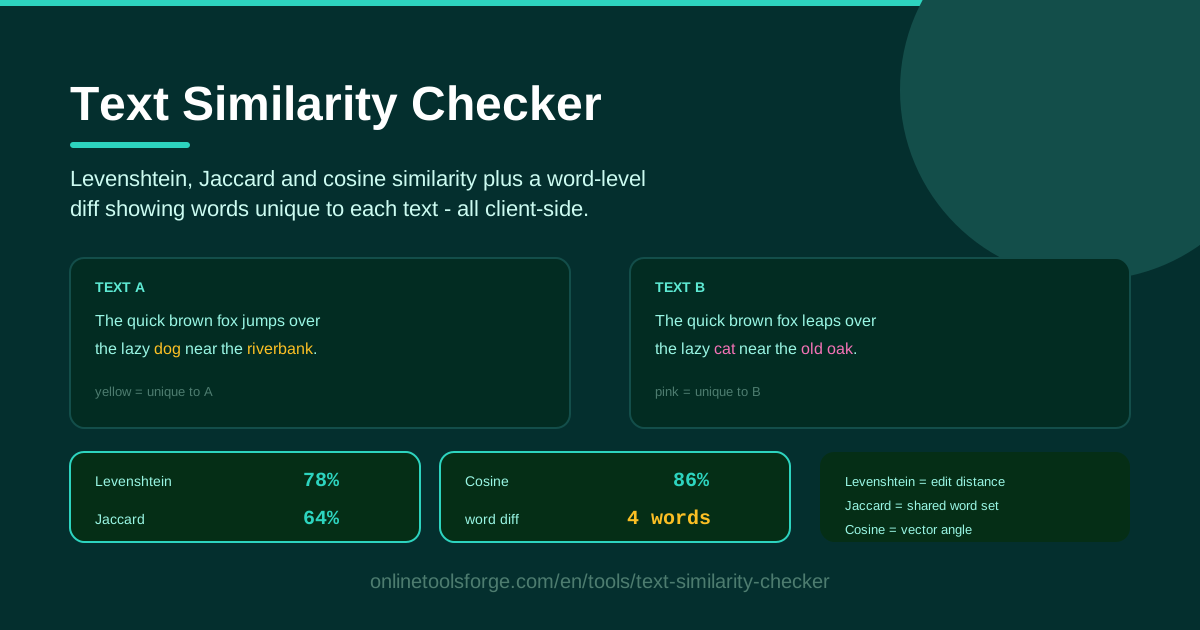
Table of Contents
Every writer, editor, marketer and teacher eventually asks the same question: how similar are these two texts, really? Reading them side by side rarely settles it — human eyes forgive paraphrases, skim past swapped words and lose count after a few paragraphs. The Text Similarity Checker replaces that guesswork with numbers.
The tool scores your texts three ways at once: Levenshtein edit-distance similarity counts character-level changes, Jaccard similarity measures how much the two word sets overlap, and cosine similarity captures how closely the texts align as vectors. Beneath the percentages, a word-level diff highlights every word that appears in only one of the two texts.
Everything runs client-side in your browser — nothing is uploaded, stored or logged — so confidential drafts and unpublished work stay private. This guide explains how to use the tool, what each score actually measures, and how to read the numbers when they disagree.
Why Use Text Similarity Checker?
- Three measures in one view. Levenshtein, Jaccard and cosine each answer a different question about similarity; together they are far more reliable than any single number.
- A diff you can read. Percentages say how much the texts differ; the word diff shows which words are unique to each side, turning an abstract score into a concrete list of changes.
- Fully private processing. All calculations run locally in your browser, so unreleased copy and sensitive documents never leave your device.
- No signup, no limits. Open the page, paste your texts, read the results — no accounts, quotas or configuration.
- Neutral evidence. Point to objective percentages instead of a gut feeling before raising duplication concerns with a colleague, student or vendor.
- Works with any text. The math operates on characters and words, so it handles articles, product descriptions, translations and code alike.
Key Features
| Feature | What it does |
|---|---|
| Side-by-side input | Paste text A and B into two panels; results update automatically |
| Levenshtein similarity | Converts edit distance — insertions, deletions, substitutions — into a percentage |
| Jaccard similarity | Compares the two word sets and reports shared vocabulary as a percentage |
| Cosine similarity | Treats each text as a term-frequency vector and measures the angle between them |
| Word-level diff | Highlights words that appear only in text A or only in text B |
| Client-side computation | Every calculation runs locally in your browser; no data is transmitted |
A few details worth knowing:
- The three percentages are computed independently, so they can move in different directions as you edit — divergence is informative, not a bug.
- The diff works on whole words, making swapped terminology, renamed products and missing qualifiers easy to spot at a glance.
How to Use Text Similarity Checker
- Open the tool and paste your first text. Put your reference version — the original draft, source document or previous description — into the left panel.
- Paste the second text beside it. Drop the version you want to compare into the right panel; scores compute automatically as soon as both panels contain text.
- Read the three percentages together. Start with Levenshtein for character-level fidelity, then Jaccard for vocabulary overlap and cosine for overall alignment, noting whether the numbers agree or spread apart.
- Study the word diff. Scan the words unique to each text: 90% similarity built from swapped adjectives means something very different from 90% that hides changed prices or legal terms.
- Iterate until it sits right. Edit, re-paste and watch the scores move; most comparisons converge within two or three passes.
Three Ways to Measure Similarity
Levenshtein Edit Distance: Counting Character Changes
Levenshtein edit distance is the minimum number of single-character operations — insertions, deletions or substitutions — needed to turn one string into the other. "Colour" needs one deletion to become "color"; "their" needs one substitution to become "there". The tool converts this raw count into a similarity percentage, so fewer edits mean a higher score. Working character by character, it is the most sensitive measure: one typo or changed digit visibly lowers the score, making it the best proxy for how carefully a text was copied.
Jaccard Similarity: Measuring Shared Vocabulary
Jaccard similarity ignores word order and frequency. It builds the set of unique words in each text, then divides the overlap by the union — shared vocabulary over total vocabulary. Two texts that shuffle the same sentences still score 100%, while a new paragraph of unfamiliar terms pulls the score down. This makes Jaccard the cleanest measure of topical overlap: did a rewrite change the substance or just the surface?
Cosine Similarity: The Angle Between Texts
Cosine similarity treats each text as a vector of word frequencies and measures the angle between the two vectors. Identical word distributions point the same way and score near 100%; texts that share some vocabulary but lean on different terms land in between. Unlike Jaccard, cosine respects frequency, so a document mentioning "refund" twenty times will not look identical to one mentioning it once. It is the same intuition behind search ranking: similar documents point in similar directions.
When the Scores Disagree
Divergence between the numbers is itself information. High Jaccard with low Levenshtein usually means the same vocabulary in a different order — a rewrite or a shuffled list. High Levenshtein with modest cosine often signals one text is much longer, since edit distance punishes extra characters while cosine cares about proportions. Low Jaccard with high cosine typically means shared connective words but different subjects. Whenever the scores spread apart, read the diff before concluding anything.
Practical Use Cases
Checking Paraphrases
A client returns your white paper "lightly edited." Paste both versions in. High Levenshtein with only a few unique words in the diff means the edits are cosmetic; a noticeably lower Jaccard means whole sections changed topic and deserve a closer look before you approve.
Comparing Product Descriptions for Duplication
Marketplaces and search engines penalize duplicated copy. Compare a supplier's description with your listing: cosine similarity in the high nineties with a nearly empty diff means the text is effectively the same and needs a rewrite, while a lower score confirms your version is distinct.
Reviewing Translation Edits
When a reviewer returns your translation, compare the original and revised versions. Clusters of unique words in the diff show exactly which passages were reworked, so you can review those changes deliberately instead of re-reading the whole document.
Plagiarism Sanity Checks
The tool is not a forensic plagiarism detector, but it is a fast first screen. Before escalating a suspected copied submission, one quick comparison gives you objective percentages — and often the diff alone settles the question in seconds.
Best Practices
- Normalize case when casing is meaningless, since "iPhone" and "iphone" are different strings for edit distance.
- Never judge on one score. Read the three percentages as a set before deciding anything.
- Inspect the diff before deciding. The unique-word list explains why the scores moved; equal percentages can hide different changes.
- Be careful with short texts. One word swings the scores on short inputs, so treat them as a hint and read the pair yourself.
- Compare like with like. A short summary against a long report always scores low; trim or split the longer text first.
- Re-run after every edit. Similarity is a moving target, and checking each revision keeps you on track.
Need to compare two texts right now? The Text Similarity Checker runs entirely in your browser: paste both texts and get Levenshtein, Jaccard and cosine percentages plus a full word diff in seconds, with nothing ever leaving your device.
Related Tools You Might Like:
- Diff Checker — compare two texts line by line with every change highlighted
- Duplicate Line Remover — strip repeated lines from lists and logs in one click
- Word Counter — count words, characters and reading time as you write
Similar texts, sorted in seconds — happy comparing!
Frequently Asked Questions
Q: Is my text uploaded to a server? A: No. Every calculation — Levenshtein, Jaccard, cosine and the word diff — runs client-side in your browser. Your text never leaves your device.
Q: Which of the three scores should I trust most? A: None on its own. Levenshtein reflects character-level fidelity, Jaccard reflects vocabulary overlap and cosine reflects overall proportions — read them together, then confirm with the diff.
Q: Why do the scores differ so much for short texts? A: With few words, every change is a large fraction of the whole, so treat the numbers as a rough signal and judge by reading the texts yourself.
Q: Can this tool prove plagiarism? A: It provides objective similarity evidence, not a legal verdict. Use it as a fast first screen, then review the highlighted unique words to judge whether the overlap is coincidental or suspicious.