URL Brand Impersonation Checker: Spot Lookalike Domains Before They Fool You
Learn how the URL Brand Impersonation Checker flags typosquatting, homoglyph, punycode and risky-TLD domains imitating known brands - fully offline, in seconds.
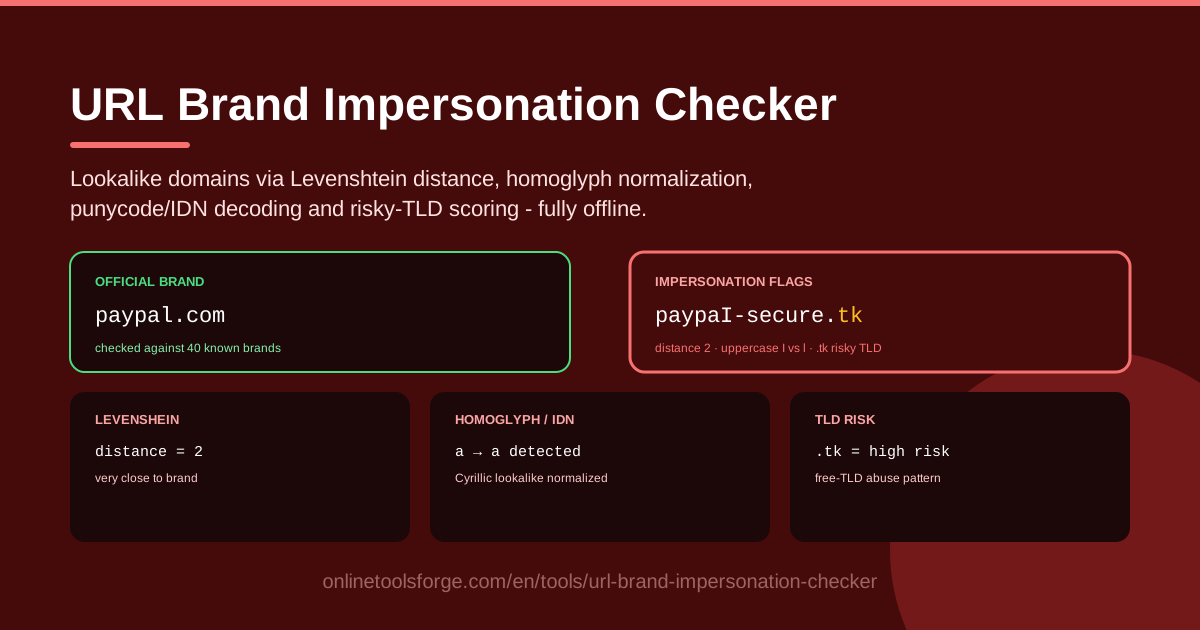
Table of Contents
You click a link that looks like your bank, your cloud dashboard, or a favorite retailer, and everything seems right: the logo, the fonts, the wording. Yet the login page quietly forwards your credentials to an attacker. This is brand impersonation, and it almost always begins with one small detail - a domain that imitates a real one. The URL Brand Impersonation Checker exists to expose that trick before you hand over anything valuable.
Attackers register lookalike domains at scale: swapping a letter, borrowing a Cyrillic character that renders like a Latin one, hiding the true name behind punycode, or parking the whole scheme on a cheap, trusting TLD. To the human eye these are near-perfect copies. To a machine they carry measurable signals - edit distance from the real brand, non-Latin characters in the label, an xn-- prefix, and a TLD with a poor reputation.
The URL Brand Impersonation Checker reads all of those signals at once and runs fully offline, so nothing you paste ever leaves your browser. In this guide we will show you how to use it, dissect the anatomy of a lookalike domain, and share habits that keep you ahead of domain-based phishing.
Why Use URL Brand Impersonation Checker?
- Catch typosquats before you click. A dropped, doubled or swapped letter is the oldest trick in the book, and distance scoring makes it instantly visible.
- Expose homoglyphs you cannot see. Cyrillic "а" renders identically to Latin "a" but is a different character entirely; normalization strips the disguise.
- Decode punycode on sight. Domains starting with xn-- hide internationalized names that may be nothing like what the address bar appears to show.
- Weigh risky TLDs properly. Extensions such as .tk and .zip appear in phishing campaigns far above their share of the web, and the tool scores that risk for you.
- Replace gut feeling with numbers. Instead of squinting at a URL and hoping, you get a concrete distance score and signal cards you can compare and act on.
- Keep everything on your machine. All analysis runs locally in your browser with no network calls, which matters when you are investigating something sensitive.
Key Features
| Feature | What it does |
|---|---|
| Lookalike domain flagging | Scores the pasted domain against known brands using Levenshtein distance and flags near-matches |
| Homoglyph normalization | Folds Cyrillic and other lookalike scripts back to their Latin equivalents before comparison |
| Punycode and IDN decoding | Expands xn-- labels into the real internationalized name so the disguise becomes visible |
| Risky TLD scoring | Assigns a risk weight to extensions notorious for abuse, such as .tk and .zip |
| Fully offline analysis | Every check runs locally in your browser; no URL, query or telemetry is transmitted |
A few details deserve a closer look:
- Levenshtein distance counts how many single-character edits separate two strings, so "paypaI" sits exactly one edit from "paypal" - a red flag no human eye would catch.
- Homoglyph normalization means the comparison sees through characters that merely render like Latin letters, defeating classic IDN spoofing outright.
- Signals are shown separately, so you always know why a domain was flagged instead of trusting one opaque score.
How to Use URL Brand Impersonation Checker
- Paste the suspicious URL. Copy the link from the email, message, QR code or document you are checking and drop it into the input box. The tool parses out the true registrable domain automatically, ignoring the path and query strings attackers use as decoration.
- Review the impersonation flags. Within moments you will see whether the domain matches, or nearly matches, a known brand. Any flag here is your headline finding: this domain is imitating somebody.
- Inspect the distance and homoglyph signals. Read the Levenshtein distance score - one or two edits from a major brand deserves suspicion - and check whether homoglyph normalization changed the domain before comparison. If the normalized form differs from what you pasted, the domain is wearing a costume.
- Check the TLD risk. Read the TLD risk signal next. A lookalike name on a free or abuse-prone extension is far more damning than the same name on a mainstream TLD, and the score quantifies exactly that.
- Decide and report. Combine the signals into a verdict. If the domain is a confirmed lookalike, do not click through; report it to the impersonated brand's abuse address and your email provider, and share the findings with your team or family so nobody else falls for it.
Anatomy of a Lookalike Domain
To use the checker well, it helps to understand what it is actually measuring. Lookalike domains rely on a handful of well-worn tricks, and each one leaves a fingerprint.
Levenshtein distance signals. Distance is the workhorse signal. Consider "paypaI.com" - the last character is a capital I, not a lowercase l, but in most fonts they are visually identical. Measured as characters, that domain sits one substitution away from "paypal.com". A distance of one is essentially always malicious when the target is a major brand: nobody legitimately registers a domain one keystroke from someone else's trademark. Distance two covers doubled letters, dropped letters and transpositions. The lower the distance, the more deliberate the imitation looks.
Homoglyph and IDN tricks. Unicode contains thousands of characters that render like Latin letters but occupy different code points - Cyrillic "а" (U+0430) is the famous example. An attacker registers "pаypal.com" with a Cyrillic first letter, and in the address bar it is indistinguishable from the real thing. When such a domain is registered it becomes punycode, a string beginning with xn--, because DNS only speaks ASCII. Most people never decode that prefix, which is precisely the point. The checker both normalizes homoglyphs back to Latin and decodes punycode, collapsing both tricks into a plain comparison.
Risky TLD patterns. Some extensions are cheap, instant and rarely policed. Free TLDs like .tk have long hosted an outsized share of phishing; newer entrants such as .zip and .mov confuse users because they look like file extensions; bulk-registered .top, .xyz and .click domains churn through campaign after campaign. No extension is guilty by itself, but a brand-like name sitting on one of them raises the combined risk sharply - exactly what the TLD score expresses.
Subdomain deception. The nastiest variant needs no clever registration at all. "brand.com.evil.co" is a perfectly ordinary subdomain of evil.co; everything before the final two labels is decoration. The same applies to "paypal.com.verify-login.tk". The reliable habit is to read a URL from right to left and identify the real registrable domain - the checker does that parsing for you and scores only the part that matters.
Combining signals into a verdict. No single signal proves malice, but they compound. A domain one edit from a known brand, whose normalized form differs from its displayed form, sitting on a high-risk TLD, is not a coincidence. When several signal cards light up at once, treat it as an impersonation attempt and act accordingly.
Practical Use Cases
Vetting a Link Before You Click
A message claims your package is on hold and links to some "delivery-update" address. Before clicking, paste the URL into the checker. If it flags a distance-one match to a shipping brand, or reveals a homoglyph swap, you have your answer in ten seconds - delete and move on. The same applies to links in chat apps, SMS texts and QR codes scanned in parking garages.
Checking a Suspicious Invoice Email
An invoice arrives with a payment link and a mild sense of urgency. Finance teams should paste the payment domain into the checker before approving anything. A vendor portal resolving to a name one edit away from the real vendor domain is a classic business email compromise setup, and catching it protects your audit trail too: the flag and its signals become evidence you can attach to an incident report.
Brand Protection Monitoring
If you run a brand, impersonation is not hypothetical - it is a matter of when. Security and marketing teams can proactively test registrations they worry about, or periodically check domains spotted in referral logs and ad reports. Every confirmed lookalike is a takedown request waiting to be filed with the registrar, and the tool's distance and TLD evidence strengthens that request.
Security Awareness Training
Nothing teaches like a live demonstration. In a training session, show colleagues a convincing domain, run it through the checker, and let the signal cards reveal the Cyrillic "а" hiding in plain sight. People remember the moment the disguise dissolved, and they start hovering over links unprompted - the exact behavior change every awareness program is after.
Best Practices
- Never move money from a link. For payments, logins and transfers, navigate by bookmark or by typing the address you already know - the checker is your second line of defense, not your first.
- Verify out-of-band. If an email demands urgent action, contact the sender through a channel you trust, such as the phone number on their official website, not the one in the email.
- Report confirmed lookalikes. Forward the domain to the impersonated brand's abuse address, your email provider's phishing report and your national CERT; reports get domains sinkholed faster.
- Register defensive domains. Brands should proactively register common typos, the homoglyph versions of their name and key TLDs before someone else does it for them.
- Treat one signal as suspicion, several as proof. A distance-one match alone is alarming; combined with homoglyph normalization and a risky TLD, it is a verdict.
- Make checking a habit, not an event. The tool takes seconds and costs nothing; the habit of pasting before clicking is what actually changes outcomes.
Ready to put this into practice? Open the URL Brand Impersonation Checker, paste the last link that made you hesitate, and watch the signal cards do the talking. It runs entirely offline, needs no signup, and takes less time than reading this paragraph twice.
Related Tools You Might Like:
- Homoglyph Detector - scan text and domains for invisible character swaps
- Punycode Converter - encode and decode xn-- IDN domains in both directions
- WHOIS Lookup - check who registered a suspicious domain and when
Staying one keystroke ahead of the phishers is easier than you think. Stay safe out there!
Frequently Asked Questions
Q: Is the URL I paste sent anywhere? A: No. The checker runs fully offline inside your browser. The domain never leaves your machine and nothing is logged, which makes it safe even for sensitive internal investigations.
Q: What does a Levenshtein distance of one mean? A: It means the suspicious domain differs from a known brand by exactly one character edit - a substitution, insertion or deletion. For major brands, a distance of one or two is a strong impersonation signal, because legitimate sites essentially never sit that close to a trademark they do not own.
Q: Why does the domain start with xn--? A: That prefix marks punycode, the ASCII encoding used for internationalized domain names. Sometimes it is legitimate non-English branding, but it is also a favorite hiding place for homoglyph spoofs, which is why the tool decodes it automatically.
Q: Can a legitimate domain ever get flagged? A: Yes, occasionally. A company whose name sits one letter from a famous brand, or a genuine site on a high-risk TLD, can trip a signal. That is why each signal is shown separately: you read the combination, apply context, and make the final call.