UUID Decoder: Parse Versions, Variants and Hidden Timestamps
The UUID Decoder identifies UUID versions and variants and extracts creation timestamps from v1, v6 and v7 values entirely in your browser. Learn how in this guide.
Free Interactive Tool
UUID Decoder
Decode UUIDs to reveal their version, variant, and creation timestamps for time-based v1, v6, and v7 values. Paste a batch and export to CSV, entirely in your browser.
Table of Contents
Most developers treat a UUID as opaque noise: paste it in, store it, never look back. But a UUID is a structured 128-bit value whose most useful clue sits in a tiny place — the version nibble. The version nibble tells you whether a UUID hides a creation timestamp, leaks the MAC address of the machine that made it, or is nothing but random bits. The UUID Decoder automates that reading.
The UUID Decoder parses any UUID and instantly identifies its version (1-8) and variant. For time-based versions it also extracts the embedded timestamp: the 60-bit Gregorian clock of v1, the reordered fields of v6, and the Unix-millisecond counter of v7. Everything runs 100% client-side, so production identifiers never leave your machine.
Why Use UUID Decoder?
- Instant version identification. The 13th hex digit encodes the version. The tool reads that nibble and tells you immediately whether you hold a v1 time-based ID, a v4 random ID, a v7 sortable ID, or another form — no mental conversion.
- Hidden timestamp extraction. Versions 1, 6, and 7 record the moment of their creation. The decoder reconstructs that timestamp as a raw counter and a readable UTC date, answering "when was this created?" from the ID alone.
- Variant decoding. The variant bits show which specification the UUID follows — the modern RFC 9562 layout or a historic Microsoft form — which matters when auditing legacy identifiers.
- Fully client-side and free. All parsing happens locally, with no signup, no API key, and no rate limits. IDs from a live incident never leave your browser.
- Handles every version you meet. From classic v1 IDs to the v7 IDs modern frameworks generate, plus v3, v5, and v8 forms, each version is identified.
Key Features
| Feature | Description |
|---|---|
| Version detection | Reads the version nibble; identifies versions 1 through 8 |
| Variant detection | Decodes RFC 9562 and Microsoft variant layouts |
| v1 timestamp extraction | Reconstructs the 60-bit Gregorian timestamp and MAC address |
| v6 timestamp extraction | Handles the reordered v1 fields of the revised specification |
| v7 timestamp extraction | Converts the 48-bit Unix-millisecond counter into a UTC date and time |
- Machine identity revealed. The v1 breakdown exposes the node field, which on classic machines is the IEEE MAC address of the generator.
- Correct math for reordered fields. Because v6 rearranges v1 so its timestamp sorts correctly, the decoder applies the same Gregorian-clock math to both fields.
How to Use
- Open the UUID Decoder in your browser. The input accepts UUIDs with or without hyphens, uppercase or lowercase.
- Paste the identifier, copied from a database row, a log line, or an error report.
- Read the version and variant badges, which show the detected version and whether a timestamp is embedded.
- Inspect the decoded fields: the raw counter, the UTC date and time, plus clock sequence and node.
- Keep going — there is no limit on how many identifiers you can parse.
Not All UUIDs Are Random
A canonical UUID is 32 hex digits grouped 8-4-4-4-12, and their meaning depends on the version. The version nibble is the first hex digit of the third group; the variant is set by the leading bits of the fourth group's first digit.
- Version 1 packs a 60-bit timestamp counted in 100-nanosecond intervals since 15 October 1582, a clock sequence, and the 48-bit MAC address of the generating interface. IDs from one machine sort correctly, but the format leaks.
- Version 4 is what most people picture: 122 bits of cryptographic randomness with only the version and variant bits fixed. No timestamp, no machine identity, no order.
- Version 6 reorders version 1 so the timestamp's most significant fields come first, making IDs sort lexicographically while keeping the same Gregorian clock and privacy trade-offs.
- Version 7 is the modern time-ordered UUID: a 48-bit Unix-millisecond timestamp followed by random bits, making IDs sortable and index-friendly.
The variant bits occupy the top bits of the 16th hex digit. A nibble of 8, 9, a, or b (binary 10xx) means the RFC 9562 layout used by modern libraries; c or d indicates the historic Microsoft layout; e and f are reserved. A failed variant check usually means a non-conformant generator.
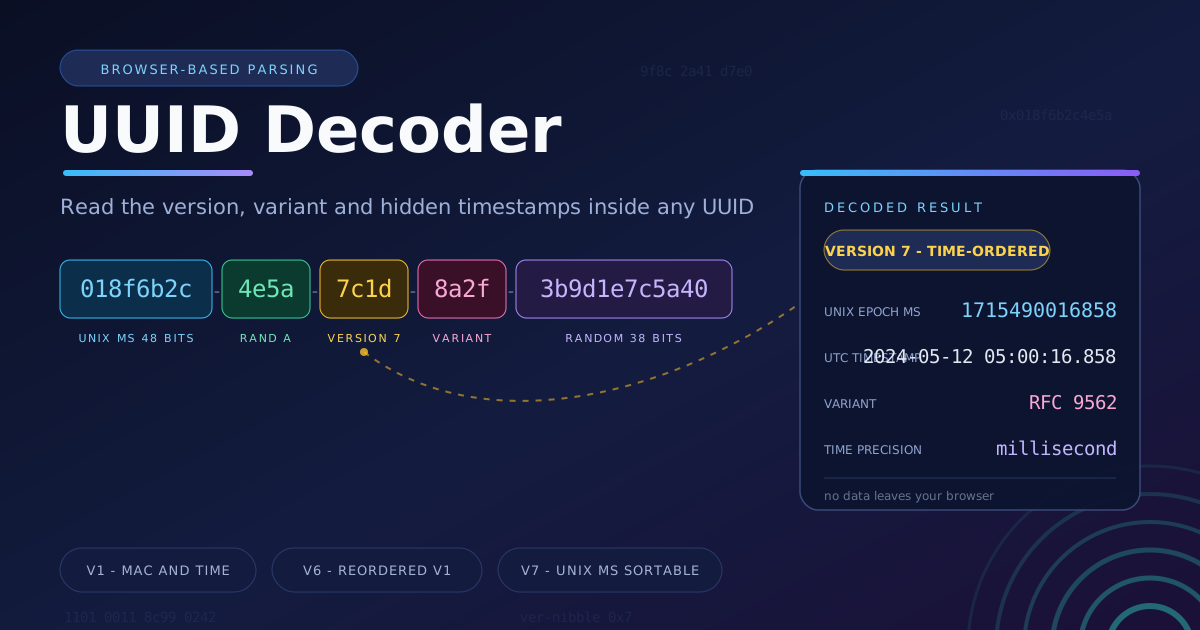
Extracting a timestamp is simple once you know the layout. Take v7 identifier 018f6b2c-4e5a-7c1d-8a2f-3b9d1e7c5a40: version nibble 7, variant nibble 8. The leading 48 bits, 018f6b2c4e5a, convert to 1,715,490,016,858 milliseconds since the Unix epoch — 2024-05-12 05:00:16.858 UTC.
Now a v1 example: 1e5f8330-9b6c-11ee-8c99-0242ac120002. Combining time_hi (0x1ee), time_mid (0x9b6c), and time_low (0x1e5f8330) yields 139,219,527,163,413,296 intervals of 100 nanoseconds since 1582, landing at 2023-12-15 17:05:16.341 UTC. Note the node field 0242ac120002 — a real MAC address; the Docker 02:42 prefix gives away its origin. Version 6 stores the same 60-bit value reordered as 1ee9b6c1-e5f8-6330-..., and the decoder recovers an identical time.
Here is the privacy angle: a version 1 UUID is a small confession. It leaks both the exact creation time and the hardware identity of its generator — researchers have fingerprinted machines from leaked v1 IDs. Before exposing IDs publicly, know what yours say about you.
Practical Use Cases
Dating Database Records
In a table using time-based UUIDs, every identifier is a free created_at column. Inheriting a legacy database with no audit timestamps? Decoding v1 or v7 primary keys recovers creation times for every row — invaluable during migrations.
Debugging Distributed Systems
When a request fails across services, the UUIDs on its messages tell a story. Decoding the v7 IDs of events reconstructs the ordering of operations across machines with drifting clocks and correlates log entries.
Document Forensics
Word processors and PDF generators embed UUIDs in metadata, and many still produce v1 values. Decoding an embedded ID can reveal when a document was created and on which machine — evidence that matters in incident response.
Choosing Between v4 and v7 for New Systems
Picking an ID strategy for a new project? Decode samples from each library. v4 offers total opacity; v7 offers sortability and free creation timestamps at the cost of leaking creation time to anyone who sees the ID.
Best Practices
- Prefer v7 for new sortable identifiers. It combines a millisecond Unix timestamp with random entropy, sorts naturally in B-tree indexes, and avoids v1's MAC-address leakage.
- Remember that v1 leaks. Decode a v1 UUID before exposing it publicly; a node field holding a real MAC address is a data leak, so migrate to v4 or v7.
- Validate before decoding. Confirm the string matches the canonical 8-4-4-4-12 pattern before trusting the output.
- Treat decoded timestamps as creation times, not truth. The timestamp is when the ID was minted, which may differ from when the business event occurred.
- Do not base security decisions on decoded times. Clock skew and spoofing make them unsuitable as the sole basis for authorization.
Try It Now
The next time a UUID appears in a log file, bug report, or database dump, do not shrug at it. Paste it into the UUID Decoder and let the identifier tell its own story.
Related Tools You Might Like:
- UUID Generator — create v1, v4, and v7 identifiers in bulk.
- Snowflake ID Decoder — extract timestamps from Snowflake identifiers.
- Epoch Batch Converter — convert Unix timestamps into readable dates.
Next time an ID looks like noise, remember: the version nibble knows the answer. Happy decoding.
Frequently Asked Questions
Q: Can the decoder recover a timestamp from every UUID?
A: No. Only time-based versions carry one. Versions 1 and 6 embed a 60-bit Gregorian timestamp and version 7 a 48-bit Unix-millisecond timestamp. Versions 4, 3, and 5 contain no time information.
Q: Is it safe to paste production UUIDs into the tool?
A: Yes. All parsing runs entirely in your browser. Identifiers are never transmitted to a server, logged, or stored, so the tool is safe during a live incident.
Q: Why does my v4 UUID show no timestamp?
A: Version 4 is purely random. Apart from the fixed version and variant bits, all 122 remaining bits are random, so there is nothing to decode. If you need creation times, generate v7 IDs.
Q: How accurate is the v1 timestamp?
A: The v1 clock resolves to 100-nanosecond intervals, so accuracy is limited by the generating machine's clock — usually microseconds to milliseconds.