ATS Resume Checker: Score Your Resume Against Any Job Description Before You Apply
The free ATS Resume Checker scores your pasted resume against any job description with keyword coverage, formatting flags and missing-section warnings — deterministic, offline, and private.
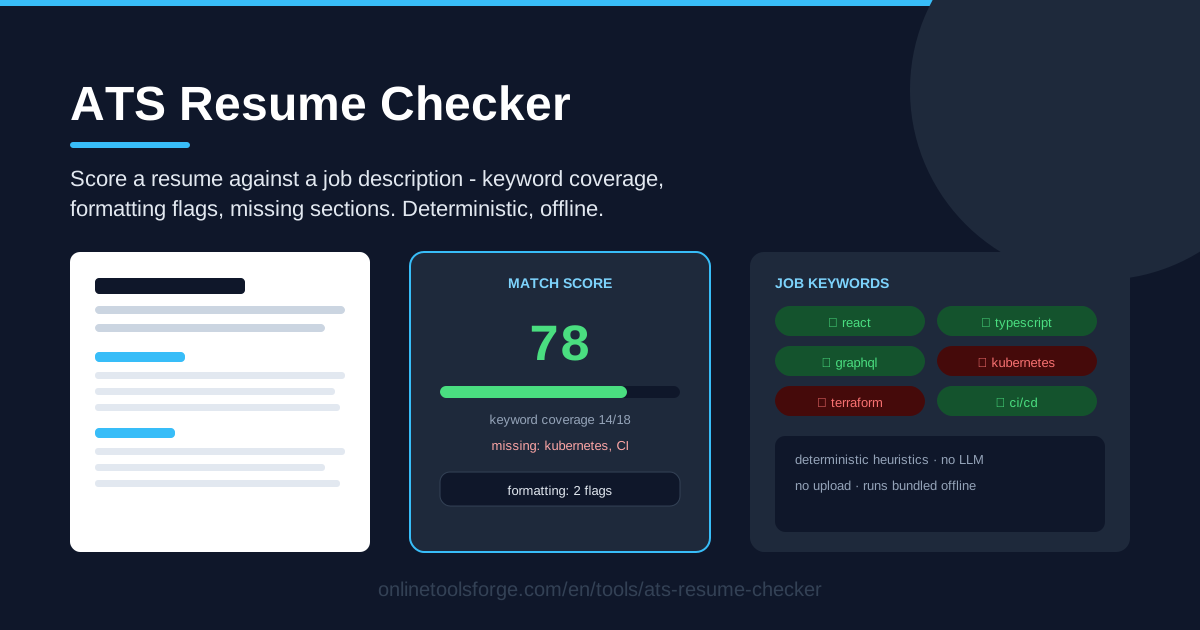
Table of Contents
Recruiters rarely read every resume that lands in their inbox. Before a human sees your application, an Applicant Tracking System (ATS) has usually parsed it, extracted its keywords, and ranked it against the job description. If your resume never uses the exact terms the employer searched for, it can be filtered out no matter how qualified you are. The ATS Resume Checker exists to catch that problem before it costs you an interview.
The tool is deliberately simple: paste your resume text, paste the job description, and get a clear score with keyword coverage, formatting flags and missing-section warnings. It runs on deterministic heuristics — no language model, no randomness, no upload. The entire analysis happens offline from code bundled with the page, so the same input always yields the same score.
Why Use ATS Resume Checker?
- Deterministic, no-LLM results. The score comes from fixed, transparent rules, not an unpredictable AI model. Same input, same score — every improvement you make is real, not model noise.
- Total privacy, zero upload. Your resume and the job description never leave your browser — important when the document holds your phone number, address and work history.
- Keyword coverage you can act on. You see exactly which job description keywords appear in your resume and which are missing — the same literal matching most ATS filters perform.
- Formatting flags that prevent parser failures. Tables, multi-column designs and icons look fine to humans but scramble ATS parsers. The checker flags the risky ones before you apply.
- Missing-section warnings. Contact, work experience and education are sections every ATS looks for. If yours are absent or mislabelled, you are warned immediately.
- Free, instant, repeatable. No account, no processing queue. Checking a revision takes seconds, so you can iterate until the match is genuinely strong.
Key Features
| Feature | What it does |
|---|---|
| Keyword coverage score | Shows which job description keywords appear in your resume and which are still missing |
| Overall resume score | Produces a single match score from keyword coverage, formatting and structure checks |
| Formatting flags | Highlights formatting that commonly trips ATS parsers, such as tables, columns and icons |
| Missing-section warnings | Detects absent contact, experience or education sections |
| Deterministic heuristics | Fixed rules bundled with the page — no LLM, no randomness, no upload |
Two details worth knowing:
- The keyword analysis mirrors real ATS filters: literal matching against the job description text, so the closer your wording is to the employer's vocabulary, the higher your coverage.
- The heuristics run locally, so the tool still works offline once the page has loaded.
How to Use ATS Resume Checker
- Paste your resume text. Open the ATS Resume Checker and paste your full resume into the resume field. Plain text is all the tool needs — it analyzes content, not fonts.
- Paste the job description. Copy the complete posting from the employer's site into the job description field. Responsibilities and requirements are where the keywords live.
- Read the score and keyword coverage. You get an overall score plus a breakdown of which job keywords are present and which are missing. Treat the missing list as your editing checklist.
- Fix formatting flags. If tables, columns, icons or other parser hazards are flagged, rebuild those parts as simple linear text, and add any missing sections — contact, experience, education.
- Re-check. Paste your edited resume again and compare the score. Repeat until coverage is high and the flags are gone, then export a clean, simple version for submission.
How ATS Systems Actually Read Resumes
Keyword matching is mostly literal. Most ATS filters do not "understand" your career story; they extract words and phrases from your resume and compare them with the job description or recruiter searches. "Project management" and "managed projects" are not automatically the same phrase. The keyword coverage view matters because it shows the real overlap between your vocabulary and the employer's.
Formatting breaks parsers more than content does. Two-column designs, tables and text boxes are the classic failure case: parsers read columns interleaved, drop table cells, or turn a tidy skills grid into gibberish. Icons instead of words and contact details hidden in headers or footers cause similar trouble. Simple, single-column, linear text is the one format every parser handles reliably.
Standard section names keep you findable. Parsers classify content by looking for conventional headings. "Work Experience", "Education" and "Skills" are recognized almost everywhere, while creative titles like "My Journey" may leave the parser with no experience section at all — exactly what the checker's missing-section warnings catch.
Honest coverage beats keyword stuffing. Use the employer's exact vocabulary where it genuinely describes your experience, and skip keywords that do not. Stuffing terms you cannot back up creates awkward interviews — and recruiters do read the shortlisted resumes. The tool is honest because it only reports what is present; presence is not competence.
What deterministic heuristics can — and cannot — tell you. A rule-based checker tells you with certainty which keywords are missing, whether risky formatting is present, and whether essential sections are absent. It cannot judge whether your bullet points are compelling or guarantee an interview. Treat the score as a floor, not a ceiling: it removes the mechanical reasons a resume gets filtered and leaves the human persuasion to you.
Practical Use Cases
Tailoring a Resume for Each Posting
A marketing analyst applies to five companies with one master resume. For a fintech role, coverage shows "SQL" and "dashboarding" missing even though she has both skills; two reworded bullets later, the score jumps — ten minutes per application.
Comparing Two Resume Versions
Undecided between a skills-forward and an experience-forward resume? Score both against the same job description: one covers 14 of 18 keywords, the other 9. Because the heuristics are deterministic, the difference is real, not model mood.
A Final Check Before a Referral Submission
A friend offers to refer you internally. Before your resume goes in, the checker surfaces one formatting flag (a two-column header) and a missing education section. Both are fixed in five minutes, so the referral is never wasted.
Career-Switcher Gap Analysis
A teacher moving into instructional design pastes a target job description against his current resume. The missing keywords — "LMS administration", "curriculum mapping", "stakeholder training" — show where his resume undersells transferable experience. Some gaps close with rewording; others become short courses to prioritize.
Best Practices
- Claim only genuine coverage. Add a keyword when it honestly describes your experience; never fabricate skills to chase a higher score.
- Use the employer's exact terms. If the posting says "stakeholder management", write exactly that, not "worked with various parties". ATS matching is literal.
- Keep sections standard and complete. Use conventional headings for contact, experience and education in a single-column layout, so every parser finds them.
- Never use hidden-text tricks. White-on-white keywords and hidden keyword blocks are detectable, unethical, and can get an application rejected outright.
- Tailor per posting, not per industry. Two "similar" jobs can demand different keywords — re-check against each job description before submitting.
- Save each tailored version. Keep the scored resume text with the job description, so interview prep starts from your submitted wording.
Ready to Score Your Resume?
Your next application deserves better than guesswork. Open the ATS Resume Checker, paste in your resume and the job description, and see your keyword coverage, formatting flags and missing sections in seconds — fully offline, with nothing uploaded. Fix what it finds, re-score, and apply with a resume built to survive the first filter.
Related Tools You Might Like:
- Resume Builder — build a clean, ATS-friendly resume once your keywords are set.
- Text Similarity Checker — compare two resume versions against a posting's wording.
- Word Counter — keep your resume within length limits as you edit.
Happy applying!
Frequently Asked Questions
Q: Is my resume uploaded to a server when I use the ATS Resume Checker? A: No. The tool runs entirely in your browser using deterministic heuristics bundled with the page. Your resume text and the job description are never sent anywhere or stored.
Q: Why no AI? Wouldn't an LLM give a smarter score? A: An LLM score is unpredictable — the same resume can get different ratings on different runs. Deterministic heuristics give you a stable, explainable score, so every improvement shows up consistently.
Q: What score should I aim for before applying? A: There is no universal pass mark, but the practical goal is high keyword coverage with no formatting flags and no missing sections. Coverage built on forced keywords will not survive the interview.
Q: Does the checker work with resumes in languages other than English? A: Keyword coverage works for any language because it analyzes whatever text you paste. Formatting and section-name checks follow the English-oriented conventions most ATS platforms expect, so bilingual resumes may flag accordingly.