CSV Validator: Catch RFC 4180 Errors Before They Break Your Imports
Use CSV Validator to check any CSV file against RFC 4180 and catch ragged rows, unescaped quotes, BOM issues, and other csv errors before an import fails.
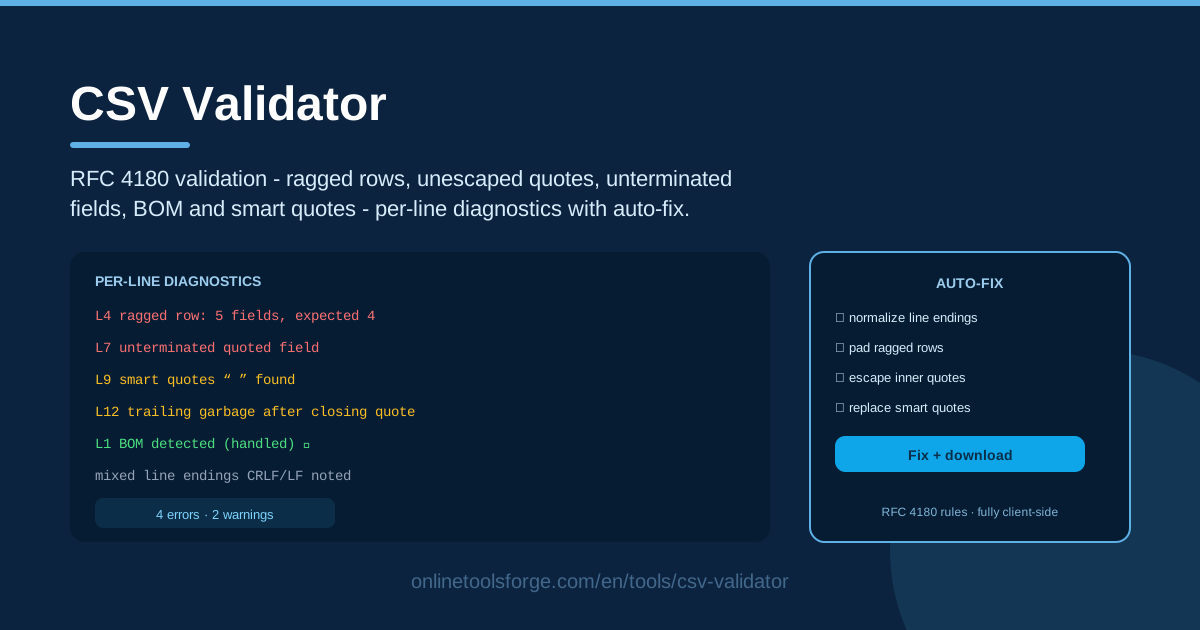
Table of Contents
Few file formats inspire as much false confidence as CSV. It looks like plain text, it opens everywhere, and it feels impossible to get wrong — until the morning a 50,000-row import fails halfway through because one supplier embedded a literal quote mark in a product name. The CSV Validator on Online Tools Forge exists for exactly those mornings: it checks your file against RFC 4180, the specification that actually defines CSV, and shows you precisely where your file and the standard diverge.
Most CSV damage is invisible until a parser chokes on it. A ragged row that has twelve fields under an eleven-column header. A quote that was never escaped. A byte-order mark hiding at the start of the file, silently corrupting your first column name. The tool scans for all of these — ragged row lengths, unescaped quotes, unterminated quoted fields, trailing garbage after closing quotes, blank lines, mixed line endings, BOM, and smart quotes — and reports each one as a per-line diagnostic with an auto-fix suggestion.
Because everything runs fully client-side, your data never leaves the browser. Customer lists, financial exports, and sensitive supplier feeds can be validated without a single byte ever touching a server.
Why Use CSV Validator?
- Catch breakage before an import. The worst time to discover a CSV defect is inside a production database loader. Validating first turns a catastrophic half-finished import into a five-minute fix in a text editor.
- Get line-accurate diagnostics. Instead of a vague parser error like "malformed input", you get the exact line number, the rule that was violated, and what the parser expected to find.
- Fix problems quickly. Every diagnostic ships with an auto-fix suggestion — double that quote, drop that trailing garbage, normalize that line ending — so corrections take seconds, not hours.
- Protect data quality downstream. A file that parses is not necessarily a file you can trust. Enforcing RFC 4180 keeps columns aligned, so numbers land in numeric fields and dates land in date fields.
- Expose invisible characters. BOM bytes and curly smart quotes never render in a text editor, but they silently break column names and string comparisons. The tool flags them by line.
- Keep sensitive files local. Fully client-side validation means no uploads, no storage, and no third party ever touching your data.
Key Features
| Feature | What it does |
|---|---|
| RFC 4180 validation | Checks the whole file against the official CSV specification, rule by rule. |
| Ragged row detection | Finds rows with more or fewer fields than the header so columns never shift. |
| Quote auditing | Catches unescaped quotes, unterminated quoted fields, and trailing garbage after closing quotes. |
| Per-line diagnostics | Reports each issue with a line number, the violated rule, and a plain-language explanation. |
| Auto-fix suggestions | Offers a concrete correction for every finding, from doubled quotes to removed blank lines. |
| Encoding checks | Detects BOM bytes, smart quotes, and mixed line endings that parsers mishandle. |
| Client-side processing | Validates entirely in your browser — nothing is uploaded, logged, or stored. |
- Validation is instant and iterative. Paste text or load a file, review the results, edit, and re-validate — the whole round trip takes seconds.
- Every finding is actionable. The tool explains what RFC 4180 expects and how to produce it; it never just says "error".
- No configuration required. There is no dialect wizard to fight; the checks match what real-world parsers will actually do to your file.
How to Use CSV Validator
- Load your CSV. Open CSV Validator, paste the raw CSV text into the input area, or load a file from disk. Nothing leaves your machine.
- Run the validation. Trigger the check and the tool parses the entire file against RFC 4180 right in your browser.
- Read the per-line diagnostics. Each issue lists its line number, the violated rule, and a short explanation of why it will break a parser.
- Apply the auto-fixes. Work through the suggestions — escape the quote, remove the trailing garbage, strip the BOM, normalize the endings.
- Re-validate. Run the check again until the file comes back clean, then hand the corrected file to your import job or pipeline.
The RFC 4180 Rules That Trip Everyone
The specification is short, but it codifies several rules that everyday tools violate constantly.
Ragged row lengths. Every record must have the same number of fields as the header. When a row has one comma too few, parsers either drop data or shift every following value into the wrong column — the classic cause of "the phone numbers are in the email field".
Quoting and escaping. A field containing a comma, quote, or line break must be wrapped in double quotes, and any quote inside the field must be escaped by doubling it. A value like He said "hello" must be written as "He said ""hello""". Miss one doubling and the field swallows the rest of the row.
Trailing garbage after closing quotes. Once a quoted field ends, RFC 4180 expects a delimiter or a record break. Text like "abc"def — where def sits after the closing quote — is technically invalid, yet it appears constantly in hand-edited exports, and lenient parsers may silently merge or drop it.
BOM at the file start. Many Windows tools prepend a UTF-8 byte-order mark to files. Humans never see it, but it becomes part of the first header name, so a lookup for the column id finds a corrupted key instead, and the column mapping fails.
Smart quotes from word processors. Opening a CSV in Word or certain editors replaces straight quotes with typographic curly ones. RFC 4180 recognizes only the straight ASCII quote, so those elegant quotation marks break every quoted field they touch.
Mixed line endings. A file patched by several people often contains both CRLF and LF records. Some parsers reject the file outright; others quietly leave stray carriage-return characters stuck to the last value of each affected row.
Why not just open it in Excel? Excel is a spreadsheet, not a validator. It silently repairs ragged rows, mangles leading zeros on IDs, rewrites dates into your locale, and happily saves smart quotes. It will show you data; it will never tell you the file was broken. A validator tells you the truth about the bytes.
Practical Use Cases
Pre-Import Check for a Database Load
Before feeding a nightly ETL job or a bulk COPY command, validate the file. A single unescaped quote in row 3,912 can abort the load — or worse, let it fail halfway — and leave you restoring tables from backup. A pre-flight check converts that scenario into a caught-and-fixed diagnostic before anything touches the database.
Cleaning Supplier Feeds
Third-party CSV feeds are exported by whoever happens to click the button: Excel here, a legacy ERP there, or a hand-typed file from a partner's intern. Validate each feed on arrival, apply the auto-fixes, and normalize line endings before the data enters your system. Your import logs stop filling up with skipped-row warnings.
Validating Exported Reports
Reports exported from BI tools and admin panels get edited by humans before being re-imported somewhere else, and every manual edit is a chance for a broken quote or a deleted comma. Validate the edited file before it travels back upstream, and you will never have to explain why a "small edit" corrupted 4,000 records.
API Integration Prep
Many APIs still accept CSV uploads — bulk contact imports, product catalogs, payment batches. Validate the payload before making the call so you fail fast locally with a clear line number, instead of receiving an opaque 400 error from a remote service with no context at all.
Best Practices
- Validate before every import. Make it as routine as saving the file; a clean validation is the cheapest insurance in data engineering.
- Quote all text fields. Wrapping every text field in quotes eliminates whole classes of comma and quote errors at essentially zero cost.
- Standardize on UTF-8 and LF. One encoding and one line-ending convention mean far fewer surprises when files cross platforms.
- Keep a validation step in pipelines. Place the check between export and import in every automated flow so bad files are rejected before they propagate.
- Fix at the source when possible. If a supplier's export is broken every week, fix their export configuration instead of patching the file forever.
- Re-validate after every edit. A "quick fix" in a text editor is the most common way a clean file becomes a broken one.
Ready to stop gambling on imports? Run your next file through CSV Validator, read the per-line diagnostics, apply the auto-fixes, and send a certified-clean file to your pipeline. It takes about a minute, and it never leaves your browser.
Related Tools You Might Like:
- CSV to HTML Table Converter — turn validated CSV data into a styled HTML table.
- Markdown Table Formatter — clean up and align markdown tables built from your data.
- SQL Schema Diff — compare database schemas before and after a data migration.
Happy validating!
Frequently Asked Questions
Q: What is RFC 4180 and why does it matter for CSV? A: RFC 4180 is the internet specification that defines the CSV format — quoting rules, escaping with doubled quotes, and record structure. Validating against it means your file will parse correctly in standards-compliant tools, instead of merely looking fine in one lucky spreadsheet.
Q: Does CSV Validator upload my file to a server? A: No. All validation runs fully client-side in your browser. Your data never leaves your machine, so you can safely validate confidential customer, financial, or supplier files.
Q: Can the tool fix my CSV automatically? A: It provides an auto-fix suggestion for each diagnostic — doubling an unescaped quote, removing trailing garbage after a closing quote, or stripping a BOM — so corrections are quick and targeted rather than guesswork.
Q: My file opens fine in Excel. Is it really broken? A: Quite possibly. Excel silently repairs ragged rows and converts characters, hiding defects that will surface the moment the file meets a strict parser or an import job. A validator shows you the underlying rule violations instead of the repaired view.