Email Bounce Rate Calculator: Read Your Campaign Health Before It Costs You
Use the free Email Bounce Rate Calculator to turn sent and bounced counts into a bounce rate with a hard versus soft split, industry benchmark verdicts, and deliverability-health warnings — fully offline.
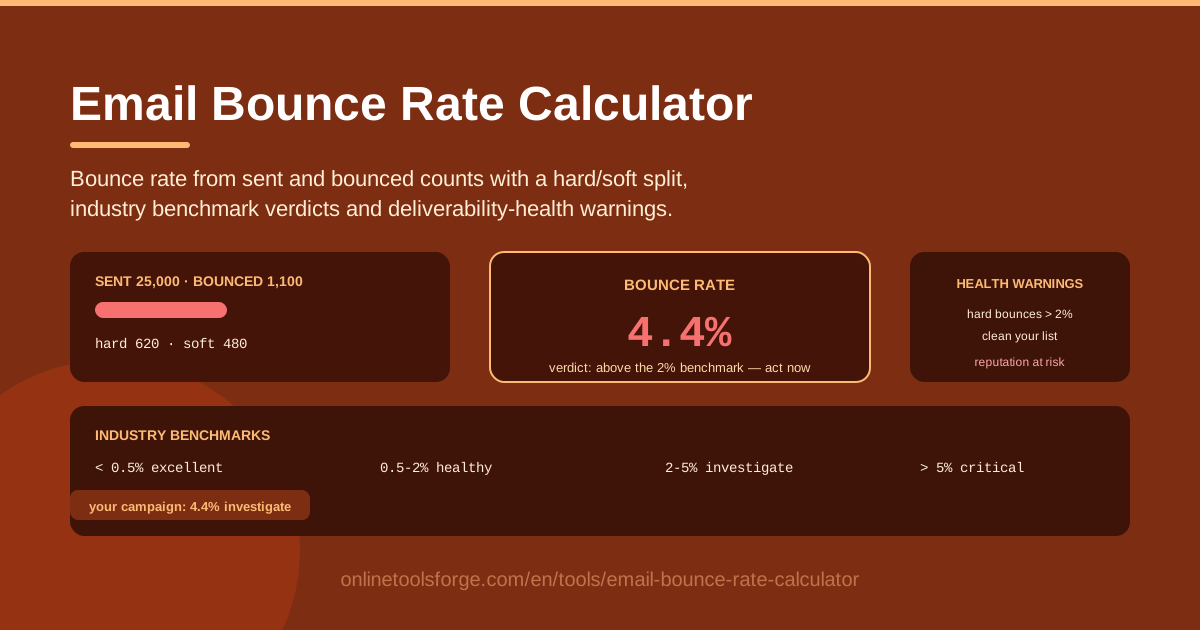
Table of Contents
Every campaign report already tells you two numbers: how many emails went out and how many came back as bounces. Most marketers glance at them and move on, which is a mistake — bounce rate is one of the first signals mailbox providers like Gmail and Outlook use to judge your sending domain, and once that reputation slips, even great campaigns start landing in spam. The Email Bounce Rate Calculator closes the gap: enter your sent and bounced counts, and it returns your bounce rate, a hard-bounce versus soft-bounce split, an industry benchmark verdict, and deliverability-health warnings you can act on the same day.
The verdict matters because the two bounce types demand opposite responses. A rate driven by invalid addresses means your list is rotting and needs cleaning now; a rate driven by full inboxes and temporary server issues often resolves itself. The calculator grades your result as excellent, healthy, investigate, or critical, then raises the right warnings — list cleaning, reputation risk, address verification — based on your mix.
Everything runs fully offline in your browser, with no signup, no uploads, and no cost. This guide covers why the tool exists, how to use it, what the benchmarks really mean, and the habits that keep your list lean and your inbox placement strong.
Why Use Email Bounce Rate Calculator?
- You get a verdict, not just a number. A raw 2.7% means nothing until you compare it to a standard. The calculator grades your rate against accepted industry bands, so within seconds you know whether to shrug or scramble.
- The hard versus soft split points to the right fix. Hard bounces demand removal; soft bounces demand patience and monitoring. Treating them the same either wrecks your list or keeps dead addresses on it.
- Deliverability warnings surface risk early. When your numbers cross into risky territory, the tool flags reputation risk and nudges you toward list cleaning before an ESP suspension or a slide into the spam folder.
- It works at any list size. Whether you sent 500 emails or 500,000, the math and the verdicts scale identically.
- Your data never leaves your device. Everything is computed offline in your browser — important when campaign metrics are confidential or your network is locked down.
- There is no setup at all. No account, no API key, no integration: open the page and calculate.
Key Features
| Feature | What it does |
|---|---|
| Bounce rate calculation | Divides bounces by emails sent and shows the percentage instantly, with all math done locally in your browser. |
| Hard versus soft bounce split | Separates permanent failures (invalid mailboxes, dead domains) from temporary ones (full inboxes, server outages) so the right remedy is obvious. |
| Industry benchmark verdicts | Grades your result as excellent, healthy, investigate, or critical against widely accepted email marketing thresholds. |
| Deliverability-health warnings | Flags reputation risk and prescribes corrective steps such as list cleaning and address verification when your numbers drift. |
| Fully offline operation | No network calls, no logins, no data collection — it works anywhere, including on a plane. |
Two details worth highlighting:
- Verdicts map to concrete actions. Each band carries a response: keep going, watch closely, investigate the list, or stop and clean immediately.
- Warnings adapt to your mix. A critical rate made mostly of hard bounces triggers removal-focused advice, while a mostly-soft rate points at throttling and retry windows instead.
How to Use Email Bounce Rate Calculator
- Pull your sent and bounced counts. Open your ESP's campaign report and copy the total sent figure and the total bounces figure — usually labeled "Sent" and "Bounced" or "Failed."
- Enter the two counts. Type them into the sent and bounced fields, and the bounce rate appears immediately.
- Split the bounces into hard and soft. From the report's bounce breakdown, enter how many were hard bounces versus soft bounces. This powers the split analysis and sharpens the warnings.
- Read your rate and verdict. The tool shows your bounce rate beside its benchmark grade — excellent, healthy, investigate, or critical — so you can place the campaign in context at a glance.
- Act on the deliverability warnings. Purge hard bounces, watch soft bounces for repeat offenders, re-permission risky segments, and re-check domain authentication if the rate stays elevated.
Bounce Benchmarks and What They Cost You
The formula is simple; the discipline is not. Bounce rate equals bounces divided by emails sent, multiplied by 100. Send 8,000 emails and log 320 bounces, and your rate is 4.0%. What the formula hides is composition: those 320 bounces could be 40 dead addresses or 300, and the two scenarios need opposite responses.
Hard bounces are permanent failures. The mailbox does not exist, the domain is gone, or the address was deactivated. No retry fixes a hard bounce, and every one you keep on the list tells receiving servers you do not manage your data. The fix is removal — immediately, ideally automated before the next send.
Soft bounces are temporary. A full inbox, an offline mail server, an oversized message, or greylisting at the receiving gateway. These often resolve on their own, so the standard practice is retrying soft bounces for a few days and removing only addresses that keep failing across multiple campaigns.
The benchmark bands give you a common language. Below 0.5% is excellent — the territory of verified, double opt-in lists. Between 0.5% and 2% is healthy and typical of well-run programs. From 2% to 5% you are in investigate territory: something is wrong with acquisition or hygiene. Above 5% is critical — mailbox providers begin treating you as a spammer, and ESPs may throttle or suspend the account.
Reputation damage compounds. Providers score your domain continuously. Elevated bounces lower the score, a lower score sends more mail to spam, spam placement kills engagement, and low engagement lowers the score again. One bad campaign can drag the next several, which is why catching a 2.4% investigate case beats explaining a 7% emergency.
Clean, and when necessary, cull. Remove hard bounces on sight, and run a sunset policy for contacts that have not opened or clicked in 90 to 180 days: send a re-permission campaign, then drop the silent. A smaller verified list beats a large stale one on deliverability, on ESP billing (many charge by contact count), and on every metric that survives the send.
Practical Use Cases
Post-Campaign Health Check
The morning after a major send, run the numbers through the calculator before touching anything else. A healthy verdict confirms the list is in good shape; an investigate or critical verdict tells you to pause follow-up sends until hard bounces are purged — protecting the rest of the quarter's calendar.
Old-List Revival Assessment
Reviving a list that sat dormant for a year is one of the riskiest moves in email marketing. Send a small re-engagement batch first, then check its numbers. A rate well above your normal band means the list has rotted — better to re-verify or rebuild it than to torch your domain reputation with a full send.
Monthly Reporting Made Simple
For teams reporting to stakeholders, the calculator supplies a consistent, defensible number: the month's bounce rate, its benchmark grade, and the hard versus soft mix. Instead of debating whether 2.3% "feels high," the report shows exactly which band the program occupies and whether it moved month over month.
Comparing ESPs Before You Switch
Bounce definitions and suppression handling can differ between platforms. Run the same campaign's numbers through the calculator on the old and new ESP. If the rate jumps after the switch, the problem is list quality or migration hygiene, not your copy — fix it before sending at full volume again.
Best Practices
- Remove hard bounces immediately. Never let a hard-bounced address receive a second campaign; most ESPs can automate the suppression.
- Sunset disengaged contacts. No opens in 90 to 180 days means a re-permission email, then removal. Dead weight drives bounces and drags engagement down together.
- Verify new signups. Double opt-in plus real-time address verification at capture stops most fake and mistyped addresses before they reach the list.
- Authenticate your domain. Publish SPF and DKIM and enforce DMARC so servers can confirm the mail is genuinely yours — authentication is checked before reputation even matters.
- Track the trend, not one send. A single 1.8% campaign is noise; three campaigns climbing from 1% to 2.5% is a hygiene problem in progress.
- Warm up new domains and IPs. Sudden volume from a fresh domain looks like spam, generates bounces, and starts your reputation on the wrong foot.
Take thirty seconds with your next campaign report and run it through the Email Bounce Rate Calculator. You will know today whether your list is quietly working for you — or quietly working against you.
Related Tools You Might Like:
- SPF Record Builder — generate a correct SPF record so receiving servers trust your sending domain.
- DMARC Record Builder — create and tune a DMARC policy that protects your domain from spoofing.
- Email Deliverability Spam Checker — scan your message content for spam triggers before you hit send.
Happy sending!
Frequently Asked Questions
Q: What is considered a good email bounce rate? A: Below 0.5% is excellent and reflects a verified, well-maintained list. Between 0.5% and 2% is healthy and typical of well-run programs. From 2% to 5% you should investigate list quality and acquisition sources, and above 5% is critical — slow or stop sending, purge hard bounces, and re-verify the list before continuing.
Q: What is the difference between a hard bounce and a soft bounce? A: A hard bounce is a permanent failure — the mailbox does not exist or the domain is gone — and the address should be removed immediately. A soft bounce is temporary, such as a full inbox or an offline mail server, and is normally retried for a few days before any removal decision.
Q: How do I calculate bounce rate manually? A: Divide bounced emails by emails sent and multiply by 100. For example, 320 bounces from 8,000 sent is 320 ÷ 8,000 × 100 = 4%. The Email Bounce Rate Calculator does this instantly and adds the hard versus soft split and benchmark verdict on top.
Q: Do soft bounces hurt sender reputation as much as hard bounces? A: Not as directly. Providers weight hard bounces far more heavily because they indicate a low-quality list. Occasional soft bounces are normal, but a high soft-bounce rate across many campaigns still signals trouble — aggressive volume or stale segments — and will drag your reputation down over time.