JSONC to JSON Converter: Strip Comments Into Strict JSON
Remove comments and trailing commas from JSONC files like tsconfig.json to get strict, valid JSON, with exact error line and column on bad syntax. Free in your browser.
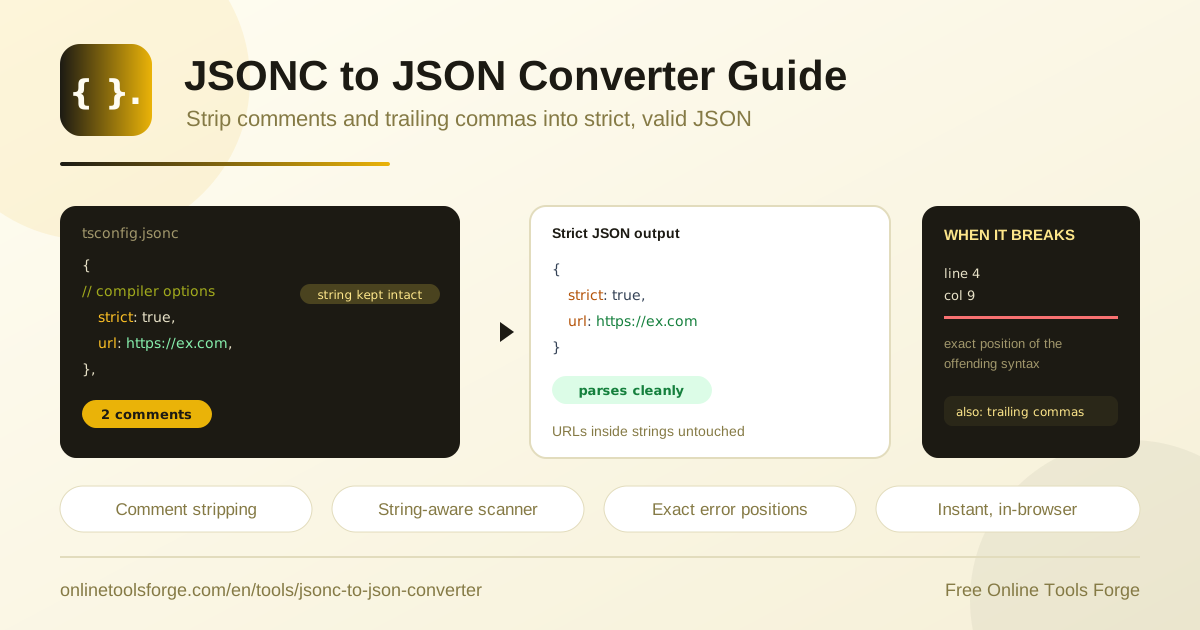
Table of Contents
If you have ever piped tsconfig.json into a build script or sent a slice of settings.json to an API, you have hit the same wall: strict JSON parsers reject comments and trailing commas. Those files are not really JSON at all — they are JSONC, a forgiving dialect that the TypeScript compiler and VS Code happily accept but almost nothing else does. The free JSONC to JSON Converter closes that gap in a single paste.
Paste your JSONC and the tool strips line comments, block comments, and trailing commas, handing back clean, strict, valid JSON that any parser or API will accept. Everything runs in your browser: no signup, no uploads, no waiting. When the input contains a genuine syntax error, the converter reports the exact line and column so you can fix it in seconds.
This guide explains why JSONC exists, how safe comment stripping works, and where a jsonc to json conversion fits into a developer workflow.
Why Use the JSONC to JSON Converter?
- Strict output, guaranteed. JSON.parse, CI validation steps, REST APIs, and schema validators all demand comment-free, comma-correct JSON. The converter normalizes your JSONC once so those tools never choke again.
- String-aware stripping. Naive regex scripts delete every // sequence, silently corrupting values like https://api.example.com. The scanner-based stripper tracks string state, so URLs and glob patterns survive untouched.
- Exact error locations. When the input is truly broken, the tool pinpoints the offending line and column, turning a frustrating hunt into a one-glance fix.
- Complete privacy. Conversion happens entirely in your browser. Config files often reveal paths, hostnames, and internal tooling choices; nothing ever leaves your machine.
- Free with no signup. Open the page, paste, copy. No accounts, no quotas, no watermarks.
- Built for real configs. tsconfig.json, jsconfig.json, VS Code settings.json, launch.json, and any hand-annotated JSON convert cleanly.
Key Features
| Feature | What it does |
|---|---|
| Comment removal | Strips both // line comments and /* ... */ block comments from anywhere outside string literals |
| Trailing comma removal | Drops the final comma in objects and arrays so strict parsers accept the result |
| Scanner-based stripper | Walks the input character by character, tracking string state so comment-like sequences inside strings are never mistaken for real comments |
| Exact error reporting | Reports the line and column of genuine syntax errors so you can fix the source immediately |
| Instant, in-browser results | Converts as you paste with no network requests, installation, or account |
A few details worth knowing:
- The scanner keeps string literals intact while it works, which matters in configs packed with URLs, globs, and regular expressions.
- Nothing touches a server, so results are instant even for large files, and the tool keeps working offline.
How to Convert JSONC to JSON
- Open the JSONC to JSON Converter in your browser.
- Paste your JSONC content — a full tsconfig.json, a fragment of settings.json, or any annotated JSON — into the input area.
- If the input is valid JSONC, clean strict JSON appears instantly. If something is off, read the reported line and column and correct the source.
- Copy the converted output to your clipboard or save it for use in scripts, test fixtures, or API payloads.
- Optionally pretty-print and validate the result with a strict parser before you ship it.
What Makes JSONC Different From JSON
JSONC stands for JSON with comments. It is structurally identical to JSON — same objects, arrays, strings, numbers, and booleans — with two deliberate relaxations.
The first is comments. JSONC allows // line comments and /* ... */ block comments in any position where whitespace is legal. This exists because configuration files are edited by humans far more often than they are parsed by machines, and a note explaining an unusual option prevents months of guesswork. The TypeScript compiler and VS Code chose JSONC parsers on purpose: for files edited daily, annotation beats machine purity.
The second relaxation is trailing commas. JSONC permits a comma after the last element of an object or array. It removes friction when appending entries: a new key no longer forces you to edit the previous line, so diffs stay small.
Strict JSON, defined by RFC 8259 and enforced by JSON.parse and virtually every runtime, allows neither. Feed it a comment or a dangling comma and parsing fails immediately — that is the boundary the converter manages for you.
There is also a subtle trap for homegrown solutions: comment syntax is legal text inside string literals. A value like "homepage": "https://example.com/docs" contains //, and a regex that deletes everything from // to end of line will mangle it into "homepage": "https:. Glob patterns such as **/*.ts break the same way. The tool avoids this entirely with a scanner-based stripper that walks the input character by character, tracking whether it is inside a string and honoring escape sequences, so only real comments are removed.
Finally, when stripping succeeds but the remaining text still cannot parse, the tool does not just say "invalid JSON". It reports the exact line and column of the failure — for example, an unexpected token at line 12, column 5 — which is precise enough to fix the source file in seconds.
A quick before and after:
{ "target": "ES2022", /* strict from day one */ "strict": true, }
→
{ "target": "ES2022", "strict": true }
Practical Use Cases
Feeding tsconfig Values Into Scripts
Codegen tools, monorepo scripts, and bundler integrations frequently need values from tsconfig.json: the paths alias map, baseUrl, target, or outDir. Reading the file with JSON.parse fails because the real-world file contains comments and often a trailing comma. Convert the file first, parse the clean output, and your script stays simple and reliable — the same trick works for jsconfig.json.
Cleaning VS Code Settings for APIs
Team-shared settings.json files document themselves with comments, which is exactly why they break when you push subsets of them to configuration APIs or developer portals. Convert the JSONC to strict JSON, extract the section the API expects, and send it without a wall of validation errors. When you need the same data in another format, the JSON to YAML converter and the JSON to CSV converter take it from there.
Preparing Fixtures for Tests
Test fixtures benefit hugely from comments — each case can explain what it exercises and why. But JSON.parse in your test runner rejects annotated fixtures. Keep the comments in a source .jsonc file, strip them during fixture generation, and commit strict JSON for CI, so your documentation survives and the parser never sees what it cannot handle.
Comparing Config Diffs
Comments shift line numbers and bury real changes in noise. When reviewing a teammate's tsconfig.json refactor or comparing branches of a settings file, convert both versions first. With comments and trailing commas stripped, git diff or any structural diff shows only the values that actually changed.
Best Practices
- Keep your comments in the JSONC source and treat conversion as a build or preprocessing step, not a one-off edit you have to repeat by hand.
- Convert at the boundary: store annotated JSONC for humans, and generate strict JSON for machines, so both audiences get the format they need.
- Never strip JSON comments with a regex; the string-literal trap around URLs and globs guarantees silent data corruption eventually.
- Validate after converting; a final strict parse confirms the output before it reaches consumers.
- Watch for duplicate keys; comments sometimes hide older settings, and strict parsers keep only the last occurrence.
- Minimize diff noise by preferring trailing commas in your source — the remover cleans them up, so your edits stay one line long.
Ready to Convert Your JSONC?
The next time tsconfig.json refuses to parse, JSON.parse rejects your annotated fixture, or an API bounces your settings payload, skip the manual cleanup. Paste the file into the JSONC to JSON Converter, get strict JSON instantly, and copy it wherever it needs to go. It is free, it runs entirely in your browser, and it tells you the exact line and column whenever your syntax is the real problem.
Related Tools You Might Like:
Happy converting!
Frequently Asked Questions
Q: Is the JSONC to JSON conversion lossless?
A: Structurally, yes. Every property, value, and nesting level appears in the output exactly as written; only the constructs strict JSON forbids — comments and trailing commas — are removed. String values, numbers, and key order all survive intact.
Q: Will URLs like https://example.com inside strings be damaged?
A: No. The stripper is scanner-based and tracks string state character by character, so a // sequence inside a string literal is recognized as text, not as a comment. URLs, globs, and regular expressions pass through unchanged.
Q: Does the tool upload my config files to a server?
A: No. The conversion runs entirely in your browser with no network requests and no storage of your input; your config files never leave your machine.
Q: What happens if my input has a genuine syntax error?
A: The tool reports the exact line and column where parsing fails, such as an unexpected token at line 12, column 5. Fix the spot, paste again, and the clean JSON appears immediately.
Q: Can I convert strict JSON back into JSONC with comments?
A: The converter works in one direction, from JSONC to JSON. To keep comments in your workflow, maintain the annotated JSONC as your source of truth and regenerate the strict JSON whenever machines need it.