JSONL Validator: Find and Fix Broken Lines in Your JSONL Files
Validate JSONL and NDJSON files row by row, flag broken lines with exact line numbers, and convert the surviving records into a clean JSON array - free and 100% client-side.
Free Interactive Tool
JSONL Validator
Validate JSON Lines/NDJSON files row by row, flag broken lines with line numbers, and convert valid records to a JSON array — entirely in your browser.
Table of Contents
A huge share of modern machine-learning and data infrastructure speaks one specific dialect of JSON: JSON Lines. OpenAI expects fine-tuning and batch files in JSONL format, stream processors such as Kafka and Spark consume newline-delimited records, and structured logging systems write one JSON object per line. The format is wonderfully simple — until a single malformed line sneaks in. Because parsers stop at the first syntax error, one bad record can make an entire file of thousands of valid lines look useless. The free JSONL Validator was built for exactly that moment.
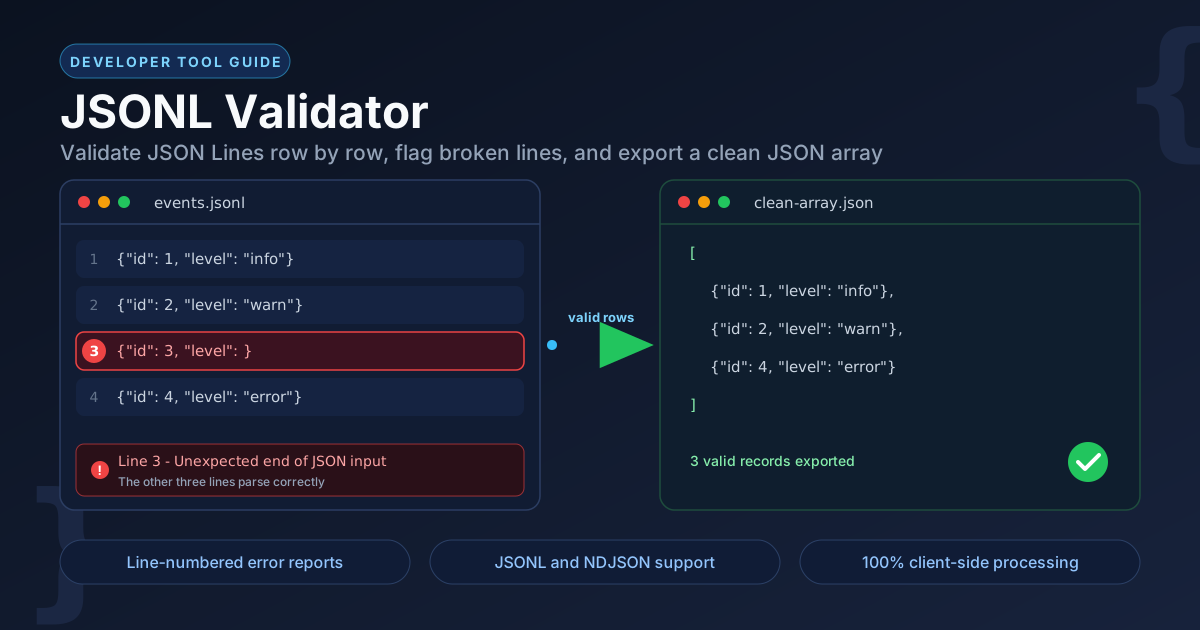
If you have ever pasted a JSONL file into a standard JSON parser, you know the frustration: you get one cryptic message about an unexpected token, with no idea which of your 40,000 lines caused it. JSONL Validator reads the file the way JSONL is meant to be read — one line at a time — and reports every broken line individually, with its line number and the underlying parser error.
It also recognizes messy data: you often want to keep the good records even when a few lines are beyond saving. The tool converts every valid row into a standard JSON array you can copy or download, while flagging the broken lines separately. Everything runs 100% client-side, so sensitive training data and logs never leave your machine.
Why Use JSONL Validator?
- Exact line-number error reports. Instead of one vague parser failure, you get the precise line number and error details for every broken row, so fixes take seconds instead of hours.
- JSONL and NDJSON support. Newline-delimited JSON has two popular names and one practical shape. The tool parses both dialects identically: one JSON value per line.
- Salvage what is salvageable. Rather than an all-or-nothing pass or fail, valid records are collected and exportable as a JSON array even while other lines are broken.
- Built for big files. Row-by-row parsing behaves predictably on large files, processing records as it streams through them.
- Completely private. All validation happens in your browser. No uploads, no accounts, no server-side processing of your data.
- Zero setup. Open the page, paste or drop your file, and get results — nothing to install, nothing to pay.
Key Features
| Feature | What It Does |
|---|---|
| Row-by-row validation | Parses each line as an independent JSON value, the way JSONL consumers actually read the file |
| Line-number flagging | Highlights broken lines with their line number and the exact parser error message |
| Valid-records export | Converts every parseable line into a standard JSON array, ready to copy or download |
| NDJSON compatibility | Handles NDJSON (newline-delimited JSON) files with the same parser |
| Client-side processing | Performs 100% of the work locally in your browser |
A few details worth knowing:
- Error messages come straight from the JSON parser, so they name the real problem — an unexpected token, an unterminated string, or a missing closing brace.
- The output array preserves the original order of the valid lines, so record sequence is never disturbed.
How to Use
- Open the tool. Go to the JSONL Validator page in any modern browser.
- Paste or drop your file. Paste your JSONL text into the input area, or drop a .jsonl or .ndjson file directly onto it.
- Review the report. Broken lines are flagged in red with their line numbers and error details, and a summary shows how many lines parsed cleanly.
- Export the good data. Copy or download the JSON array of valid records for tools that need standard JSON.
- Fix and re-run. Correct the flagged lines in your source file, then validate again until the report is clean.
One Record Per Line: How JSONL and NDJSON Actually Work
JSONL (JSON Lines) and NDJSON (Newline-Delimited JSON) describe the same idea: instead of one large JSON document, the file holds one JSON value per line, and the newline character is the delimiter. A healthy file looks like this:
{"user": "ana", "action": "login", "ok": true}
{"user": "bo", "action": "click", "ok": true}
{"user": "cy", "action": "submit", "ok": true}
Now imagine an export job crashes halfway and leaves a truncated record behind:
{"user": "dee", "action": "submit", "ok": }
A normal JSON parser reads the whole file as one document and gives up on the spot. A line-oriented validator instead isolates the failure and reports it as Line 4: Unexpected token }. Every other line is still known to be good.
Why does this format exist at all? Three practical reasons:
- Streaming. A consumer can process records one at a time as they arrive, without waiting for a closing bracket that may be gigabytes away.
- Append-only writes. Services log one new line per event. Appending is cheap and crash-safe; rewriting a giant array for every record is not.
- Huge files. Line-based files split cleanly across workers, shards, and network chunks, which is exactly what big-data and ML pipelines need.
The trade-off is that many downstream tools want a conventional JSON document. That is where the export step comes in: JSONL Validator collects all valid rows into a standard JSON array, which spreadsheets, dashboards, and most HTTP APIs accept directly:
[
  { "user": "ana", "action": "login", "ok": true },
  { "user": "bo", "action": "click", "ok": true },
  { "user": "cy", "action": "submit", "ok": true }
]
Practical Use Cases
LLM Training Data Preparation
Fine-tuning endpoints expect strictly valid JSONL — one training example per line, no exceptions. A single malformed record can reject the entire upload and waste a costly iteration. Run every training file through the validator before uploading, then fix only the flagged lines.
Log File Debugging
Structured logs are JSONL in practice, and they fail in predictable ways: a process crashes mid-write and leaves a truncated line, or a log message containing a real newline splits one record into two invalid ones. The line-number report points you to the exact broken record in seconds.
ETL Pipeline Checks
Before a staged file is loaded into a warehouse or an API, validate it at the boundary. Row-by-row validation catches upstream format drift — a new field, a bad export, an encoding glitch — before it becomes a failed load job hours later.
Dataset Cleaning
Scraped and merged datasets almost always contain broken rows. Validate the file, drop or repair the flagged lines, and export the clean records as a JSON array for analysis or import elsewhere.
Best Practices
- Fix the first error, then re-run. Later errors may cascade from the first — a problem early in a line can masquerade as several downstream failures. Work top-down and validate between rounds.
- Keep empty lines out. Blank lines are not valid JSON values, so most validators flag them. Strip trailing empty lines before validating or uploading.
- Validate before uploading to APIs. Training endpoints and ingestion APIs typically reject the whole file on the first bad line. A 30-second check avoids a failed upload cycle.
- One record per line — really. Never pretty-print a JSONL file in place; multi-line records break the format. If you want to inspect a record, format a copy instead.
- Watch strings that contain newlines. A literal line break inside a string value splits one record into two. Escape it as \n in the source data.
- Export the clean subset first. Salvage the valid records immediately, then repair the broken lines separately at your own pace.
Ready to Clean Up Your JSONL Files?
Whether you are preparing a fine-tuning dataset, chasing a malformed log line, or checking an ETL handoff, the JSONL Validator gives you a line-accurate answer in seconds — right in your browser, with nothing uploaded anywhere. Paste your file and see exactly which lines need work.
Related Tools You Might Like:
- JSON Formatter — pretty-print, minify, and validate ordinary JSON documents.
- MongoDB ObjectId Decoder — extract timestamps and machine data from MongoDB identifiers.
- CSV to JSON Converter — turn spreadsheet exports into structured JSON records.
Happy validating!
Frequently Asked Questions
Q: What is the difference between JSONL and NDJSON?
A: Almost nothing in practice. Both mean one JSON value per line, delimited by newline characters. JSON Lines comes from the jsonlines.org convention, while NDJSON comes from the newline-delimited JSON specification. Tools that accept one almost always accept the other, and this validator parses both identically.
Q: Does the tool upload my data to a server?
A: No. Validation runs 100% client-side in your browser using JavaScript. Your file is never transmitted, stored, or logged anywhere, which makes the tool safe for confidential training data and production logs.
Q: What happens to broken lines when I export?
A: They are skipped. The exported JSON array contains only the records that parsed successfully, in their original order, while the report keeps pointing you at the broken lines so you can fix them in the source file.
Q: Is there a file size limit?
A: There is no fixed limit, but parsing happens in your browser, so available memory is the practical ceiling. Files with hundreds of thousands of short lines usually process fine.