Keccak SHA3 Hash Generator: SHA-3 and Ethereum Keccak-256 Hashes in Your Browser
Generate SHA3-224/256/384/512 and Keccak-256 (Ethereum) hashes of text or files entirely in your browser. Learn how SHA-3 differs from original Keccak and when each variant matters.
Free Interactive Tool
Keccak/SHA-3 Hash Generator
Generate SHA3-224, SHA3-256, SHA3-384, SHA3-512 and Keccak-256/512 hashes of text or files entirely in your browser.
Table of Contents
Keccak-256 is the hash function that quietly secures a trillion dollars of value. Every Ethereum transaction is signed with it, every smart contract function selector is derived from it, and every checksummed address embeds it. Yet most online hash tools only offer the SHA-2 family, so the moment you need Keccak-256 to verify a selector, reproduce an ENS namehash, or debug a checksum mismatch, a standard SHA-256 tool cannot help you.
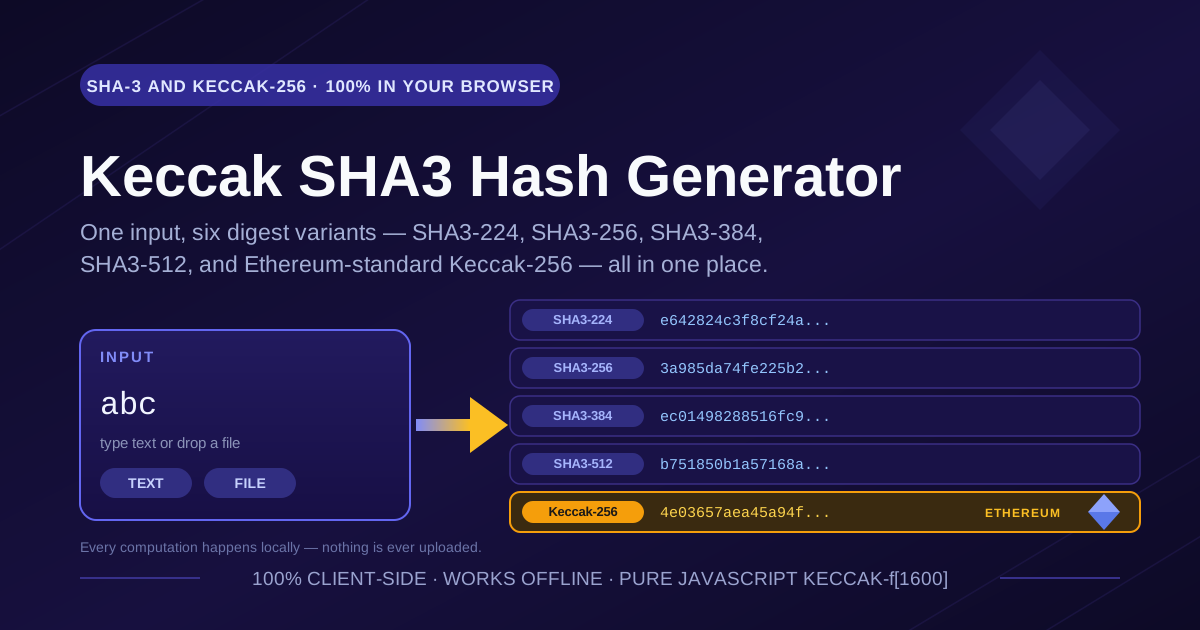
The free Keccak SHA3 Hash Generator closes that gap. It computes SHA3-224, SHA3-256, SHA3-384, and SHA3-512 — the four sizes standardized by NIST — alongside the original Keccak variants, including Keccak-256, the exact hash Ethereum uses. Paste text or drop in a file and all six digests appear instantly. A pure-JavaScript Keccak-f[1600] engine computes everything in your browser: nothing is uploaded, and the tool works even offline.
Why Use Keccak SHA3 Hash Generator?
- Both families, side by side. SHA3-224 through SHA3-512 and Keccak-256 render in one view, so comparing variants takes seconds.
- Ethereum-compatible Keccak-256. Output matches keccak256() in Solidity, ethers.js, and web3.js exactly — original Keccak padding, not the NIST variant. This is the discrepancy behind most selector and checksum bugs.
- Text and file modes. Type a short string or drop in a multi-megabyte firmware image; file bytes are read and hashed locally, so binaries never touch the network.
- Pure-JS Keccak-f[1600] permutation. No server round trip, no API key, no rate limit. Hashing runs in your tab and works offline.
- All four SHA-3 output sizes. SHA3-224, SHA3-256, SHA3-384, and SHA3-512 are produced in one pass.
- Free and registration-free. No account, no usage caps — sensitive inputs stay on your device by design.
Key Features
| Feature | What You Get |
|---|---|
| Algorithms | SHA3-224, SHA3-256, SHA3-384, SHA3-512, Keccak-256, Keccak-512 |
| Input modes | Typed or pasted text; file drop or file picker for local files |
| Hashing engine | Pure-JavaScript Keccak-f[1600] sponge, standard padding per variant |
| Ethereum support | Keccak-256 identical to Solidity keccak256() and ethers.js output |
| Output format | Lowercase hexadecimal, one click to copy any digest |
| Privacy | 100% client-side; input is never uploaded or logged |
| Offline | Fully functional with the network disconnected after first load |
| Cost | Free and unlimited, no sign-up required |
- The six-way comparison pays off when chasing a mismatch: seeing all variants at once reveals within seconds whether someone computed Keccak-256 where the spec asked for SHA3-256.
- File mode hashes the raw bytes of the file — not a text rendering — the only correct way to fingerprint binaries and archives.
How to Use
- Open the tool. Navigate to the Keccak SHA3 Hash Generator. Nothing to install, nothing to configure.
- Enter your input in text mode. Type or paste a string; all six digests update as you type.
- Copy the digest you need. Read the label carefully: Keccak-256 and SHA3-256 are both 256 bits but are different hashes, as explained below.
- Switch to file mode for files. Drop a local file to get the same six digests for its contents — ideal for verifying downloads, artifacts, or firmware images.
- Cross-check the result. Compare against a known test vector or your library output — and for maximum assurance, re-run with the network disconnected.
SHA-3 vs Keccak-256: The Subtle Difference
SHA-3 and Keccak-256 share the exact same core — the Keccak-f[1600] permutation and the sponge construction that absorbs input and squeezes out the digest. The single difference is one byte of padding at the end of the message: when NIST standardized Keccak as SHA-3 in 2015, it changed the domain-separation padding from 0x01 (the original Keccak submission) to 0x06 (SHA-3 final). That one byte flows through the permutation and completely changes the output.
The consequence is blunt: Keccak-256 of any input is not SHA3-256 of that input. Same permutation, different padding, totally different digests — for every input, including the empty string. There is no way to convert between them.
Why does it matter? Ethereum standardized on the original Keccak before NIST re-padded it and never changed. Solidity's keccak256(), EIP-55 address checksums, and the ENS namehash algorithm are all Keccak-256 with 0x01 padding — not SHA3-256. Older libraries compounded the confusion by naming the function sha3() while actually computing Keccak-256, and the mismatch is silent: you get the wrong hash, not an error.
The four SHA-3 sizes trade digest length for speed: SHA3-224 emits 28 bytes (288-bit rate), SHA3-256 emits 32 bytes (1088-bit rate), SHA3-384 emits 48 bytes (832-bit rate), and SHA3-512 emits 64 bytes (576-bit rate), all through the same sponge with different rate/capacity splits. File mode applies the same logic to files, hashing contents byte for byte — one flipped bit changes every digest.
Try the classic NIST test input abc. The expected digests are:
- SHA3-224: e642824c3f8cf24ad09234ee7d3c766fc9a3a5168d0c94ad73b46fdf
- SHA3-256: 3a985da74fe225b2045c172d6bd390bd855f086e3e9d525b46bfe24511431532
- SHA3-384: ec01498288516fc926459f58e2c6ad8df9b473cb0fc08c2596da7cf0e49be4b298d88cea927ac7f539f1edf228376d25
- SHA3-512: b751850b1a57168a5693cd924b6b096e08f621827444f70d884f5d0240d2712e10e116e9192af3c91a7ec57647e3934057340b4cf408d5a56592f8274eec53f0
- Keccak-256: 4e03657aea45a94fc7d47ba826c8d667c0d1e6e33a64a036ec44f58fa12d6c45
Practical Use Cases
Ethereum and Web3 Address Work
Derive ABI function selectors (the first four bytes of Keccak-256 over a signature like transfer(address,uint256)), reproduce EIP-55 address checksums, or verify ENS namehash intermediates — without a whole class of "why does my selector not match" debugging.
Verifying File Integrity
Before running a downloaded installer, deploying firmware, or restoring a backup, hash the file in file mode and compare the digest with the one the vendor or your CI pipeline published.
Cross-Checking Library Outputs
When js-sha3, hash-wasm, ethers.js, OpenSSL, and your smart contract disagree, paste the same input here and compare all six digests at once. Agreement with the tool tells you which side of a mismatch is using the wrong variant.
Learning Hash Internals
Type abc, read the digests, change one character, and read them again — every digest changes completely. That avalanche effect is a memorable introduction to how a sponge construction works.
Best Practices
- Name the variant explicitly in documentation and code. Write "Keccak-256" or "SHA3-256", never a bare "sha3" — ambiguous names cause most Keccak-related bugs.
- Verify against a known test vector. Keep the abc digests above handy; note that even the empty string hashes differently under the two variants (a7ffc6f8... versus c5d24601...), proving the padding difference instantly.
- Use file mode for large inputs. Drop the actual file rather than copy-pasting megabytes of base64, so raw bytes are hashed exactly as stored.
- Compare full digests, not prefixes. A truncated visual diff can hide a late-byte difference.
- Treat hashes as integrity, not authenticity. Anyone can recompute a hash, so use signatures or keyed MACs to prove origin.
Conclusion
Whether you are deriving a function selector, verifying a firmware image, or teaching a class how a sponge works, the Keccak SHA3 Hash Generator puts all six variants on one screen, computes everything locally, and costs nothing. Open the tool, paste your input or drop your file, and copy a digest with confidence.
Related Tools You Might Like:
- Hash Generator — classic MD5, SHA-1, and SHA-2 digests for everyday checksum work.
- File Hash Checker — verify downloaded files against published checksums in a couple of clicks.
- Hash Type Identifier — paste an unknown digest and identify which hash format likely produced it.
Hash confidently, name your variants precisely, and may all your digests match on the first try.
Frequently Asked Questions
Q: Is Keccak-256 the same as SHA3-256?
A: No. Both use the Keccak-f[1600] permutation, but SHA-3 pads with 0x06 while original Keccak pads with 0x01. Because the padding is hashed as part of the message, the two functions produce different digests for the same input.
Q: Which hash does Ethereum actually use?
A: Original Keccak-256 with 0x01 padding — used for transaction hashes, EIP-55 address checksums, ABI function selectors, and the ENS namehash algorithm.
Q: Are my text and files uploaded to a server?
A: No. The pure-JavaScript implementation runs entirely in your browser. Text and file bytes are read and hashed locally and never transmitted.
Q: Why does my library output differ from the tool output?
A: Usually a variant mix-up: the library computed Keccak-256 where you compared against SHA3-256, or vice versa. The next most common cause is an encoding difference, such as hashing UTF-8 bytes versus a hex string.