Keyboard Focus Order Checker: See Your Page the Way Keyboard Users Do
Paste HTML and instantly see the expected Tab order. The Keyboard Focus Order Checker flags positive tabindex, onclick-only controls that keyboard users can never reach, and aria-hidden focus traps — 100% client-side.
Free Interactive Tool
Keyboard Focus Order Checker
Paste HTML to list the expected keyboard tab order, flag positive tabindex, unreachable onclick controls, and aria-hidden focus traps
Table of Contents
Pressing the Tab key is how millions of people move through the web — screen reader users, people who cannot use a mouse, and keyboard-first power users. They all rely on one quiet promise: focus will travel through your page in a sensible order and land on everything that can be activated. When that promise breaks, the page becomes unusable no matter how beautiful it looks. The Keyboard Focus Order Checker shows you what keyboard users will experience before they do.
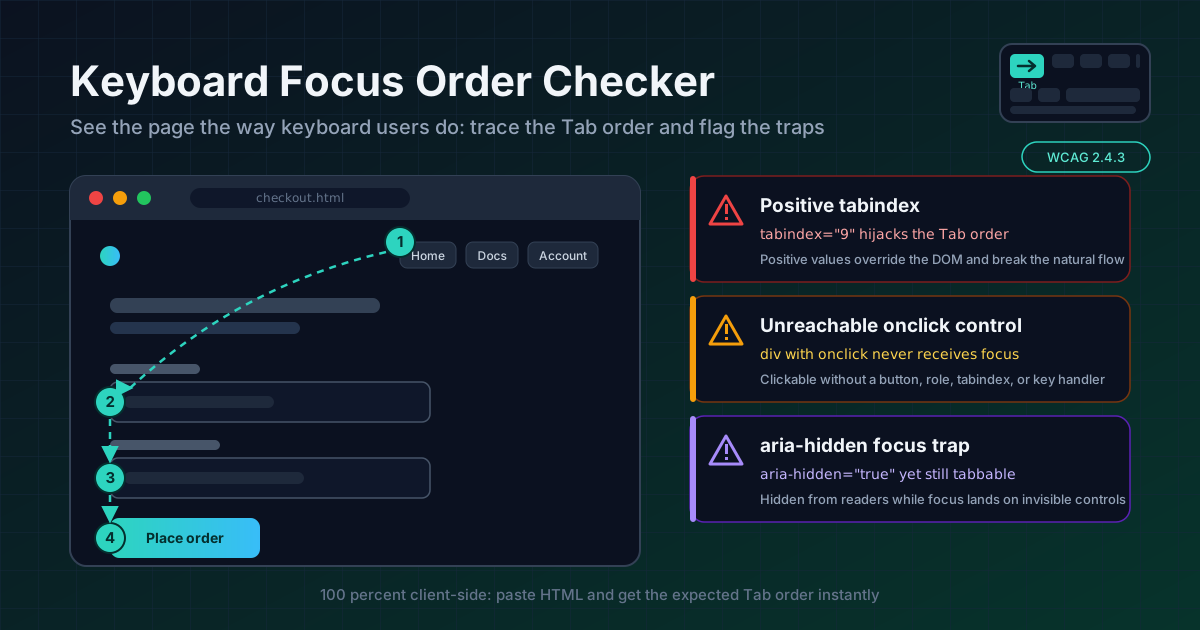
Paste any HTML and the tool walks the document like a browser would: it builds the expected tab order element by element, then flags the classic failure modes — positive tabindex values that hijack the sequence, click-only div and span elements that can never receive keyboard focus, and aria-hidden="true" elements that still contain focusable children, the worst combination because focus lands on invisible controls.
Everything runs 100% client-side. Your markup never leaves the browser, so internal dashboards, client templates, and pre-release builds are all safe to audit.
Why Use Keyboard Focus Order Checker?
- It simulates the Tab key before you touch one. Manually tabbing through a page is slow and resets with one stray click. The checker produces the complete expected order in a single paste.
- It catches the three classic focus failures automatically. Positive tabindex, click-only controls, and aria-hidden traps break keyboard navigation most often — each is flagged on paste.
- It pinpoints issues with exact locations. Every finding reports line and column with the snippet inline, so you jump straight to the fix.
- It reasons about reachability, not just syntax. Valid HTML can still be unreachable. The tool checks which elements can receive focus — what matters to a keyboard user.
- You can copy a full report. One click yields a summary with counts and every finding, ready for a pull request or audit.
- Zero friction, full privacy. No account, no upload, no install. Proprietary markup stays in your browser.
Key Features
| Feature | What it does |
|---|---|
| Expected tab order list | Walks focusable elements in the order the Tab key will visit them |
| Positive tabindex flag | Reports every tabindex above zero that breaks natural sequence |
| Unreachable control flag | Finds clickable elements with no path to keyboard focus |
| aria-hidden trap flag | Detects hidden containers that still hold focusable children |
| Severity and locations | Errors and warnings with line, column, and snippet |
| Copyable report | One-click plain-text summary with issue counts for tickets and reviews |
- Elements removed from the tab order are labeled as such, rather than silently skipped, so the list matches reality.
- Analysis updates as you edit, and a built-in sample of deliberately broken markup shows every check firing immediately.
How to Use
- Open the tool. Nothing to install, nothing to configure.
- Paste your HTML. A full page or one component — a modal, a navbar, a form. The built-in sample works too.
- Read the expected tab order list. Compare it against your visual layout: the numbers should match what your eyes expect, top to bottom.
- Fix flagged issues by severity. Each finding shows severity, line, column, and snippet. Unreachable controls and hidden traps usually matter most.
- Re-paste and copy the report. Confirm the flags are gone, then attach the report to your pull request or audit notes.
Three Ways Focus Goes Wrong
1. Positive tabindex breaks the natural order
The default tab order follows the DOM, top to bottom. A positive tabindex="1" yanks an element out of that flow into a manually ordered island, and mixing positive values with normal elements produces an order no one can predict — one that reshuffles with every later edit. It is the usual patch for a layout that renders controls out of visual sequence, and it makes things worse by creating two sources of truth. The fix: delete the positive values and reorder the DOM. The checker flags every positive value with its location.
2. Clickable elements that never receive focus
A div with an onclick handler works flawlessly with a mouse and is a brick wall with a keyboard: it cannot receive focus, so Tab never stops there and Enter and Space do nothing. The right fix is semantic — use a real button or a, which gives you focusability, keyboard activation, and the correct role for free. If you must keep a non-semantic element, you need role="button", tabindex="0", and manual keydown handlers. The checker lists every clickable element keyboard users cannot reach.
3. aria-hidden elements that are still tabbable
aria-hidden="true" removes an element from the accessibility tree — screen readers skip it — but does nothing to the tab order. A hidden container whose children remain focusable creates the worst case: focus moves to something invisible, nothing is announced, and the user is stranded. This happens constantly with closed dropdowns and off-screen widgets. Make the hiding real: unfocus hidden children with tabindex="-1", use the hidden attribute or inert, or delay rendering. The checker detects this pattern and points at the offending subtree.
Across all three cases one principle wins: natural DOM order beats tabindex patches. Restructure the markup so source order matches visual order, and the tab order comes out correct forever.
Practical Use Cases
WCAG 2.1.1 and 2.4.3 audits
Success Criterion 2.1.1 (Keyboard) requires all functionality to be keyboard operable; 2.4.3 (Focus Order) requires focus to move in an order that preserves meaning. The tab order list evidences 2.4.3, while unreachable-control and hidden-trap findings are concrete 2.1.1 failures. Drop the report into your audit workbook.
Custom component development
Dropdowns, tabs, and toolbars are where teams hand-roll focusable widgets — and where reachability bugs are born. Paste the rendered HTML during development, not after launch, and catch the onclick-on-a-div habit early.
Modal dialogs and focus traps done right
A good modal keeps focus inside itself; a broken one lets focus escape, or worse, hides the background with aria-hidden while its controls stay tabbable. Paste the full page with the modal open and verify focus enters the dialog, cycles through it, and returns only after close.
Legacy page remediation
Old pages accumulate a decade of positive tabindex and click-only widgets. Paste each page instead of a manual walkthrough — a handful of patterns usually accounts for most findings, and one shared fix clears dozens of issues.
Best Practices
- Make DOM order match visual order. With modern flexbox and grid they rarely need to diverge — and when they do, focus order should follow visual order.
- Use real buttons and links. A native button or a with an href solves focus, activation, and semantics in one tag.
- Never ship a positive tabindex. Treat one as a code smell; the DOM is the single source of truth for tab order.
- Hide means hide. Anything aria-hidden must have no focusable children — or should not be rendered at all.
- Test by unplugging the mouse. Complete your core flow with the keyboard only; the checker finds structural issues, the unplugged-mouse test confirms the experience.
- Re-check after every layout refactor. Reordering components with CSS is invisible in code review but instantly visible in the tab order.
Ready to see your page the way keyboard users do? Paste your HTML into the free Keyboard Focus Order Checker and get the expected tab order, every positive tabindex, every unreachable control, and every aria-hidden trap — in seconds, in your browser.
Related Tools You Might Like:
- Accessible Name Calculator — compute what a screen reader will announce for any element, so every focused control has a name.
- Heading Structure Checker — focus order and heading levels are the two halves of linear navigation. Validate your hierarchy too.
- JSON Formatter — format and inspect the JSON payload your component renders to trace which value lands in which control.
Focus order is the difference between a page people can use and a page they can only look at — run yours through the Keyboard Focus Order Checker before keyboard users find the gaps for you.
Frequently Asked Questions
Q: What is the difference between the natural tab order and the order with positive tabindex values?
A: The natural order follows the DOM, top to bottom. Positive tabindex values create a separate sequence that runs first; the natural order resumes only after every positive value is exhausted. With more than one positive value the final order becomes impossible to predict — which is why each one is flagged.
Q: Does a positive tabindex ever make sense?
A: Almost never. tabindex="-1" is the widely accepted value, used to remove an element from the tab order programmatically. Zero is occasionally used for custom widgets; any value of one or higher is an anti-pattern — fix the DOM order instead.
Q: My div works fine when I click it. Why is it flagged?
A: Because mouse clicks and keyboard activation are different input paths. A div with onclick responds to the mouse but cannot receive focus, so keyboard users can never trigger it. Replace it with a button and the handler serves both paths automatically.