Markdown Link Checker: Find Broken Links Before Your Readers Do
Scan Markdown for malformed links — empty URLs, spaces in URLs, unclosed inline links, undefined reference labels, and duplicate or unused definitions — with line numbers, severity filters, and a plain-text report. 100% client-side.
Free Interactive Tool
Markdown Link Checker
Scan Markdown for malformed links: empty URLs, spaces in URLs, unclosed brackets, undefined references, and duplicate or unused definitions. Runs 100% in your browser.
Table of Contents
Broken links are the most embarrassing bugs in documentation because nothing crashes. The page renders, the prose reads perfectly, and the reader discovers the problem only when they click — landing on a 404 or nothing at all. By then the trust damage is done.
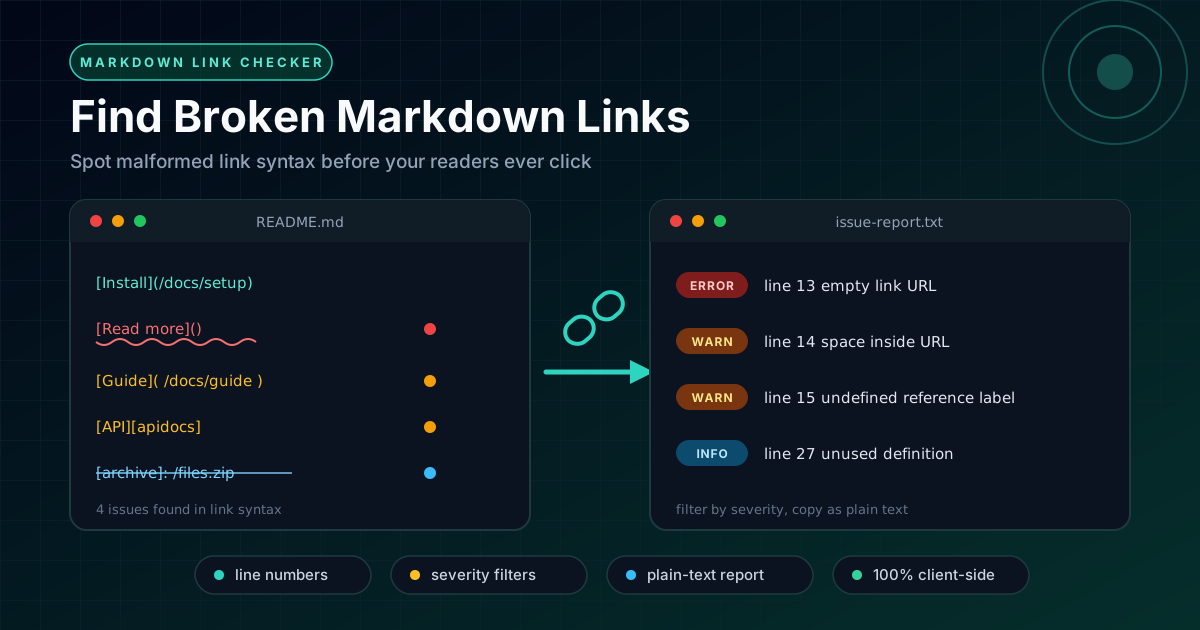
Markdown makes this worse: most link failures are silent. An empty URL, a stray space inside parentheses, a reference label that was quietly renamed — none of these produce an editor error or look wrong in a preview at a glance. The Markdown Link Checker makes those silent failures loud: it scans your document, flags every malformed link with its line number, and returns a severity-ranked report ready to act on.
This guide covers the five ways Markdown links break, how to prioritize by severity, and where a link check fits into your publishing workflow.
Why Use Markdown Link Checker?
- Catches what a visual preview misses. A preview shows something that looks like a working link even when the URL is empty or contains spaces. Syntax-level scanning sees what the parser actually sees — which decides whether the click works.
- Gives you exact line numbers. Every issue points to the precise line, so you jump straight to the fix instead of hunting for one bad parenthesis.
- Sorts problems by severity. A visibly broken link is not the same class of problem as an orphaned definition. Severity filters let you work through the report in a deliberate order.
- Understands reference-style links. It verifies that every [text][label] usage has a matching definition, and reports labels that are defined twice or never used.
- Produces a plain-text report. One click copies the findings for pasting into a pull request, a review comment, or a CI log — no screenshots needed.
- Runs 100% client-side. Everything happens in your browser, so internal docs and unpublished drafts never leave your machine.
Key Features
| Detection | What it finds | Typical cause |
|---|---|---|
| Empty URLs | Links with nothing inside the parentheses | Placeholder written and never filled in |
| Spaces in URLs | Whitespace inside or around the URL | Pasted URLs, wiki or CMS exports |
| Unclosed inline links | An opening parenthesis with no matching close | Deleted bracket, or parentheses inside the URL |
| Undefined reference labels | A label used with no definition in the file | Renamed or deleted definition, misspelled label |
| Duplicate definitions | The same label defined more than once | Merged edits from two branches |
| Unused definitions | Labels defined but never referenced | Cleaned-up prose that left definitions behind |
What makes the report practical:
- Instant and repeatable. Paste, read, fix, paste again — no setup or install step.
- Portable output. Severity filters keep long documents manageable, and the plain-text report drops cleanly into merge requests.
How to Use
- Open the tool. Go to the Markdown Link Checker and paste your Markdown — a README, a docs page, a blog draft.
- Let the scan run. Analysis happens immediately in your browser, with no upload step.
- Read the report. Each finding shows the line number, the issue type, and its severity.
- Filter and fix in severity order. Surface the highest-impact issues first, jump to each line, apply the fix.
- Re-scan and share. Paste the corrected document back to confirm a clean report, then copy it into your pull request so reviewers can see the document was checked.
Five Ways Markdown Links Break
These are the five failure modes the tool detects, ordered roughly by how much each hurts the reader.
1. Empty URLs
Read the [full documentation]() before you start.
This renders as a clickable-looking link with an empty destination. Clicking does nothing or reloads the page — a dead end. It happens when someone writes the prose first and forgets to fill in the URL.
Fix: add the URL, or remove the link markup and leave plain text.
2. Spaces Inside URLs
See the [getting started guide](/docs/getting-started) for setup steps.
This is the classic wiki-migration break. Exports from wikis, CMS platforms, and word processors often inject spaces inside the parentheses, and many parsers then fail to resolve the URL — the link silently dies even though the source looks fine. Pasting a URL with real spaces unencoded causes the same failure.
Fix: strip all whitespace between the parentheses, and percent-encode any legitimate spaces as %20.
3. Unclosed Inline Links
Check the [API reference](https://example.com/api for details.
A missing closing parenthesis leaves the parser guessing where the URL ends. Some renderers swallow the rest of the sentence into the link; others leave it as literal text. This often happens when the URL itself contains parentheses, as on Wikipedia.
Fix: close the link, and percent-encode parentheses that belong to the destination (%28 and %29).
4. Undefined Reference Labels
Full details in the [API guide][apidocs].
If no [apidocs]: https://... definition exists in the document, the link renders as plain text with visible brackets. This is the most common casualty of refactoring: a renamed definition, a deleted section, or a label misspelled by one character.
Fix: add the missing definition, or convert the link to inline form if it is only used once.
5. Duplicate or Unused Definitions
[docs]: https://example.com/docs/v1
[docs]: https://example.com/docs/v2
[changelog]: https://example.com/changelog
A duplicate definition is quietly dangerous: most renderers let the last definition win, so every [docs] link silently points at the second URL, likely the wrong one. An unused definition like [changelog] is harmless to readers but misleads maintainers.
Fix: keep exactly one definition per label, and delete definitions no link references.
Severity Levels and Triage Order
Empty URLs, spaces in URLs, and unclosed links are highest severity — they produce broken or missing links every reader can hit. Undefined reference labels come next: readers see raw bracket text instead of a link. Duplicate definitions follow, since the link works but may target the wrong URL. Unused definitions are lowest: pure hygiene. Triage the top tier first, sweep the middle, and batch the cleanup last.
Practical Use Cases
README Pre-Publish Checks
Your README is the front door of your repository, edited by many hands over many years. Scan it before every release: a broken link there is disproportionately costly because every visitor sees it — including people deciding whether to adopt your project.
Documentation Sites
Long-form docs accumulate reference-style links defined dozens of lines from where they are used — exactly the distance in which renames and deletions go unnoticed. A scan before each deploy catches undefined labels and stale definitions no reviewer reliably spots.
Blog Drafts
Blog posts are written fast and linked casually. A quick check before publishing catches the placeholder you meant to fill in and the paste-mangled URL with a space hiding inside it.
Migration Validation
Moving content between platforms — wiki to docs site, HTML to Markdown — is where spaces-in-URLs breakage breeds. Scan every migrated file on arrival so systematic problems surface on day one, not in reader reports.
Best Practices
- Use reference-style links for anything you repeat. A URL appearing three or more times belongs in one definition; when it changes, you update it once.
- Check before every merge, not after publishing. A link check takes seconds and belongs in the same mental slot as proofreading.
- Keep the report in your CI logs or PR description. The plain-text report creates a paper trail reviewers can verify.
- Keep exactly one definition per label. Duplicates resolve ambiguously, and "last one wins" is not a rule anyone should rely on.
- Percent-encode special characters. Spaces and parentheses belong encoded, so the link syntax and the URL never fight over the same characters.
- Pair the syntax check with a rendered preview. The checker catches what the parser sees; the Markdown Preview confirms what the reader sees.
Try It Now
Paste your most-edited document into the Markdown Link Checker and see what has been hiding in it. It runs entirely in your browser, needs no sign-up, and returns a severity-ranked report in seconds.
Related Tools You Might Like:
- Markdown Preview — render your Markdown exactly as readers will see it, before you publish.
- HTML Tag Remover — strip markup down to clean plain text when converting out of HTML.
- Regex Railroad Diagram Generator — visualize complex regex patterns as readable diagrams.
Happy linking — may every click land where your readers expect.
Frequently Asked Questions
Q: Does the tool check whether the destination page actually exists?
A: No. It validates link syntax — whether each link is well-formed — not whether the remote URL currently responds. Syntax checks are instant and deterministic, and they catch the failure modes behind most broken links.
Q: Is my Markdown uploaded to a server?
A: No. Scanning runs 100% client-side in your browser, so the tool is safe for internal documentation, unreleased drafts, and anything covered by a confidentiality policy.
Q: Which severity levels should block a release?
A: A reasonable rule: empty URLs, spaced URLs, and unclosed links block publishing; undefined reference labels block reader-facing docs; duplicates and unused definitions are scheduled cleanup rather than blockers.
Q: Does it support reference-style links as well as inline links?
A: Yes. Inline links are checked for empty, spaced, or unclosed URLs, and reference-style links are checked against their definitions — including duplicate and unused labels.