ULID Decoder: Read the Timestamp Hidden Inside Every ULID
Decode ULIDs into their embedded millisecond timestamps, creation dates in any timezone, and 80-bit randomness parts. Validate Crockford Base32 format and batch-decode up to 200 ULIDs at once, fully client-side.
Free Interactive Tool
ULID Decoder
Decode ULIDs into timestamps, creation dates, and randomness parts
Table of Contents
Every ULID is two things at once: a unique identifier and a quiet diary entry. Short for Universally Unique Lexicographically Sortable Identifier, a ULID is a 26-character string that sorts by creation time, survives database indexes better than random UUIDs, and — less famously — hides a millisecond timestamp in plain sight. The ULID Decoder cracks it open in seconds, no code or library required.
Paste any ULID and the tool splits it into its two halves: a 48-bit timestamp marking the exact millisecond of creation and an 80-bit randomness part that keeps the identifier unpredictable. You get the raw epoch milliseconds, a readable creation date in any timezone you choose, and a per-character format check against the Crockford Base32 alphabet.
Why Use ULID Decoder?
- Recover creation time instantly. The first 10 characters encode a 48-bit millisecond clock. Paste the ID and read the creation date instead of writing a throwaway script or squinting at base-32 math.
- Catch malformed IDs before they bite. Strict Crockford Base32 validation flags typos, wrong lengths, and impossible letters before a broken identifier reaches production.
- Read dates in your timezone, not just UTC. Render the decoded creation time anywhere, with millisecond precision.
- Inspect the randomness half. See the 80-bit entropy isolated, useful when testing generators or explaining why two ULIDs from the same millisecond still differ.
- Batch-decode up to 200 at once. Paste a whole column of IDs, one per line, and get a decoded table back in a single pass.
- Keep sensitive data local. No upload step, no API call, no telemetry — decoding happens entirely in your browser tab.
Key Features
| Feature | What it does |
|---|---|
| Embedded timestamp extraction | Reads the 48-bit millisecond clock in the first 10 characters of every ULID |
| Timezone-aware creation dates | Renders the decoded timestamp as a full date and time in any timezone, to the millisecond |
| Randomness breakdown | Isolates the final 16 characters — the 80-bit random component — for inspection or copying |
| Crockford Base32 validation | Rejects invalid characters (including I, L, O, and U) and malformed lengths, with a status per row |
| Batch mode up to 200 | Decodes a whole list at once, one per line, with per-row results |
| 100% client-side processing | All decoding happens in the browser; identifiers never leave your device |
Lowercase input is accepted and normalized automatically. In batch mode, invalid rows are labeled with a status while valid rows still decode, and every decoded field can be copied individually.
How to Use
- Open the ULID Decoder in your browser. Nothing to install, no account needed.
- For a single identifier, paste the 26-character ULID into the input field; the tool immediately shows the millisecond timestamp, creation date, and randomness part.
- Pick a display timezone from the dropdown if you want the creation date rendered somewhere other than UTC.
- For batch decoding, paste up to 200 ULIDs, one per line. The tool builds a results table with timestamp, date, and randomness columns for every row — lowercase entries welcome.
- Review the status column — invalid rows explain what failed — and copy any value into your notes or ticket.
Crockford Base32 and the 48-Bit Clock
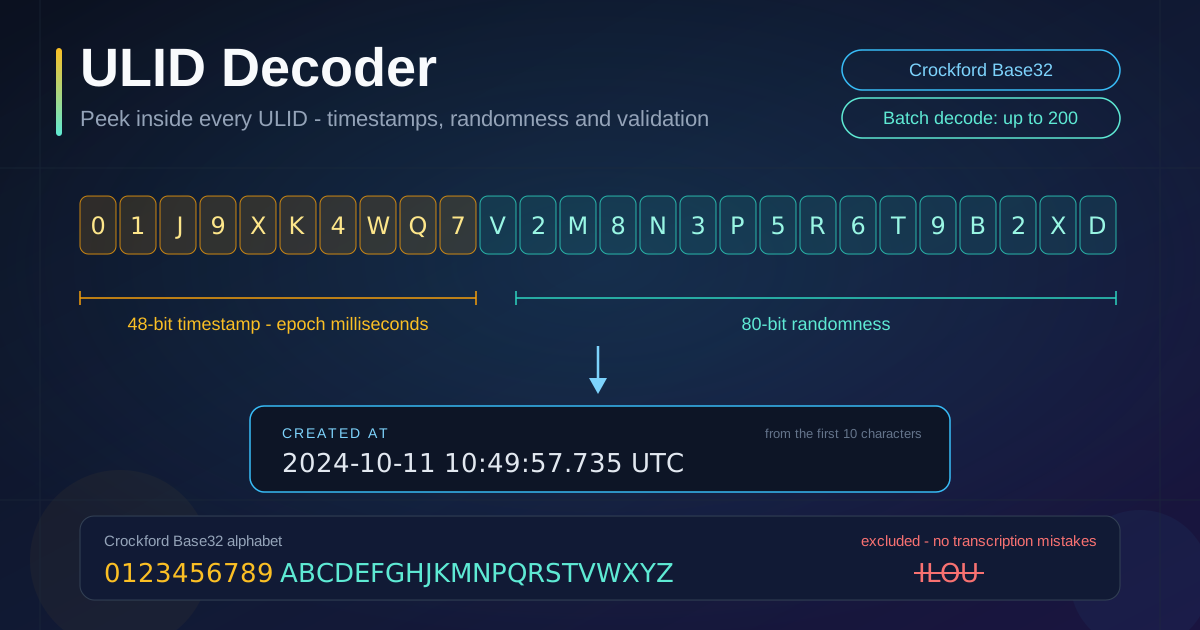
A ULID is exactly 26 characters long, and the layout is fixed. The first 10 characters encode a 48-bit timestamp — the milliseconds since the Unix epoch — and the remaining 16 characters encode 80 bits of cryptographically strong randomness. Together they form a 128-bit identifier that is unique by construction and ordered by birth.
The encoding is Crockford Base32, a 32-symbol alphabet designed for human transcription: digits 0-9 plus the letters ABCDEFGHJKMNPQRSTVWXYZ. Notice who is missing — I, L, O, and U. I and L look like the digit 1, O looks like 0, and U is dropped to keep printed identifiers free of accidental profanity. Removing look-alike symbols means an ID retyped from a screenshot or read over a call is far less likely to be corrupted. The alphabet is case-insensitive, so the decoder accepts lowercase input.
The decode math is a straightforward positional expansion. Treat the 10-character timestamp block as a base-32 number: multiply each character's alphabet index by 32 raised to its position from the right, then sum. The result is milliseconds since 1970-01-01 UTC. Take the example ULID 01J9XK4WQ7V2M8N3P5R6T9B2XD: its timestamp block 01J9XK4WQ7 evaluates to 1,728,643,757,735 milliseconds — 2024-10-11 10:49:57.735 UTC. The trailing V2M8N3P5R6T9B2XD is the randomness, typically shown as a hex value.
Batch decoding turns this into a log-analysis superpower: paste up to 200 ULIDs scraped from application logs and you have an instant chronological table, even for lines that lack reliable timestamps of their own.
ULID has time-ordered cousins. UUIDv7 embeds a similar 48-bit millisecond timestamp but inside the hexadecimal UUID layout, so reading it takes bit-level knowledge, and Snowflake IDs pack a timestamp, machine ID, and sequence into one 64-bit integer. ULID's edge is human-friendliness: lexicographic sorting, a transcription-safe alphabet, and a layout simple enough to decode by hand.
Practical Use Cases
Database Record Dating
Backfilled a table without a created_at column, or inherited a schema where the primary key is the only provenance? Decode a sample of ULIDs and you can date records to the millisecond, from when a signup wave started to whether that "old" test account was actually created last week.
Log Correlation Across Services
When the same ULID appears in a gateway log, a queue payload, and a service log, the embedded timestamp anchors it to a moment regardless of where it surfaced, revealing true sequencing across systems whose clocks disagree.
Ordering Verification
ULIDs are supposed to sort chronologically. If a sorted list yields decoded timestamps out of order, you have found clock skew or a sorting bug in your query — turning "the ordering feels wrong" into a demonstrable finding.
System Migration Audits
During a platform migration, you often must prove when records were created using only the identifiers that survived. Batch-decoding ULIDs from old and new systems provides an audit trail without trusting either system's row metadata.
Best Practices
- Validate before you decode. A single mistyped character can silently produce a plausible-looking but wrong timestamp.
- Remember that timestamps reveal creation time. ULIDs leak when a record was born; treat them as mildly sensitive in public issues.
- Use a sort check as a timestamp check. For ULID-ordered data, monotonically rising decoded timestamps are a cheap integrity test after exports, ETL jobs, and restores.
- Compare across systems in UTC. Timezone rendering is for humans; switch the display to UTC when reconciling dates between environments.
- Batch in chunks of 200. The tool caps each run to keep decoding instant — split larger exports and paste them in sequence.
- Treat decoded time as the generating clock. Clock skew makes it evidence of creation time, not a guarantee of insert order in every database.
Ready to Decode Your First ULID?
Grab any ULID from your logs, database, or codebase and paste it into the ULID Decoder. In one glance you will see the millisecond it was born, the full creation date in your timezone, and the randomness that keeps it unique.
Related Tools You Might Like:
- Snowflake ID Decoder — split 64-bit Snowflake integers into timestamp, worker, and sequence parts.
- UUID Decoder — inspect UUID versions, variant bits, and embedded timestamps.
- Unix Timestamp Converter — convert raw epoch seconds and milliseconds into readable dates.
Happy decoding!
Frequently Asked Questions
Q: Can a ULID really reveal exactly when a record was created?
A: Yes, to the millisecond, relative to the clock of the machine that generated it. The first 10 characters encode a 48-bit millisecond timestamp, subject to that system's clock accuracy.
Q: Why are the letters I, L, O, and U missing from ULIDs?
A: Crockford Base32 deliberately excludes look-alike symbols. I and L are easily confused with the digit 1, O with 0, and U is omitted to keep printed identifiers free of accidental profanity. The decoder flags any of these letters as invalid.
Q: How many ULIDs can I decode at once?
A: Up to 200 per batch. Paste them one per line — lowercase is fine — and the tool returns a table where valid rows are fully decoded and invalid rows are clearly labeled, so one malformed ID never blocks the rest.
Q: Is my data uploaded anywhere when I use the decoder?
A: No. All decoding runs 100% client-side in your browser — the ULIDs you paste never leave your device.
Q: What is the difference between the timestamp part and the randomness part?
A: The first 10 characters are the 48-bit creation timestamp; the last 16 are 80 bits of random entropy that keep simultaneous ULIDs unique. Sorting by ULID sorts by the timestamp part.