Ratio Calculator Guide: Simplify, Solve, and Scale Any Proportion
Learn how the Ratio Calculator simplifies ratios to lowest terms with GCD math, solves missing proportion terms, compares two ratios, and scales quantities using equivalent-ratio tables.
Free Interactive Tool
Ratio Calculator
Simplify ratios to lowest terms, solve missing proportion terms, compare two ratios, and scale quantities with equivalent-ratio tables.
Table of Contents
Ratios are everywhere once you start looking. You meet them when mixing a drink at 2 parts syrup to 3 parts water, resizing a photo so it is not stretched, reading a 1:50,000 map, or splitting profits with a partner. A ratio is simply a comparison of two quantities, and getting it right is the difference between a balanced recipe and a ruined batch.
The most common everyday question is the missing-term problem: "My mix calls for 2 parts syrup to 3 parts water, but my pitcher holds 8 liters — how much syrup do I need?" The free Ratio Calculator answers it instantly, plus three more daily jobs: simplifying ratios to lowest terms, checking whether two ratios are equivalent, and scaling quantities up or down.
Why Use Ratio Calculator?
- No algebra required. Solving 2:3 = 4:x by hand means cross-multiplying and dividing; the tool does it in one click.
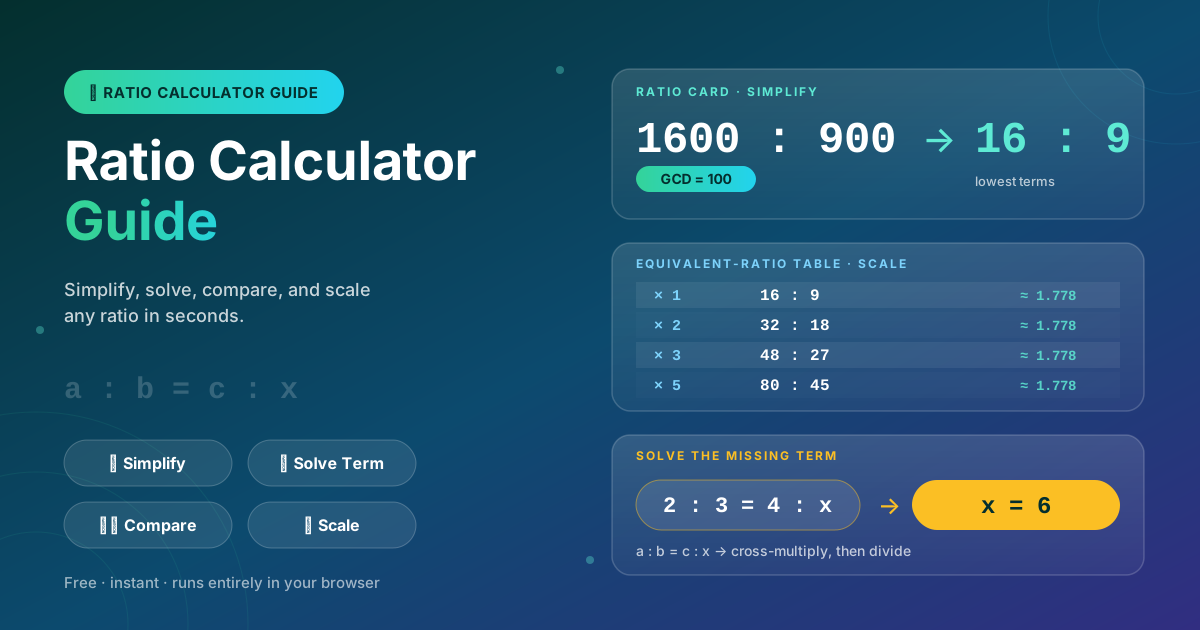
- Instant simplification with GCD. The calculator divides both terms by their greatest common divisor, turning 1600:900 into the far simpler 16:9.
- Reliable comparisons. Is 3:5 the same as 24:40? Cross products settle it deterministically instead of eyeballing.
- Ready-made equivalent-ratio tables. Scaling usually means several equivalent ratios at once; the table multiplies both terms by any factor, so every row stays consistent.
- Works with real numbers. Integers and decimals are both accepted — handy for measurements like 1.5 liters.
- Private and instant. Everything runs 100% client-side in your browser: no uploads, no sign-up, results as you type.
Key Features
| Feature | What It Does |
|---|---|
| Simplify to lowest terms | Divides both terms by their GCD (1600:900 becomes 16:9) |
| Solve the missing term | Fills the unknown in a proportion such as a:b = c:x |
| Compare two ratios | Reports whether two ratios are equivalent, and which is larger if not |
| Scale quantities | Builds an equivalent-ratio table by multiplying both terms by one factor |
| Client-side privacy | All math runs in the browser with no data sent anywhere |
- Built-in sanity check: the simplify mode displays the GCD it divided out.
- Flexible unknown: the solve mode accepts the missing term in any of the four positions of the proportion.
How to Use the Ratio Calculator
- Open the tool and pick a mode. Go to the Ratio Calculator and choose Simplify, Solve Missing Term, Compare, or Scale.
- Simplify a ratio. Enter two terms, for example 1600 and 900. The tool shows 16:9 plus the GCD of 100 it used.
- Solve for the missing term. In the Solve tab, enter three known values in a proportion like 2:3 = 4:x and read x = 6.
- Compare two ratios. Enter both in the Compare tab to learn whether they are equivalent and, if not, which one is larger.
- Scale with the equivalent-ratio table. In the Scale tab, enter a base ratio and a factor, then pick the row matching your batch size.
Simplify, Solve, Scale: The Math Behind the Tool
Reducing a Ratio with the GCD
Simplifying works like reducing a fraction: divide both terms by their greatest common divisor. For 1600:900 the GCD is 100, giving 16:9 — the familiar widescreen shape. The value is unchanged; only readability improves, which makes later steps easier.
Solving the Missing Term by Cross-Multiplication
A proportion states that two ratios are equal: a:b = c:x. Cross-multiplication turns this into a × x = b × c, so x = (b × c) ÷ a.
Here is the worked mixing example. Your syrup-to-water recipe is 2:3, and a 5-liter batch contains exactly 2 liters of syrup. You now want an 8-liter batch, so scale the syrup share: 2:5 = x:8 gives 2 × 8 = 5 × x, so x = 3.2 liters of syrup and 4.8 liters of water. The Solve tab handles this instantly as long as the same quantity sits on the same side of both ratios.
Building Equivalent-Ratio Tables for Scaling
Ratios are equivalent when one is the other multiplied through by the same factor. From 16:9 the table generates 32:18, 48:27, 80:45 — the same shape at different sizes. Recipe scaling works exactly this way: dough mixed at 3:2 flour to water triples to 9:6 and bakes identically. Reading a prepared table beats recomputing each multiple by hand.
Comparing Ratios by Cross Products
To test whether a:b equals c:d, cross-multiply: they match when a × d = b × c. For 3:5 versus 24:40, both products are 120, so the ratios are equivalent. When the products differ, the larger one shows which ratio represents the bigger share — the logic the Compare tab applies.
Practical Use Cases
Cooking and Recipe Scaling
Recipes are ratios in disguise: vinaigrette at 3:1 oil to vinegar, rice at 2:1 water to rice. When guests double or the pot changes, the table shows every batch size at once, and the missing-term mode answers "how much oil for 500 ml of vinegar?" on the spot.
Screen and Print Dimensions
A 1600:900 mockup simplifies to 16:9, which tells you a 3840×2160 export keeps the same shape. Print work runs the other way: given a 3:2 frame and a known width, the missing-term solve returns the exact matching height, so nothing arrives cropped.
Model Making and Scale Drawings
Scale models and 1:50 floor plans are pure proportion problems. If a real wall is 4.2 meters, the missing-term mode yields 8.4 centimeters on paper, and enlarging the plan for a poster is one table away.
Chemical and Cleaning Mixtures
Dilution instructions like 1:20 concentrate to water are ratios too. Whether you are filling a 10-liter bucket or a 750-milliliter spray bottle, solving for the missing term gets the concentrate amount exactly right — which matters for both effectiveness and safety.
Best Practices for Working with Ratios
- Keep units consistent. Compare liters to liters before forming the ratio; a mixed-unit ratio is silently wrong.
- Simplify first. Reduce raw ratios to lowest terms before solving or scaling; smaller numbers mean fewer entry errors.
- Sanity-check the direction of the proportion. The same quantity must sit in the same position on both sides; a flipped pair is the most common mistake.
- Distinguish direct from inverse relationships. More workers can mean less time — treating that inverse proportion as direct inverts your answer.
- Prefer exact fractions to rounded decimals. Carrying 10/3 forward beats rounding to 3.33 early and compounding the error.
- Verify with the comparison mode. The resulting ratio should still be equivalent to the original; if not, recheck the inputs.
Start Simplifying, Solving, and Scaling Today
Next time a recipe, layout, or dilution throws a ratio at you, skip the scratch paper. Open the Ratio Calculator, pick the mode that matches your question, and get a verified answer in seconds.
Related Tools You Might Like:
- Percentage Calculator — turn ratios into percentages for reports and discounts
- Unit Price Calculator — compare products fairly by normalizing prices per unit
- Golden Ratio Calculator — apply the famous 1:1.618 proportion to layouts and designs
Happy calculating — may all your proportions balance!
Frequently Asked Questions
Q: How does the Ratio Calculator simplify a ratio to lowest terms?
A: It finds the greatest common divisor (GCD) of both terms and divides them by it — 1600:900 has a GCD of 100, so it becomes 16:9. The tool also displays the GCD.
Q: What does solving the missing term mean in a proportion like 2:3 = 4:x?
A: It means finding the fourth number that makes the two ratios equal. The tool cross-multiplies (2 × x = 3 × 4) and divides to get x = 6.
Q: Can the tool work with decimal values, not just whole numbers?
A: Yes. Values like 1.5 or 2.25 are accepted, which suits real measurements such as liters, cups, or centimeters.
Q: Are two ratios equivalent if their simplified forms match?
A: Exactly — 32:18 and 16:9 both simplify to 16:9. The Compare tab checks this via cross products: a:b equals c:d when a × d = b × c.
Q: Is my data sent anywhere when I use the calculator?
A: No. All calculations run 100% client-side in your browser; nothing is uploaded or stored on a server.