How to Build Production-Grade System Prompts with System Prompt Builder
System Prompt Builder assembles role, tone, constraints, and output format into clean, copy-paste LLM system prompts — right in your browser with no API required.
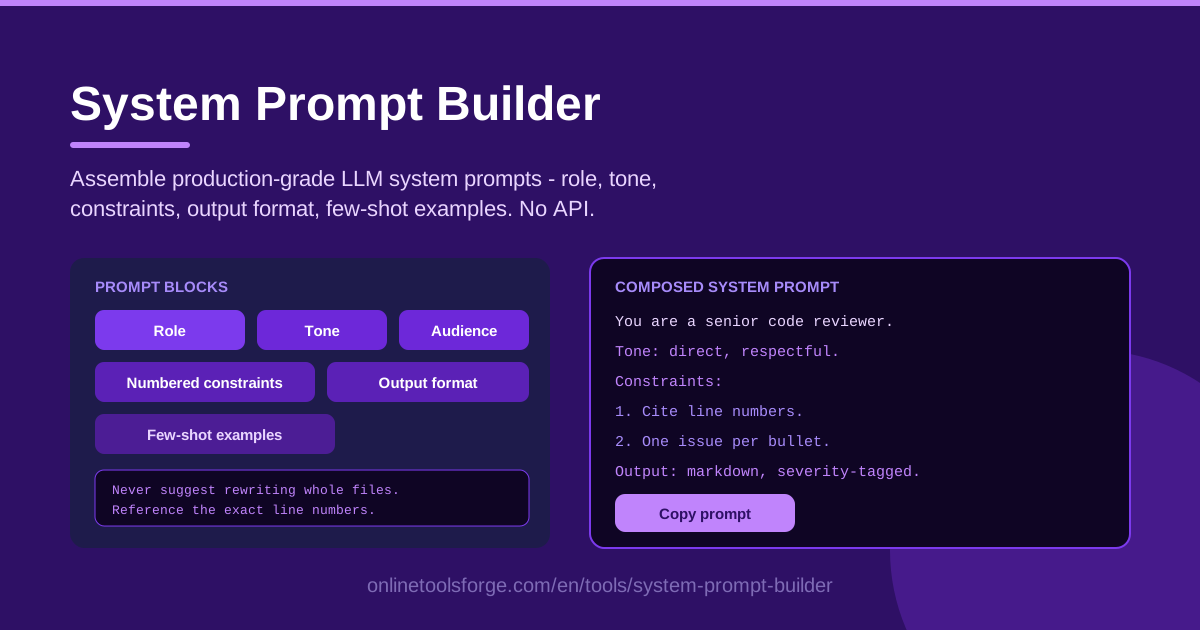
Table of Contents
A weak system prompt is the quiet reason most LLM features disappoint. The model is capable, the user input is fine, yet the answers arrive in the wrong tone, ignore your rules, or come back as rambling prose when you wanted structured output. The root cause is almost always the same: the instructions were improvised instead of engineered.
System Prompt Builder fixes this by treating a system prompt as something you assemble from blocks, not something you retype from scratch each time. You fill in structured sections for role, tone, audience, numbered constraints, output format, and few-shot examples, and the tool composes everything into one clean, copy-paste-ready prompt. It runs entirely in your browser with no API key and no account.
This guide covers why structured prompts outperform improvised ones, a step-by-step walkthrough of the tool, the anatomy of a production-grade system prompt, and practical use cases you can adapt today.
Why Use System Prompt Builder?
- Structure beats improvisation. Role, tone, constraints, and format live in separate blocks, so nothing drowns in a wall of prose. Every instruction gets its own line — and its own weight.
- Numbered constraints the model can follow. Vague advice like "be concise and helpful" gives a model nothing to hold onto. The constraints block turns your rules into a numbered list the model can enumerate, obey, and be audited against.
- Consistent output contracts. The output-format block specifies exactly how responses should be shaped — JSON, markdown tables, bullet summaries — so your downstream parsing code stops breaking.
- Few-shot examples without the mess. Example guidance such as "Never suggest rewriting whole files" or "Reference the exact line numbers" fits naturally into the constraints block, while few-shot examples anchor behavior far better than long explanations.
- Zero friction. No sign-up, no API, and nothing leaves your machine. Open the tool, build the prompt, paste it into ChatGPT, Claude, or any LLM you use.
- Faster iteration. Blocks are editable independently, so tuning one constraint never means rewriting the whole prompt.
Key Features
| Feature | What it does |
|---|---|
| Role block | Defines who the model is — "senior code reviewer", "support triage analyst" — setting expertise and scope. |
| Tone and audience blocks | Calibrates voice (formal, friendly, blunt) and tailors vocabulary to the reader (beginner, executive, developer). |
| Numbered constraints block | Converts your rules into an ordered list the model can follow item by item. |
| Output-format block | Declares the exact response shape: sections, tables, JSON, or fixed-length summaries. |
| Few-shot examples block | Adds input/output pairs that anchor behavior on real cases. |
| One-click composer | Assembles every block into clean, copy-paste text with no reformatting. |
Details worth knowing:
- The composer outputs plain text, so results work anywhere a system prompt field exists: chat UIs, API calls, agent frameworks, and IDE assistants.
- Blocks are ordered the way models read best — identity first, behavior next, format last — which measurably improves instruction-following.
- Built-in guidance like "Never suggest rewriting whole files" doubles as a lesson in what a well-formed constraint looks like, so you learn prompt engineering while you build.
How to Use System Prompt Builder
- Define the role. Start with who the model should be. Specific beats generic: "You are a meticulous code reviewer for a TypeScript monorepo" produces sharper behavior than "You are a helpful assistant."
- Set the tone and audience. Decide how the model should sound and who it is talking to. A prompt for internal engineers can be blunt and technical; one for end users should be warm and jargon-free.
- Add numbered constraints. Write rules as short, testable statements: "Reference the exact line numbers", "Limit findings to the five most critical issues", "Suggest a fix for every finding." Quality beats quantity.
- Specify the output format. Declare the contract — "Return findings as a markdown table with columns Severity, File, Line, Issue, Fix" — and the model stops freelancing on structure.
- Copy the composed prompt. The tool assembles everything into polished text. Paste it into your system prompt field, run a few test inputs, and refine individual blocks as needed.
Anatomy of a Production System Prompt
Why does block-based assembly work so well? Because each block answers a different question the model silently asks about every conversation.
Role framing narrows the distribution. An LLM trained on the internet can be anything; a role tells it which slice of itself to activate. "You are a senior TypeScript reviewer" biases the model toward review-style language, severity judgment, and code-level specificity. The narrower and more credible the role, the more consistent the persona.
Tone and audience calibration controls register. Tone decides sentence length, hedging, and directness; audience decides vocabulary and how much background to explain. The same finding — "this function has a race condition" — reads very differently to a staff engineer than to a product manager. Naming the audience stops the model from guessing.
Numbered constraints are followable; paragraphs of rules are not. A model handles "1. Reference exact line numbers. 2. Limit output to five findings. 3. Suggest a fix for each" far better than a paragraph saying the same thing. Numbers create discrete, checkable units — you can even ask the model to verify itself against them.
Output-format contracts make responses parseable. If any application reads model output, a declared format is not optional. Stating "respond only with JSON matching the schema below" turns a chatty assistant into a reliable component. This block exists to make that contract explicit and unambiguous.
Few-shot examples anchor behavior better than descriptions. One perfect input/output pair communicates style, length, and edge-case handling faster than any adjective. Two or three examples — including one that shows how to say "no findings" — usually eliminates most format drift.
Practical Use Cases
Code review assistants
Compose a reviewer that behaves like a senior engineer: role set to "senior TypeScript reviewer", constraints like "Reference the exact line numbers" and "Never suggest rewriting whole files", plus "Limit findings to critical and high severity." A markdown output format (Severity | File | Line | Issue | Fix) keeps reviews skimmable and diff-friendly.
Support ticket triage
Build a prompt that classifies tickets by category, urgency, and sentiment, then drafts a first reply. Constraints such as "Never invent SLA commitments" and "Escalate billing disputes to a human" encode policy directly into the prompt, while a JSON output format feeds your routing system cleanly.
Content style enforcement
Paste your style guide into the constraints block — sentence length limits, banned clichés, heading conventions — and set tone to match your brand. Few-shot examples showing an on-brand paragraph beside an off-brand one keep drafts consistently on voice.
Data extraction agents
For pulling structured fields from messy text, cast the model as an "extraction agent", constrain it to "Return only values present in the input; use null when a field is missing", and declare the exact JSON schema. The model stops hallucinating plausible-looking values and starts behaving like a parser.
Best Practices
- Prefer positive phrasing. "Use bullet points for findings" is followed more reliably than "Don't write walls of text." Say what to do; reserve "never" for genuinely risky behavior.
- Keep constraints under ~10. Long lists dilute attention. If you exceed ten, merge related rules or move company-wide policies into a separate reference document.
- Test with adversarial inputs. Paste an empty file, a hostile message, or an off-topic request and confirm the prompt holds. Rules that survive only happy paths are not rules yet.
- Version your prompts. Keep the composed text in version control with a changelog, so when behavior shifts after a model update you know exactly which constraint moved.
- Refresh few-shot examples regularly. Examples age as your product changes; stale examples quietly teach the model outdated behavior.
Ready to stop improvising? Open the System Prompt Builder, assemble your first production prompt in about five minutes, and paste it straight into your next LLM session — no account, no API, just a better prompt.
Related Tools You Might Like:
- Token Counter — check how many tokens your system prompt and context will consume before you ship.
- AI Tool Schema Builder — define function-calling schemas that pair naturally with a structured system prompt.
- Regex Tester — validate extraction patterns for the prompt-defined agents you build.
Happy prompting!
Frequently Asked Questions
Q: Is System Prompt Builder free to use? A: Yes. It runs entirely in your browser with no account, no API key, and no usage limits. Nothing you type is sent to a server.
Q: Which LLMs do the generated prompts work with? A: Any model that accepts a system prompt — ChatGPT, Claude, Gemini, open-source models, and agent frameworks — because the composer outputs portable plain text.
Q: How many constraints should I include? A: Aim for five to eight high-quality constraints and stay under ten. A short list of testable rules outperforms a long list of vague ones.
Q: Can I keep different versions of my prompts? A: The tool stores nothing server-side, so copy each composed prompt into your notes or version control to preserve a versioned history.