How to Estimate Model Training Cost Before You Spend a Single GPU-Hour
Use the Model Training Cost Calculator to turn parameters, tokens, and GPU prices into a realistic dollar estimate, then compare cloud providers side by side.
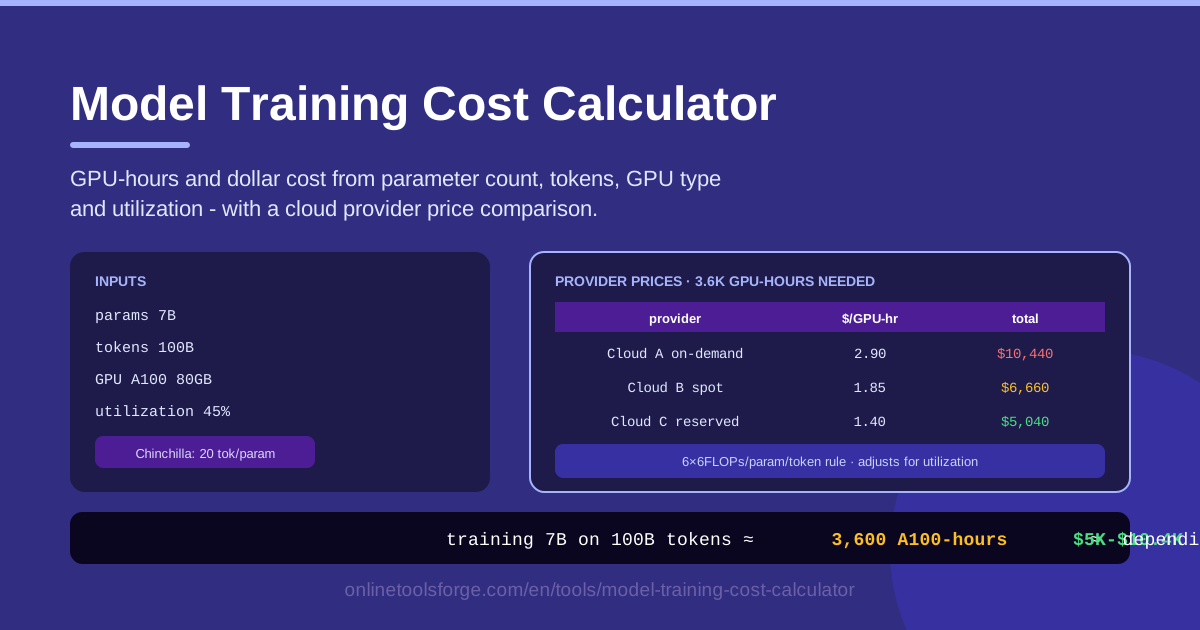
Table of Contents
Training your own model sounds like an engineering problem until the first invoice arrives. A run that looked harmless on a whiteboard can quietly consume thousands of GPU-hours, and an optimistic utilization assumption alone can swing the final bill by tens of thousands of dollars. The Model Training Cost Calculator turns that guesswork into arithmetic: enter a parameter count, a token budget, a GPU type, and an expected utilization, and it returns estimated total GPU-hours, dollar cost, and a provider price comparison table.
The math behind it is the same math practitioners put in planning documents: compute scales roughly with 6 × parameters × tokens, and price scales with how many GPUs it takes to deliver that compute at an efficiency you can actually achieve.
This guide explains what the tool does, how to use it, where the FLOPs rule comes from, and what any such estimate deliberately leaves out.
Why Use Model Training Cost Calculator?
- Budget before you build. Get a defensible dollar figure before committing to a GPU reservation, a cloud contract, or a roadmap.
- Compare cloud providers side by side. The same GPU-hours cost very different amounts across providers; the comparison table makes the spread visible in seconds.
- Pressure-test scope decisions. Doubling parameters or tokens roughly doubles compute, and watching the number change live makes trade-offs concrete.
- Speak finance's language. "About 38,000 GPU-hours, roughly $92,000 on provider X" lands very differently from "a while on a big cluster."
- Avoid the utilization trap. A GPU advertised at peak performance rarely delivers it during training; realistic utilization is baked into the math.
- Run it anywhere. Everything executes in your browser: no sign-up, no uploads, no spreadsheets to maintain.
Key Features
| Feature | What it does |
|---|---|
| Parameter count | Enter the model size in parameters (7B, 13B, 70B) as the basis of the estimate. |
| Token count | Specify how many training tokens the run will process. |
| GPU type | Choose the hardware you plan to rent so peak throughput matches reality. |
| Utilization | Set the fraction of peak performance the cluster will actually sustain. |
| GPU-hours estimate | Converts total training FLOPs into the GPU-hours required. |
| Cost and price table | Prices those GPU-hours and compares cloud providers in one view. |
| Browser-based | All math runs locally; nothing leaves your device. |
Details worth noting:
- The calculator applies the standard training FLOPs rule of thumb (~6 × parameters × tokens), keeping the estimate fast and transparent.
- Utilization is a first-class input, not a hidden constant, so you can compare a well-tuned cluster with a struggling one in dollars.
How to Use Model Training Cost Calculator
- Enter the parameter count. Type the model size — 7,000,000,000 for a 7B model. Still choosing between sizes? Run the calculator once per candidate.
- Enter the token count. Add the number of training tokens; the Chinchilla analysis suggests roughly 20 per parameter for compute-optimal training, but your data budget may dictate less.
- Pick the GPU type. Select the hardware you plan to rent; newer accelerators deliver more FLOPs per GPU-hour, shrinking both hours and wall-clock time.
- Set the utilization. Enter the efficiency you expect; without measurements, start conservative — 30 to 40 percent is a defensible planning range.
- Read GPU-hours, then compare prices. The tool shows total GPU-hours and cost; the provider table shows the same workload priced elsewhere. Screenshot it for slides.
From FLOPs to Dollars
The ~6 × parameters × tokens rule is the backbone of every serious training estimate. For a dense transformer, a forward pass costs roughly 2 FLOPs per parameter per token, and backpropagation adds about twice that — roughly 4 more. Sum them and each token costs about 6 × parameters FLOPs; multiply by the token count and you have total training compute. The Chinchilla finding follows from the same math: compute-optimal training uses roughly 20 tokens per parameter.
Utilization — often called MFU, model FLOPs utilization — is where estimates live or die. It is the fraction of a GPU's theoretical peak your training loop actually sustains, and real runs routinely land between 30 and 50 percent because time is lost to optimizer steps, inter-GPU communication, and data loading. Assuming 50 percent and achieving 30 is a 67 percent cost overrun.
GPU type changes the math twice. Peak throughput differs dramatically — an H100 delivers far more FLOPs per second than an A100, so the same workload needs fewer GPU-hours. But achievable utilization also depends on hardware: memory bandwidth, interconnect speed, and kernel quality determine how much of that peak you can hold. That is why the tool asks for GPU type and utilization separately.
Pricing adds the final layer. Spot or preemptible capacity often costs 60 to 90 percent less, but machines can be reclaimed mid-run, so frequent checkpointing is mandatory. Reserved pricing trades a discount for lock-in. And remember what the estimate excludes: data preparation, failed runs, ablations, evaluation, storage, and every inference token the finished model will serve. Treat the result as the cost of one successful run.
Practical Use Cases
Budgeting a Fine-Tune
Fine-tuning a 13B model on 1 billion tokens costs about 78 exaFLOPs of compute. At realistic utilization, that translates into a few thousand GPU-hours — a team budget, not a company initiative. Run the numbers before anyone falls in love with a 70B fine-tune and the schedule quietly triples.
Fine-Tune or API Calls: The Break-Even Decision
Product teams often ask whether to train at all. Estimate the one-time training cost, then compare it to projected monthly API spend. If a fine-tune costs $30,000 and the API bill is $8,000 a month, break-even arrives around month four. The calculator turns an architectural debate into a payback question.
Writing a Grant or Pitch Number
Reviewers and investors distrust vague cost lines. An estimate with a transparent method — 6 × parameters × tokens, explicit utilization, quoted provider rates — is easy to defend. Cite the inputs, show the comparison table, and your ask reads as engineering rather than optimism.
Comparing Lab vs Cloud Training
If your lab owns GPUs, the GPU-hours figure still helps: multiply it by your internal cost per GPU-hour (hardware, power, staff) and compare against renting. Owned clusters often win on cost but lose on wall-clock time, which matters when roadmap dates are fixed.
Best Practices
- Pad the budget for failed runs. Budgeting 1.5 to 2 times the single-run estimate for crashes and bad hyperparameters is normal, not wasteful.
- Measure utilization on a small run first. Run a scaled-down version of the job, record the achieved MFU, and feed that measured number back into the calculator.
- Re-price often. GPU prices fall and new hardware appears; last quarter's accurate estimate may be 20 percent high today.
- Separate training from inference costs. Serving a model over its lifetime can exceed training cost, so never present training as total cost of ownership.
- Plan checkpoints around spot pricing. With preemptible capacity, checkpoint often enough that a preemption costs minutes, not days.
- Document your assumptions. Record parameters, tokens, GPU type, and utilization so the estimate can be updated instead of re-derived from memory.
Open the Model Training Cost Calculator, enter your next project's parameters and token budget, and see the number before anyone else does. Thirty seconds in your browser produces the figure every planning meeting is waiting for: what will this cost?
Related Tools You Might Like:
- Token Counter — measure token counts to plan training data and API budgets.
- AI Tool Schema Builder — define structured tool schemas for AI agents and LLM integrations.
- Scientific Calculator — handle any follow-up math, from FLOPs conversions to amortized cost per GPU-hour.
Happy training!
Frequently Asked Questions
Q: How accurate is the estimate? A: It is a planning estimate, not a quote. The 6 × parameters × tokens math is well established; the main uncertainty is utilization and the rate you actually pay. With measured utilization, most budgets land close to the estimate.
Q: Why 6 × parameters × tokens? A: A forward pass costs about 2 FLOPs per parameter per token, and backpropagation adds roughly 4 more. The rule fits dense transformer training best; activation recomputation shifts the constant slightly.
Q: What utilization should I assume? A: Without measurements, 30 to 40 percent is a defensible range for distributed training. Well-tuned clusters can exceed 50 percent; struggling ones fall below 25. Measure on a small run and use the real number.
Q: Does the estimate include data preparation or inference costs? A: No. The tool prices one training run in GPU-hours and dollars. Data collection, cleaning, evaluation, storage, and inference are separate budget lines to add alongside it.