LLM Context Packer: Fit Your Whole Codebase Into One Perfect Prompt
LLM Context Packer packs files and text into your LLM context window with per-file toggles, token estimates, and an XML-tagged bundle ready to paste into any chat.
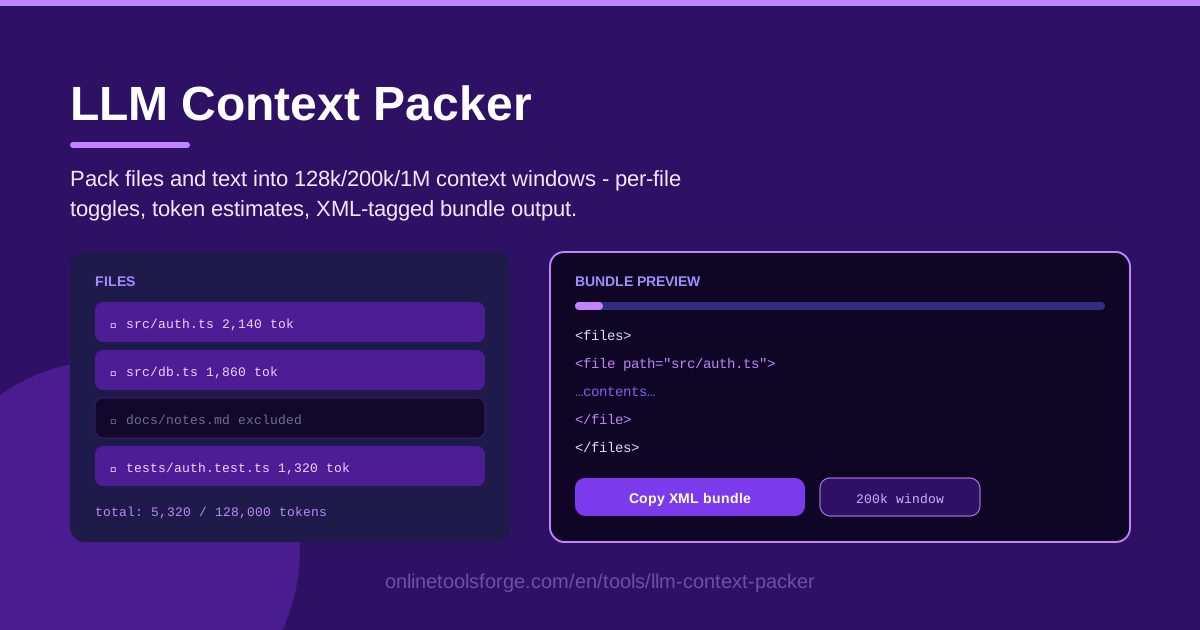
Table of Contents
Anyone who works with AI-assisted development knows the ritual: the answer you need lives somewhere in your code, but the chat box only takes whatever you paste into it. You copy files one at a time, hit an invisible token ceiling, and hope the model fills in the gaps. LLM Context Packer ends that guessing game.
The tool lets you add files and text snippets, choose a context window size — 128k, 200k, or 1M tokens — and toggle each file in or out with a single click. As you assemble the bundle, it estimates token counts per file and in total, then produces an XML-tagged bundle you can paste straight into any chat interface.
This guide walks through why deliberate context packing matters, how to use the tool step by step, and how to start treating your context window like the budget it really is.
Why Use LLM Context Packer?
- Fit a whole codebase into one prompt. Instead of pasting three files and describing the fourth, pack an entire module — or, with a 1M-token window, a whole small project — into a single organized prompt the model can actually navigate.
- Stop guessing at token counts. Eyeballing whether forty files will fit is a losing game. Per-file and total estimates show exactly where you stand against the window you picked.
- Curate exactly what the model sees. Per-file include/exclude toggles let you drop generated code, bulky fixtures, and irrelevant folders without rebuilding the bundle.
- Give the model clean boundaries. XML tags mark where each file starts and ends, which reduces the classic failure of blending code from one file into another.
- Keep your code in your browser. The tool runs entirely client-side, so nothing is uploaded to any server.
- Switch models without redoing work. Pick a different window size and the budget recalculates instantly.
Key Features
| Feature | What it does |
|---|---|
| Files and text input | Add source files and free-form text snippets — notes, stack traces, instructions — into a single bundle. |
| Context window presets | Choose 128k, 200k, or 1M tokens to match the model you are targeting. |
| Per-file toggles | Include or exclude any file with one click and watch the totals update. |
| Token estimates | See an estimated count for every file plus a running total against your budget. |
| XML-tagged bundle | Generates a paste-ready bundle with a clear tag around each file. |
| Runs in the browser | Everything happens locally; no account, no upload, no cost. |
A few details worth knowing:
- Estimates use a fast approximation tuned for source code and prose, which is close enough for budgeting — exact counts vary slightly between model tokenizers.
- Text snippets and files live side by side, each in its own tagged section, so a bug report or a task description sits right next to the code it concerns.
How to Use LLM Context Packer
- Add your files and text. Drop in the source files for your task, then add any text snippets such as an error message, a bug report, or the instructions you want the model to follow.
- Pick the context window size. Choose 128k, 200k, or 1M tokens to match your target model.
- Toggle includes and excludes. Work down the list and exclude anything the task does not need — generated code, old versions, unrelated modules.
- Watch the token budget. The per-file counts and running total show how much of the window you are using and how much room remains.
- Copy the XML bundle. One click copies the full tagged bundle, ready to paste at the start of your chat.
Context Windows Are a Budget
Think of the context window as a fixed budget you spend on every prompt. Every file, comment, and whitespace character draws from the same account — and whatever the model writes back draws from it too. Packing well simply means spending that budget on tokens that change the answer.
What actually fits? A 128k-token window holds roughly 90,000-100,000 words of English prose, but code is token-dense, so in practice it covers a medium-sized module — perhaps 40-60 typical source files. At 200k you can carry a small project's entire src directory, tests included. At 1M you can bring a whole small-to-mid project — source, tests, and docs — with room to spare.
Estimates matter because overflow is rarely announced. When a prompt exceeds the limit, most interfaces silently truncate the tail, so the last files you pasted may never be read at all. Even below the hard limit, answer quality degrades on very long inputs as attention thins out; a live estimate lets you stop well before the cliff.
Not all tokens are equal. Source code earns its place first — it is ground truth. Tests come second, documenting intent and expected behavior in a form the model can reason about. Docs come last, since they drift out of date and much of them can be inferred from the code itself. For each file ask one question: would the answer actually change if this file were absent? If not, exclude it.
Structure earns tokens too. Wrapping each file in XML tags gives the model unambiguous boundaries — it knows exactly where one file ends and the next begins, it can cite file paths back to you, and it is far less likely to splice code across files. Finally, leave room for the answer: fill 126k of a 128k window with code and you will get terse, shallow replies. Aim for about 80% utilization and let the model keep the rest for reasoning and its response.
Practical Use Cases
Whole-Module Code Review Prompts
Pack every file in the module under review, add a short text snippet describing what the module is supposed to do, and ask for a structured review. Because the model sees every call site at once, it catches cross-file issues — inconsistent error handling, duplicated logic, a public function whose contract one caller quietly violates — that file-by-file reviews always miss.
Docs + Code Q&A Bundles
Combine your README and API docs with the source files they describe, then ask onboarding questions: how does authentication flow through the system, where is rate limiting enforced, what happens when a webhook fails. Grounding answers in both docs and code surfaces the spots where documentation and reality disagree.
Bug Report Context Packs
Paste the stack trace as a text snippet, include every file named in that trace, exclude everything else, and ask for a root-cause analysis. The tight scope keeps the model's attention on the failing path instead of the whole repository, and the tagged bundle lets it quote the exact lines it believes are at fault.
Architecture Analysis at a Glance
Switch to the 1M window, pack the entry points, route definitions, configuration, and the largest modules, then ask for an architecture summary: main layers, dependency directions, coupling hotspots, and candidates for extraction. It is the fastest way to get a map of a codebase you did not write.
Best Practices
- Exclude build artifacts ruthlessly. Lockfiles, minified bundles, generated code, and vendored dependencies eat tens of thousands of tokens while telling the model almost nothing.
- Put instructions first. State the task and your constraints at the top of the message, then paste the bundle below so the model knows what it is looking for before it starts reading.
- Keep 20% headroom. Stop packing around 80% of the window so the model has room to reason and answer.
- Re-pack when switching models. A bundle sized for a 200k model is wasteful on a 128k one and underuses a 1M one; re-select the window and rebalance your toggles.
- Include interfaces, not just implementations. Types, schemas, and public signatures often explain a system for a fraction of the tokens of full source.
- Iterate on the bundle, not the chat. If an answer went wrong, adjust the toggles and re-pack a cleaner context rather than piling follow-ups onto a muddy one.
Ready to stop guessing? Open LLM Context Packer, drop in your files, pick your window size, and copy a clean, tagged bundle in under a minute — right in your browser, with nothing uploaded anywhere.
Related Tools You Might Like:
- Token Counter — get exact token counts for any text.
- LLM Response Cleaner — strip artifacts and noise out of model output.
- LLM VRAM Calculator — size GPU memory before running local models.
Happy packing!
Frequently Asked Questions
Q: How accurate are the token estimates? A: They use a fast approximation tuned for code and prose, accurate enough for budgeting. Exact counts vary slightly by model tokenizer, so leave headroom rather than filling the window to the last token.
Q: Is my code uploaded anywhere? A: No. The tool runs entirely in your browser. Files are read locally, and the generated bundle never leaves your machine until you paste it into the chat of your choice.
Q: Which window size should I pick? A: Match the model you are prompting. 128k suits most compact and mid-size models, 200k matches popular large-context assistants, and 1M is for long-context models handling whole projects.
Q: Can I mix files and plain text in one bundle? A: Yes. Text snippets and files are bundled together, each in its own tagged section, so a bug report or task description can sit right alongside the source it concerns.