LLM Response Cleaner: Get Clean JSON From Any Model Output
Strip markdown fences, thinking tags, and chatty preamble from LLM output to extract clean JSON or plain text. Instant, private, and fully client-side.
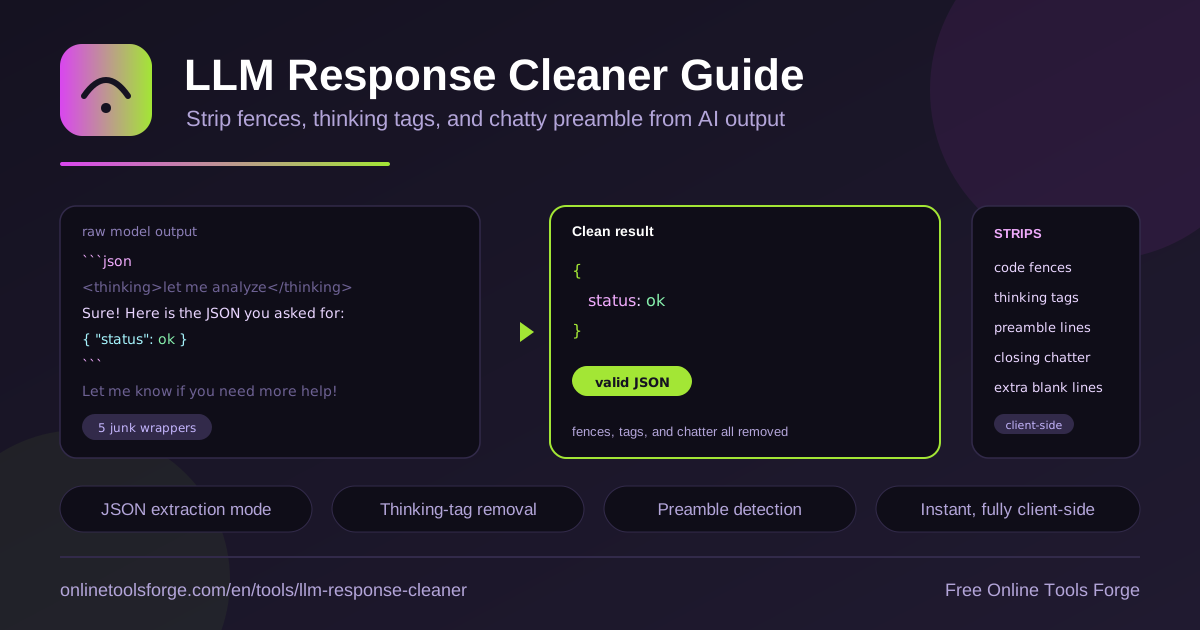
Table of Contents
Large language models are excellent at producing structured output, yet almost none of them hand it over cleanly. Ask for a JSON object and the answer often arrives wrapped in a friendly sentence, fenced in triple backticks, prefaced by a block of visible reasoning, and finished with an offer to help further. Whatever pipeline consumes that response now has to guess where the payload starts and ends.
The LLM Response Cleaner removes that guesswork. Paste any raw model output and the tool strips markdown code fences, thinking tags, chatty preamble, and closing offers, leaving you with the pure JSON or plain text payload. It runs instantly and entirely in your browser — no signup, no uploads, no API calls.
If you build agents, write prompts, or maintain tests that depend on model output, a dedicated cleaner turns a fragile string-munging chore into a one-step, deterministic operation.
Why Use the LLM Response Cleaner?
- Deterministic parsing. Pipelines that parse model output fail when wrappers change between runs, models, or providers. Cleaning first gives your parser a stable input.
- Instant results. Cleaning happens as you paste, with no server round trip, so you can iterate on prompts and payloads without waiting.
- Private by design. Everything runs 100% client-side. Sensitive payloads — customer records, internal IDs, proprietary prompts — never leave your machine.
- Broad wrapper coverage. Code fences, angle-bracket thinking brackets, apology openers, closing offers, and stray blank lines are all handled in one pass.
- Free and frictionless. No account, no quota, no key. Open the page, paste, copy the clean result.
- Better fixtures. Produce clean, valid JSON you can check straight into test suites without hand-editing.
Key Features
| Feature | What it does |
|---|---|
| Code fence stripping | Removes triple-backtick fences and language labels such as json that models add around payloads |
| Thinking tag removal | Drops angle-bracket reasoning blocks and other hidden chain-of-thought wrappers |
| Preamble trimming | Deletes chatty openers like Sure! Here is the JSON you asked for |
| Closing offer removal | Strips trailing lines such as Let me know if you need anything else |
| Blank line cleanup | Collapses extra blank lines so the payload is tight and copy-ready |
| Payload extraction | Returns the pure JSON object, array, or plain text ready for parsing |
A few details worth knowing:
- Payload-first logic. The cleaner looks for the structured payload and treats surrounding prose as noise, which is more reliable than deleting lines by position.
- Safe for plain text. When the model returns prose instead of JSON, the same rules apply, so you get a clean paragraph rather than a broken fragment.
- Zero-friction workflow. Paste, review the result, copy it out — the whole loop takes seconds.
How to Clean LLM Output
- Copy the raw response. Grab the complete model output from your API response, playground, or chat transcript, including any fences and chatter.
- Paste it into the cleaner. Open the LLM Response Cleaner and drop the text into the input area.
- Let the tool strip the wrappers. Fences, thinking tags, preamble, and closing offers are removed instantly, fully client-side.
- Inspect the extracted payload. Confirm the remaining output is the JSON or plain text you expected.
- Copy the clean result. Feed it to your parser, save it as a test fixture, or drop it into documentation.
Why Model Output Needs Cleaning
Models wrap structured answers in prose for reasons rooted in how they are trained. Next-token prediction optimizes for text that reads naturally to humans, so when you ask for JSON, a helpful assistant voice still wants to say Sure! first. Fine-tuning on conversational data reinforces the habit, and reasoning models deliberately emit visible deliberation blocks before answering. The result is a structured payload inside an unstructured envelope.
The common wrappers fall into a few families. Code fences are the most familiar: the model wraps the payload in triple backticks, sometimes with a language hint. Thinking tags come next, where the model reflects inside angle-bracket blocks before answering. Finally there is conversational framing — apologies, summaries, and closing offers — before and after the payload.
These wrappers break parsers in predictable ways. A fence line is not valid JSON, so the first byte of a naive parse already fails. Trailing prose after the final brace produces a second parse error. Some extractors respond by slicing text with ad hoc regexes, which works until the model changes phrasing and the slice lands inside the payload.
That is why deterministic cleaning beats guesswork. The LLM Response Cleaner applies a fixed, ordered set of rules — strip fences, drop thinking blocks, trim known preamble and offer patterns, collapse blank lines — so identical input always produces identical output. Deterministic behavior is exactly what CI pipelines, agent runtimes, and fixture generators need.
You can also reduce wrappers at the prompt layer:
- Ask explicitly for raw JSON only, with no explanation, in the system prompt.
- Prefer structured-output or JSON-mode APIs when the provider offers them.
- Keep temperature low for extraction tasks so phrasing stays consistent.
- Treat cleaning as a required last step anyway, because no prompt eliminates wrappers completely.
Before and after, in four lines:
Sure! Here is the JSON you requested:       -> stripped
<thinking>the user wants an order...</thinking>  -> stripped
[markdown code fence labeled json]           -> stripped
{"order": {"id": 42, "total": 9.99}}         -> kept as the payload
Practical Use Cases
Building Agent Pipelines That Survive Messy Output
Agent chains pass output from one step to the next, and every handoff is a chance for a wrapper to sneak in. If step two expects a JSON tool call and step one returns it inside a fence with a preamble, the chain crashes or silently misroutes. Inserting a cleaning stage between calls gives every downstream step a predictable payload, and because the cleaner is instant and client-side, it fits naturally into local prototyping before you harden your production parser.
Preparing Reliable Test Fixtures
Fixture files for parser tests should contain clean data, not whatever a single API call happened to return. Run messy real-world samples through the cleaner, verify the extracted payload, and commit the result. Your tests then exercise the parsing logic you control, while the dirty originals stay in your notes as regression examples. Teams that snapshot model outputs across providers can clean each sample the same way, keeping comparisons fair.
Cleaning Chat Transcripts for Documentation
When you paste assistant answers into runbooks, blog posts, or internal wikis, fences and thinking blocks add noise that markdown renderers may mangle. A quick pass through the cleaner leaves readable prose or a tidy code payload, which keeps documentation consistent even when answers come from different models with different chattiness habits.
Extracting Structured Data From Conversations
Analysts often copy long-form model responses — extracted entities, summaries, record lists — into spreadsheets or scripts. Cleaning first means the JSON array of records is ready to load without manual trimming, and the same deterministic rules make the extraction repeatable next week when the model phrasing changes slightly.
Best Practices
- Always clean before parsing. Make cleaning an explicit pipeline stage, never an inline string trick buried in application code.
- Prefer deterministic rules over clever regexes. A fixed rule set survives provider changes far better than a pattern tuned to one phrasing.
- Keep raw output for debugging. Store the uncleaned response alongside the clean payload so failures are traceable to their source.
- Validate after cleaning. Run the cleaned JSON through schema validation to catch structural problems that cleaning cannot fix.
- Combine with prompt-side discipline. Strong system prompts reduce wrappers; the cleaner catches whatever slips through.
- Re-clean when you switch models. Different providers wrap output differently, so re-run the cleaner whenever the model behind a step changes.
Start With Clean Output Today
Messy model output is a tax on every prompt engineer and agent builder, and it is a tax you can stop paying in seconds. Open the LLM Response Cleaner, paste your next fenced, thinking-tagged, chatty response, and copy out clean JSON or plain text — free, private, and fully client-side.
Related Tools You Might Like:
Pair the cleaner with other utilities in the toolkit:
Happy cleaning!
Frequently Asked Questions
Q: Is the LLM Response Cleaner free to use?
A: Yes. The tool is completely free, requires no signup or API key, and processes unlimited payloads.
Q: Does my model output leave my browser?
A: No. Cleaning runs 100% client-side in your browser. Your prompts, payloads, and responses are never uploaded to a server.
Q: What exactly gets stripped from the response?
A: Markdown code fences and language labels, thinking tags in angle brackets, chatty preamble lines such as Sure! Here is..., closing offers such as Let me know if..., and extra blank lines.
Q: Can it handle plain text as well as JSON?
A: Yes. The same rules apply to prose answers, so you get a clean plain-text payload even when the model did not return structured data.
Q: Should I still use structured output modes?
A: Absolutely. JSON mode or structured-output APIs reduce wrappers at the source, and the cleaner remains the deterministic safety net for everything else.