Unicode Range Generator: Build Perfect @font-face Subsets for Thai and Latin Scripts
Build CSS unicode-range values and complete @font-face rules for Thai, Latin, and other scripts with the free Unicode Range Generator, complete with live preview and fully client-side processing.
Free Interactive Tool
CSS Unicode Range Generator
Build CSS unicode-range values and complete @font-face rules for web font subsetting.
Table of Contents
Shipping custom webfonts to a multilingual audience is harder than it looks. A typeface that covers Latin beautifully can balloon by hundreds of kilobytes once it also has to cover Thai, Cyrillic, or Arabic. The Unicode Range Generator solves this with a standards-based mechanism: CSS unicode-range, wrapped in ready-to-paste @font-face rules.
Here is the trap many developers miss: a Thai page pointing at a Latin-only webfont fails silently. The Thai glyphs fall back to a system font while the surrounding Latin text renders in your chosen typeface, producing mixed typography nobody designed. unicode-range is how multi-script sites load only what they need — the browser downloads a font file only when the page uses characters inside its declared range, and skips the download entirely otherwise.
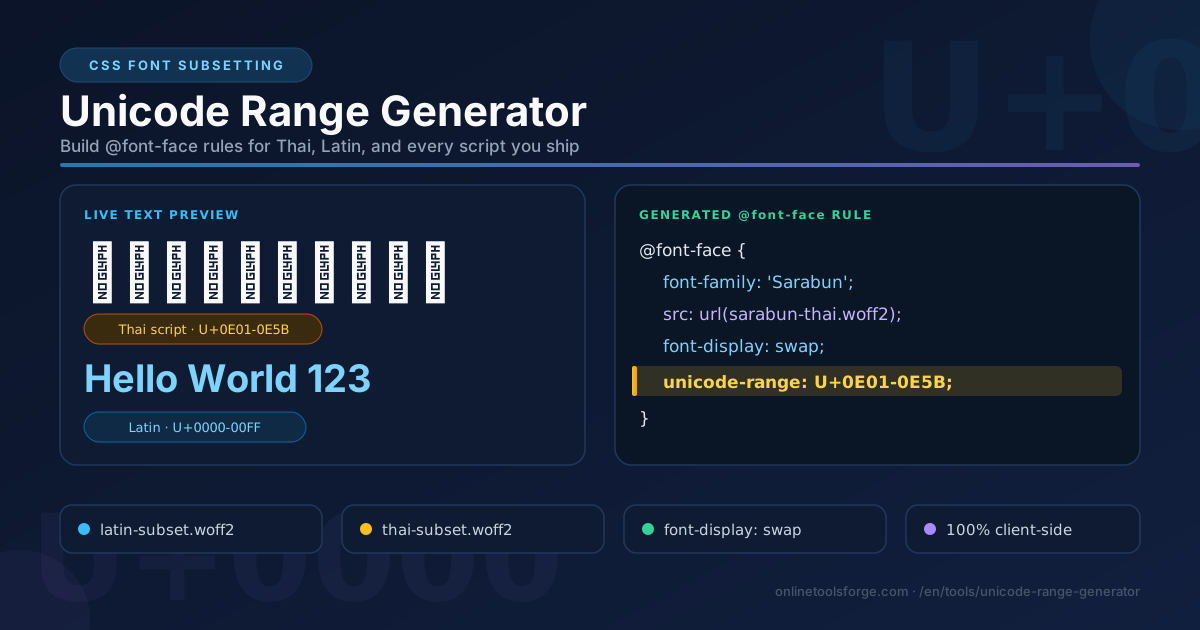
The Unicode Range Generator builds those range values and complete @font-face rules for you, from script presets or custom ranges, with a live preview of your text. Everything runs 100% client-side — no uploads, no accounts.
Why Use Unicode Range Generator?
- Purpose-built presets for real scripts. Latin (U+0000-00FF), Latin Extended (U+0100-024F, U+1E00-1EFF), Thai (U+0E00-0E7F), Cyrillic, Greek, and Arabic, one dropdown click away.
- Complete @font-face output, not a fragment. The tool emits an entire rule — font-family, src, font-weight, font-style, font-display: swap, and unicode-range — valid the moment you paste it.
- Live preview of rendered text. Type a sample string and confirm your subset covers what visitors will actually see.
- Custom ranges for edge cases. Comma- or space-separated values such as U+0000-00FF, U+0E00-0E7F are validated and merged into one clean descriptor, so icon fonts are as easy as presets.
- Copy or download as CSS. Grab the rule from the clipboard or download a ready-to-ship .css file.
- 100% client-side processing. Every calculation happens in your browser; your font names and URLs never touch a server.
Key Features
| Feature | What It Does |
|---|---|
| Script presets | One-click unicode-range values for six major scripts |
| Custom range input | Accepts comma- or space-separated U+ ranges with live validation |
| Font metadata controls | Family name, source URL, format, weight, and style |
| Generated @font-face rule | Full, paste-ready CSS with font-display: swap included |
| Live text preview | Renders your sample text to verify glyph coverage instantly |
| Copy and download | One-click clipboard copy or a downloadable .css file |
- font-display: swap is included by default, so text paints immediately in a fallback font and upgrades when the subset loads — no invisible-text flash.
- The generated rule is minimal and deterministic, and as a pure client-side utility the tool keeps working offline once loaded.
How to Use
- Open the Unicode Range Generator. It loads instantly with the Latin preset selected.
- Choose a character set preset — Latin, Latin Extended, Thai, Cyrillic, Greek, or Arabic — or switch to Custom and enter your own range, such as U+0E01-0E5B for the Thai script block.
- Fill in the font metadata: family name, subset file URL, format, weight, and style.
- Check the live preview. Type a mixed string such as "สวัสดี Hello" and confirm every glyph renders in the intended face.
- Copy the generated rule or download it as a .css file, then paste it into your stylesheet. Repeat for each subset.
Script Subsets Without the Jargon
The unicode-range descriptor tells the browser which Unicode code points a font file covers. When the page renders text, the browser checks each character against the declared ranges of every registered @font-face rule and uses the matching font. It also gates the download: a font file is fetched only if at least one character on the page falls inside its range. Declare narrow ranges, ship small files, and let the browser fetch only what a page truly needs.
The U+ syntax supports three forms. A single code point such as U+0E48 targets exactly one character (the Thai tone mark mai ek). A range such as U+0E01-0E5B covers every code point between its endpoints. A wildcard such as U+0E?? covers every code point starting with those hex digits. Any combination can be chained with commas, and the tool normalizes the list for you.
The idiomatic pattern for a Thai site is one @font-face rule per subset, all sharing one font-family name but pointing at different files:
@font-face {
  font-family: 'Sarabun';
  src: url('/fonts/sarabun-latin.woff2') format('woff2');
  font-display: swap;
  unicode-range: U+0000-00FF;
}

@font-face {
  font-family: 'Sarabun';
  src: url('/fonts/sarabun-thai.woff2') format('woff2');
  font-display: swap;
  unicode-range: U+0E01-0E5B;
}
With this in place, an English page downloads only the small Latin subset while a Thai page pulls the Thai subset instead. Pairing with font-display: swap keeps perceived performance high: text paints immediately in a system fallback and swaps when the subset arrives. A full Thai-plus-Latin font can easily exceed 200 KB, so subsetting routinely halves transfer size — often far more, since CJK fonts run into megabytes while a script-specific subset is a tiny fraction of that.
One nuance: the tool's Thai preset uses the full block U+0E00-0E7F, while the tighter U+0E01-0E5B still covers every assigned Thai character, skipping only unassigned code points. Either works.
Practical Use Cases
Thai-English Bilingual Sites
This is the killer use case. Thai portals, e-commerce catalogs, and news sites mix scripts within a single page — a Thai headline above an English product name, baht amounts beside Latin SKU codes. Separate subsets under one family name mean each language page loads only its own glyphs, while mixed strings render consistently from the same typeface.
Icon Fonts
Icon fonts built on a private use area live in code points like U+E600-U+E6FF. Scoping them with unicode-range keeps your text font from ever claiming those code points and splits icons and prose into independently cacheable files.
CJK Mixed Content
Japanese, Chinese, and Korean fonts are enormous, which is why the ecosystem leans on slice-based subsets. unicode-range is the mechanism those slices ride on: many small @font-face rules, each covering a narrow band, with the browser fetching only the bands a page uses.
Performance Tuning
When Lighthouse flags render-blocking fonts or layout shift stems from late glyph swaps, subset-first is the fix. Generate per-script rules, add font-display: swap, and measure.
Best Practices
- Subset webfonts per script under one font-family name. Rules with the same family and different ranges compose transparently into one logical font.
- Test glyph coverage on real content. Paste your actual headings into the live preview; a subset missing sara am or the baht sign will betray you in production.
- Keep fallback stacks complete. Your font-family list must include a system font that covers every script on the page.
- Always pair with font-display: swap. Invisible text is worse than briefly different text.
- Serve woff2 first. Add woff or truetype fallbacks in src only for legacy browser support.
- Re-verify ranges after font updates. Re-run your characters through the preview whenever the typeface changes.
Start Subsetting in Under a Minute
Head to the Unicode Range Generator, pick the Thai or Latin preset, paste sample text into the preview, and copy a production-ready @font-face rule. Free, instant, and fully client-side.
Related Tools You Might Like:
- CSS Font Stack Generator — build resilient font-family stacks that pair perfectly with your subsets.
- Text to Braille Translator — explore how text maps to another Unicode writing system.
- CSS Unit Converter — convert px, rem, em, and more for precise typography.
Happy subsetting!
Frequently Asked Questions
Q: Does unicode-range reduce the number of HTTP requests?
A: It can go either way, which is the point. You declare more @font-face rules, but the browser downloads fewer total bytes and skips files entirely when a page never uses their characters.
Q: What happens if a glyph is missing from my subset?
A: The browser walks down your font-family stack and renders the character in the next font that covers it, ultimately reaching the system fallback. That is why a complete fallback stack matters.
Q: Can I put multiple ranges in a single @font-face rule?
A: Yes. Separate them with commas, such as unicode-range: U+0000-00FF, U+2000-206F. The generator accepts and normalizes comma- or space-separated input.
Q: Does the tool upload my fonts anywhere?
A: No. The Unicode Range Generator is 100% client-side and never receives your font names, URLs, sample text, or generated CSS.